
内部揭秘:Universal Commerce Protocol (UCP)
Source: Google Developers Blog
请提供您希望翻译的文章正文内容,我将为您完整地翻译成简体中文并保留原始的格式、Markdown 语法以及技术术语。谢谢!
Source: …
什么是 UCP?
通用商务协议 (UCP) 是一个开源标准,旨在为下一代代理商务提供动力。通过建立通用语言和功能原语,UCP 实现了消费者界面、企业和支付提供商之间的无缝商务旅程。它能够兼容现有零售基础设施,并与 Agent Payments Protocol(AP2)兼容,以实现安全的代理支付。UCP 还通过 API、Agent2Agent(A2A)以及 Model Context Protocol(MCP)提供灵活的集成方式。
UCP 由 Google 与包括 Shopify、Etsy、Wayfair、Target 和 Walmart 在内的行业领袖合作开发,并得到包括 Adyen、American Express、Best Buy、Flipkart、Macy’s、Mastercard、Stripe、The Home Depot、Visa、Zalando 等在内的 20 多家全球合作伙伴的认可。
UCP 的构建目标是惠及整个商务生态系统
- 对企业而言: 在 Google Search 的 AI Mode 和 Gemini 等消费者界面上展示产品。保留业务逻辑所有权并保持商家记录(Merchant of Record)身份。 “嵌入式选项” 让您从第一天起就拥有完全自定义的结账体验。
- 对 AI 平台而言: 通过标准化 API 为您的受众提供代理购物,同时允许使用 MCP、A2A 或现有的代理框架保持灵活性。
- 对开发者而言: 为一个不断演进、社区驱动的开源标准做出贡献。与我们一起构建下一代数字商务。
- 对支付提供商而言: 开放、模块化的支付处理器设计实现了互操作性,并通过加密的用户同意证明提供可验证的通用支付。
- 对消费者而言: 从发现到购买的摩擦更少,享受会员福利,安心购物。
引入新、灵活标准的理由
对话式体验需要在当前上下文中进行实时库存检查、动态定价和即时交易。传统技术栈会产生 N × N 的集成瓶颈,迫使每个界面都需要定制连接。
UCP 通过单一、安全的抽象层解决了这一瓶颈,标准化了完整的商务旅程——从发现到订单管理:
- 统一集成: 将 N × N 的复杂度压缩为一个集成点。
- 共享语言: 标准化发现、能力模式和传输绑定,实现跨平台互操作性。
- 可扩展架构: 灵活的能力和扩展,可随新的代理体验和垂直领域扩展。
- 安全优先: 令牌化支付和可验证凭证确保代理与后端之间的通信安全。
UCP 概览
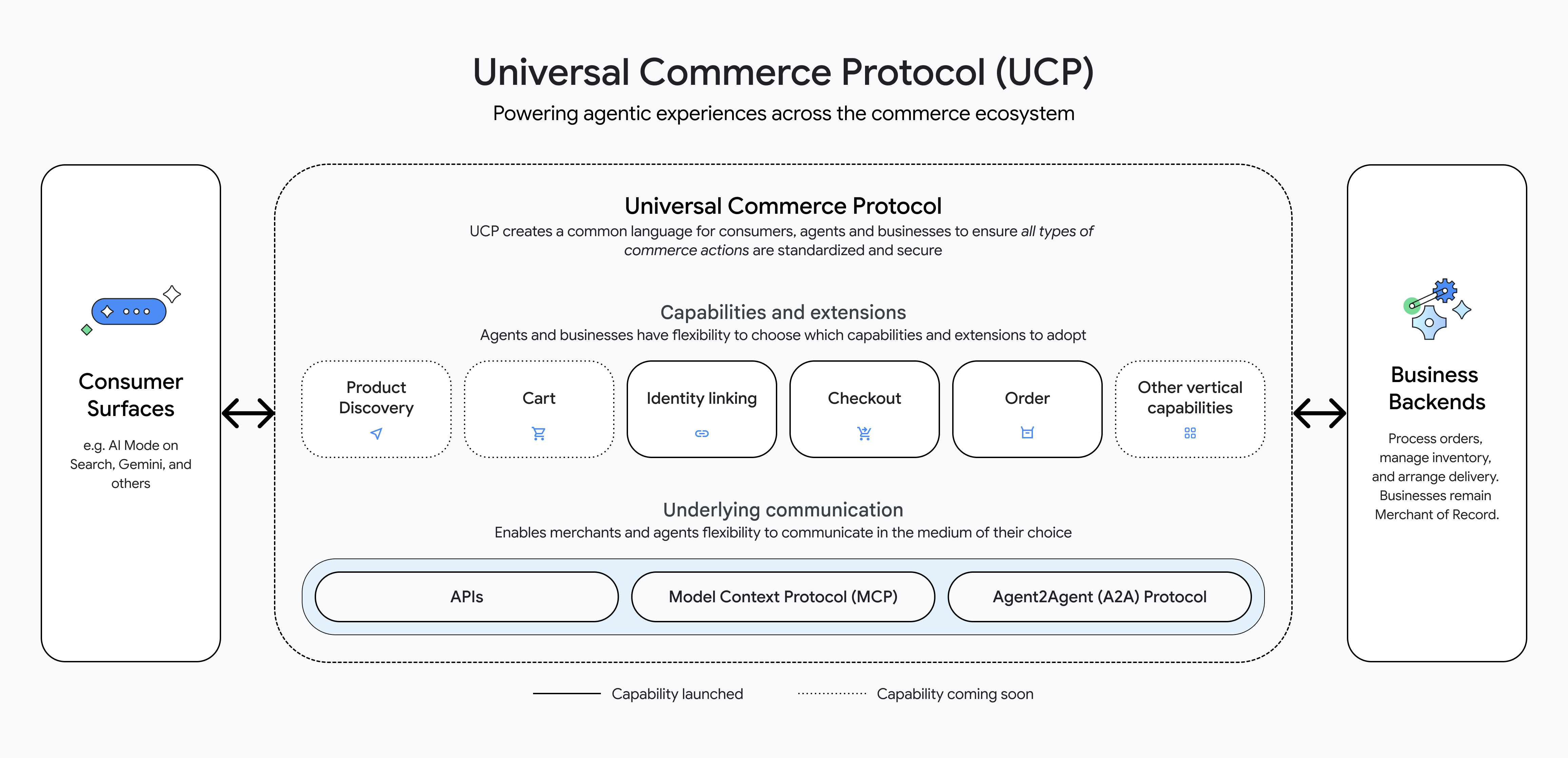
UCP 为消费者界面(例如搜索中的 AI Mode、Gemini)与企业后端之间的产品发现、购物车结算等提供了清晰的语言。企业公开服务和能力(例如结账、产品发现),代理可以动态发现这些能力。支付通过将 工具(消费者使用的支付方式)与 处理器(支付提供商)分离进行建模,并支持多种传输方式(A2A、MCP、API)。
工作原理
让我们来演示一个示例业务商店和一个代理。
2.1 设置业务服务器并添加示例商品
mkdir sdk
git clone https://github.com/Universal-Commerce-Protocol/python-sdk.git sdk/python
pushd sdk/python
uv sync
popd
git clone https://github.com/Universal-Commerce-Protocol/samples.git
cd samples/rest/python/server
uv sync
创建一个包含示例商品的本地 SQLite 数据库:
mkdir /tmp/ucp_test
uv run import_csv.py \
    --products_db_path=/tmp/ucp_test/products.db \
    --transactions_db_path=/tmp/ucp_test/transactions.db \
    --data_dir=../test_data/flower_shop
2.2 启动业务服务器
uv run server.py \
   --products_db_path=/tmp/ucp_test/products.db \
   --transactions_db_path=/tmp/ucp_test/transactions.db \
   --port=8182 &
SERVER_PID=$!
2.3 使用你的代理发现业务能力
export SERVER_URL=http://localhost:8182
export RESPONSE=$(curl -s -X GET $SERVER_URL/.well-known/ucp)
echo $RESPONSE
示例响应
{
  "ucp": {
    "version": "2026-01-11",
    "services": {
      "dev.ucp.shopping": {
        "version": "2026-01-11",
        "spec": "https://ucp.dev/specs/shopping",
        "rest": {
          "schema": "https://ucp.dev/services/shopping/openapi.json",
          "endpoint": "http://localhost:8182/"
        }
      }
    },
    "capabilities": [
      { "name": "dev.ucp.shopping.checkout", "version": "2026-01-11", "spec": "https://ucp.dev/specs/shopping/checkout", "schema": "https://ucp.dev/schemas/shopping/checkout.json" },
      { "name": "dev.ucp.shopping.discount", "version": "2026-01-11", "spec": "https://ucp.dev/specs/shopping/discount", "schema": "https://ucp.dev/schemas/shopping/discount.json", "extends": "dev.ucp.shopping.checkout" },
      { "name": "dev.ucp.shopping.fulfillment", "version": "2026-01-11", "spec": "https://ucp.dev/specs/shopping/fulfillment", "schema": "https://ucp.dev/schemas/shopping/fulfillment.json", "extends": "dev.ucp.shopping.checkout" }
    ]
  },
  "payment": {
    "handlers": [
      {
        "id": "shop_pay",
        "name": "com.shopify.shop_pay",
        "version": "2026-01-11",
        "spec": "https://shopify.dev/ucp/handlers/shop_pay",
        "config_schema": "https://shopify.dev/ucp/handlers/shop_pay/config.json",
        "instrument_schemas": ["https://shopify.dev/ucp/handlers/shop_pay/instrument.json"],
        "config": { "shop_id": "d124d01c-3386-4c58-bc58-671b705e19ff" }
      },
      {
        "id": "google_pay",
        "name": "google.pay",
        "version": "2026-01-11",
        "spec": "https://example.com/spec",
        "config_schema": "https://example.com/schema",
        "instrument_schemas": ["https://ucp.dev/schemas/shopping/types/gpay_card_payment_instrument.json"],
        "config": {
          "api_version": 2,
          "api_version_minor": 0,
          "merchant_info": {
            "merchant_name": "Flower Shop",
            "merchant_id": "TEST",
            "merchant_origin": "localhost"
          },
          "allowed_payment_methods": [
            {
              "type": "CARD",
              "parameters": {
                "allowedAuthMethods": ["PAN_ONLY", "CRYPTOGRAM_3DS"],
                "allowedCardNetworks": ["VISA", "MASTERCARD"]
              },
              "tokenization_specification": [
                {
                  "type": "PAYMENT_GATEWAY",
                  "parameters": [
                    { "gateway": "example", "gatewayMerchantId": "exampleGatewayMerchantId" }
                  ]
                }
              ]
            }
          ]
        }
      },
      {
        "id": "mock_payment_handler",
        "name": "dev.ucp.mock_payment",
        "version": "2026-01-11",
        "spec": "https://ucp.dev/specs/mock",
        "config_schema": "https://ucp.dev/schemas/mock.json",
        "instrument_schemas": ["https://ucp.dev/schemas/shopping/types/card_payment_instrument.json"],
Source: …
     "config": { "supported_tokens": ["success_token", "fail_token"] }
      }
    ]
  }
}
2.4 调用结账功能
export RESPONSE=$(curl -s -X POST "$SERVER_URL/checkout-sessions" \
  -H 'Content-Type: application/json' \
  -H 'UCP-Agent: profile="https://agent.example/profile"' \
  -H 'request-signature: test' \
  -H 'idempotency-key: 0b50cc6b-19b2-42cd-afee-6a98e71eea87' \
  -H 'request-id: 6d08ae4b-e7ea-44f4-846f-d7381919d4f2' \
  -d '{
        "line_items":[{"item":{"id":"bouquet_roses","title":"Red Rose"},"quantity":1}],
        "buyer":{"full_name":"John Doe","email":"john.doe@example.com"},
        "currency":"USD",
        "payment":{"instruments":[],"handlers":[
          {"id":"shop_pay","name":"com.shopify.shop_pay","version":"2026-01-11","spec":"https://shopify.dev/ucp/handlers/shop_pay","config_schema":"https://shopify.dev/ucp/handlers/shop_pay/config.json","instrument_schemas":["https://shopify.dev/ucp/handlers/shop_pay/instrument.json"],"config":{"shop_id":"d124d01c-3386-4c58-bc58-671b705e19ff"}},
          {"id":"google_pay","name":"google.pay","version":"2026-01-11","spec":"https://example.com/spec","config_schema":"https://example.com/schema","instrument_schemas":["https://ucp.dev/schemas/shopping/types/gpay_card_payment_instrument.json"],"config":{"api_version":2,"api_version_minor":0,"merchant_info":{"merchant_name":"Flower Shop","merchant_id":"TEST","merchant_origin":"localhost"},"allowed_payment_methods":[{"type":"CARD","parameters":{"allowedAuthMethods":["PAN_ONLY","CRYPTOGRAM_3DS"],"allowedCardNetworks":["VISA","MASTERCARD"]},"tokenization_specification":[{"type":"PAYMENT_GATEWAY","parameters":[{"gateway":"example","gatewayMerchantId":"exampleGatewayMerchantId"}]}]}]},
          {"id":"mock_payment_handler","name":"dev.ucp.mock_payment","version":"2026-01-11","spec":"https://ucp.dev/specs/mock","config_schema":"https://ucp.dev/schemas/mock.json","instrument_schemas":["https://ucp.dev/schemas/shopping/types/card_payment_instrument.json"],"config":{"supported_tokens":["success_token","fail_token"]}}
        ]}
      }' ) && echo $RESPONSE
示例结账响应
{
  "ucp": { "version": "2026-01-11", "capabilities": [ { "name": "dev.ucp.shopping.checkout", "version": "2026-01-11" } ] },
  "id": "cb9c0fc5-3e81-427c-ae54-83578294daf3",
  "line_items": [
    {
      "id": "2e86d63a-a6b8-4b4d-8f41-559f4c6991ea",
      "item": { "id": "bouquet_roses", "title": "Bouquet of Red Roses", "price": 3500 },
      "quantity": 1,
      "totals": [ { "type": "subtotal", "amount": 3500 }, { "type": "total", "amount": 3500 } ]
    }
  ],
  "buyer": { "full_name": "John Doe", "email": "john.doe@example.com" },
  "status": "ready_for_complete",
  "currency": "USD",
  "totals": [ { "type": "subtotal", "amount": 3500 }, { "type": "total", "amount": 3500 } ],
  "links": [],
  "payment": { "handlers": [], "instruments": [] },
  "discounts": {}
}
2.5 对结账请求应用折扣
export CHECKOUT_ID=$(echo $RESPONSE | jq -r '.id')
export LINE_ITEM_1_ID=$(echo $RESPONSE | jq -r '.line_items[0].id')
export RESPONSE=$(curl -s -X PUT "$SERVER_URL/checkout-sessions/$CHECKOUT_ID" \
  -H 'Content-Type: application/json' \
  -H 'UCP-Agent: profile="https://agent.example/profile"' \
  -H 'request-signature: test' \
  -H 'idempotency-key: b9ecd4b3-0d23-4842-8535-0d55e76e2bad' \
  -H 'request-id: 28e70993-e328-4071-91de-91644dc75221' \
  -d "{
        \"id\":\"$CHECKOUT_ID\",
        \"line_items\":[{\"id\":\"$LINE_ITEM_1_ID\",\"item\":{\"id\":\"bouquet_roses\",\"title\":\"Red Rose\"},\"quantity\":1}],
        \"currency\":\"USD\",
        \"payment\":{\"instruments\":[],\"handlers\":[]},
        \"discounts\":{\"codes\":[\"10OFF\"]}
      }") && echo $RESPONSE | jq
应用折扣后的响应
{
  "ucp": { "version": "2026-01-11", "capabilities": [ { "name": "dev.ucp.shopping.checkout", "version": "2026-01-11" } ] },
"id": "cb9c0fc5-3e81-427c-ae54-83578294daf3",
"line_items": [
{
"id": "2e86d63a-a6b8-4b4d-8f41-559f4c6991ea",
"item": { "id": "bouquet_roses", "title": "Bouquet of Red Roses", "price": 3500 },
"quantity": 1,
"totals": [ { "type": "subtotal", "amount": 3500 }, { "type": "total", "amount": 3500 } ]
}
],
"buyer": { "full_name": "John Doe", "email": "john.doe@example.com" },
"status": "ready_for_complete",
"currency": "USD",
"totals": [
{ "type": "subtotal", "amount": 3500 },
{ "type": "discount", "amount": 350 },
{ "type": "total", "amount": 3150 }
],
"links": [],
"payment": { "handlers": [], "instruments": [] },
"discounts": {
"codes": [ "10OFF" ],
"applied": [
{
"code": "10OFF",
"title": "10% Off",
"amount": 350,
"automatic": false,
"allocations": [ { "path": "subtotal", "amount": 350 } ]
}
]
}
}清理
kill ${SERVER_PID}回顾
我们搭建了一个业务服务器和一个代理,发现了其功能,创建了结账会话并应用了折扣——全部使用 UCP 完成。该协议还支持身份关联、订单管理,并将继续扩展以提供更丰富的代理体验。你可以通过 Python 示例实现以及其 README.md 亲自尝试。
与 Google 集成
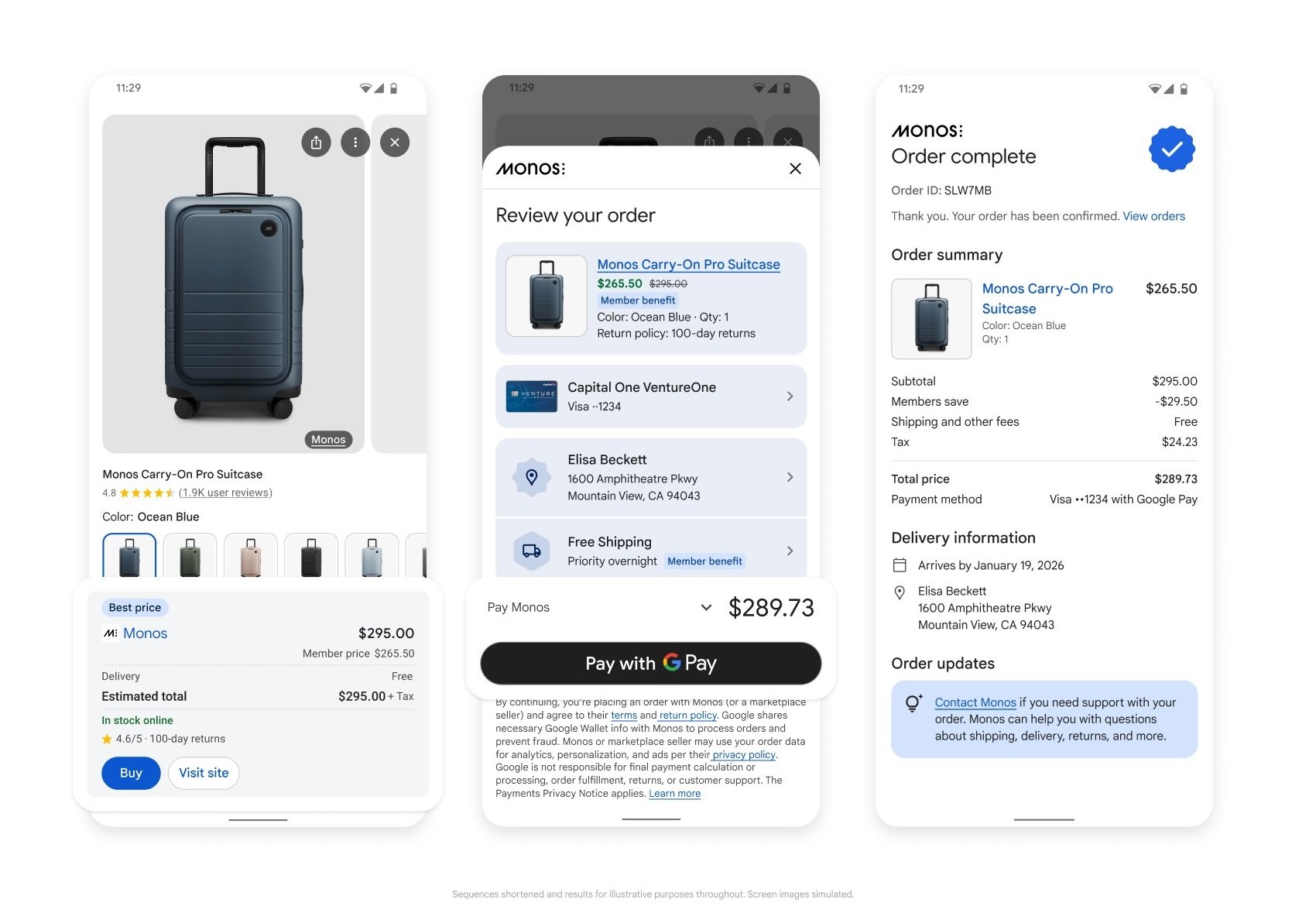
UCP 与供应商无关,但 Google 提供了一个参考实现,支持在搜索的 AI 模式和 Gemini 中的购物体验,使消费者能够使用 Google Pay 和已存储的钱包信息直接向符合条件的商家购买商品。
示例查询: “寻找一款适合即将出行的轻便行李箱。”
通过 Merchant Center 的企业集成
要使用 Google 的实现,您需要拥有一个活跃的 Merchant Center 账户,并且其中包含符合条件的商品。
后续步骤
- 按照 Google 集成指南 设置您的 Merchant Center 账户并提交商家兴趣表单。
- 根据指南的结账部分说明完成 UCP 集成。
合作邀请
通用商务协议由超过 20 家合作伙伴共同开发并获得认可,且为开源项目。邀请开发者、企业和平台架构师通过 GitHub 仓库、Discussions 和 pull requests 进行贡献。