
Under the Hood: Universal Commerce Protocol (UCP)
Source: Google Developers Blog
What is UCP?
The Universal Commerce Protocol (UCP) is an open‑source standard designed to power the next generation of agentic commerce. By establishing a common language and functional primitives, UCP enables seamless commerce journeys between consumer surfaces, businesses, and payment providers. It works with existing retail infrastructure and is compatible with the Agent Payments Protocol (AP2) for secure agentic payments. UCP also offers flexible integration via APIs, Agent2Agent (A2A), and the Model Context Protocol (MCP).
UCP is developed by Google in collaboration with industry leaders including Shopify, Etsy, Wayfair, Target, and Walmart, and is endorsed by over 20 global partners such as Adyen, American Express, Best Buy, Flipkart, Macy’s, Mastercard, Stripe, The Home Depot, Visa, Zalando, and many more.
UCP is built to benefit the entire commerce ecosystem
- For businesses: Showcase products on consumer interfaces like AI Mode in Google Search and Gemini. Retain ownership of business logic and remain the Merchant of Record. An “embedded option” lets you keep a fully customized checkout experience from day one.
- For AI platforms: Enable agentic shopping for your audiences with standardized APIs while allowing flexibility to use MCP, A2A, or existing agent frameworks.
- For developers: Contribute to an evolving, community‑driven open‑source standard. Build the next generation of digital commerce with us.
- For payment providers: An open, modular payment‑handler design enables interoperability and provable universal payments backed by cryptographic proof of user consent.
- For consumers: Reduce friction from discovery to purchase, enjoy member benefits, and shop with confidence.
The case for a new, flexible standard
Conversational experiences demand real‑time inventory checks, dynamic pricing, and instant transactions within the current context. Traditional tech stacks create an N × N integration bottleneck, forcing bespoke connections for every surface.
UCP tackles this bottleneck with a single, secure abstraction layer that standardizes the full commerce journey—from discovery to order management:
- Unified integration: Collapses N × N complexity into one integration point.
- Shared language: Standardizes discovery, capability schemas, and transport bindings for cross‑platform interoperability.
- Extensible architecture: Flexible capabilities and extensions that scale with new agentic experiences and verticals.
- Security‑first approach: Tokenized payments and verifiable credentials secure communication between agents and backends.
UCP Overview
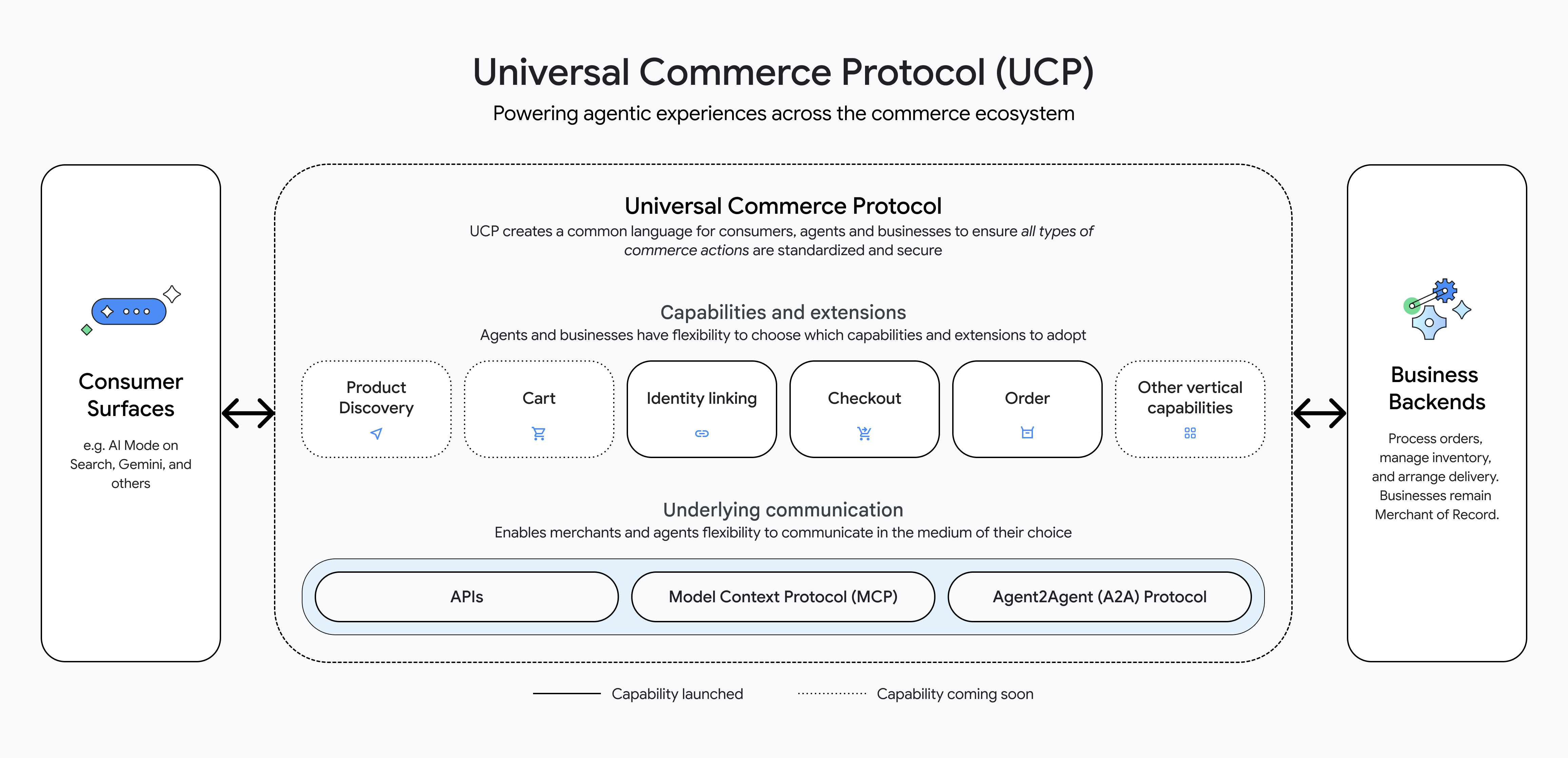
UCP creates a clear language for consumer surfaces (e.g., AI Mode on Search, Gemini) to connect to business backends for product discovery, cart checkout, etc. Businesses expose services and capabilities (e.g., checkout, product discovery) that agents can discover dynamically. Payments are modeled by separating instruments (what consumers use) from handlers (payment processors), supporting multiple transports (A2A, MCP, APIs).
How it works
Let’s walk through a sample business store and an agent.
2.1 Set up the business server and add sample products
mkdir sdk
git clone https://github.com/Universal-Commerce-Protocol/python-sdk.git sdk/python
pushd sdk/python
uv sync
popd
git clone https://github.com/Universal-Commerce-Protocol/samples.git
cd samples/rest/python/server
uv sync
Create a local SQLite database with sample products:
mkdir /tmp/ucp_test
uv run import_csv.py \
    --products_db_path=/tmp/ucp_test/products.db \
    --transactions_db_path=/tmp/ucp_test/transactions.db \
    --data_dir=../test_data/flower_shop
2.2 Start the business server
uv run server.py \
   --products_db_path=/tmp/ucp_test/products.db \
   --transactions_db_path=/tmp/ucp_test/transactions.db \
   --port=8182 &
SERVER_PID=$!
2.3 Discover business capabilities with your agent
export SERVER_URL=http://localhost:8182
export RESPONSE=$(curl -s -X GET $SERVER_URL/.well-known/ucp)
echo $RESPONSE
Sample response
{
  "ucp": {
    "version": "2026-01-11",
    "services": {
      "dev.ucp.shopping": {
        "version": "2026-01-11",
        "spec": "https://ucp.dev/specs/shopping",
        "rest": {
          "schema": "https://ucp.dev/services/shopping/openapi.json",
          "endpoint": "http://localhost:8182/"
        }
      }
    },
    "capabilities": [
      { "name": "dev.ucp.shopping.checkout", "version": "2026-01-11", "spec": "https://ucp.dev/specs/shopping/checkout", "schema": "https://ucp.dev/schemas/shopping/checkout.json" },
      { "name": "dev.ucp.shopping.discount", "version": "2026-01-11", "spec": "https://ucp.dev/specs/shopping/discount", "schema": "https://ucp.dev/schemas/shopping/discount.json", "extends": "dev.ucp.shopping.checkout" },
      { "name": "dev.ucp.shopping.fulfillment", "version": "2026-01-11", "spec": "https://ucp.dev/specs/shopping/fulfillment", "schema": "https://ucp.dev/schemas/shopping/fulfillment.json", "extends": "dev.ucp.shopping.checkout" }
    ]
  },
  "payment": {
    "handlers": [
      {
        "id": "shop_pay",
        "name": "com.shopify.shop_pay",
        "version": "2026-01-11",
        "spec": "https://shopify.dev/ucp/handlers/shop_pay",
        "config_schema": "https://shopify.dev/ucp/handlers/shop_pay/config.json",
        "instrument_schemas": ["https://shopify.dev/ucp/handlers/shop_pay/instrument.json"],
        "config": { "shop_id": "d124d01c-3386-4c58-bc58-671b705e19ff" }
      },
      {
        "id": "google_pay",
        "name": "google.pay",
        "version": "2026-01-11",
        "spec": "https://example.com/spec",
        "config_schema": "https://example.com/schema",
        "instrument_schemas": ["https://ucp.dev/schemas/shopping/types/gpay_card_payment_instrument.json"],
        "config": {
          "api_version": 2,
          "api_version_minor": 0,
          "merchant_info": {
            "merchant_name": "Flower Shop",
            "merchant_id": "TEST",
            "merchant_origin": "localhost"
          },
          "allowed_payment_methods": [
            {
              "type": "CARD",
              "parameters": {
                "allowedAuthMethods": ["PAN_ONLY", "CRYPTOGRAM_3DS"],
                "allowedCardNetworks": ["VISA", "MASTERCARD"]
              },
              "tokenization_specification": [
                {
                  "type": "PAYMENT_GATEWAY",
                  "parameters": [
                    { "gateway": "example", "gatewayMerchantId": "exampleGatewayMerchantId" }
                  ]
                }
              ]
            }
          ]
        }
      },
      {
        "id": "mock_payment_handler",
        "name": "dev.ucp.mock_payment",
        "version": "2026-01-11",
        "spec": "https://ucp.dev/specs/mock",
        "config_schema": "https://ucp.dev/schemas/mock.json",
        "instrument_schemas": ["https://ucp.dev/schemas/shopping/types/card_payment_instrument.json"],
        "config": { "supported_tokens": ["success_token", "fail_token"] }
      }
    ]
  }
}
2.4 Invoke a checkout capability
export RESPONSE=$(curl -s -X POST "$SERVER_URL/checkout-sessions" \
  -H 'Content-Type: application/json' \
  -H 'UCP-Agent: profile="https://agent.example/profile"' \
  -H 'request-signature: test' \
  -H 'idempotency-key: 0b50cc6b-19b2-42cd-afee-6a98e71eea87' \
  -H 'request-id: 6d08ae4b-e7ea-44f4-846f-d7381919d4f2' \
  -d '{
        "line_items":[{"item":{"id":"bouquet_roses","title":"Red Rose"},"quantity":1}],
        "buyer":{"full_name":"John Doe","email":"john.doe@example.com"},
        "currency":"USD",
        "payment":{"instruments":[],"handlers":[
          {"id":"shop_pay","name":"com.shopify.shop_pay","version":"2026-01-11","spec":"https://shopify.dev/ucp/handlers/shop_pay","config_schema":"https://shopify.dev/ucp/handlers/shop_pay/config.json","instrument_schemas":["https://shopify.dev/ucp/handlers/shop_pay/instrument.json"],"config":{"shop_id":"d124d01c-3386-4c58-bc58-671b705e19ff"}},
          {"id":"google_pay","name":"google.pay","version":"2026-01-11","spec":"https://example.com/spec","config_schema":"https://example.com/schema","instrument_schemas":["https://ucp.dev/schemas/shopping/types/gpay_card_payment_instrument.json"],"config":{"api_version":2,"api_version_minor":0,"merchant_info":{"merchant_name":"Flower Shop","merchant_id":"TEST","merchant_origin":"localhost"},"allowed_payment_methods":[{"type":"CARD","parameters":{"allowedAuthMethods":["PAN_ONLY","CRYPTOGRAM_3DS"],"allowedCardNetworks":["VISA","MASTERCARD"]},"tokenization_specification":[{"type":"PAYMENT_GATEWAY","parameters":[{"gateway":"example","gatewayMerchantId":"exampleGatewayMerchantId"}]}]}]},
          {"id":"mock_payment_handler","name":"dev.ucp.mock_payment","version":"2026-01-11","spec":"https://ucp.dev/specs/mock","config_schema":"https://ucp.dev/schemas/mock.json","instrument_schemas":["https://ucp.dev/schemas/shopping/types/card_payment_instrument.json"],"config":{"supported_tokens":["success_token","fail_token"]}}
        ]}
      }' ) && echo $RESPONSE
Sample checkout response
{
  "ucp": { "version": "2026-01-11", "capabilities": [ { "name": "dev.ucp.shopping.checkout", "version": "2026-01-11" } ] },
  "id": "cb9c0fc5-3e81-427c-ae54-83578294daf3",
  "line_items": [
    {
      "id": "2e86d63a-a6b8-4b4d-8f41-559f4c6991ea",
      "item": { "id": "bouquet_roses", "title": "Bouquet of Red Roses", "price": 3500 },
      "quantity": 1,
      "totals": [ { "type": "subtotal", "amount": 3500 }, { "type": "total", "amount": 3500 } ]
    }
  ],
  "buyer": { "full_name": "John Doe", "email": "john.doe@example.com" },
  "status": "ready_for_complete",
  "currency": "USD",
  "totals": [ { "type": "subtotal", "amount": 3500 }, { "type": "total", "amount": 3500 } ],
  "links": [],
  "payment": { "handlers": [], "instruments": [] },
  "discounts": {}
}
2.5 Apply discounts to the checkout request
export CHECKOUT_ID=$(echo $RESPONSE | jq -r '.id')
export LINE_ITEM_1_ID=$(echo $RESPONSE | jq -r '.line_items[0].id')
export RESPONSE=$(curl -s -X PUT "$SERVER_URL/checkout-sessions/$CHECKOUT_ID" \
  -H 'Content-Type: application/json' \
  -H 'UCP-Agent: profile="https://agent.example/profile"' \
  -H 'request-signature: test' \
  -H 'idempotency-key: b9ecd4b3-0d23-4842-8535-0d55e76e2bad' \
  -H 'request-id: 28e70993-e328-4071-91de-91644dc75221' \
  -d "{
        \"id\":\"$CHECKOUT_ID\",
        \"line_items\":[{\"id\":\"$LINE_ITEM_1_ID\",\"item\":{\"id\":\"bouquet_roses\",\"title\":\"Red Rose\"},\"quantity\":1}],
        \"currency\":\"USD\",
        \"payment\":{\"instruments\":[],\"handlers\":[]},
        \"discounts\":{\"codes\":[\"10OFF\"]}
      }") && echo $RESPONSE | jq
Response with discount applied
{
  "ucp": { "version": "2026-01-11", "capabilities": [ { "name": "dev.ucp.shopping.checkout", "version": "2026-01-11" } ] },
  "id": "cb9c0fc5-3e81-427c-ae54-83578294daf3",
  "line_items": [
    {
      "id": "2e86d63a-a6b8-4b4d-8f41-559f4c6991ea",
      "item": { "id": "bouquet_roses", "title": "Bouquet of Red Roses", "price": 3500 },
      "quantity": 1,
      "totals": [ { "type": "subtotal", "amount": 3500 }, { "type": "total", "amount": 3500 } ]
    }
  ],
  "buyer": { "full_name": "John Doe", "email": "john.doe@example.com" },
  "status": "ready_for_complete",
  "currency": "USD",
  "totals": [
    { "type": "subtotal", "amount": 3500 },
    { "type": "discount", "amount": 350 },
    { "type": "total", "amount": 3150 }
  ],
  "links": [],
  "payment": { "handlers": [], "instruments": [] },
  "discounts": {
    "codes": [ "10OFF" ],
    "applied": [
      {
        "code": "10OFF",
        "title": "10% Off",
        "amount": 350,
        "automatic": false,
        "allocations": [ { "path": "subtotal", "amount": 350 } ]
      }
    ]
  }
}
Clean up
kill ${SERVER_PID}Recap
We set up a business server and an agent, discovered capabilities, created a checkout session, and applied a discount—all using UCP. The protocol also supports identity linking, order management, and will continue expanding to richer agentic experiences. Try it yourself via the Python sample implementation and its README.md.
Integrate with Google
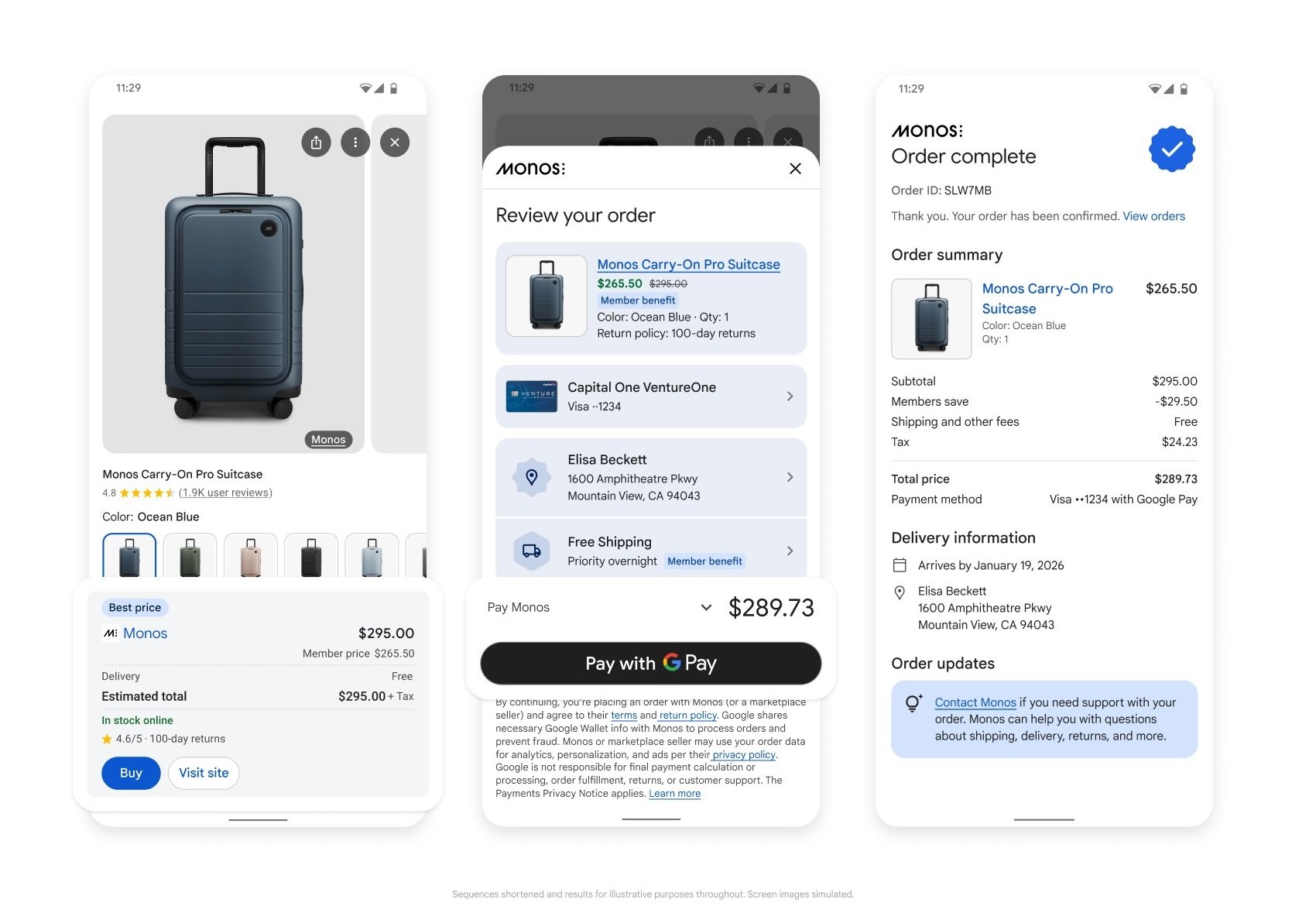
UCP is vendor‑agnostic, but Google provides a reference implementation that powers buying experiences in AI Mode on Search and Gemini, allowing consumers to purchase directly from eligible businesses using Google Pay and stored wallet information.
Example query: “Find a lightweight suitcase for an upcoming trip.”
Business Integration via Merchant Center
To use Google’s implementation, you need an active Merchant Center account with eligible products.
Next steps
- Follow the Google integration guide to set up your Merchant Center account and submit a merchant interest form.
- Complete the UCP integration using the instructions in the guide’s checkout section.
Call for collaboration
The Universal Commerce Protocol is co‑developed and endorsed by more than 20 partners and is open‑source. Developers, businesses, and platform architects are invited to contribute via the GitHub repository, Discussions, and pull requests.