
NVIDIA RTX Accelerates 4K AI Video Generation on PC With LTX-2 and ComfyUI Upgrades
Source: NVIDIA AI Blog
2025: A Breakout Year for AI on the PC
PC‑class small language models (SLMs) improved accuracy by nearly 2× over 2024, dramatically closing the gap with frontier cloud‑based large language models (LLMs). AI developer tools such as Ollama, ComfyUI, llama.cpp, and Unsloth have matured—popularity has doubled year over year, and the number of users downloading PC‑class models has grown tenfold since 2024.
These advances are paving the way for generative AI to achieve widespread adoption among everyday PC creators, gamers, and productivity users.
NVIDIA’s AI Upgrades (Announced at CES 2025)
NVIDIA unveiled a suite of upgrades for GeForce RTX, RTX PRO, and DGX Spark devices that unlock the performance and memory needed for developers to deploy generative AI on the PC:
- 3× performance boost & 60 % VRAM reduction for video and image generative AI via PyTorch‑CUDA optimizations and native NVFP4/FP8 precision support in ComfyUI.
- RTX Video Super Resolution integration in ComfyUI, accelerating 4K video generation.
- NVFP8 optimizations for the open‑weights release of Lightricks’ state‑of‑the‑art LTX‑2 audio‑video generation model.
- A new video generation pipeline that creates 4K AI video from a 3D scene in Blender, enabling precise control over outputs.
- Up to 35 % faster inference for SLMs when using Ollama and llama.cpp.
- RTX acceleration for Nexa.ai’s Hyperlink video‑search capability.
These advancements let users run advanced video, image, and language AI workflows locally, delivering the privacy, security, and low latency that only RTX‑powered PCs can provide.
Generate Videos 3× Faster and in 4K on RTX PCs
Generative AI can produce amazing videos, but many online tools are hard to control with just prompts, and generating 4K footage is often impossible because most models exceed PC VRAM limits.
NVIDIA’s new RTX‑powered video generation pipeline gives artists precise control while delivering:
- 3× faster generation
- 4K upscaling using only a fraction of VRAM
The pipeline lets creators:
- Storyboard a concept.
- Render photorealistic keyframes from a 3‑D scene.
- Animate between start‑ and end‑keyframes and upscale the result to 4K.
Pipeline Blueprints
| Blueprint | Description |
|---|---|
| 3D Object Generator | Produces assets for scenes. |
| 3D‑Guided Image Generator | Users set up a scene in Blender and generate photorealistic keyframes. |
| Video Generator | Animates between keyframes and uses NVIDIA RTX Video to upscale to 4K. |
Core Model: LTX‑2
The breakthrough LTX‑2 model (released by Lightricks) is available for download today. Highlights:
- Generates up to 20 seconds of 4K video with high visual fidelity.
- Built‑in audio, multi‑keyframe support, and advanced conditioning via controllability low‑rank adaptations.
- Matches the quality of leading cloud‑based models while running locally.
Performance Boosts
- ComfyUI powers the pipeline. NVIDIA has collaborated with the ComfyUI team to:
- Accelerate inference ≈ 40 % on NVIDIA GPUs.
- Add support for the NVFP4 and NVFP8 data formats.
| Format | Speed ↑ | VRAM ↓ |
|---|---|---|
| NVFP4 (RTX 50 Series) | 3× faster | ‑60 % VRAM |
| NVFP8 | 2× faster | ‑40 % VRAM |
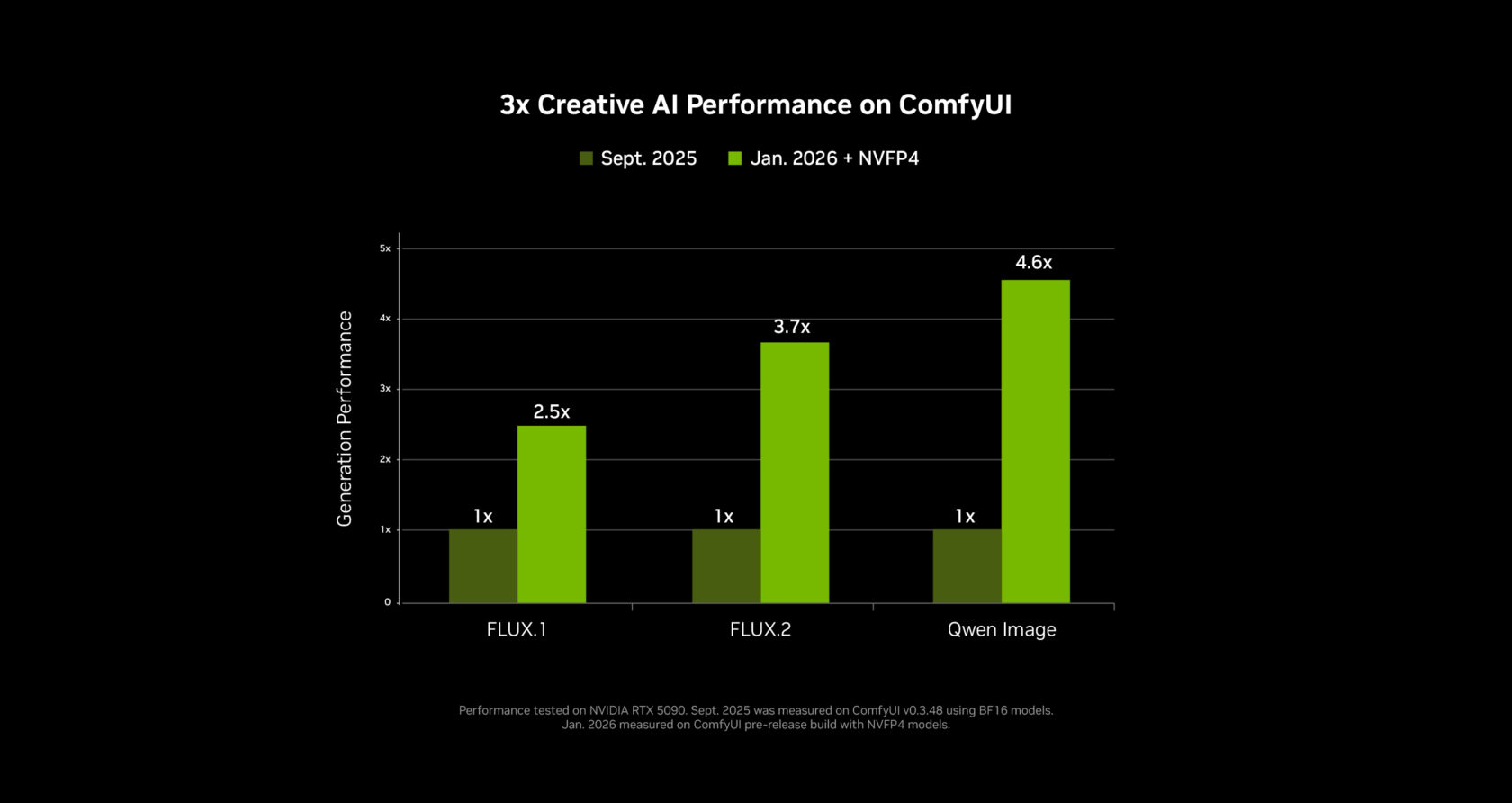
Ready‑to‑Use Models in ComfyUI
NVFP4/NVFP8 checkpoints are now bundled for several top models directly in ComfyUI:
- LTX‑2 – Lightricks
- FLUX.1 & FLUX.2 – Black Forest Labs
- Qwen‑Image & Z‑Image – Alibaba
Tip: Download these models from the ComfyUI model manager; more model support is coming soon.
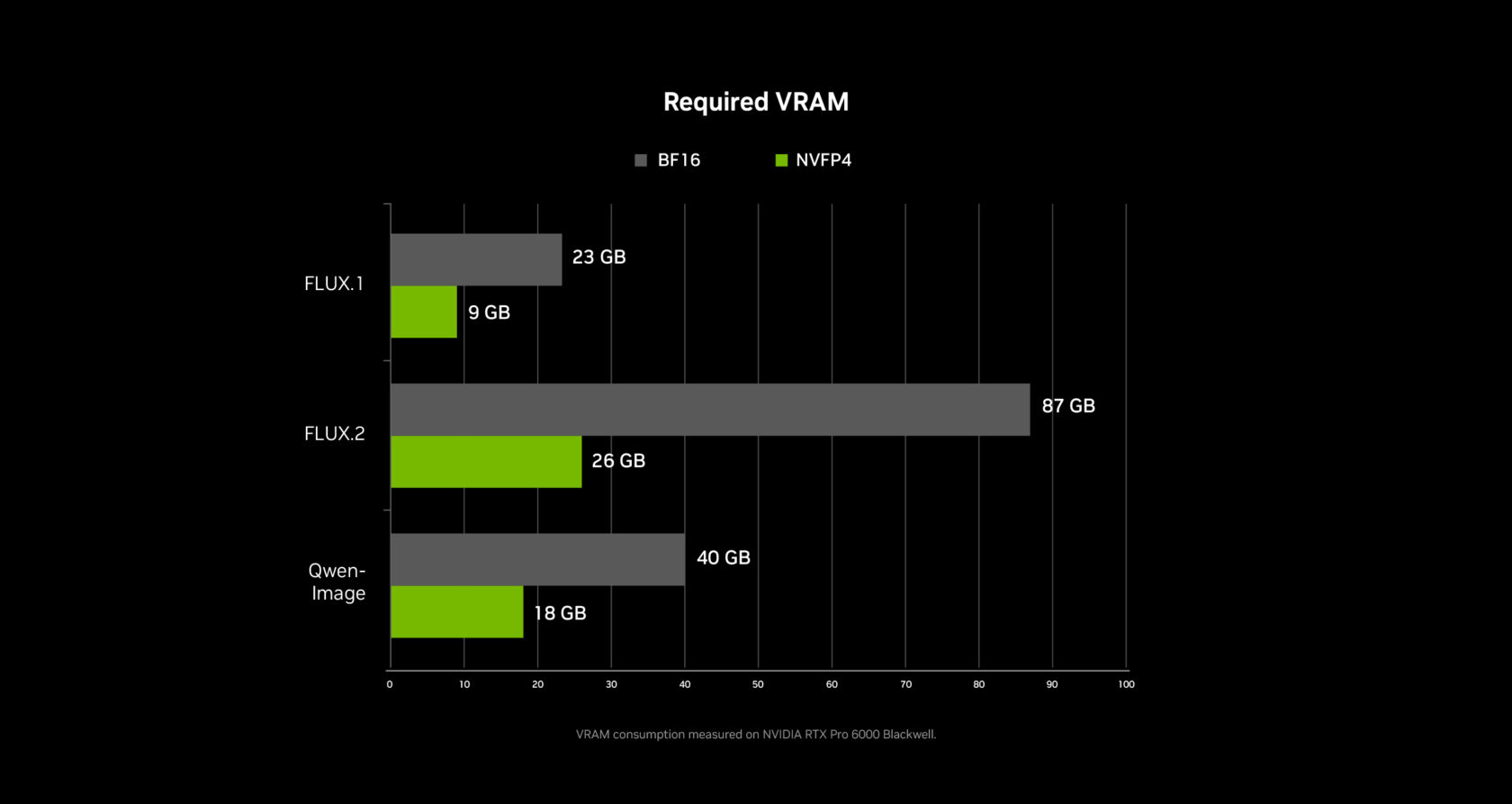
RTX Video Upscaling
After a clip is generated, the RTX Video node in ComfyUI upscales it to 4K in seconds:
- Real‑time processing.
- Edge sharpening and compression‑artifact removal.
Availability: RTX Video will be released in ComfyUI next month.
Extending GPU Memory with Weight Streaming
To overcome VRAM constraints, NVIDIA enhanced ComfyUI’s weight‑streaming (memory‑offload) feature:
- When VRAM is exhausted, weights are streamed from system RAM.
- Enables larger models and more complex node graphs on mid‑range RTX GPUs.
Release Timeline
| Item | Availability |
|---|---|
| LTX‑2 Video Model (open weights) | Now |
| ComfyUI RTX updates | Now |
| Full video‑generation workflow | Next month (downloadable) |
| RTX Video node | Next month (ComfyUI) |
Get started today: download the LTX‑2 weights, install the latest ComfyUI RTX build, and begin creating 4K AI‑generated videos on your RTX PC.
A New Way to Search PC Files and Videos
File searching on PCs has been the same for decades. It still mostly relies on file names and spotty metadata, which makes tracking down that one document from last year far harder than it should be.
What is Hyperlink?
Hyperlink – Nexa.ai’s local‑search agent – turns RTX‑powered PCs into a searchable knowledge base that can answer natural‑language questions with inline citations.
- Content it can index: documents, slides, PDFs, images, and (now) video files.
- Privacy‑first: all data is processed locally and never leaves the user’s machine.
- Performance (RTX 5090):
- Indexing – ~30 seconds per GB of text + image data.
- Query response – ~3 seconds per request.
- Performance (CPU only):
- Indexing – ~1 hour per GB.
- Query response – ~90 seconds per request.
New Video Support (Beta)
At CES, Nexa.ai announced a beta version of Hyperlink that adds video‑content search:
- Search for objects, actions, and spoken words inside your video library.
- Ideal for:
- Video artists hunting for specific B‑roll clips.
- Gamers locating a winning moment in a battle‑royale match to share.
- Anyone who needs to locate a particular scene without scrubbing through hours of footage.
How to Join the Private Beta
| Step | Action |
|---|---|
| 1 | Visit the beta sign‑up page. |
| 2 | Fill out the short request form. |
| 3 | Wait for an invitation – roll‑out begins this month. |
Learn More
- Hyperlink product page – (link pending)
- Nexa.ai company site – (link pending)
Turn your RTX PC into a fast, private, AI‑powered search engine for files and videos.
Small Language Models Get 35% Faster
NVIDIA has partnered with the open‑source community to deliver major performance gains for small language models (SLMs) on RTX GPUs and the NVIDIA DGX Spark desktop supercomputer using Llama.cpp and Ollama. The latest changes are especially beneficial for mixture‑of‑experts models, including the new NVIDIA Nemotron 3 family of open models.
- Inference speed‑up:
- Llama.cpp: +35 %
- Ollama: +30 % (over the past four months)
- Additional improvements:
- A quality‑of‑life upgrade for Llama.cpp that also reduces LLM loading times.
These updates are available now and will appear in the next release of LM Studio. They will also be integrated soon into agentic applications such as the new MSI AI Robot app, which leverages the Llama.cpp optimizations to let users control MSI device settings.
NVIDIA Broadcast 2.1 Brings Virtual Key Light to More PC Users
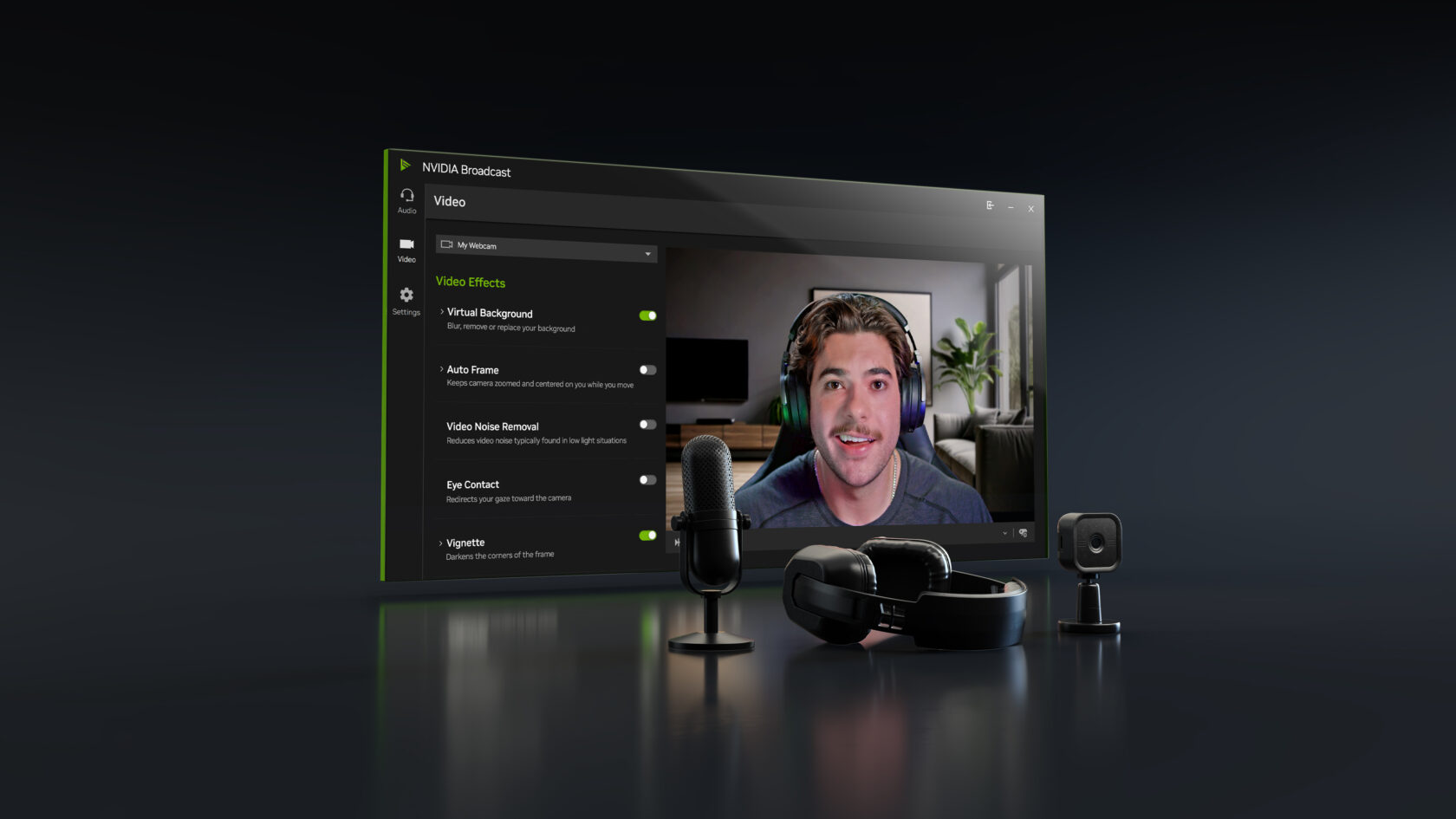
The NVIDIA Broadcast app enhances a PC’s microphone and webcam with AI‑driven effects, making it ideal for livestreaming and video conferencing.
What’s new in version 2.1
- Virtual Key Light is now supported on RTX 3060 desktop GPUs and higher.
- Improved performance and stability.
- Handles a wider range of lighting conditions.
- Expanded color‑temperature control.
- Updated HDRi base map for a two‑key‑light setup commonly used in professional streams.
Download the NVIDIA Broadcast app and try the new features today.
Transform an At‑Home Creative Studio Into an AI Powerhouse With DGX Spark
As new and increasingly capable AI models arrive on PC each month, developer interest in more powerful and flexible local AI setups continues to grow. DGX Spark – a compact AI supercomputer that fits on a desk and pairs seamlessly with a primary desktop or laptop – enables experimenting, prototyping, and running advanced AI workloads alongside an existing PC.
- Ideal for testing large language models (LLMs) or prototyping agentic workflows.
- Perfect for artists who want to generate assets in parallel to their main workflow, keeping the primary PC free for editing.
At CES, NVIDIA unveiled major AI‑performance updates to Spark, delivering up to 2.6× faster performance since its launch just under three months ago.
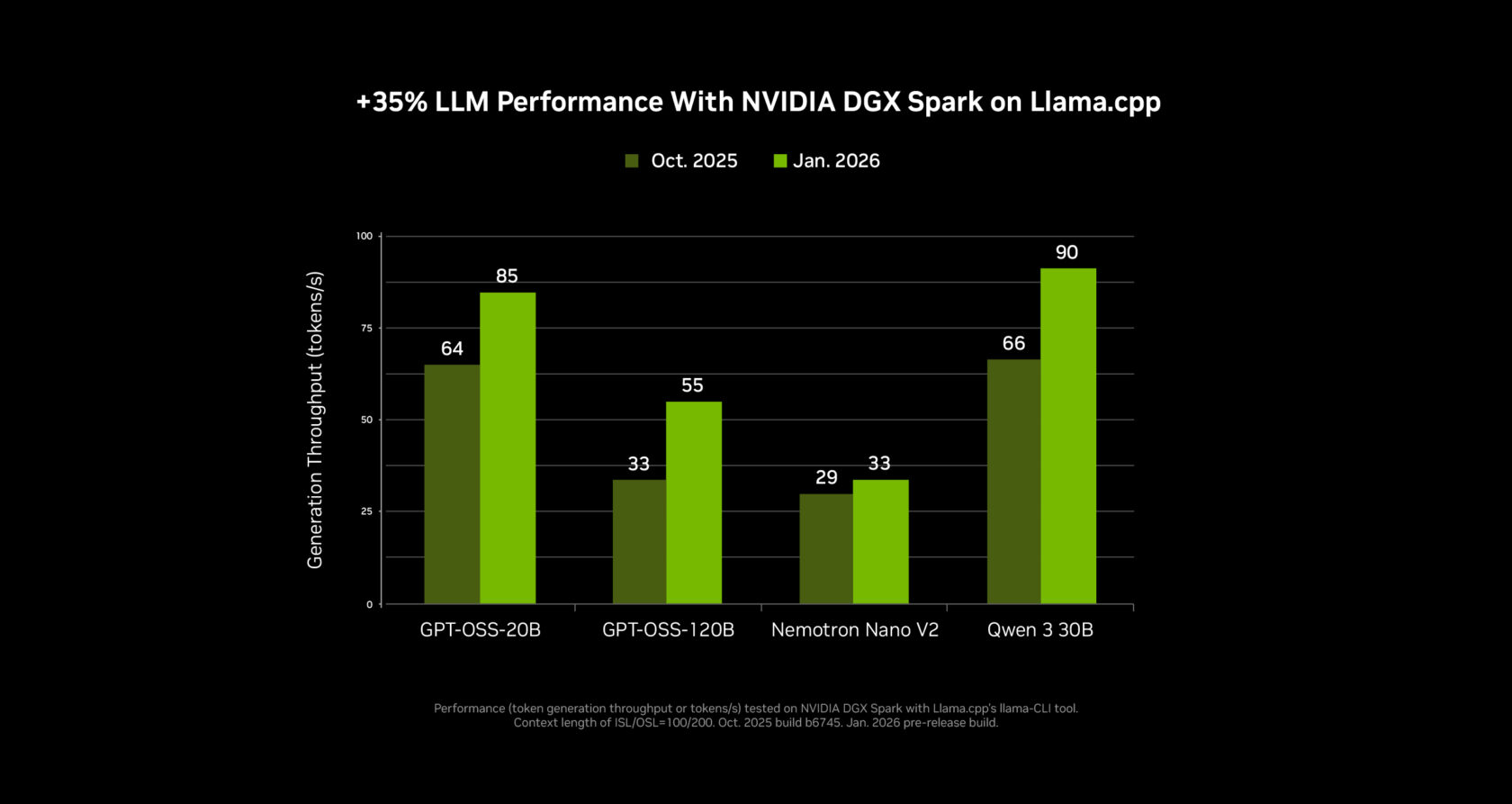
New DGX Spark Playbooks
- Speculative decoding – accelerate inference for LLMs.
- Fine‑tuning with two DGX Spark modules – scale model training locally.
Explore the playbooks here: DGX Spark Playbooks.
Stay Connected
- Facebook: NVIDIA AI PC
- Instagram: nvidia.ai.pc
- TikTok: @nvidia_ai_pc
- X (Twitter): NVIDIA_AI_PC
Subscribe to the RTX AI PC newsletter for the latest updates.
Follow NVIDIA Workstation
- LinkedIn: NVIDIA Workstation Showcase
- X (Twitter): NVIDIAworkstatn
Notice: See NVIDIA’s terms of service for software product information.