
Apple study looks into how people expect to interact with AI agents
Source: 9to5Mac

A team of Apple researchers set out to understand what real users expect from AI agents, and how they’d rather interact with them. Here’s what they found.Apple Explores UX Trends for the Era of AI Agents
In the study titled Mapping the Design Space of User Experience for Computer Use Agents, a team of four Apple researchers notes that while the market heavily invests in developing and evaluating AI agents, some aspects of the user experience have been overlooked—specifically, how users want to interact with them and what these interfaces should look like.
Study Overview
The researchers divided the work into two phases:
- Identify UX patterns – They cataloged the main UX patterns and design considerations that AI labs have incorporated into existing AI agents.
- User testing – They tested and refined those ideas through hands‑on user studies using a Wizard of Oz methodology.
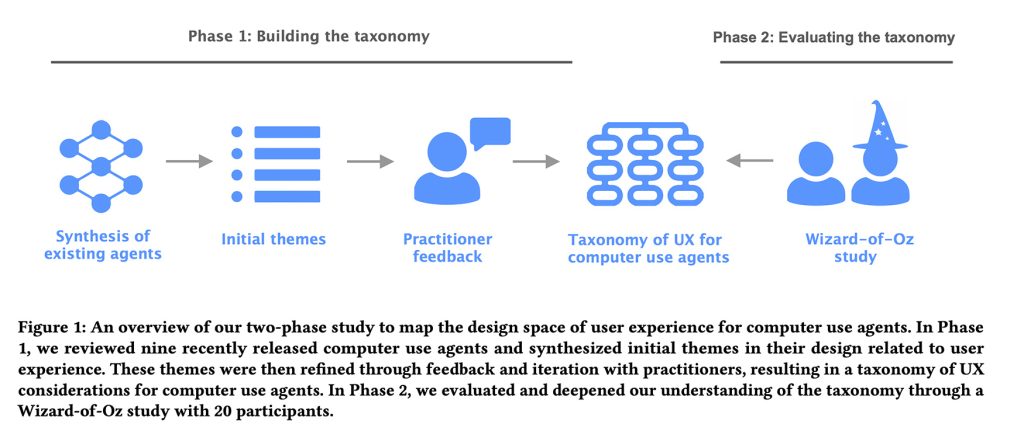
By observing how those design patterns hold up in real‑world interactions, the team identified which current AI‑agent designs align with user expectations and which fall short.
Phase 1: The Taxonomy
The researchers examined nine desktop, mobile, and web‑based agents:
- Claude Computer Use Tool
- Adept
- OpenAI Operator
- AIlice
- Magnetic‑UI
- UI‑TARS
- Project Mariner
- TaxyAI
- AutoGLM
They then consulted eight practitioners—designers, engineers, or researchers working in UX or AI at a large technology company. This collaboration helped them construct a comprehensive taxonomy consisting of:
- 4 main categories
- 21 sub‑categories
- 55 example features
These elements capture the key UX considerations for computer‑using AI agents.
The Four Main Categories
- User Query – How users input commands.
- Explainability of Agent Activities – What information to present about the agent’s actions.
- User Control – How users can intervene.
- Mental Model & Expectations – How to help users understand the agent’s capabilities.
In short, the framework covers everything from interface elements that let agents present their plans, to how they communicate capabilities, surface errors, and allow users to step in when something goes wrong.
With this foundation, the team proceeded to Phase 2.
Phase 2: The Wizard‑of‑Oz Study
The researchers recruited 20 participants who had prior experience with AI agents. Each participant interacted with an “AI agent” via a chat interface to complete either a vacation‑rental task or an online‑shopping task.
Study Setup
- Mock chat interface – Participants typed natural‑language queries in a chat window.
- Execution interface – Hidden from participants, the researcher (acting as the “agent”) saw the same commands and controlled the mouse and keyboard to perform the requested actions on a web page.
- Task‑completion signal – When the researcher finished the task, they pressed a shortcut key that posted a “task completed” message in the chat thread.
- Interrupt button – Participants could stop the agent at any time; an “agent interrupted” message then appeared in the chat.
Note: The participants were unaware that the “AI agent” was actually a researcher in the next room reading their instructions and executing the tasks manually.
Procedure
| Step | Description |
|---|---|
| 1. Introduction | Participants were briefed on the study and shown the chat interface. |
| 2. Task selection | Each participant performed six functions for their assigned scenario (vacation rental or online shopping). |
| 3. Controlled failures | For some functions the researcher deliberately caused the agent to fail (e.g., getting stuck in a navigation loop) or to make intentional mistakes (e.g., selecting an item different from the user’s request). |
| 4. Reflection | After completing the six functions, participants answered open‑ended questions about their experience and suggested improvements. |
| 5. Data collection | Video recordings and chat logs were captured for later analysis. |
Example Interface

The image shows the chat window (left) and the researcher’s execution view (right).
Findings (Overview)
- User expectations: Participants often assumed the agent possessed full autonomy and could recover from errors without assistance.
- Pain points: Interrupting the agent, ambiguous responses, and unexpected failures caused frustration.
- Behavioral themes: Users tended to re‑phrase queries after a failure, relied heavily on the chat transcript for context, and frequently asked for confirmation of actions.
The researchers used the video recordings and chat logs to identify these recurring themes and to inform design recommendations for future AI‑agent interfaces.
Main Findings
The researchers discovered several key insights about how users interact with AI agents:
-
Visibility vs. Micromanagement
Users want to see what the AI is doing, but they don’t want to micromanage every step. If they had to manage each action, they would simply perform the task themselves. -
Context‑Dependent Behavior
Desired agent behavior changes depending on the task:- Exploration – users prefer more guidance, explanations, and the ability to intervene.
- Familiar tasks – users are comfortable with a more hands‑off approach.
-
Experience Level Matters
The less familiar a user is with the interface, the more they request:- Transparency about intermediate steps
- Explanations of why decisions are made
- Confirmation pauses, even for low‑risk actions
-
Control for High‑Stakes Actions
When actions have real consequences (e.g., purchases, changing account or payment details, contacting others on the user’s behalf), users demand tighter control and clearer oversight. -
Trust Is Fragile
Trust erodes quickly if the agent:- Makes silent assumptions
- Commits errors without flagging them
- Chooses ambiguously when multiple options exist
In the study, participants frequently instructed the system to pause and ask for clarification whenever the agent faced ambiguous choices or deviated from the original plan without explicit notification.
Overall, this study offers valuable guidance for app developers looking to embed agentic capabilities into their products. You can read the full paper here.
Recommended Accessories on Amazon
| Product | Link |
|---|---|
| AirPods Pro 3 | Buy on Amazon |
| Apple AirTag (4‑Pack) | Buy on Amazon |
| Beats USB‑C to USB‑C Woven Short Cable | Buy on Amazon |
| Wireless CarPlay Adapter | Buy on Amazon |
| Logitech MX Master 4 | Buy on Amazon |
FTC Disclosure: Some of the links above are affiliate links that may earn a commission at no extra cost to you. Learn more.
Promotional Banner
