
Apple @ Work: DDM OS Reminder 2.0 fixes the biggest flaw in Declarative Device Management software updates
Published: (February 14, 2026 at 09:00 AM EST)
5 min read
Source: 9to5Mac
Source: 9to5Mac
> **Apple @ Work** is exclusively brought to you by **Mosyle**, the only Apple Unified Platform.
> Mosyle integrates all the solutions needed to automatically deploy, manage, and protect Apple devices at work. Over 45,000 organizations trust Mosyle to make millions of Apple devices work‑ready—effortlessly and affordably.
> [Request your **EXTENDED TRIAL**](https://mosyle.net/3RDn) today and see why Mosyle is everything you need to work with Apple.
## Declarative Device Management (DDM) – The Present, Not the Future
Declarative Device Management moves the logic from the server to the device, making management **faster**, **more autonomous**, and **more reliable**. One of its best uses is managing software updates:
- Set a deadline → the device enforces it.
- Eliminates the pain points of legacy update mechanisms.
## About *Apple @ Work*
Bradley Chambers managed an enterprise IT network from 2009‑2021. His experience includes:
- Deploying firewalls, switches, and enterprise‑grade Wi‑Fi.
- Managing thousands of Macs and iPads via a mobile device management system.
In this series, Bradley will:
- Show how Apple IT managers deploy devices.
- Explain how to build networks that support them.
- Share training tips, real‑world IT stories, and suggestions for Apple product improvements.
[](https://mosyle.net/3RDn)
## The Problem with Native macOS Update Notifications
When you deploy DDM macOS updates in production, Apple’s native notifications are often **subtle**. Users may:
- Miss the notification.
- Ignore it.
- Not realize a forced restart is imminent until it happens.
### DDM OS Reminder 2.0
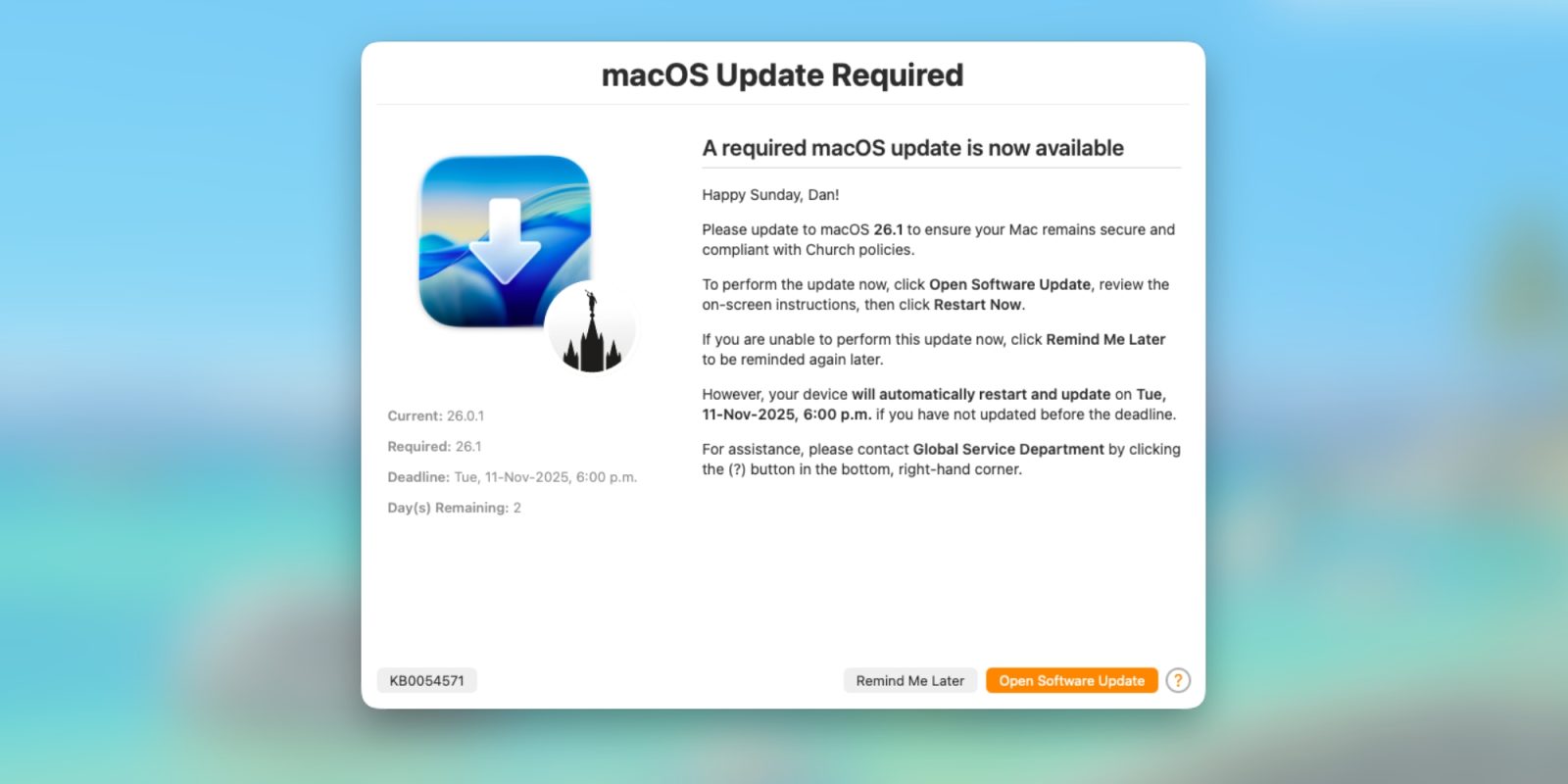
[DDM OS Reminder 2.0](https://snelson.us/2025/12/ddm-os-reminder-2-0-0/) is an **incredible tool** that fills this gap by providing clear, timely reminders to end users, ensuring smoother update rollouts and fewer surprise restarts.
---
*Feel free to explore the links above for deeper dives into DDM and the DDM OS Reminder tool.*
## What Problem Does It Solve?
If you are new to this solution, the concept is simple: Apple’s native DDM notifications are designed to be unobtrusive, which is great for a home user but terrible for a knowledge worker who is about to lose unsaved work.
### How DDM OS Reminder Works
- **Runs locally** on the machine.
- Uses a **`LaunchDaemon`** to watch the `/var/log/install.log` file for entries that indicate a software update through DDM is pending and has an enforced deadline.
- When a deadline is approaching, it leverages **[swiftDialog](https://swiftdialog.app/)** to display a notification to the user.
### “Intelligently Intrusive”
- Detects whether the user is in an online meeting (e.g., Zoom or Teams) before alerting, so you aren’t interrupted during a presentation.
- Provides a clear countdown and lets the user start the update on their own terms before the forced restart occurs.
## Version 2.0 Brings New Features
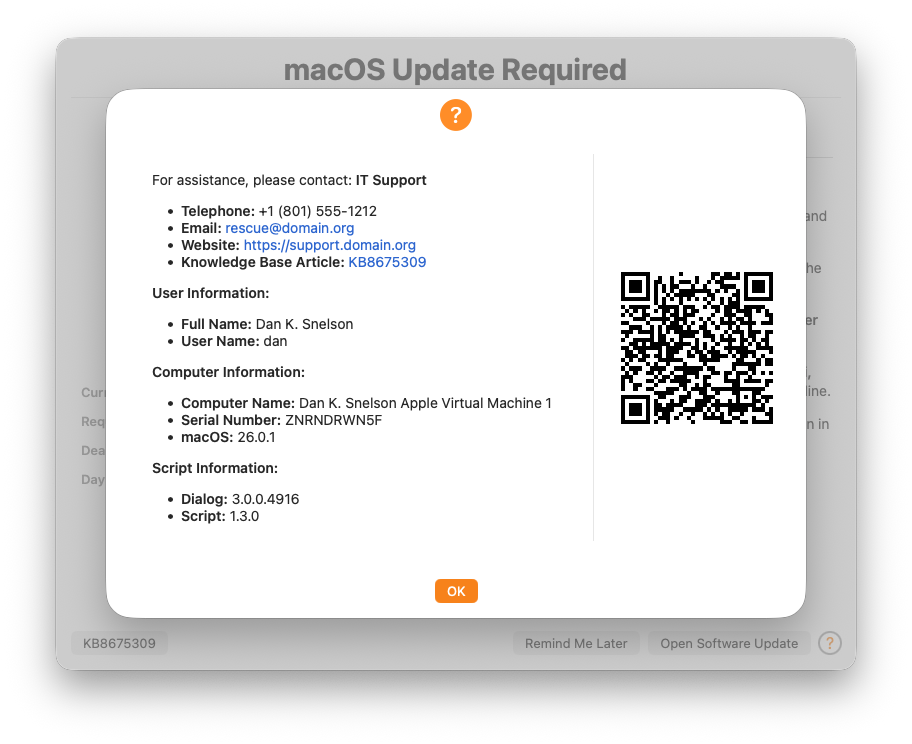
The original DDM OS Reminder was solid, but it required manual edits to the script for any change—whether that was an icon, a message, or a setting. Version 2.0 eliminates that friction by separating configuration from code.
### What’s New
- **Configuration‑Profile Support**
- Deploy a standard `.mobileconfig` profile through your device‑management solution.
- Adjust messages, deadline thresholds, icons, etc., without touching the script or reinstalling the app.
- **Demo Mode**
- Simulate macOS update notifications instantly.
- Allows admins to preview exactly what users will see, removing the need to wait for a real OS update.
These enhancements streamline deployment and testing, giving you full control over the reminder experience with far less effort.
## Refactored Logic
The update also refines the **“Blur Screen”** feature. As the deadline approaches, DDM OS Reminder can blur the user’s screen to capture their attention.
In version 2.0, this logic has been switched from a **days‑based** to a **seconds‑based** calculation, giving administrators much tighter control over the final alerting experience.
## Wrap up on DDM OS Reminder
With DDM as the modern standard for managing macOS software updates, you need a way to communicate with your users that matches the reliability of the enforcement. **DDM OS Reminder** takes the “surprise” out of forced reboots and gives your users clear information about *what* and *why*.
You can learn more about DDM OS Reminder and the 2.X update on [Dan’s website](https://snelson.us/2026/02/ddm-os-reminder-2-4-0/). He also notes that version **3.0.0**—currently in its first alpha release—will support multiple languages.
> **Apple @ Work** is exclusively brought to you by **Mosyle**, the only Apple Unified Platform. Mosyle integrates, in a single professional‑grade solution, everything needed to seamlessly and automatically deploy, manage, and protect Apple devices at work. Over 45,000 organizations trust Mosyle to make millions of Apple devices work‑ready with no effort and at an affordable cost.
> [**Request your EXTENDED TRIAL**](https://mosyle.net/3RDn) today and see why Mosyle is everything you need to work with Apple.
---
### Affiliate Disclosure
*FTC: We use income‑earning auto‑affiliate links.*
[More details.](https://9to5mac.com/about/#affiliate)
---
### Preferred Source Badges


---
### Sponsored Banner
[](https://benqurl.biz/3WZyqpL)