
Announcing the Data Commons Gemini CLI extension
Source: Google Developers Blog
What is Data Commons?
Think of Data Commons as a massive, organized library for public data. It brings together billions of data points from sources like the United Nations, the World Bank, and various government agencies into a single knowledge graph based on the open‑source Schema.org vocabulary.
Benefits from the Data Commons extension
The Data Commons extension for Gemini CLI utilizes the underlying Data Commons MCP tools, which are optimized for high‑level, natural‑language data interactions. The extension makes it even simpler – you can install and run the tools with a single command and immediately start running a full range of data‑driven queries, from initial discovery to generative reports, right away.
Get instant answers to public data questions
Data Commons gives anyone interested in public statistical data easy access to hundreds of datasets distilled from authoritative public sources. The Data Commons agent and tools are optimized to engage in conversations with exploratory and analytical questions, such as:
Data exploration
- “What are some interesting statistics about India?”
- “What economic data do you have about France?”
Data analysis and insights
- “Summarize the trends in violent crime statistics in Brazil.”
- “Analyze the impact of education expenditure on GDP per capita in Scandinavian countries.”
- “Compare the unemployment rates of the G20 countries.”
- “List out the yearly population of Canada since 1964 and save the results to a CSV file.”
Ground or compare data returned by other tools with authoritative data
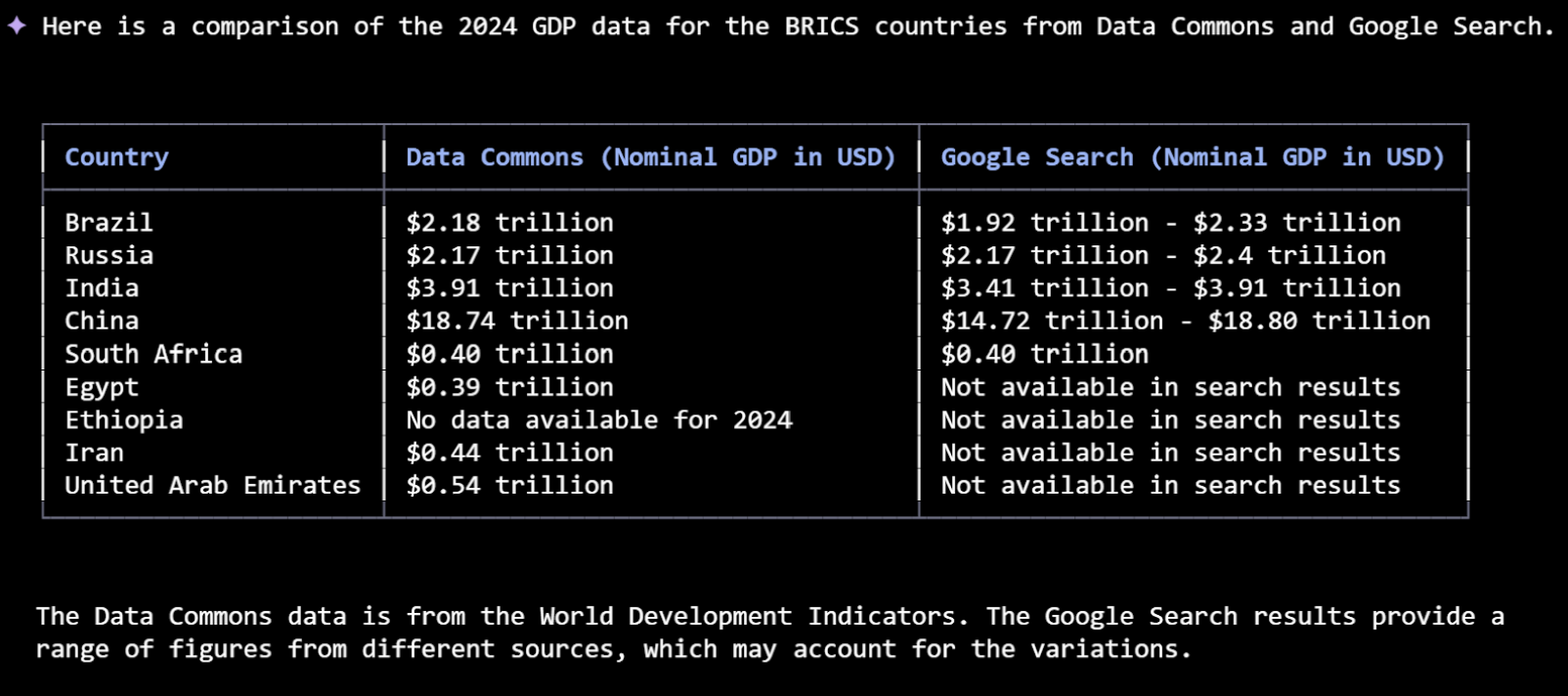
Data Commons data is pulled directly from authoritative public sources, thereby reducing hallucinations. You can compare Data Commons data results with results returned by other Gemini CLI tools, such as GoogleSearch.
Integrate with your workflow
The Gemini CLI framework allows you to combine results from Data Commons with those from other data‑related extensions into an integrated workflow.
For example, you could use the MCP Toolbox for Databases to compare public data with your own proprietary datasets; or you could use Looker to create visualizations based on Data Commons results.
Dig deeper: develop your data application
You can use Data Commons’ standalone MCP server to build your own agents and applications. To learn more, check out the Data Commons MCP server announcement.