
VMware Cloud on AWS: What’s New (December 2025)
Source: VMware Blog
Updated: 12/02/2025
At Broadcom, we are focused on helping customers modernize their infrastructure, improve resiliency, and simplify operations – without adding complexity for their teams to manage. Over the past few months, we’ve released several updates to make VMware Cloud on AWS (VMC) more flexible and easier to use. It’s easy to miss the latest updates on our release notes, so we want to use this opportunity to highlight some of the most recent feature releases.
Our latest features provide enterprise customers more cost‑efficient resilience with non‑stretched secondary clusters and improved scale‑down, clearer operational insights via a redesigned user interface, an improved VMC Sizer, new Host Usage APIs, and continued product enhancements through HCX 4.11.3.
Here’s a look at what’s new.
Optimize Your SDDC Deployments: Stretched Cluster Enhancements
When you deploy a Software Defined Datacenter (SDDC) in VMC, you are given the choice of either a standard or a stretched SDDC deployment. While a standard cluster is deployed in a single AWS availability zone (AZ), a stretched cluster offers improved availability by deploying the SDDC across three AWS availability zones. Two of the availability zones are selected for the instance deployments and the third hosts the vSAN witness component.
Because SDDCs in stretched clusters deploy hosts in two AWS availability zones, they require customers to size at two‑to‑one for their resource needs. This can be cost‑prohibitive for workloads that don’t require high availability. Additionally, once stretched clusters have been scaled beyond six hosts, they were previously unable to scale back down. To improve both of these experiences, the VMC team has introduced Non‑Stretched Secondary Clusters in Stretched Cluster SDDCs and Improved Scale‑Down Options for Stretched Clusters.
Non‑Stretched Secondary Clusters in Stretched SDDCs
Previously, all clusters in a stretched SDDC were stretched across two AZs. With this update, only the primary cluster must be stretched, while secondary clusters now have the option to be deployed in a single AZ. In a stretched cluster, hosts must be deployed uniformly and therefore the minimum increment is two. But in a non‑stretched secondary cluster, host additions can be made in increments of one, allowing you to increase the deployed host count in only the specific AZ where hosts are required.
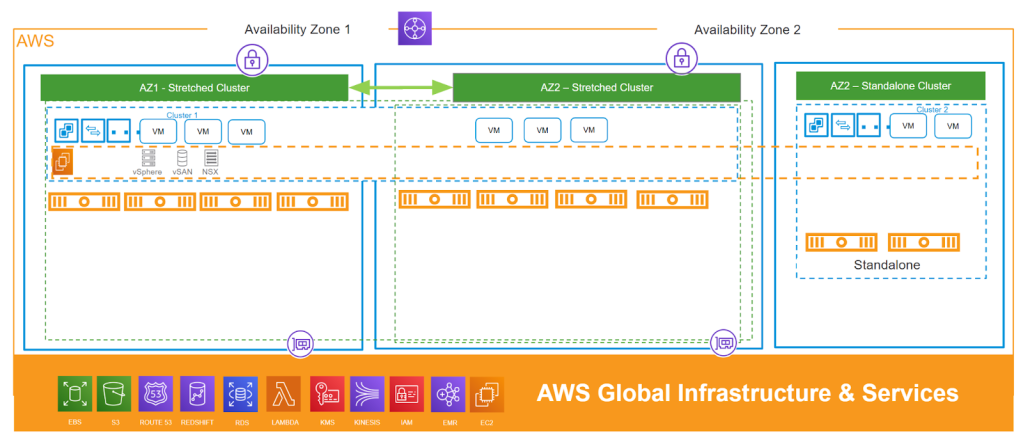
Some key benefits include
- Provides the benefits of both stretched and non‑stretched clusters in the same SDDC.
- Enables single‑AZ host expansion in increments of one in non‑stretched clusters.
- Lowers the cost for workloads that do not require stretched‑cluster availability, including test and/or development workloads where high availability is not necessary.
- Supports application architectures with native replication at the application level; these can be deployed to two independent non‑stretched secondary clusters.
VMC supports stretched clusters for applications requiring cross‑AZ resilience. With SDDC 1.24v5, customers gain flexibility in how their clusters are deployed and scaled. Non‑stretched clusters can only be deployed in one of the two AWS availability zones where the stretched cluster hosts reside, and this feature is only available for SDDCs at version 1.24v5 or later. The SLA for a non‑stretched cluster differs from that of a stretched cluster because it lacks the high‑availability guarantees of a stretched deployment.
When planning new SDDC deployments, consider a stretched‑cluster SDDC to get the benefits of both high availability and optimized workload deployments.
Improved Scale‑Down Options for Stretched Clusters
Previously, stretched clusters could not be scaled down below six hosts (three in each availability zone). You can now scale down your cluster from six or more hosts to as few as four hosts (two in each availability zone) or even two hosts (one in each availability zone), depending on resource availability and other considerations. This gives you greater control over your infrastructure and helps to optimize costs based on your needs.
Key use cases
- Workload usage has reduced over time and you need to scale down your stretched cluster based on current resource utilization.
- You previously scaled up a stretched cluster to six or more hosts for peak demand and now need to reduce the host count.
- You have migrated clusters from
i3.metaltoi4i.metalori3en.metalinstance types and no longer require the larger number of hosts. Newer instance types can operate in a smaller footprint while delivering equivalent or better performance.
Important considerations before scaling down
- If your primary cluster uses Large management appliances, you must maintain at least six hosts (three per AZ).
- For clusters with custom CPU configurations set to eight, the minimum size is four hosts (two per AZ).
- Scaling down is not possible if the cluster is already at or near its resource thresholds or if it would violate any custom policies you have set.
Ready to optimize? Review your current configuration, check it against the guidelines above, and you’ll be all set to right‑size your stretched cluster for maximum efficiency.
Take Control of Your Data: New Host Usage Report API
We’re excited to announce the Host Usage Report API, giving you programmatic access to your host usage data. You can retrieve daily host usage reports for any date range and filter by region, instance type, SKU, and other attributes—all through a simple API.
Use this data to analyze host usage trends, optimize costs, and integrate usage metrics directly into your existing reporting tools and dashboards. The API supports standard query parameters, including sort and filter operations, giving you flexibility to retrieve exactly the data you need.
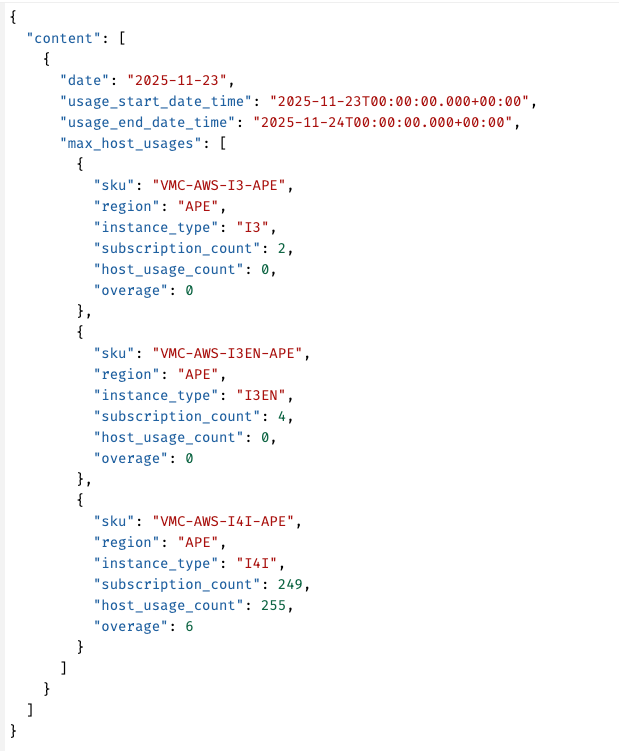
The above image shows a sample output of the API. You can automate this to feed data into the analytics tool of your choice. Give it a try today!
Product Enhancement: HCX version 4.11.3 Now Available for VMC
We’re pleased to announce that VMware HCX version 4.11.3 is now available for VMware Cloud on AWS, and it comes with several important updates.
What’s New in HCX 4.11.3?
This maintenance release brings essential fixes and enhancements across datapath, system updates, and overall operations to help you run more smoothly. For a complete breakdown of all the improvements, see the official HCX Release Notes.
HCX version 4.11.3 extends support until October 11 2027, providing long‑term stability. We strongly encourage all customers to upgrade to version 4.11.3 as soon as possible, since older versions will no longer be supported.
If you’re setting up HCX for the first time, VMware Cloud on AWS automatically deploys version 4.11.3. For existing deployments…