
Unlocking Peak Performance on Qualcomm NPU with LiteRT
Source: Google Developers Blog
Overview
NOV 24, 2025
Lu Wang – Senior Staff Software Engineer
Modern smartphones feature sophisticated SoCs (system‑on‑a‑chip), composed of CPU, GPU, and NPU, which enable compelling on‑device GenAI experiences that are far more interactive and real‑time than their server‑only counterparts. The GPU is the most ubiquitous accelerator for AI tasks, with GPU compute available on roughly 90 % of all Android devices. However, relying solely on the GPU can create performance bottlenecks—especially when building complex, interactive GenAI experiences.
Example scenario
- Run a compute‑intensive, text‑to‑image generation model on‑device.
- Simultaneously process the live camera feed with an ML‑based segmentation model.
Even the most powerful mobile GPU will struggle under this combined load, resulting in jarring frame drops and a broken user experience.
Video (placeholder)
Sorry, your browser doesn’t support playback for this video.
GPU vs. NPU/GPU Parallel Processing
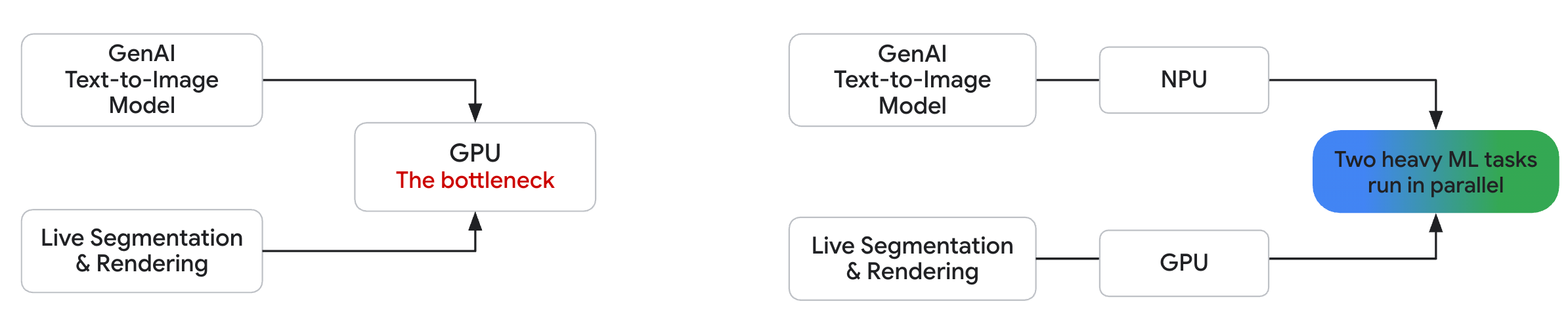 | Performance bottleneck with full GPU inference (left) vs. smooth user experience with NPU/GPU parallel processing (right). Captured on Samsung Galaxy S25 Ultra powered by Qualcomm Snapdragon 8 Elite. |
Why the NPU Matters
- High throughput – Offers tens of TOPS (tera‑operations‑per‑second) of dedicated AI compute, far exceeding what a mobile GPU can sustain.
- Power efficiency – Delivers far more TOPS per watt than CPUs or GPUs, a critical factor for battery‑operated devices.
- Ubiquity – No longer a niche feature; over 80 % of recent Qualcomm SoCs now include an NPU.
- Parallelism – Runs in parallel with the GPU and CPU, allowing heavy AI processing to be offloaded to the NPU while the GPU handles rendering and the CPU manages main‑thread logic.
This modern architecture unlocks the smooth, responsive, and fast performance that contemporary AI applications demand.
Introducing LiteRT Qualcomm AI Engine Direct Accelerator
To bring NPU power to LiteRT, Google’s high‑performance on‑device ML framework, we’re excited to announce a major upgrade: the LiteRT Qualcomm AI Engine Direct (QNN) Accelerator. Developed in close collaboration with Qualcomm, it replaces the previous TFLite QNN delegate.
What’s new for developers?
1. Unified, simplified mobile‑deployment workflow
You no longer have to:
- Interact with low‑level, vendor‑specific SDKs – LiteRT integrates SoC compilers and runtimes and exposes them through a single, streamlined API.
- Target individual SoC versions – LiteRT abstracts fragmentation across chips, letting you scale deployments to multiple SoCs simultaneously.
Now you can deploy your model seamlessly across all supported devices, using either ahead‑of‑time (AOT) or on‑device compilation. This makes integrating pre‑trained .tflite models (e.g., from Qualcomm AI Hub) into production easier than ever.
2. State‑of‑the‑art on‑device performance
- Supports an extensive range of LiteRT ops, enabling full model delegation and maximum NPU utilization.
- Includes specialized kernels and optimizations for sophisticated LLMs and GenAI models, delivering SOTA performance for models such as Gemma and FastVLM.
Superior performance, real‑world results
We benchmarked the new LiteRT QNN accelerator across 72 canonical ML models spanning vision, audio, and NLP. The results show a massive jump in raw performance:
- Up to 100× speed‑up over CPU
- Up to 10× speed‑up over GPU
The accelerator supports 90 LiteRT ops, allowing 64 of the 72 models to delegate fully to the NPU.
Real‑time impact
On Qualcomm’s latest flagship SoC, the Snapdragon 8 Elite Gen 5, the performance benefit is substantial:
- > 56 models run in 11,000 tokens / s
- Decode throughput: > 100 tokens / s
These figures enable a smooth, real‑time, interactive AI experience on mobile devices.
Live Demo: Scene Understanding
We built a live scene‑understanding demo that processes and describes the world around you.
Note: The video playback may not be supported in all browsers.
Sorry, your browser doesn't support playback for this video.Scene understanding using FastVLM vision modality running on Snapdragon 8 Elite Gen 5 with Xiaomi 17 Pro Max.
Getting started in 3 steps
Deploy a .tflite model on the NPU of any Qualcomm SoC with LiteRT’s unified workflow. Pre‑trained, production‑quality models are available from sources such as the Qualcomm AI Hub.
Step 1 (optional) – AOT compilation for the target SoC(s)
Pre‑compiling your model offline (AOT) is optional, but it reduces on‑device initialization time and peak memory usage—especially for large models.
1️⃣ Compile with LiteRT on the host
from ai_edge_litert.aot import aot_compile as aot_lib
from ai_edge_litert.aot.vendors.qualcomm import target as qnn_target

# Compile for **all** supported SoCs
compiled_models = aot_lib.aot_compile(tflite_model_path)

# Or compile for **specific** Qualcomm SoC versions
# Example: Snapdragon 8 Elite Gen5 (SM8850)
sm8850_target = qnn_target.Target(qnn_target.SocModel.SM8850)
compiled_models = aot_lib.aot_compile(
    tflite_model_path,
    target=[sm8850_target],
)
2️⃣ Export the compiled models as a Google Play AI Pack
from ai_edge_litert.aot.ai_pack import export_lib as ai_pack_export

# Bundle model variants + metadata so Play can deliver the right one
ai_pack_export.export(
    compiled_models,
    ai_pack_dir,
    ai_pack_name,
    litert_model_name,
)
Full example: see the LiteRT AOT Compilation notebook.
Step 2 – Deploy with Google Play for On‑device AI
Add the model (or AI Pack) to your Android project.
📦 For on‑device compilation
Copy the original .tflite file into app/src/main/assets/.
📦 For AOT compilation
Copy the entire AI Pack generated in Step 1 into the project root and reference it in Gradle:
// my_app/settings.gradle.kts
include(":ai_pack:my_model")
// my_app/app/build.gradle.kts
android {
// …
assetPacks.add(":ai_pack:my_model")
}3️⃣ Fetch the Qualcomm NPU runtime libraries
# For AOT compilation
./litert_npu_runtime_libraries/fetch_qualcomm_library.sh   # downloads litert_npu_runtime_libraries.zip

# For on‑device (JIT) compilation
# ./litert_npu_runtime_libraries/fetch_qualcomm_library.sh   # downloads litert_npu_runtime_libraries_jit.zip
4️⃣ Add the runtime libraries as dynamic‑feature modules
// my_app/settings.gradle.kts
include(":litert_npu_runtime_libraries:runtime_strings")
include(":litert_npu_runtime_libraries:qualcomm_runtime_v79")
// my_app/app/build.gradle.kts
android {
// …
dynamicFeatures.add(":litert_npu_runtime_libraries:qualcomm_runtime_v79")
}
dependencies {
// Strings for NPU runtime libraries
implementation(project(":litert_npu_runtime_libraries:runtime_strings"))
}Complete guide: see the official Play for On‑device AI tutorial.
Step 3 – Run inference on the NPU with LiteRT Runtime API
LiteRT hides SoC‑specific details and provides a built‑in fallback (CPU/GPU) if the NPU is unavailable. AOT‑compiled models also support partial delegation.
// 1️⃣ Load the model (fallback to GPU if NPU is missing)
val model = CompiledModel.create(
    context.assets,
    "model/mymodel.tflite",
    CompiledModel.Options(Accelerator.NPU, Accelerator.GPU)
)

// 2️⃣ Allocate input / output buffers
val inputBuffers  = model.createInputBuffers()
val outputBuffers = model.createOutputBuffers()

// 3️⃣ Fill the first input buffer
inputBuffers[0].writeFloat(/* your input data */)

// 4️⃣ Run inference
model.run(inputBuffers, outputBuffers)

// 5️⃣ Read the output
val result = outputBuffers[0].readFloat()
📱 Sample app
Explore the full workflow in the image‑segmentation sample (Kotlin + NPU).
What’s Next
The new LiteRT Qualcomm AI Engine Direct (QNN) Accelerator is a major achievement for LiteRT, closing the gap between raw hardware potential and real‑world application performance. We’re incredibly excited to see what you’ll build with this power.
- Explore the LiteRT DevSite
- Check out the LiteRT GitHub repository
Happy building!
Acknowledgements
Special thanks to the Google ODML team and the Qualcomm LiteRT team for their significant contributions.
Google ODML team
- Alice Zheng
- Advait Jain
- Andrew Zhang
- Arian Arfaian
- Chintan Parikh
- Chunlei Niu
- Cormac Brick
- Gerardo Carranza
- Gregory Karpiak
- Jingjiang Li
- Jing Jin
- Julius Kammerl
- Lu Wang
- Luke Boyer
- Marissa Ikonomidis
- Maria Lyubimtseva
- Matt Kreileder
- Matthias Grundmann
- Na Li
- Ping Yu
- Quentin Khan
- Rishika Sinha
- Sachin Kotwani
- Sebastian Schmidt
- Steven Toribio
- Teng‑Hui Zhu
- Terry (Woncheol) Heoi
- Vitalii Dziuba
- Weiyi Wang
- Yu‑Hui Chen
- Zichuan We
Qualcomm LiteRT team
- Alen Huang
- Bastiaan Aarts
- Brett Taylor
- Chun‑Hsueh Lee (Jack)
- Chun‑Po Chang (Jerry)
- Chun‑Ting Lin (Graham)
- Felix Baum
- Jiun‑Kai Yang (Kelvin)
- Krishna Sridhar
- Ming‑Che Lin (Vincent)
- William Lin