
Spotify now lets you share your favorite part of a podcast
Source: Android Authority
TL;DR
- Spotify now lets users create and share short podcast clips directly from the app using a new scissors tool.
- The feature could make podcast discovery far more social, turning viral moments into an easy way for new listeners to find shows.
- Podcast Clips are rolling out globally on mobile for both Free and Premium users, with support for more shows expanding over time.
Why Clips Matter
I share interesting clips on my Instagram Stories all the time — funny moments, useful advice, or conversations that instantly deserve a repost. Podcasts are full of those moments, but sharing them has never been particularly easy. That’s why Spotify’s new Clips feature feels absolutely useful.
The feature lets listeners cut out and share specific podcast moments directly inside Spotify. If a creator says something insightful, hilarious, controversial, or unexpectedly relatable, you can save just that section and send it around without forcing someone to dig through a two‑hour episode to find it.
This could be a much bigger deal for podcast discovery than it sounds. Most people don’t discover podcasts by sitting down and searching for new shows anymore — they stumble across interesting moments on social media. A funny debate, a relationship take, a finance tip, or a celebrity confession can spread far beyond the podcast’s regular audience. Spotify says its early testing already showed increased podcast saves when clips were enabled, which makes sense: one memorable 30‑second segment can sometimes do more than an entire episode title or description.
How to Use Podcast Clips
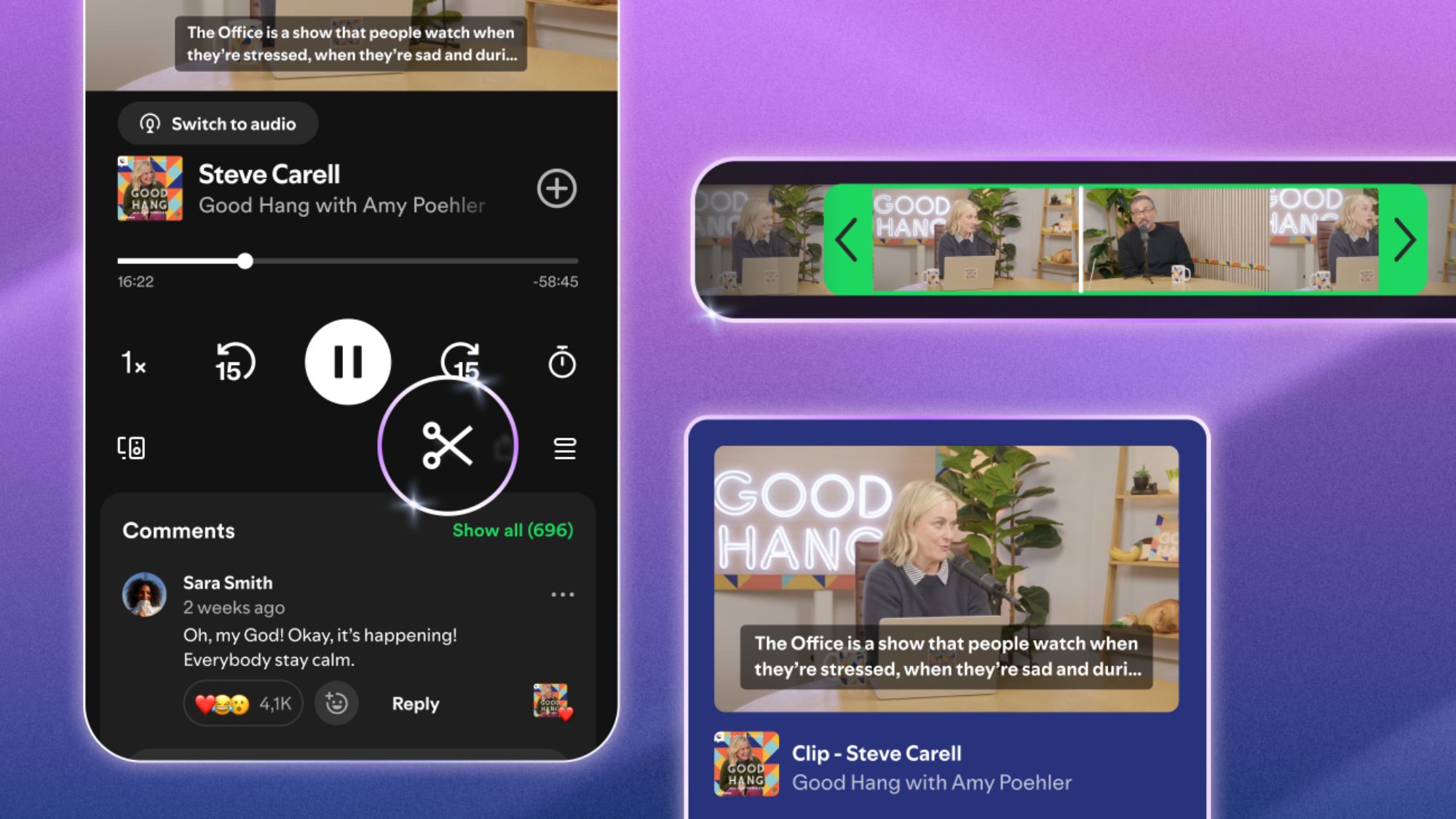
- While listening to a podcast, tap the scissors icon on the Now Playing screen.
- Trim the section you want to keep.
- Choose to save the clip for later or share it instantly.
Spotify offers multiple sharing options, including:
- Sharing the full episode
- Sharing a specific chapter
- Sharing a timestamp
- Sharing the clip itself
You can send these through Spotify Messages or other supported apps and platforms. All saved clips are stored in Your Library, where you can revisit them later or organize them into podcast playlists.
Rollout Status
Spotify says Podcast Clips are rolling out globally for both Free and Premium users on mobile, but the rollout is still a bit inconsistent. Some users (including the author) on the free tier have not yet seen the feature, while others (e.g., Android Authority’s Content Director Bogdan Petrovan, a Premium subscriber) do have access and can see the scissors icon on supported podcasts.
The scissors tool does not appear on every podcast yet. Spotify appears to be enabling it gradually across different shows and accounts, so availability may vary depending on your account and the podcast you’re listening to. Support is expected to expand to more shows over time.