
Smarter troubleshooting with the new MCP server for Red Hat Enterprise Linux (now in developer preview)
Source: Red Hat Blog
Introducing the Model Context Protocol (MCP) Server for RHEL
Red Hat Enterprise Linux (RHEL) system administrators and developers have long relied on a specific set of tools—combined with years of accumulated intuition and experience—to diagnose issues. As environments become more complex, the cognitive load required to decipher logs and troubleshoot problems continues to grow.
What’s new?
We are excited to announce the Developer Preview of a new Model Context Protocol (MCP) server for RHEL.
- Purpose: Bridge the gap between RHEL and Large Language Models (LLMs).
- Benefit: Enable a new era of smarter, AI‑assisted troubleshooting.
Stay tuned for more details on how MCP will help reduce the mental overhead of managing modern RHEL workloads.
What Is the MCP Server for RHEL?
MCP (Model Context Protocol) is an open standard that lets AI models interact with external data and systems. It was originally released by Anthropic and donated in December 2025 to the Linux Foundation’s Agentic AI Foundation.
RHEL’s new MCP server (currently in developer preview) uses this protocol to give AI applications direct, context‑aware access to RHEL. Supported clients include:
- Claude Desktop – Download
- goose – Project page
Prior MCP Server Releases
| Product | Link | Typical Use Cases |
|---|---|---|
| Red Hat Lightspeed | How to set up the MCP server for Lightspeed | AI‑assisted development, code generation, and troubleshooting |
| Red Hat Satellite | Connecting AI applications to the MCP server for Satellite | Automated host management, inventory queries, and policy enforcement |
New RHEL‑Specific MCP Server
The RHEL MCP server builds on those earlier implementations and is purpose‑built for deep‑dive troubleshooting on RHEL systems. It enables scenarios such as:
- Real‑time log analysis and root‑cause identification
- Automated remediation suggestions based on system state
- Context‑rich interactions where the AI can query system configuration, package versions, and service status directly
Note: The server is still in developer preview. Features and supported AI clients may evolve before the GA release.
Enabling Smarter Troubleshooting
Connecting your LLM to RHEL via the new MCP server unlocks powerful, read‑only use cases such as:
Intelligent Log Analysis
- Problem: Manually sifting through log data is tedious and error‑prone.
- Solution: The MCP server lets the LLM ingest and analyze RHEL system logs, providing AI‑driven root‑cause analysis, anomaly detection, and actionable insights.
Performance Analysis
- What the MCP server can access:
- Number of CPUs
- Load average
- Memory information
- CPU and memory usage of running processes
- Benefit: The LLM can evaluate the current system state, pinpoint performance bottlenecks, and suggest optimizations.
Safety‑First Preview
- Read‑only mode: This developer preview only enables read‑only MCP functionality.
- Authentication: Standard SSH keys are used for secure authentication.
- Access control:
- Configurable allow‑list for specific log files.
- Configurable allow‑list for log‑level access.
- No shell access: The MCP server runs only pre‑vetted commands; it does not provide an open shell to your RHEL system.
These safeguards let you explore the new capabilities while keeping your environment secure.
Example Use Cases
In these examples I use the goose AI agent together with the MCP server to work with a RHEL 10 system named rhel10.example.com. Goose supports many LLM providers (hosted and local); here I’m using a locally‑hosted model.
I have installed goose and the MCP server on my Fedora workstation and set up SSH‑key authentication with rhel10.example.com.
1. Checking System Health
I start with a prompt asking the LLM to check the health of rhel10.example.com.

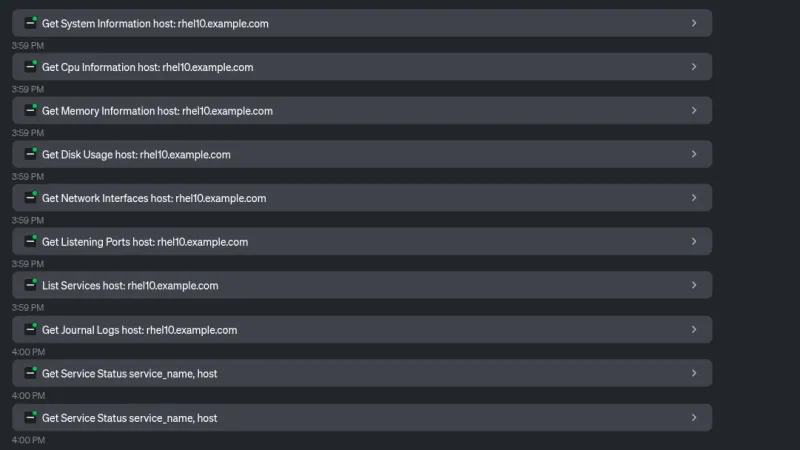
The LLM calls several MCP‑server tools to collect system information.
From the gathered data the LLM returns an overview of the system, including the table below.
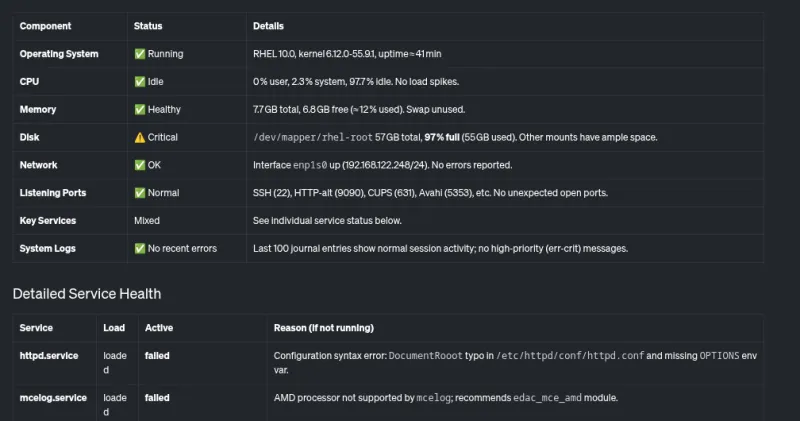
It also provides a short summary that highlights critical issues—most notably a nearly full root filesystem and a couple of failing services.

2. Investigating High Disk Usage
I ask the LLM why the disk usage is so high.

The LLM again uses MCP‑server tools to determine what is consuming space.
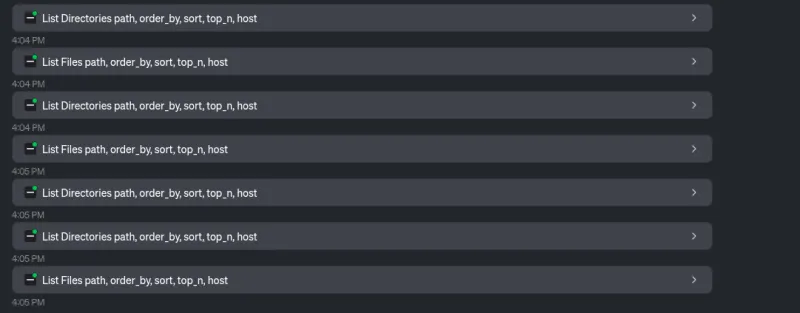
The response shows that:
/home/brian/virtual-machinescontains a 25 GB file./home/brian/.localis using 24 GB of space.

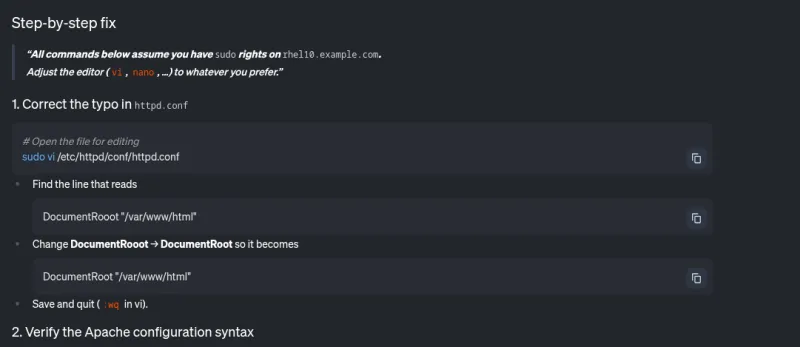
3. Troubleshooting a Failing httpd.service
Next I ask the LLM to help with the httpd.service, which was reported as failing.

The LLM uses the Read File tool provided by the MCP server.

From the log output the LLM identifies possible causes of the failure.
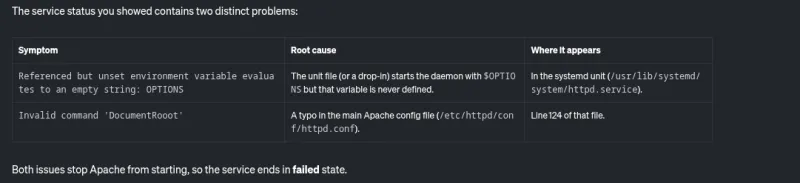
It also supplies step‑by‑step instructions to remediate the problem.
Result:
The MCP server for RHEL, combined with goose, let me quickly identify and troubleshoot two major issues on the system: an almost‑full filesystem and a failing httpd service.
What’s Next?
We are currently in a read‑only analysis phase, but our roadmap includes expanding to additional use cases. To stay updated on the development process, keep an eye on our upstream GitHub repository.
How You Can Contribute
- Upstream contributions – Fork the repository, make changes, and submit a pull request.
- Feedback – Share enhancement requests, bug reports, or general comments.
- Community contact – Reach the team via:
- GitHub Issues
- The Fedora AI/ML Special Interest Group (SIG) – see the SIG communication page.
We look forward to your involvement!
Ready to Experience Smarter Troubleshooting?
The MCP server for RHEL is now available in Developer Preview. Connect your LLM client application and see how context‑aware AI can transform the way you manage RHEL.
Get Started
- Read the official Red Hat documentation
- Explore the upstream project
Connect, experiment, and let AI assist you in discovering and troubleshooting complex issues on RHEL.