
Samsung’s $1,300 Galaxy S26 Ultra flagship has a bloatware problem
Source: Android Authority
Overview
- Samsung’s Galaxy S26 series, despite premium pricing ($900‑$1,800), ships with a significant amount of preinstalled third‑party bloatware from Meta, Microsoft, and Spotify.
- A clean setup of a 512 GB Galaxy S26 Ultra shows system files and preinstalled apps occupying over 40 GB of storage before any user data is added.
- Unlike budget phones that use bloatware to lower costs, the Galaxy S26 Ultra retains its high price tag while still including these preinstalled apps.
Samsung’s Galaxy S26 series is the company’s newest flagship lineup. Early pre‑order and sales figures suggest the Galaxy S26 Ultra could become one of the most popular Android phones if momentum holds. Prices start at $900 for the base S26, $1,100 for the S26 Plus, and $1,300 for the base S26 Ultra (the unit I tested is a $1,500 512 GB model).
Preinstalled third‑party apps
On my retail unit, the following non‑Samsung, non‑Google apps come preinstalled:
Meta
Microsoft
- M365 Copilot
- OneDrive
- Outlook
- Link to Windows
Spotify
- Spotify
These apps are installed automatically with no option to opt out during setup.
Additional preinstalled software
Google apps are required under the Mobile Application Distribution Agreement (MADA) to provide the Play Store and Google Play Services. However, some Samsung apps—such as Global Goals and Samsung TV—could have been offered as optional post‑setup choices.
The device also includes overlapping functionality:
- Two app stores: Play Store and Galaxy Store
- Two digital assistants: Gemini and Bixby (excluding Perplexity)
- Two browsers: Samsung Browser and Chrome
- Two email clients: Gmail and Outlook
- Two cloud storage apps: Google Drive and OneDrive
With all preinstalled apps auto‑updated, over 17 GB of storage is already used. Including system files, the S26 Ultra consumes more than 40 GB of its 512 GB capacity (≈8 %) before any user‑installed apps or personal media are added.
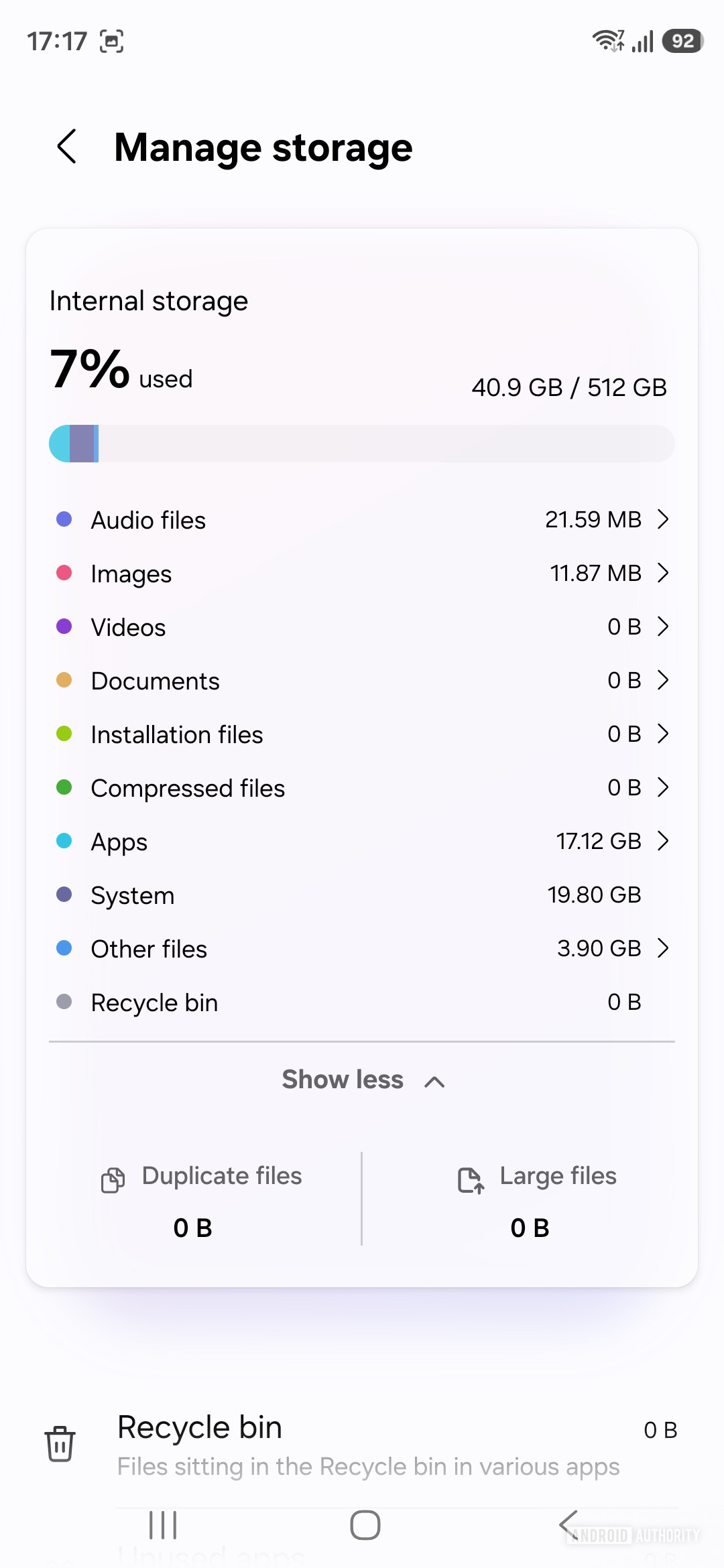
Image credit: Aamir Siddiqui / Android Authority
Testing methodology
I performed a factory reset, set up the phone without restoring any personal apps or data, signed into Google and Samsung accounts, and allowed the device to auto‑update apps via the Play Store and Galaxy Store. No additional settings were changed beyond the setup wizard, representing the base phone experience with signed‑in accounts.
Samsung isn’t done with bloatware, even on its Ultra flagship
Each preinstalled app reflects a commercial agreement—companies pay Android manufacturers (or engage in reciprocal deals) to have their apps placed on smartphones. This practice is common on budget and mid‑range Android phones, where bloatware helps lower the purchase price.
Seeing the same level of bloatware on a top‑end device, where users pay premium prices, is disappointing. Samsung’s hardware specifications have not changed dramatically in recent years, raising the question of what users are truly paying for.
Community feedback
How do you feel about third‑party pre‑installed apps (bloatware) on Android flagships?
Responses vary. Some Samsung fans argue that these apps can be easily uninstalled and therefore pose little issue, or that they save users a step by preinstalling apps they would install anyway. Others point out that many of these apps (e.g., M365 Copilot, LinkedIn) are not universally useful, and that most users will migrate their existing app selections during phone upgrades. For a device costing $900‑$1,800, the presence of such bloatware is widely regarded as unnecessary.