
Samsung just quietly added a handy new security trick to the Galaxy S26
Published: (March 9, 2026 at 11:42 AM EDT)
2 min read
Source: Android Authority
Source: Android Authority
TL;DR
- Samsung has rolled out a new Inactivity restart feature to the Galaxy S26 series.
- The feature automatically restarts your phone if it remains locked for 72 hours.
- After the restart, the phone enters a higher‑security state: notifications and incoming calls are hidden until the device is unlocked.
What is Inactivity Restart?
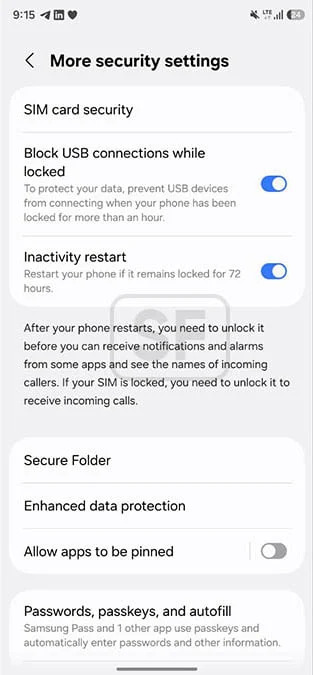
Samsung’s Privacy Display already helps keep onlookers from seeing your screen, but the new Inactivity restart adds another layer of protection. When enabled, the phone will automatically reboot after being locked for three days. This mirrors a similar feature Google introduced in Android 16, but Samsung’s implementation is now part of the February 2026 security patch for the Galaxy S26 lineup.
Warning
After your phone restarts, you need to unlock it before you can receive notifications and alarms from some apps and see the names of incoming callers. If your SIM is locked, you need to unlock it to receive incoming calls.
How to Enable
- Open Settings.
- Navigate to Security and Privacy.
- Tap More security settings.
- Locate the Inactivity restart toggle and turn it on (or leave it off if you prefer).