
NVIDIA and ComfyUI Streamline Local AI Video Generation for Game Developers and Creators at GDC
Source: NVIDIA AI Blog
Announcements
- ComfyUI App View – A new, simplified interface that lowers the barrier to entry for the popular generative‑AI tool.
- RTX Video Super Resolution for ComfyUI – A real‑time 4K upscaler ideal for video generation, also available to developers as a Python wheel.
- NVFP4 and FP8 model variants for FLUX.2 Klein – Available today, with NVFP4 support for LTX‑2.3 arriving soon. These variants deliver up to 2.5× performance gains and 60 % lower memory usage for both models.
Frictionless Local AI: Collaborate, Optimize, Customize
Many of today’s popular AI applications make it easier for beginners to run state‑of‑the‑art models directly on their laptop or desktop.
App View vs. Node View
- App View – A simplified interface for artists who aren’t familiar with node graphs.
- Enter a prompt.
- Adjust a few parameters.
- Click Generate.
- Node View – The full node‑based experience remains available, and you can switch between the two modes seamlessly.
RTX Optimizations in ComfyUI
- Performance on RTX GPUs is ~40 % faster (since September).
- Native support for NVFP4 and FP8 data formats.
Combined gains
| GPU Series | Speed‑up | VRAM reduction |
|---|---|---|
| RTX 50 (NVFP4) | 2.5× | ‑60 % |
| RTX 50 (FP8) | 1.7× | ‑40 % |
New NVFP4 & FP8 Models (available Jan 2025 CES)
- LTX‑2.3 – NVFP4 support coming soon → Hugging Face
- FLUX.2 Klein 4B → Hugging Face
- FLUX.2 Klein 9B → Hugging Face
How to get started
- Download the NVFP4 or FP8 checkpoint from Hugging Face.
- Open ComfyUI → Template Browser → load a default workflow.
- Replace the default model checkpoint with the one you just downloaded.
Availability
App View is available today. Learn more at the official site.
Faster 4K Video Generation
Generating high‑quality video usually means balancing three constraints: speed, VRAM, and control. Most artists prefer to create a quick, low‑resolution preview first and upscale it later. Traditional upscalers can take minutes to convert a 10‑second clip to 4K.
Upscale to 4K instantly with RTX Video Super‑Resolution
- Available as a ComfyUI node for building video workflows from scratch.
- Can also be used as a stand‑alone node for quick upscaling.
For AI developers
NVIDIA provides a free Python package that gives programmatic access to the same AI upscaling technology behind RTX Video.
| Resource | Description |
|---|---|
| PyPI package | nvidia-vfx – install with pip install nvidia-vfx |
| GitHub samples | |
| Documentation | |
| SDK |
Key benefits
- Runs directly on RTX GPU Tensor Cores.
- Delivers 4K upscaling ~30× faster than popular local upscalers.
- Uses a fraction of the VRAM required by other solutions.
Example image
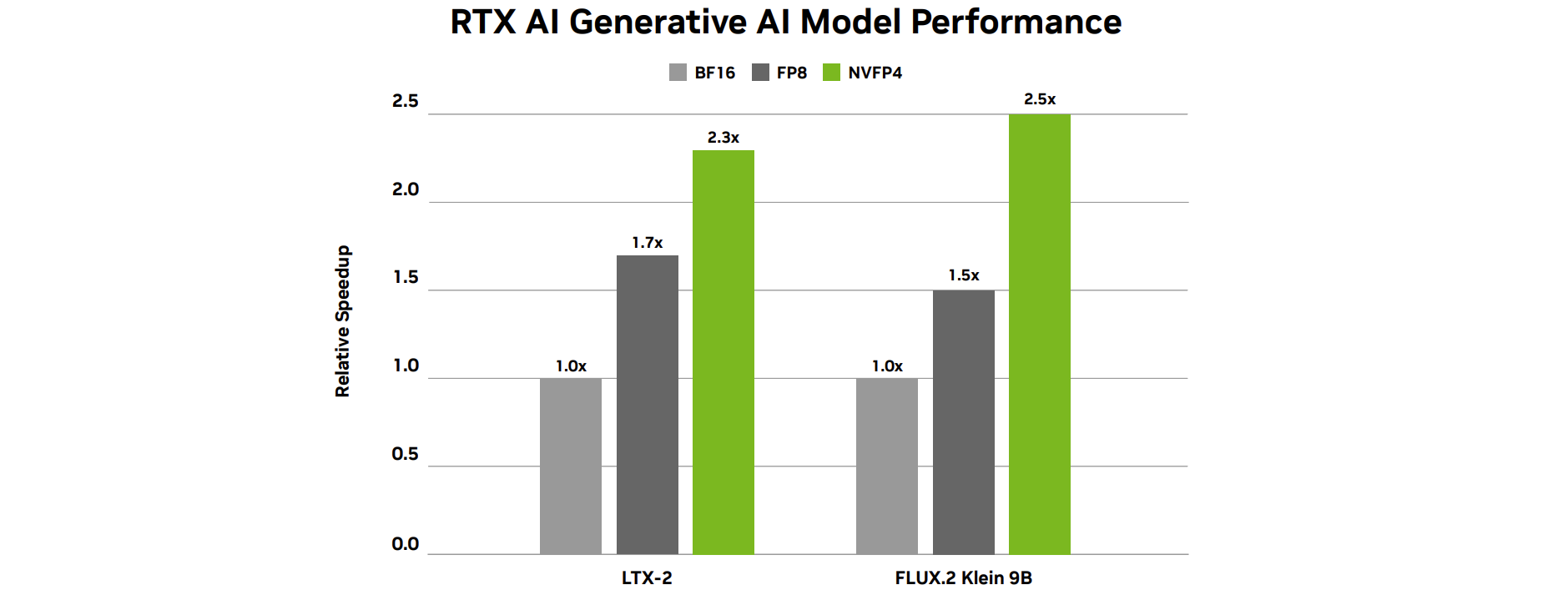
Generative AI model performance for LTX‑2 and FLUX.2 Klein 9B on an NVIDIA RTX 5090 GPU. Testing: LTX‑2 – 512×768, 100 frames, 20 steps; FLUX.2 Klein 9B (base) – 1024×1024, 20 steps.
Get started with ComfyUI
Watch the latest NVIDIA Studio Sessions tutorial hosted by visual‑effects artist Max Novak for a step‑by‑step walkthrough.
ICYMI: Latest Updates for RTX AI PCs at GDC
🎉 NVIDIA GTC – March 16‑19, San Jose
Join NVIDIA at GTC and attend the training session “Create Generative AI Workflow for Design and Visualization in ComfyUI” (March 17).
- Led by NVIDIA 3D‑workflow specialists.
- Covers RTX‑accelerated generative pipelines for images, video, 3D, and PBR materials.
- Register now and explore the full session catalog.
💡 LTX Desktop
A fully local, open‑source video editor that runs directly on the LTX engine, optimized for NVIDIA GPUs and compatible hardware.
▶️ Watch the demo
🦥 LM Link
Connect separate devices running LM Studio so models execute on remote machines as if they were local. Ideal for:
- Running an agent on a laptop while leveraging the power of a DGX Spark or RTX desktop.
- Accessing both free and private AI resources.
Learn how to run LM Studio on DGX Spark: Build guide
🎮 DLSS 4.5 Update (Opt‑in Beta) – March 31
For GeForce RTX 50 Series owners, the next opt‑in NVIDIA App beta will add:
- DLSS 4.5 Dynamic Multi‑Frame Generation
- DLSS 4.5 Multi‑Frame Generation 6× Mode
🤖 RTX Remix – Upcoming Update
Next month NVIDIA will release an RTX Remix update that introduces Advanced Particle VFX, giving modders a richer toolbox for particle effects, image quality, detail, and immersion.
🦄 Topaz Labs & NVIDIA
Topaz Labs has partnered with NVIDIA to optimize NeuroStream for NVIDIA GPUs. The proprietary VRAM‑optimization lets complex AI models run efficiently on consumer‑grade hardware.
📃 Microsoft VoiceMod Integration
Microsoft now supports VoiceMod, one of the first Windows ML apps for GPU‑accelerated inference, delivering markedly better voice‑quality performance versus CPU‑only processing.
Stay Connected
- Facebook: https://www.facebook.com/NVIDIA.AI.PC/
- Instagram: https://www.instagram.com/nvidia.ai.pc/
- TikTok: https://www.tiktok.com/@nvidia_ai_pc
- X (Twitter): https://x.com/NVIDIA_AI_PC
- RTX AI PC Newsletter: https://www.nvidia.com/en-us/ai-on-rtx/?modal=subscribe-ai
- LinkedIn (NVIDIA Workstation): https://www.linkedin.com/showcase/3761136/
- X (NVIDIA Workstation): https://x.com/NVIDIAworkstatn
See the notice regarding software product information.