
Microsoft: New Windows LNK spoofing issues aren't vulnerabilities
Published: (February 12, 2026 at 04:01 PM EST)
5 min read
Source: Bleeping Computer
Source: Bleeping Computer
# Wild West Hackin’ Fest – New Windows LNK Shortcut Vulnerabilities
Security researcher **Wietze Beukema** disclosed four previously unknown techniques for manipulating Windows **.lnk** shortcut files so that the target shown in the file’s *Properties* dialog differs from the program actually executed.
> “This results in the strange situation where the user sees one path in the Target field, but upon execution a completely other path is executed. Because the field is disabled, it is also possible to *hide* any command‑line arguments that are provided.” – *Wietze Beukema*
## Background
- **LNK shortcuts** have been part of Windows since Windows 95.
- They use a complex binary format that includes several optional data blocks (e.g., `LinkTargetIDList`, `LinkInfo`, `EnvironmentVariableDataBlock`).
- Explorer is forgiving: if a shortcut contains malformed or contradictory data, it will still display the file rather than reject it.
## The Four Techniques
| # | Technique | How it works | Effect |
|---|-----------|--------------|--------|
| 1 | **Forbidden‑character paths** | Insert characters such as double quotes (`"`) into the target path, creating a technically invalid path that Explorer still shows. | Explorer displays a “valid” path, but the actual executable path is different. |
| 2 | **Non‑conforming `LinkTargetIDList`** | Craft a `LinkTargetIDList` that points to a path other than the one stored in the `LinkInfo` block. | The *Target* field shows one location, while the shortcut runs another. |
| 3 | **Mismatched `LinkInfo` vs. `LinkTargetIDList`** | Use conflicting target specifications across optional structures, exploiting Explorer’s priority rules. | Users see one path; the system executes another. |
| 4 | **Manipulated `EnvironmentVariableDataBlock`** | Populate only the ANSI target field and leave the Unicode field empty. The displayed target (e.g., `invoice.pdf`) is taken from `TargetIDList`, while the real command (PowerShell, etc.) resides in the environment‑variable block and may include variables. | Complete spoofing of the target and hiding of any command‑line arguments. |
## Why It Matters
- The displayed target can be a harmless‑looking file (e.g., `invoice.pdf`), while the executed command may launch PowerShell, download payloads, or run other malicious code.
- Because the *Target* field is disabled in the UI, command‑line arguments are invisible to the user, making detection extremely difficult.
- Explorer’s forgiving parsing means malformed shortcuts are still accepted and run.
## Demonstration Tool – **lnk‑it‑up**
Beukema released an open‑source suite called **[lnk‑it‑up](https://github.com/wietze/lnk-it-up)** that:
- Generates LNK files using the four techniques for testing defensive controls.
- Analyzes existing shortcuts to predict what Explorer will display versus what will actually execute.
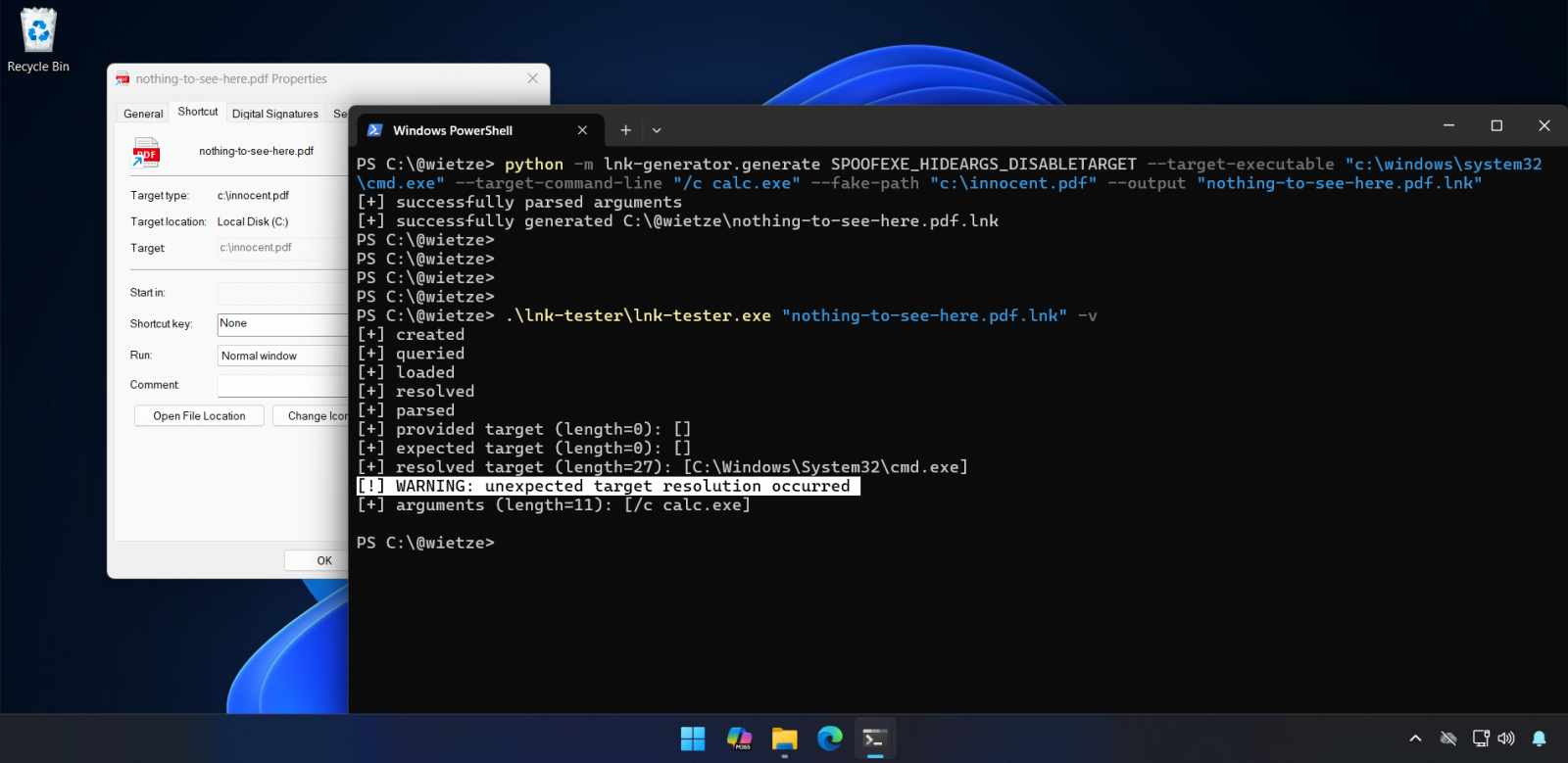
*Figure: lnk‑it‑up in action.*
## Further Reading
- Beukema’s full write‑up: **[Trust Me, I’m a Shortcut](https://wietzebeukema.nl/blog/trust-me-im-a-shortcut)**
- Event details (Wild West Hackin’ Fest): **[Discovered Issues](https://web.cvent.com/event/1dbf78f6-bde8-4ad2-90f9-3212c148205d/websitePage:64e10132-4cb6-404c-b3b7-7cb06d280643?session=33b06565-b86b-4fe0-964f-8bf12c8c05d6&shareLink=true)**
---
*If you manage Windows endpoints, consider adding LNK‑file validation to your security tooling and educate users to verify shortcuts via the command line or hash‑based checks rather than relying solely on the Explorer UI.*
## MSRC: Not a Vulnerability
When Beukema submitted the **EnvironmentVariableDataBlock** issue to the Microsoft Security Response Center (MSRC) in September (VULN‑162145), Microsoft declined to classify it as a security vulnerability. Their reasoning was that exploitation requires user interaction and does not breach security boundaries.
> “These techniques do not meet the bar for immediate servicing under our severity classification guidelines as they require an attacker to trick a user into running a malicious file,” a Microsoft spokesperson told *BleepingComputer* when asked whether the company plans to address any of the flaws.
> “Microsoft Defender has detections in place to identify and block this threat activity, and Smart App Control provides an additional layer of protection by blocking malicious files from the Internet. As a security best practice, we strongly encourage customers to heed security warnings and avoid opening files from unknown sources.”
Microsoft also noted that Windows treats shortcut files (`.lnk`) as potentially dangerous. When a user attempts to open a `.lnk` file downloaded from the Internet, Windows automatically displays a security warning advising against opening files from unknown sources. Microsoft strongly recommends heeding this warning.
> However, Beukema added that “there is a reason attackers still like LNK files—users quickly click through these sorts of warnings. Otherwise, **CVE‑2025‑9491** wouldn’t have been as ‘successful’ as it was either.”
### CVE‑2025‑9491
- **Description:** Similar to the issues Beukema discovered, CVE‑2025‑9491 can be exploited to hide command‑line arguments by using excessive whitespace padding.
- **Impact:** Cybercrime groups and state‑backed hacking groups from North Korea, Iran, Russia, and China have abused this flaw for years in zero‑day attacks.
Initially, Microsoft said CVE‑2025‑9491 didn’t break security boundaries and refused to fix it. However, in **June 2025** Microsoft **silently changed LNK files** to mitigate the actively exploited vulnerability:
- Source: [BleepingComputer – Microsoft mitigates Windows LNK flaw exploited as zero‑day](https://www.bleepingcomputer.com/news/microsoft/microsoft-mitigates-windows-lnk-flaw-exploited-as-zero-day/)
### Threat‑Actor Activity
- **Trend Micro (March 2025):** Reported that at least **11 state‑sponsored groups and cybercrime gangs** were exploiting CVE‑2025‑9491, including Evil Corp, Bitter, APT37, APT43 (Kimsuky), Mustang Panda, SideWinder, RedHotel, Konni, and others.
- Source: [Trend Micro – ZDI‑CAN‑25373 analysis](http://documents.trendmicro.com/assets/txt/Figure-1-Data---ZDI-CAN-25373-blogcU9ZZ2p.txt)
- **Arctic Wolf (October 2025):** Noted that the **Mustang Panda** Chinese state‑backed group was exploiting the Windows vulnerability in zero‑day attacks targeting European diplomats (Hungary, Belgium, etc.) to deploy the **PlugX** remote‑access trojan (RAT).
- Source: [BleepingComputer – Chinese hackers exploit Windows zero‑day to spy on European diplomats](https://www.bleepingcomputer.com/news/security/chinese-hackers-exploit-windows-zero-day-to-spy-on-european-diplomats/)
---

## The Future of IT Infrastructure
[Read the guide on Tines →](https://www.tines.com/access/guide/the-future-of-it-infrastructure/?utm_source=BleepingComputer&utm_medium=paid_media&utm_content=ROS-inarticlebanner-0102)
Modern IT infrastructure moves faster than manual workflows can handle. In this new Tines guide, you’ll learn how to:
- Reduce hidden manual delays
- Improve reliability through automated response
- Build and scale intelligent workflows on top of tools you already use