
Goodbye, OTPs and magic links: Signing up for new Android apps just got a lot easier
Published: (April 23, 2026 at 03:44 AM EDT)
2 min read
Source: Android Authority
Source: Android Authority
TL;DR
- Google now lets you sign up for an Android app via email without using magic links or one‑time PINs.
- Android offers a Verified Email feature that handles verification directly on the device.
- The feature is currently available only for consumer Gmail accounts.
What is Verified Email?
Google has updated Android’s Credential Manager API with a Verified Email feature. This allows apps to sign users up without requiring them to switch to their email app to retrieve a magic link or OTP. Instead, the app uses a cryptographically verified email credential sourced from the user’s Google account and stored on the device.
Developers can also prompt users to create a passkey after this streamlined signup process.
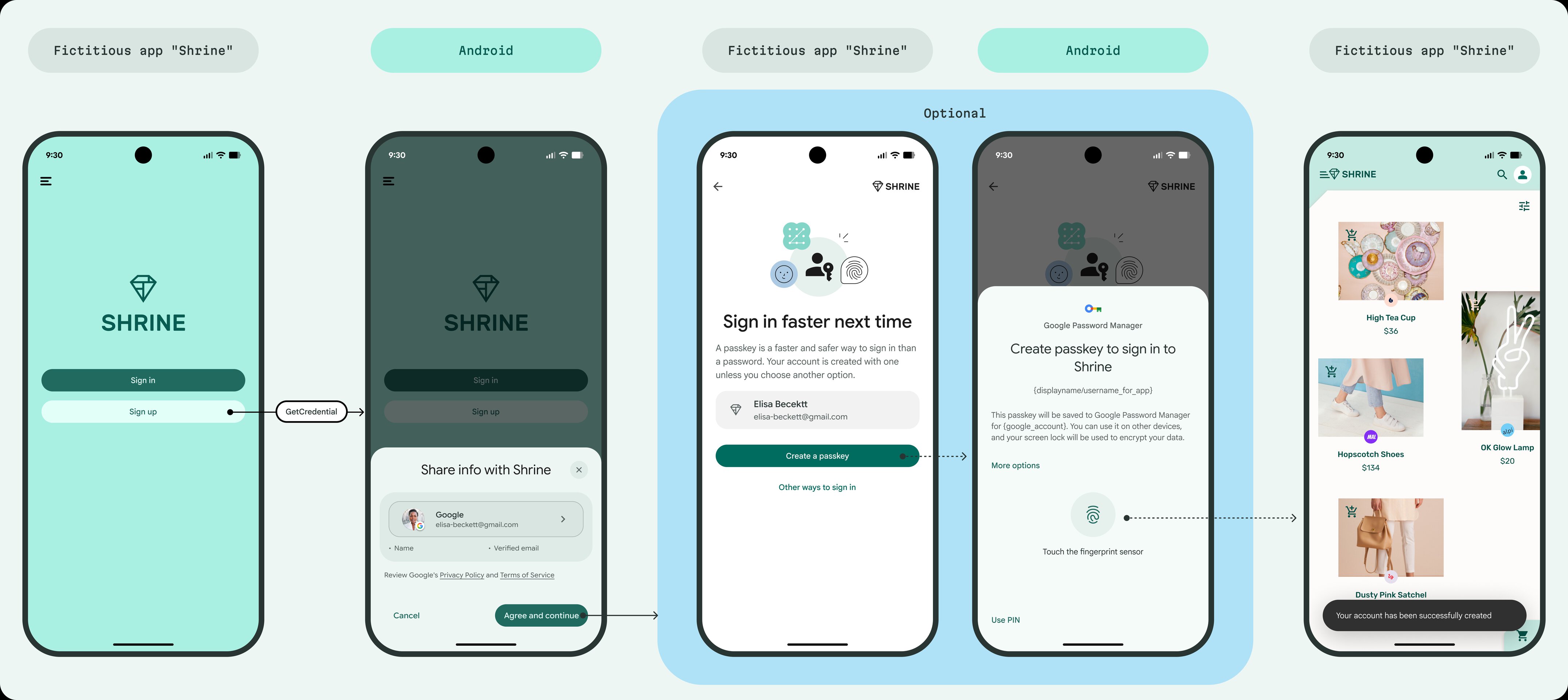
How it works
- The user enters their email address in the app.
- Android checks the address against the Google account on the device.
- If the email is verified, Android supplies a signed credential to the app, completing the signup instantly—no magic link or OTP needed.
Additional uses
Verified Email can also be employed for:
- Account recovery
- Re‑authentication for sensitive actions (e.g., changing security settings)
Caveats
- Account type: Currently limited to consumer Google accounts. Workspace or managed accounts must continue using traditional email verification methods.
- Non‑@gmail.com addresses: For accounts created with external email domains, Google advises developers to add an extra verification step (such as sending an OTP) because ownership of the email address may change over time.
Device compatibility
The feature works on:
- Devices running Android 9 (API level 28) or newer
- Devices with Google Play Services 25.49.xx or newer
This means even phones that are several years old can take advantage of Verified Email.
Comment Policy (for reference)