
Developer’s guide to multi-agent patterns in ADK
Source: Google Developers Blog
DEC. 16, 2025
Introduction
The world of software development has already learned this lesson: monolithic applications don’t scale. Whether you’re building a massive e‑commerce platform or a complex AI application, relying on a single, all‑in‑one entity creates bottlenecks, increases debugging costs, and limits specialized performance.
The same principle applies to an AI agent. A single agent tasked with too many responsibilities becomes a “Jack of all trades, master of none.” As the complexity of instructions increases, adherence to specific rules degrades, and error rates compound, leading to more and more hallucinations. If your agent fails, you shouldn’t have to tear down the entire prompt to find the bug.
Reliability comes from decentralization and specialization. Multi‑Agent Systems (MAS) allow you to build the AI equivalent of a microservices architecture. By assigning specific roles (a Parser, a Critic, a Dispatcher) to individual agents, you build systems that are inherently more modular, testable, and reliable.
In this guide we’ll use the Google Agent Development Kit (ADK) to illustrate eight essential design patterns—from the Sequential Pipeline to the Human‑in‑the‑Loop pattern—providing concrete patterns and pseudocode you need to build production‑grade agent teams.
1. Sequential Pipeline Pattern (aka the assembly line)
Let’s start with the bread and butter of agent workflows. Think of this pattern as a classic assembly line where Agent A finishes a task and hands the baton directly to Agent B. It is linear, deterministic, and refreshingly easy to debug because you always know exactly where the data came from.
This is your go‑to architecture for data‑processing pipelines. In the example below, we see a flow for processing raw documents:
| Agent | Responsibility |
|---|---|
| Parser | Turns a raw PDF into text |
| Extractor | Pulls out structured data |
| Summarizer | Generates the final synopsis |

In ADK, the SequentialAgent primitive handles the orchestration for you. The secret sauce here is state management: simply use the output_key to write to the shared session.state so the next agent in the chain knows exactly where to pick up the work.
# ADK Pseudocode

# Step 1: Parse the PDF
parser = LlmAgent(
    name="ParserAgent",
    instruction="Parse raw PDF and extract text.",
    tools=[PDFParser],
    output_key="raw_text"
)

# Step 2: Extract structured data
extractor = LlmAgent(
    name="ExtractorAgent",
    instruction="Extract structured data from {raw_text}.",
    tools=[RegexExtractor],
    output_key="structured_data"
)

# Step 3: Summarize
summarizer = LlmAgent(
    name="SummarizerAgent",
    instruction="Generate summary from {structured_data}.",
    tools=[SummaryEngine]
)

# Orchestrate the Assembly Line
pipeline = SequentialAgent(
    name="PDFProcessingPipeline",
    sub_agents=[parser, extractor, summarizer]
)
2. Coordinator / Dispatcher Pattern (aka the concierge)
Sometimes you don’t need a chain; you need a decision‑maker. In this pattern, a central, intelligent agent acts as a dispatcher. It analyzes the user’s intent and routes the request to the specialist agent best suited for the job.
Ideal for complex customer‑service bots where you might need to send a user to a “Billing” specialist for invoice issues versus a “Tech Support” specialist for troubleshooting.
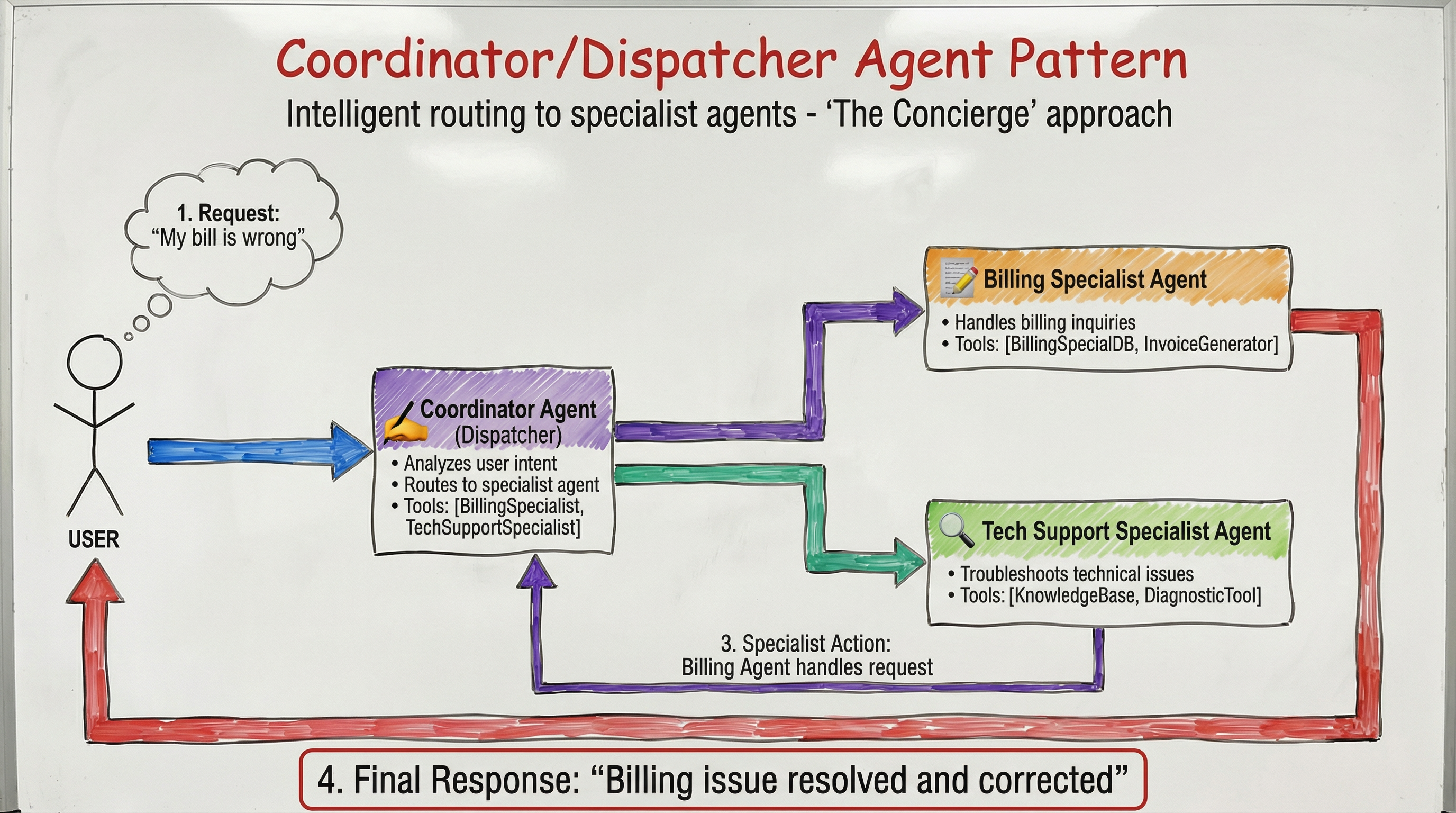
This relies on LLM‑driven delegation. Define a parent CoordinatorAgent and provide a list of specialist sub_agents. ADK’s AutoFlow mechanism takes care of the rest, transferring execution based on the descriptions you provide for the children.
# ADK Pseudocode

billing_specialist = LlmAgent(
    name="BillingSpecialist",
    description="Handles billing inquiries and invoices.",
    tools=[BillingSystemDB]
)

tech_support = LlmAgent(
    name="TechSupportSpecialist",
    description="Troubleshoots technical issues.",
    tools=[DiagnosticTool]
)

# The Coordinator (Dispatcher)
coordinator = LlmAgent(
    name="CoordinatorAgent",
    instruction=(
        "Analyze user intent. Route billing issues to BillingSpecialist "
        "and bugs to TechSupportSpecialist."
    ),
    sub_agents=[billing_specialist, tech_support]
)
3. Parallel Fan‑Out / Gather Pattern (aka the octopus)
Speed matters. If you have tasks that don’t depend on each other, why run them one by one? In this pattern, multiple agents execute tasks simultaneously to reduce latency or gain diverse perspectives. Their outputs are then aggregated by a final synthesizer agent.
Ideal for Automated Code Review: spawn a Security Auditor, a Style Enforcer, and a Performance Analyst to review a Pull Request in parallel. Once they finish, a Synthesizer agent combines their feedback into a single, cohesive review comment.
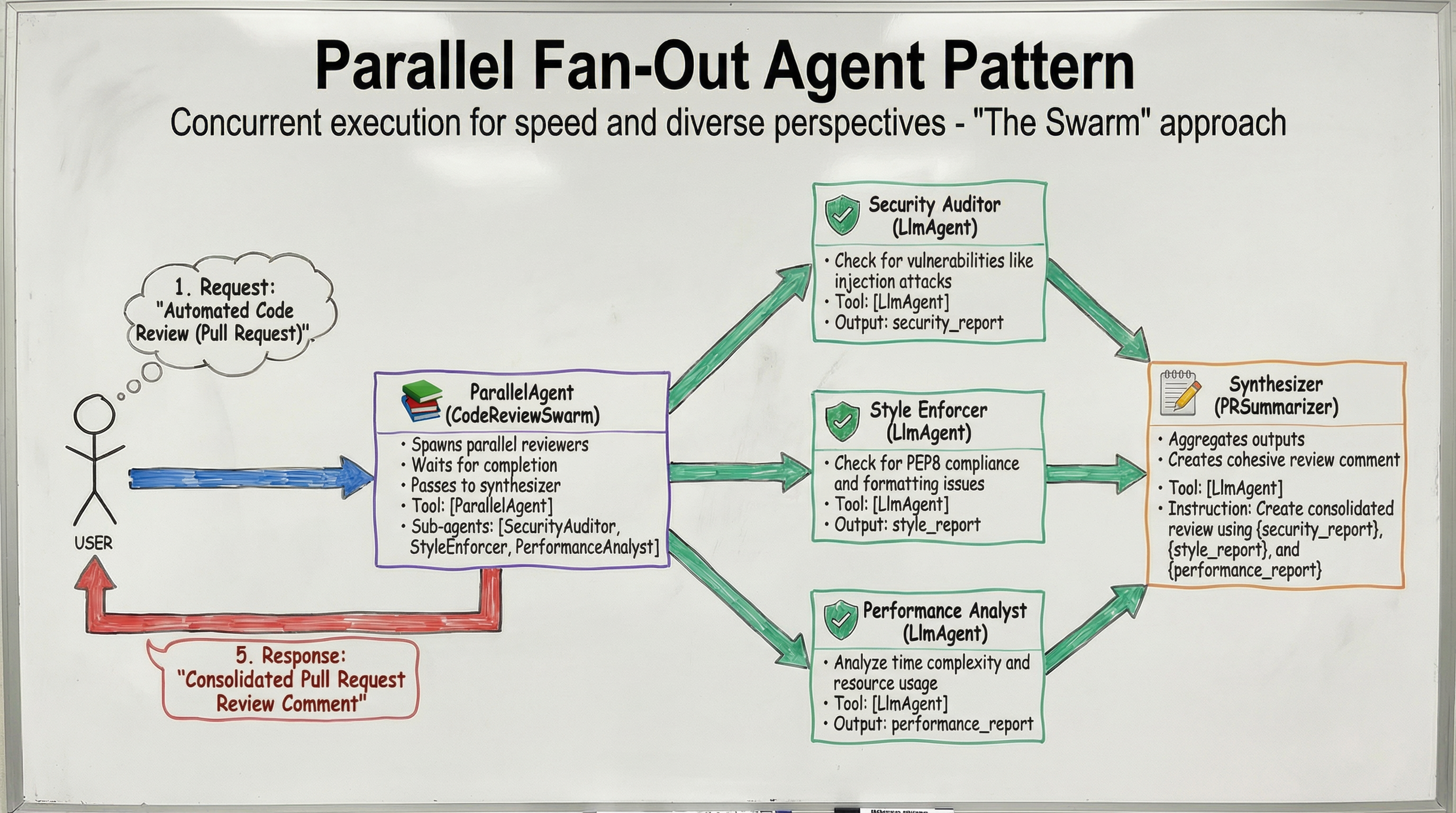
The ParallelAgent in ADK should be used to run sub_agents simultaneously. Although these agents operate in separate execution threads, they share the session state. To prevent race conditions, make sure each agent writes its data to a unique key.
# ADK Pseudocode (illustrative)

security_auditor = LlmAgent(
    name="SecurityAuditor",
    instruction="Identify security vulnerabilities in the code.",
    output_key="security_report"
)

style_enforcer = LlmAgent(
    name="StyleEnforcer",
    instruction="Check code style compliance.",
    output_key="style_report"
)

performance_analyst = LlmAgent(
    name="PerformanceAnalyst",
    instruction="Analyze performance bottlenecks.",
    output_key="performance_report"
)

# Synthesizer that gathers the reports
synthesizer = LlmAgent(
    name="ReviewSynthesizer",
    instruction=(
        "Combine {security_report}, {style_report}, and {performance_report} "
        "into a single review comment."
    ),
    tools=[CommentFormatter]
)

# Parallel execution
parallel_review = ParallelAgent(
    name="ParallelCodeReview",
    sub_agents=[security_auditor, style_enforcer, performance_analyst],
    gather_agent=synthesizer
)
The remaining five patterns (Human‑in‑the‑Loop, Retry‑with‑Fallback, Knowledge‑Base Augmentation, Adaptive Routing, and Self‑Healing) follow the same clean‑structured approach and are detailed in the full guide.
# Define parallel workers
security_scanner = LlmAgent(
    name="SecurityAuditor",
    instruction="Check for vulnerabilities like injection attacks.",
    output_key="security_report"
)

style_checker = LlmAgent(
    name="StyleEnforcer",
    instruction="Check for PEP8 compliance and formatting issues.",
    output_key="style_report"
)

complexity_analyzer = LlmAgent(
    name="PerformanceAnalyst",
    instruction="Analyze time complexity and resource usage.",
    output_key="performance_report"
)

# Fan‑out (The Swarm)
parallel_reviews = ParallelAgent(
    name="CodeReviewSwarm",
    sub_agents=[security_scanner, style_checker, complexity_analyzer]
)

# Gather / Synthesize
pr_summarizer = LlmAgent(
    name="PRSummarizer",
    instruction=(
        "Create a consolidated Pull Request review using "
        "{security_report}, {style_report}, and {performance_report}."
    )
)

# Wrap in a sequence
workflow = SequentialAgent(sub_agents=[parallel_reviews, pr_summarizer])
4. Hierarchical Decomposition (aka the Russian doll)
Sometimes a task is too big for a single agent’s context window. High‑level agents can break down complex goals into sub‑tasks and delegate them. Unlike the routing pattern, the parent agent might delegate part of a task and wait for the result before continuing its own reasoning.
In the diagram below, a ReportWriter doesn’t do the research itself. It delegates to a ResearchAssistant, which in turn manages WebSearch and Summarizer tools.
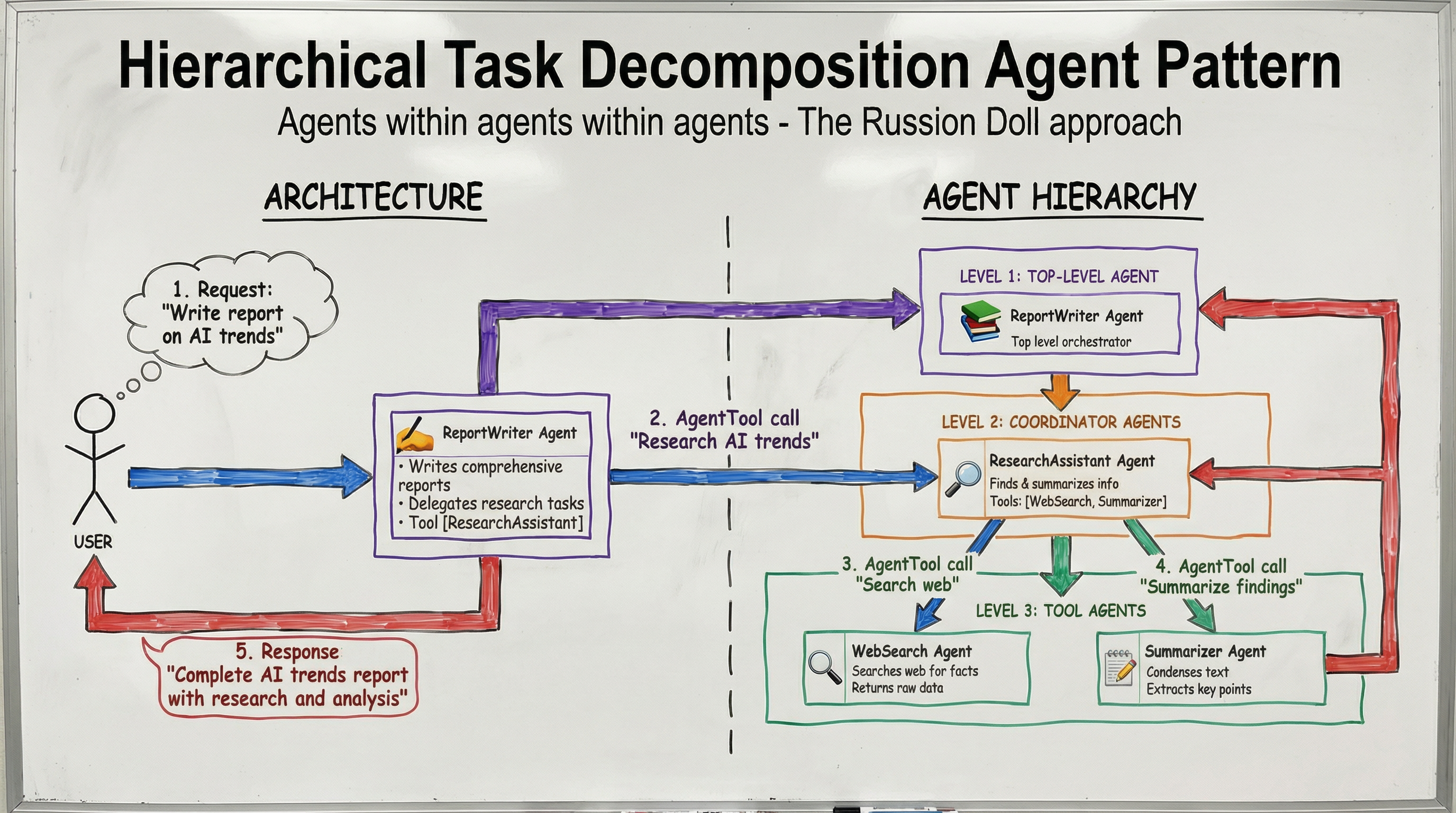
You can treat a sub‑agent as a tool. By wrapping an agent in AgentTool, the parent agent can call it explicitly, effectively treating the sub‑agent’s entire workflow as a single function call.
# ADK Pseudocode

# Level 3: Tool Agents
web_searcher = LlmAgent(
    name="WebSearchAgent",
    description="Searches web for facts."
)

summarizer = LlmAgent(
    name="SummarizerAgent",
    description="Condenses text."
)

# Level 2: Coordinator Agent
research_assistant = LlmAgent(
    name="ResearchAssistant",
    description="Finds and summarizes info.",
    sub_agents=[web_searcher, summarizer]
)

# Level 1: Top‑Level Agent
report_writer = LlmAgent(
    name="ReportWriter",
    instruction=(
        "Write a comprehensive report on AI trends. "
        "Use the ResearchAssistant to gather info."
    ),
    tools=[AgentTool(research_assistant)]
)
5. Generator and Critic (aka the editor’s desk)
Generating high‑quality, reliable output often requires a second pair of eyes. In this pattern, you separate creation from validation:
- Generator – produces a draft.
- Critic – reviews the draft against hard‑coded criteria or logical checks.
The architecture includes a conditional loop: if the review passes, the loop breaks and the content is finalized; otherwise, feedback is routed back to the Generator for revision. This is especially useful for code generation that needs syntax checking or content creation that must meet compliance standards.
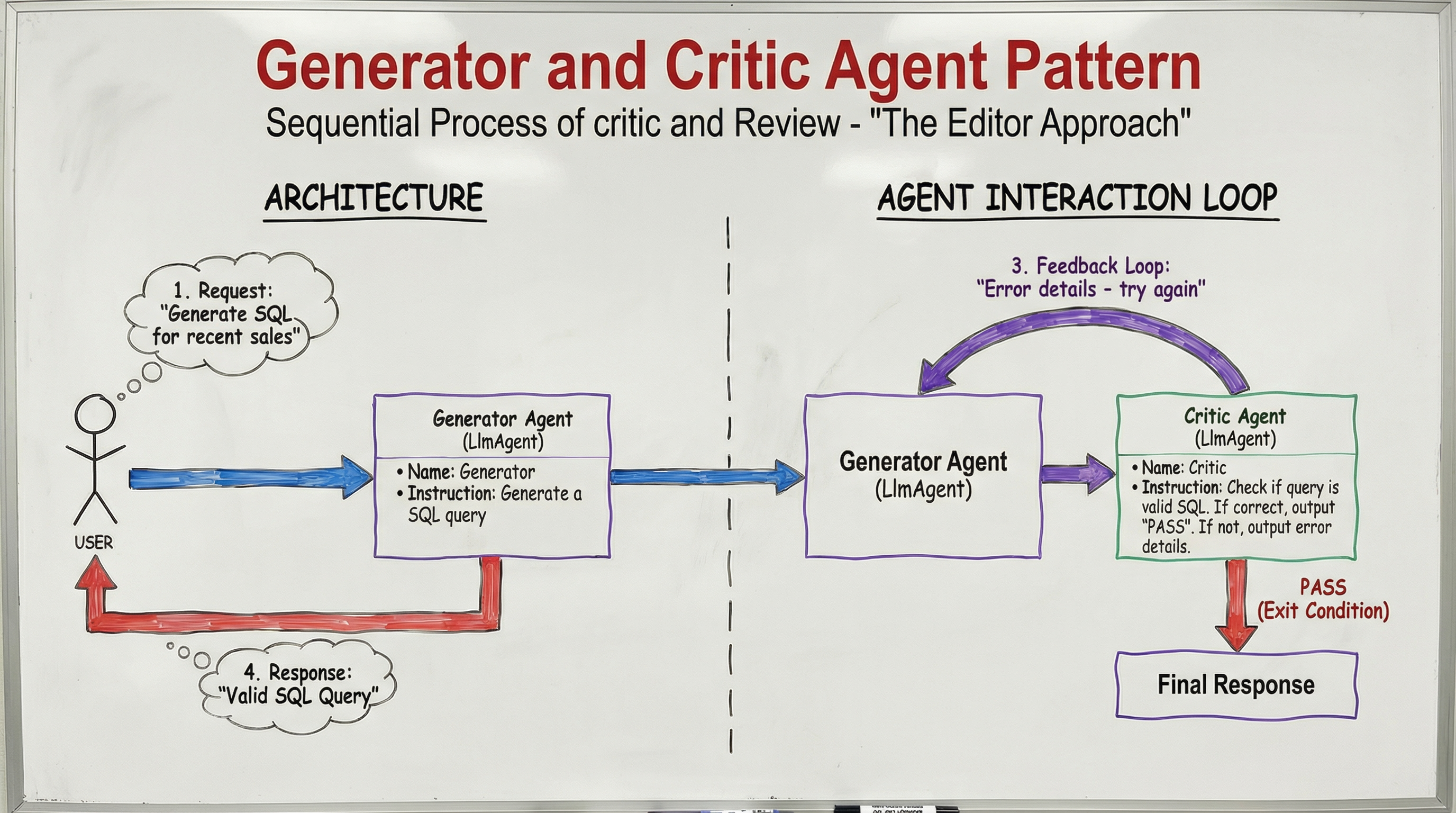
Implementation in ADK uses a SequentialAgent for the draft‑and‑review interaction and a parent LoopAgent that enforces the quality gate.
# ADK Pseudocode

# The Generator
generator = LlmAgent(
    name="Generator",
    instruction=(
        "Generate a SQL query. If you receive {feedback}, "
        "fix the errors and generate again."
    ),
    output_key="draft"
)

# The Critic
critic = LlmAgent(
    name="Critic",
    instruction=(
        "Check if {draft} is valid SQL. If correct, output 'PASS'. "
        "If not, output error details."
    ),
    output_key="feedback"
)

# The Loop
validation_loop = LoopAgent(
    name="ValidationLoop",
    sub_agents=[generator, critic],
    condition_key="feedback",
    exit_condition="PASS"
)
6. Iterative Refinement (aka the sculptor)
Great work rarely happens in a single draft. Just as a human writer revises, polishes, and edits, agents may need several attempts to reach the desired quality. This pattern extends the Generator‑Critic idea by focusing on qualitative improvement rather than a simple pass/fail check.
- Generator – creates an initial rough draft.
- Critique Agent – provides optimization notes.
- Refinement Agent – polishes the output based on those notes.
The loop continues until a quality threshold is met. ADK’s LoopAgent supports two exit mechanisms:
- Hard limit –
max_iterations. - Early completion – an agent can signal
escalate=Truein itsEventActionswhen the threshold is satisfied before the maximum is reached.
# ADK Pseudocode

# Generator
generator = LlmAgent(
    name="Generator",
    instruction="Generate an initial rough draft.",
    output_key="current_draft"
)

# Critique Agent
critic = LlmAgent(
    name="Critic",
    instruction=(
        "Review {current_draft} and provide a list of improvement notes. "
        "If the draft already meets quality standards, set "
        "`escalate=True` in the response."
    ),
    output_key="critique_notes"
)

# Refinement Agent
refiner = LlmAgent(
    name="Refiner",
    instruction=(
        "Take {current_draft} and {critique_notes}, then produce a refined version."
    ),
    output_key="refined_draft"
)

# Iterative Loop
refinement_loop = LoopAgent(
    name="IterativeRefinement",
    sub_agents=[generator, critic, refiner],
    condition_key="critique_notes",
    exit_condition="escalate",
    max_iterations=5
)
LLM Agent Example
critic = LlmAgent(
    name="Critic",
    instruction="Review {current_draft}. List ways to optimize it for performance.",
    output_key="critique_notes"
)

refiner = LlmAgent(
    name="Refiner",
    instruction="Read {current_draft} and {critique_notes}. Rewrite the draft to be more efficient.",
    output_key="current_draft"
)

loop = LoopAgent(
    name="RefinementLoop",
    max_iterations=3,
    sub_agents=[critic, refiner]
)

workflow = SequentialAgent(sub_agents=[generator, loop])
7. Human‑in‑the‑Loop (the human safety net)
AI agents are powerful, but sometimes you need a human to intervene, verify, or provide domain expertise before the final output is released. This pattern inserts a manual checkpoint between automated steps, ensuring safety, compliance, or quality standards are met. The human can approve, edit, or reject the agent’s output, after which the workflow proceeds accordingly.