
如何判断目标页面的路由是来自 Navigation 还是 router?
发布: (2026年2月17日 GMT+8 10:33)
4 分钟阅读
原文: Dev.to
Source: Dev.to
请提供您希望翻译的完整文本(除代码块、URL 和 Markdown 语法外的内容),我会将其准确地翻译成简体中文并保持原有的格式。谢谢!
背景
当应用同时使用 Navigation (NavPathStack) 和 router.pushUrl 跳转到同一目标页面时,开发者需要在目标页面内部能够知道是由哪种机制触发的导航。
Description
Navigation 和 Router 都可以用于路由重定向。关键在于确定目标页面的路由来源。
- Navigation – 用于路由导航的根视图容器。它显示首页(
Navigation的直接子节点)或非首页(NavDestination的子节点),并通过路由管理页面切换。 - router – HarmonyOS 的一个模块,支持通过 URL 进行导航,能够实现页面跳转、替换以及后退等操作。
解决方案 / 方法
从主页面重定向
| 方法 | 使用的 API |
|---|---|
| 基于 Navigation 的路由 | NavPathStack.pushPathByName() |
| 基于 Router 的路由 | router.pushUrl() |
目标页面逻辑
在 NavDestination 组件的 onReady 回调中:
- 调用
UIContext.router.getParams()。 - 如果返回
undefined,说明路由来源于 Navigation。使用NavPathStack.getParamByName()获取参数。 - 否则,路由来源于 router。使用
getParams()获取参数。
示例代码(主页面)
export class RouterParams {
  text: string;

  constructor(str: string) {
    this.text = str;
  }
}

@Entry
@Component
struct Index {
  pageInfos: NavPathStack = new NavPathStack();

  build() {
    Navigation(this.pageInfos) {
      Scroll() {
        Column({ space: 20 }) {
          Button('Navigation Jump', { stateEffect: true, type: ButtonType.Capsule })
            .width('80%')
            .height(40)
            .onClick(() => {
              // Navigation route redirection
              const info = new RouterParams('Redirect using Navigation method');
              this.pageInfos.pushPathByName('PageD', info);
            });

          Button('Router redirection', { stateEffect: true, type: ButtonType.Capsule })
            .width('80%')
            .height(40)
            .onClick(() => {
              // Router route redirection
              this.getUIContext()
                .getRouter()
                .pushUrl({ url: 'pages/PageD', params: new RouterParams('Switching from a router to a router') })
                .catch(() => {});
            });
        }
        .width('100%')
        .height('100%')
        .justifyContent(FlexAlign.Center)
        .padding('20vp');
      }
    }
    .title('Checking the Route Source During Navigation‑Router Switching');
  }
}
示例代码(目标页面)
import { RouterParams } from './Index';

@Builder
export function PageDBuilder() {
  PageD();
}

@Entry
@Component
struct PageD {
  pageInfos: NavPathStack = new NavPathStack();
  @State message: string = 'test';

  build() {
    NavDestination() {
      Column({ space: 20 }) {
        Text(this.message);
      }
      .justifyContent(FlexAlign.Center)
      .alignItems(HorizontalAlign.Center)
      .height('100%')
      .width('100%')
      .margin({ left: 5 });
    }
    .title('PageD')
    .onReady((context: NavDestinationContext) => {
      this.pageInfos = context.pathStack;
      const routerParams = this.getUIContext().getRouter().getParams();

      if (routerParams === undefined) {
        // Navigation origin
        this.message = JSON.stringify(this.pageInfos.getParamByName('PageD'));
        console.info('Navigation jump');
      } else {
        // Router origin
        this.message = (routerParams as RouterParams).text;
        console.info('Router redirection');
      }
    });
  }
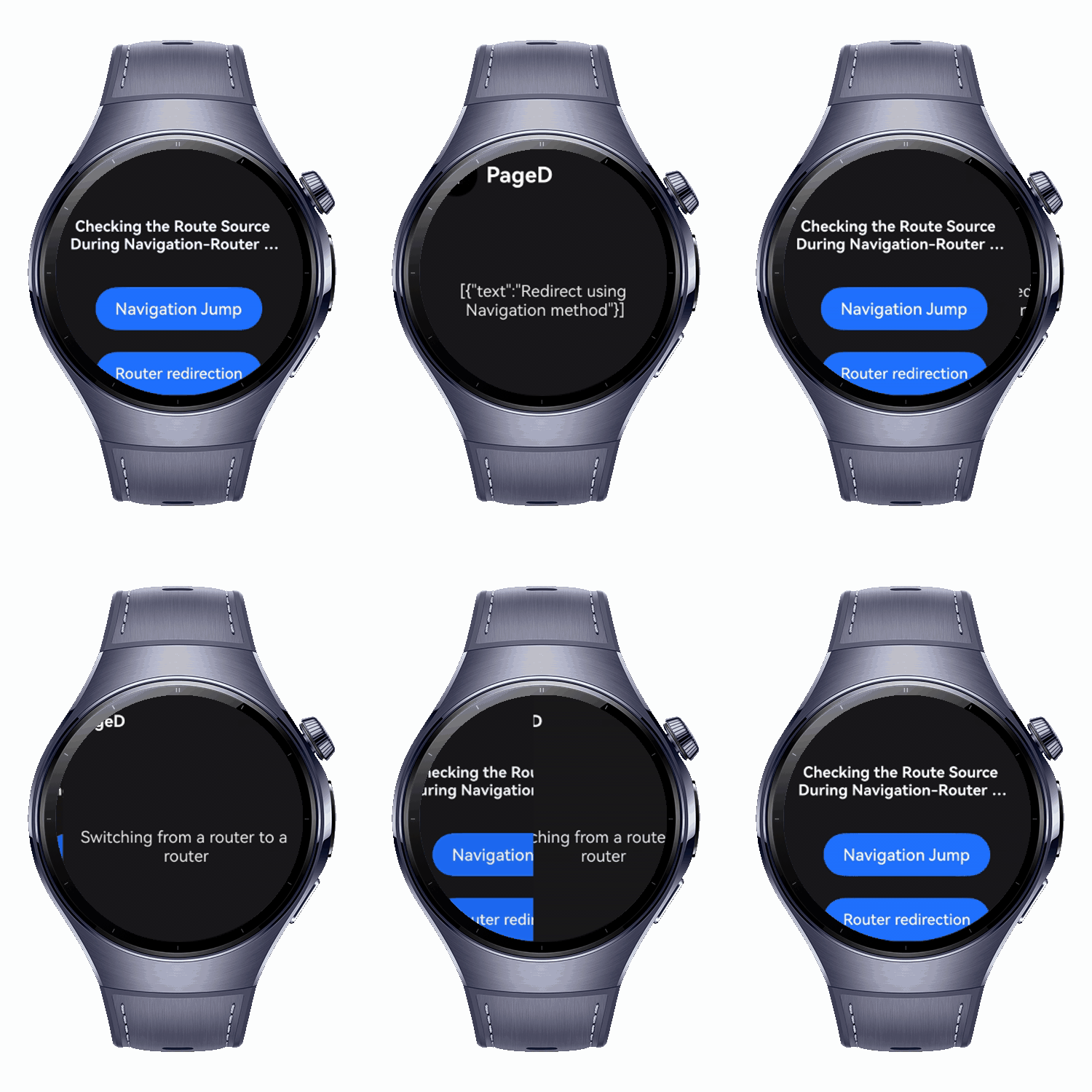
}
关键要点
-
识别路由来源 在
NavDestination.onReady()中通过检查UIContext.router.getParams()。undefined→ Navigation 来源(使用NavPathStack.getParamByName())。- 已定义 → router 来源(使用
getParams())。
-
参数处理 在 Navigation 与 router 之间有所不同;请使用相应的 API 获取传递的数据。
-
框架建议:在复杂动画和共享元素交互场景下,建议优先使用 Navigation 而非
router + @Entry,因为后者会导致页面隔离的限制。