
Neovim 번역 팝업
발행: (2026년 2월 28일 오후 11:08 GMT+9)
4 분 소요
원문: Dev.to
Source: Dev.to


제작자: opencode and Sérgio Araújo
전제 조건
-
translate‑shell 설치
translate‑shell은 Google Translate, Bing, Yandex 등으로 구동되는 명령줄 번역기입니다.직접 다운로드
wget git.io/trans
chmod +x ./trans
sudo mv trans /usr/local/bin/
또는 git 사용
git clone https://github.com/soimort/translate-shell
cd translate-shell && make && sudo make install
필수 의존성:
gawk(4.0+) 및bash또는zsh(대부분 Linux에 기본 설치되어 있음).
Neovim 구현
1. 번역 함수 추가
Create (or edit) ~/.config/nvim/lua/core/utils/nvim_utils.lua and add the translate_popup function:
function M.translate_popup()
  local text = ''
  local is_multiline = false
  local mode = vim.api.nvim_get_mode().mode

  if mode == 'v' or mode == 'V' or mode == '\x16' then
    local start_pos = vim.api.nvim_buf_get_mark(0, '')
    local lines = vim.api.nvim_buf_get_lines(0, start_pos[1] - 1, end_pos[1], false)

    if #lines > 1 then
      is_multiline = true
      text = table.concat(lines, '\n')
    else
      text = table.concat(lines, ' ')
    end
  else
    text = vim.fn.expand('') or ''
  end

  if text == '' then return end

  local ok, trans = pcall(function()
    local handle = io.popen('trans -b -no-ansi en:pt-BR ' .. vim.fn.shellescape(text))
    if not handle then return nil end
    local result = handle:read('*a')
    handle:close()
    return result
  end)

  if not ok or not trans or trans == '' then
    vim.notify('Failed to translate', vim.log.levels.ERROR, { title = 'Translate' })
    return
  end

  local lines = vim.split(trans:gsub('^%s+', ''):gsub('%s+$', ''), '\n')
  local filtered = {}
  for _, line in ipairs(lines) do
    table.insert(filtered, line)
  end
  if #filtered == 0 then
    vim.notify('Empty translation result', vim.log.levels.WARN, { title = 'Translate' })
    return
  end

  local width = 20
  for _, line in ipairs(filtered) do
    local line_width = vim.fn.strdisplaywidth(line)
    if line_width > width then
      width = math.min(80, line_width)
    end
  end
  local height = #filtered

  local buf = vim.api.nvim_create_buf(false, true)
  vim.api.nvim_buf_set_lines(buf, 0, -1, false, filtered)
  vim.api.nvim_buf_set_option(buf, 'filetype', 'markdown')
  vim.api.nvim_buf_set_option(buf, 'modifiable', false)

  vim.api.nvim_set_hl(0, 'TranslateBg', { bg = '#ffcc66', fg = '#000000' })
  vim.api.nvim_buf_set_extmark(buf, vim.api.nvim_create_namespace('translate'), 0, 0, {
    hl_group = 'TranslateBg',
    hl_eol   = true,
    end_line = height - 1,
  })

  local row, col = unpack(vim.api.nvim_win_get_cursor(0))

  local win = vim.api.nvim_open_win(buf, true, {
    style    = 'minimal',
    relative = 'cursor',
    width    = width + 2,
    height   = height,
    row      = 1,
    col      = 0,
    border   = 'rounded',
    noautocmd = true,
  })

  vim.api.nvim_set_option_value('winblend', 0, { win = win })
  vim.api.nvim_set_option_value('winhighlight', 'Normal:TranslateBg', { win = win })

  vim.keymap.set('n', 'q',   'close', { buffer = buf, nowait = true })
  vim.keymap.set('n', '', 'close', { buffer = buf, nowait = true })
end
2. 키맵 추가
A small helper for creating mappings (optional, but handy):
-- https://blog.devgenius.io/create-custom-keymaps-in-neovim-with-lua-d1167de0f2c2
-- https://oroques.dev/notes/neovim-init/
function M.map(mode, lhs, rhs, opts)
  local options = { noremap = true, silent = true }
  if opts then options = vim.tbl_extend('force', options, opts) end
  vim.keymap.set(mode, lhs, rhs, options)
end
Add the mappings in ~/.config/nvim/lua/core/keymaps.lua:
map('n', 'st', nvim_utils.translate_popup,
    { desc = 'Show Translate (word under cursor)' })
map('x', 'st', nvim_utils.translate_popup,
    { desc = 'Show Translate (selection)' })
3. 기억법
The st shortcut was chosen with the mnemonic:
- s → show (보여주기)
- t → translate (번역)
다른 번역기와 마찬가지로 “show translate”(번역 보여주기) 혹은 간단히 “translate”(번역)이라는 의미를 담고 있습니다.
Features
- Word under cursor – 커서가 있는 단어에
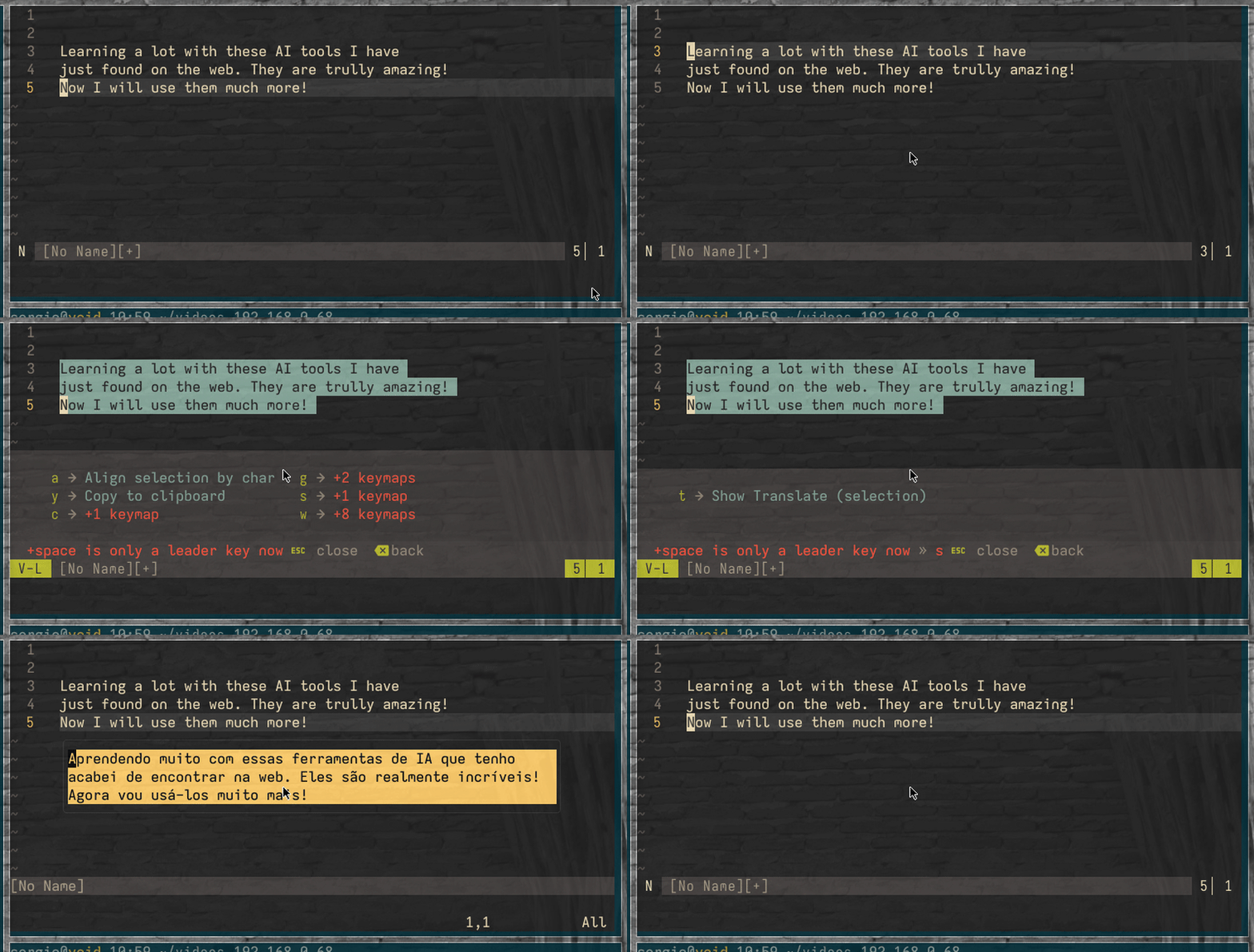
st를 눌러 번역합니다. - Visual selection – 텍스트를 선택하고
st를 눌러 번역합니다. - Multiple lines – 선택한 단락은 줄 바꿈을 유지합니다.
- Default language – English → Brazilian Portuguese (
en:pt-BR). - Styled popup – 주황/노란 배경 (
#ffcc66)에 검은색 텍스트. - Close with –
q또는 “.
데모

크레딧
- opencode – 구현 및 개발
- Sérgio Araújo – 아이디어, 테스트 및 피드백