
대상 페이지에서 라우트가 Navigation에서 온 것인지 router에서 온 것인지 어떻게 판단할 수 있나요?
발행: (2026년 2월 17일 오전 11:33 GMT+9)
4 분 소요
원문: Dev.to
Source: Dev.to
번역을 원하는 전체 텍스트를 제공해 주시면, 요청하신 대로 한국어로 번역해 드리겠습니다.
앱이 Navigation(NavPathStack)과 router.pushUrl을 모두 사용하여 동일한 목적지 페이지로 이동할 때, 개발자는 해당 목적지 페이지 안에서 어떤 메커니즘이 네비게이션을 트리거했는지 알 수 있는 방법이 필요합니다.
Description
Navigation과 Router 모두 라우트 리다이렉션에 사용할 수 있습니다. 문제는 대상 페이지에서 라우트의 출처를 판단하는 것입니다.
- Navigation – 라우트 네비게이션을 위한 루트 뷰 컨테이너입니다.
Navigation의 직접 자식인 홈 페이지 또는NavDestination의 자식인 비홈 페이지를 표시하고 라우트를 통해 전환을 관리합니다. - router – URL을 통해 네비게이션을 가능하게 하는 HarmonyOS 모듈로, 페이지 이동, 교체 및 뒤로 가기 등을 지원합니다.
솔루션 / 접근법
메인 페이지에서 리다이렉트
| 방법 | 사용된 API |
|---|---|
| Navigation‑based routing | NavPathStack.pushPathByName() |
| Router‑based routing | router.pushUrl() |
대상 페이지 로직
NavDestination 컴포넌트의 onReady 콜백에서:
UIContext.router.getParams()를 호출합니다.- 반환값이
undefined이면 라우트가 Navigation에서 시작된 것입니다.NavPathStack.getParamByName()으로 파라미터를 가져옵니다. - 그렇지 않으면 라우트가 router에서 온 것입니다.
getParams()로 파라미터를 가져옵니다.
예제 코드 (메인 페이지)
export class RouterParams {
  text: string;

  constructor(str: string) {
    this.text = str;
  }
}

@Entry
@Component
struct Index {
  pageInfos: NavPathStack = new NavPathStack();

  build() {
    Navigation(this.pageInfos) {
      Scroll() {
        Column({ space: 20 }) {
          Button('Navigation Jump', { stateEffect: true, type: ButtonType.Capsule })
            .width('80%')
            .height(40)
            .onClick(() => {
              // Navigation route redirection
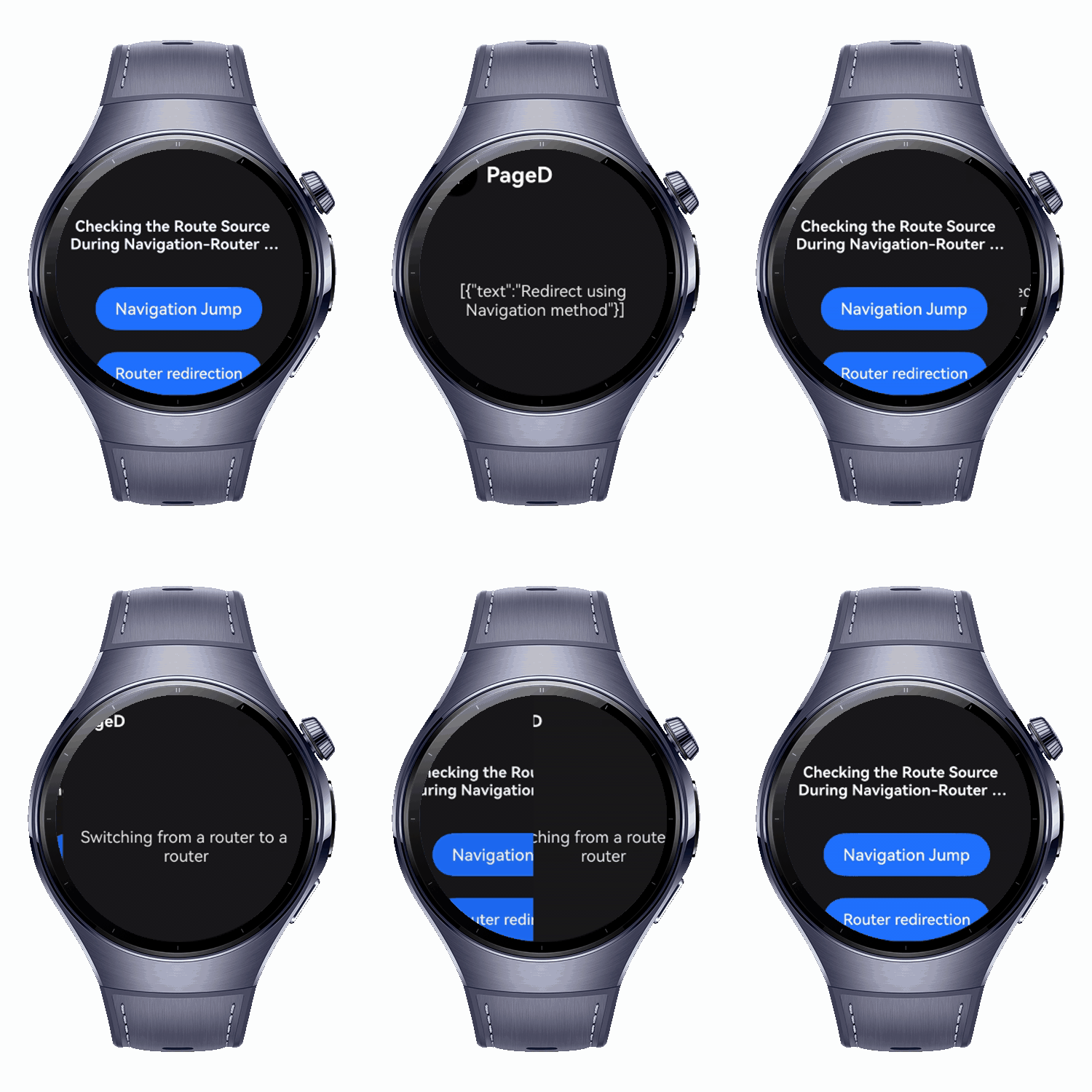
              const info = new RouterParams('Redirect using Navigation method');
              this.pageInfos.pushPathByName('PageD', info);
            });

          Button('Router redirection', { stateEffect: true, type: ButtonType.Capsule })
            .width('80%')
            .height(40)
            .onClick(() => {
              // Router route redirection
              this.getUIContext()
                .getRouter()
                .pushUrl({ url: 'pages/PageD', params: new RouterParams('Switching from a router to a router') })
                .catch(() => {});
            });
        }
        .width('100%')
        .height('100%')
        .justifyContent(FlexAlign.Center)
        .padding('20vp');
      }
    }
    .title('Checking the Route Source During Navigation‑Router Switching');
  }
}
예제 코드 (대상 페이지)
import { RouterParams } from './Index';

@Builder
export function PageDBuilder() {
  PageD();
}

@Entry
@Component
struct PageD {
  pageInfos: NavPathStack = new NavPathStack();
  @State message: string = 'test';

  build() {
    NavDestination() {
      Column({ space: 20 }) {
        Text(this.message);
      }
      .justifyContent(FlexAlign.Center)
      .alignItems(HorizontalAlign.Center)
      .height('100%')
      .width('100%')
      .margin({ left: 5 });
    }
    .title('PageD')
    .onReady((context: NavDestinationContext) => {
      this.pageInfos = context.pathStack;
      const routerParams = this.getUIContext().getRouter().getParams();

      if (routerParams === undefined) {
        // Navigation origin
        this.message = JSON.stringify(this.pageInfos.getParamByName('PageD'));
        console.info('Navigation jump');
      } else {
        // Router origin
        this.message = (routerParams as RouterParams).text;
        console.info('Router redirection');
      }
    });
  }
}
핵심 요약
-
NavDestination.onReady()에서UIContext.router.getParams()를 확인하여 라우트 소스 식별.undefined→ Navigation 원본 (NavPathStack.getParamByName()사용).- 정의됨 → router 원본 (
getParams()사용).
-
파라미터 처리는 Navigation과 router 간에 다르므로, 전달된 데이터를 가져올 때 적절한 API를 사용하십시오.
-
프레임워크 권장 사항: 복잡한 애니메이션 및 공유 요소 상호작용을 위해
router + @Entry보다 Navigation을 선호하세요. 후자는 페이지 격리 제한을 초래합니다.