
연간 $1.75에 네온에 물든 Last.fm Roast Bot 만들기
Source: Dev.to
위에 제공된 Source 링크만으로는 번역할 본문 내용을 확인할 수 없습니다. 번역이 필요한 전체 텍스트(코드 블록을 제외한 본문)를 복사해서 알려주시면, 요청하신 대로 한국어로 번역해 드리겠습니다.
Bot 만들기 🤖
Poe에 가서 그들의 ScriptBot 기능을 사용해 새로운 봇을 만들었습니다. 대략 다음과 같은 특정 시스템 프롬프트를 제공했습니다:
“당신은 허세 부리는 음악 평론가입니다. 당신의 일은 Last.fm 프로필을 분석하고 가차 없이 비난하는 것입니다. 비꼬고, 속어를 사용하며, 절대 물러서지 마세요.”
ScriptBot과 여러 차례 반복 작업을 거쳐 결과에 만족할 때까지 진행한 뒤, 저는 인텔리전스(lastfm-roaster)를 얻었지만, Poe에서 나온 출력을 제 이메일로 전달해야 했습니다.

Keys and Secrets 🗝️
우리는 GitHub Actions를 사용해 이 작업을 실행할 예정이며, API 키를 안전하게 보관해야 합니다. 스크립트에 비밀번호를 직접 하드코딩하지 마세요!
1️⃣ 키 가져오기
| 키 | 얻는 방법 |
|---|---|
| Poe API Key | 로 이동하여 키를 복사합니다. |
| Gmail App Password | Google 계정 → 보안 → 2단계 인증 → 앱 비밀번호에서 “Mail”용 16자리 비밀번호를 생성합니다. |
2️⃣ GitHub에 저장하기
- GitHub에서 비공개 새 저장소를 만듭니다.
- Settings → Secrets and variables → Actions 로 이동합니다.
- 다음 세 개의 시크릿을 추가합니다:
POE_API_KEYEMAIL_ADDRESSEMAIL_PASSWORD

3단계: 코드 🐍
requirements.txt
openai
markdown
(네, 우리는 openai를 사용합니다! Poe의 API는 OpenAI 클라이언트와 호환되어 사용이 매우 간편합니다. Gemini 2.5 Flash는 Poe API를 통해 참조되므로 별도의 키를 관리할 필요가 없습니다.)
“Neon” 스크립트 – lastfm_roast.py
import os
import smtplib
import markdown
import re
import itertools
from email.message import EmailMessage
from openai import OpenAI

# Configs (loaded safely from GitHub Secrets)
POE_API_KEY = os.environ.get("POE_API_KEY")
EMAIL_ADDRESS = os.environ.get("EMAIL_ADDRESS")
EMAIL_PASSWORD = os.environ.get("EMAIL_PASSWORD")
LASTFM_URL = "https://www.last.fm/user/profoundlypaige"

# --- NEON PALETTE ---
# A list of bright colors that look good on dark backgrounds
# (Pink, Cyan, Green, Orange, Purple, Yellow)
COLORS = ["#FF79C6", "#8BE9FD", "#50FA7B", "#FFB86C", "#BD93F9", "#F1FA8C"]

def get_roast():
    """Pings the Poe API to get the roast."""
    client = OpenAI(api_key=POE_API_KEY, base_url="https://api.poe.com/v1")
    try:
        print("🔥 Fetching roast from Poe...")
        response = client.chat.completions.create(
            model="lastfm-roaster",
            messages=[{"role": "user", "content": f"Roast my music taste: {LASTFM_URL}"}],
        )
        return response.choices[0].message.content
    except Exception as e:
        return f"Error fetching roast: {e}"

def inject_colors(html_content):
    """
    Finds every <b> tag and injects a different color from the palette.
    """
    color_cycle = itertools.cycle(COLORS)

    def replace_match(match):
        next_color = next(color_cycle)
        # Returns <b style="color: #...">...</b>
        return f''

    # Regex to replace <b> with the colored version
    return re.sub(r'', replace_match, html_content)

def create_html_email(roast_text):
    # 1. Convert Markdown to basic HTML
    raw_html = markdown.markdown(roast_text)

    # 2. Inject the rotating neon colors into bold tags
    colorful_html = inject_colors(raw_html)

    # 3. Wrap in the styled container
    html_template = f"""


        body {{ margin: 0; padding: 0; background-color: #121212; font-family: 'Helvetica Neue', Helvetica, Arial, sans-serif; }}
        .container {{
            max-width: 600px;
            margin: 40px auto;
            background-color: #1e1e1e;
            border-radius: 8px;
            padding: 20px;
            color: #f8f8f2;
        }}
        a {{ color: #8be9fd; }}


            {colorful_html}


    """
    return html_template

def send_email(html_content):
    msg = EmailMessage()
    msg["Subject"] = "Your Daily Last.fm Roast"
    msg["From"] = EMAIL_ADDRESS
    msg["To"] = EMAIL_ADDRESS
    msg.set_content("Your email client does not support HTML.", subtype="plain")
    msg.add_alternative(html_content, subtype="html")

    with smtplib.SMTP_SSL("smtp.gmail.com", 465) as smtp:
        smtp.login(EMAIL_ADDRESS, EMAIL_PASSWORD)
        smtp.send_message(msg)
        print("📧 Email sent!")

if __name__ == "__main__":
    roast = get_roast()
    html_email = create_html_email(roast)
    send_email(html_email)
GitHub Actions 워크플로우
.github/workflows/roast.yml 파일을 생성합니다:
name: Daily Last.fm Roast

on:
  schedule:
    - cron: "0 8 * * *"   # Runs every day at 08:00 UTC
  workflow_dispatch:      # Allows manual runs

jobs:
  roast:
    runs-on: ubuntu-latest
    steps:
      - name: Checkout repository
        uses: actions/checkout@v4

      - name: Set up Python
        uses: actions/setup-python@v5
        with:
          python-version: "3.12"

      - name: Install dependencies
        run: pip install -r requirements.txt

      - name: Run roast script
        env:
          POE_API_KEY: ${{ secrets.POE_API_KEY }}
          EMAIL_ADDRESS: ${{ secrets.EMAIL_ADDRESS }}
          EMAIL_PASSWORD: ${{ secrets.EMAIL_PASSWORD }}
        run: python lastfm_roast.py
TL;DR
- Create a Poe ScriptBot (
lastfm-roaster). - Store API keys in GitHub Secrets.
- Write
lastfm_roast.py– fetches a roast, injects neon colors, and emails it. - Add a GitHub Actions workflow to run the script daily.
이제는 그 부끄러운 트랙을 숨길 필요가 없습니다 – 매일 풍자적이고 색상이 튀는 굴욕을 한 번씩 받아서 친구들과 공유할 수 있습니다. 즐기세요!
정리된 마크다운 내용
CSS 및 HTML 템플릿
    .container {
        max-width: 800px;
        margin: 0 auto;
        background: #1e1e1e;
        color: #d1d5db;
        font-family: "Helvetica Neue", Helvetica, Arial, sans-serif;
        border-radius: 16px;
        overflow: hidden;
        box-shadow: 0 10px 30px rgba(0,0,0,0.5);
        border: 1px solid #333;
    }

    .header {
        background: linear-gradient(135deg, #2b2b2b 0%, #1a1a1a 100%);
        padding: 30px;
        text-align: center;
        border-bottom: 2px solid #333;
    }

    /* Gradient title text */
    .header h1 {
        margin: 0;
        font-size: 28px;
        letter-spacing: 2px;
        text-transform: uppercase;
        background: -webkit-linear-gradient(#FF79C6, #8BE9FD);
        -webkit-background-clip: text;
        -webkit-text-fill-color: transparent;
    }

    .content {
        padding: 30px;
        color: #d1d5db;
        line-height: 1.7;
        font-size: 16px;
    }

    h2 {
        color: #ffffff;
        border-left: 5px solid #BD93F9; /* Purple accent */
        padding-left: 15px;
        margin-top: 30px;
        text-transform: uppercase;
        font-size: 18px;
        letter-spacing: 1px;
    }

    ul { padding-left: 20px; }
    li { margin-bottom: 10px; }

    /* Link styles */
    a {
        color: #8BE9FD;
        text-decoration: none;
        border-bottom: 1px dotted #8BE9FD;
    }

    .footer {
        background-color: #121212;
        padding: 20px;
        text-align: center;
        font-size: 12px;
        color: #555;
    }
Source: … (keep this line exactly as it appears in the original)
🔥 데일리 번
{colorful_html}
Poe API, Gemini 2.5 Flash, 그리고 GitHub Actions가 신선하게 제공됩니다.
파이썬 이메일 전송 스크립트
def create_html_email(roast_text):
    html_template = f"""


        Daily Roast
        {CSS_BLOCK}
🔥 일일 번
            {colorful_html}


            Poe API, Gemini 2.5 Flash, 그리고 GitHub Actions가 신선하게 제공됩니다

            [당신의 비극적인 Last.fm 프로필 보기]({LASTFM_URL})


"""
return html_template
def send_email(roast_text): msg = EmailMessage() msg[“Subject”] = “Your Daily Last.fm Roast 🎸” msg[“From”] = EMAIL_ADDRESS msg[“To”] = EMAIL_ADDRESS msg.set_content(roast_text) msg.add_alternative(create_html_email(roast_text), subtype=‘html’)
try:
    with smtplib.SMTP_SSL("smtp.gmail.com", 465) as smtp:
        smtp.login(EMAIL_ADDRESS, EMAIL_PASSWORD)
        smtp.send_message(msg)
    print("✅ Email sent successfully!")
except Exception as e:
    print(f"❌ Failed to send email: {e}")
if name == “main”: roast = get_roast() send_email(roast)
### GitHub Actions로 자동화 🤖

Create `.github/workflows/daily_roast.yml`:

```yaml
name: Daily Lastfm Roast
on:
  schedule:
    - cron: '0 12 * * *' # Noon UTC, every day

jobs:
  roast:
    runs-on: ubuntu-latest
    steps:
      - uses: actions/checkout@v2
      - uses: actions/setup-python@v2
        with:
          python-version: '3.9'
      - run: pip install -r requirements.txt
      - run: python lastfm_roast.py
        env:
          POE_API_KEY: ${{ secrets.POE_API_KEY }}
          EMAIL_ADDRESS: ${{ secrets.EMAIL_ADDRESS }}
          EMAIL_PASSWORD: ${{ secrets.EMAIL_PASSWORD }}
이게 가치 있을까? 💸
This is my favorite part. Poe charges Compute Points to run the model (I used Gemini 2.5 Flash). After a few test runs I logged the costs:
| 지표 | 값 |
|---|---|
| 모델 | Gemini 2.5 Flash |
| 요청당 비용 | ~161 Compute Points |
| 달러 비용 | ~$0.0048 per roast |
연간 비용:
$0.0048 × 365 days = $1.75$1.75 per year – 2달러도 안 되는 비용으로 최첨단 LLM을 이용해 청취 트렌드를 분석하고, 매일 아침 당신의 인디 팝 취향이 “파생되고 슬프다”고 말해줍니다. 높은 ROI! 📈
결과: 전과 후
전 (채팅 인터페이스):
- 앱에 갇혀 있음.
- 공유하기 어려움.
- 단순 마크다운 텍스트.
후 (네온 업그레이드):
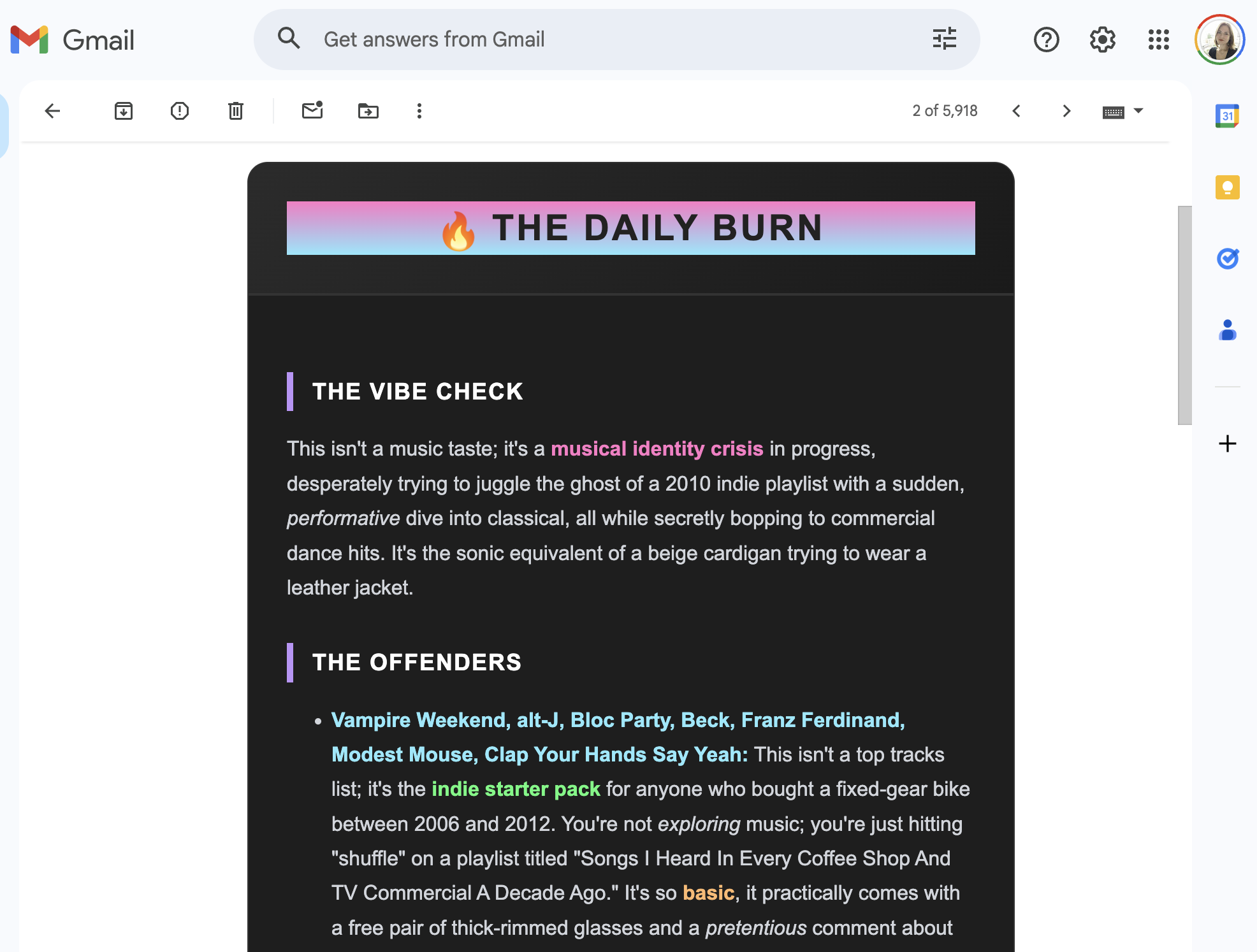
이제 이메일은 세련된 다크‑모드 카드 형태로 표시됩니다. 밴드 이름(조롱 대상)은 핑크, 시안, 그린으로 강조되어 누구를 비난당하고 있는지 한눈에 파악할 수 있습니다. 이메일이기 때문에 로스트를 바로 친구에게 전달해 그들도 당신의 고통을 함께 웃을 수 있습니다.
마무리
# (Custom Bot + API + HTML Generation + Actions)

This is my go‑to setup for almost all of my personal automation. It’s robust, free to host, and creates genuinely fun daily interactions.
언급된 저장소
시도해 보셨다면 댓글로 알려주시거나, AI가 만든 최악의 로스트를 공유해주세요. 즐거운 코딩 되세요! ✨