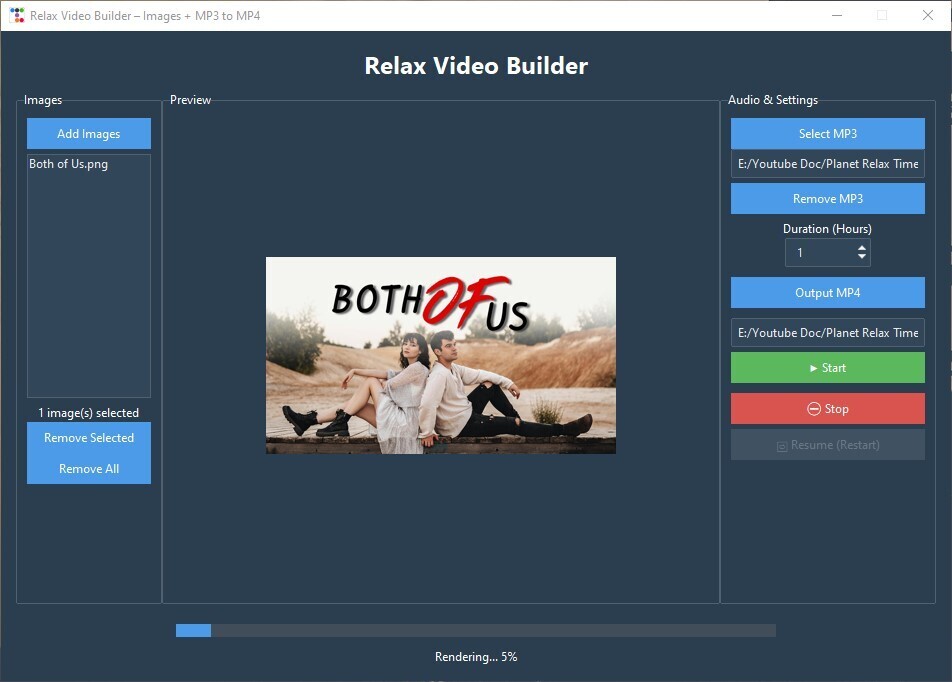
🎬 Python 및 Tkinter로 릴랙스 비디오 생성기 만들기 (Images + MP3 MP4)
발행: (2026년 1월 11일 오후 01:48 GMT+9)
5 분 소요
원문: Dev.to
Source: Dev.to
🧰 우리가 사용할 것
- Python
- Tkinter (GUI)
- ttkbootstrap (모던 UI 테마)
- Pillow (PIL) 이미지 미리보기를 위해
- FFmpeg 비디오 렌더링을 위해
- Threading (UI가 멈추지 않도록)
📦 단계 1: 요구 사항 설치
pip install ttkbootstrap pillowFFmpeg가 설치되어 있는지 확인하고 경로를 기록하세요, 예:
C:\ffmpeg\bin\ffmpeg.exe🪟 단계 2: 메인 앱 창 만들기
모든 것을 import하고 메인 창을 생성하는 것으로 시작합니다.
import tkinter as tk
from tkinter import filedialog, messagebox
import ttkbootstrap as tb
from PIL import Image, ImageTk
import subprocess
import os
import threading
import time
import re
app = tb.Window(
title="Relax Video Builder – Images + MP3 to MP4",
themename="superhero",
size=(950, 650),
resizable=(False, False)
)팁:
ttkbootstrap는 거의 추가 작업 없이 현대적인 스타일을 제공합니다.
🧠 Step 3: 앱 상태 변수
이 변수들은 선택된 파일과 앱 상태를 저장합니다.
# Selected files / user input
image_files = []
mp3_path = tk.StringVar()
output_path = tk.StringVar()
hours_var = tk.IntVar(value=10)   # Desired video length in hours

# Rendering state
process = None
rendering = False
total_seconds = 0

# FFmpeg path (⚠️ change this if yours is different)
FFMPEG_PATH = r"C:\ffmpeg\bin\ffmpeg.exe"
🖼 Step 4: 이미지 선택 및 관리
이미지 선택
def select_images():
    files = filedialog.askopenfilenames(
        filetypes=[("Images", "*.jpg *.png")]
    )
    if files:
        image_files.extend(files)
        refresh_images()
이미지 목록 새로 고침
def refresh_images():
    image_listbox.delete(0, tk.END)
    for img in image_files:
        image_listbox.insert(tk.END, os.path.basename(img))
    image_count_label.config(text=f"{len(image_files)} image(s) selected")
이미지 제거
def remove_selected_images():
    sel = image_listbox.curselection()
    for i in reversed(sel):
        del image_files[i]
    refresh_images()

def remove_all_images():
    image_files.clear()
    refresh_images()
    preview_label.config(image="")
👀 Step 5: 이미지 클릭 시 미리보기
이미지를 클릭하면 미리보기를 표시합니다.
def on_image_select(event):
    sel = image_listbox.curselection()
    if not sel:
        return

    img = Image.open(image_files[sel[0]])
    img.thumbnail((350, 250))
    tk_img = ImageTk.PhotoImage(img)

    preview_label.config(image=tk_img)
    preview_label.image = tk_img   # keep a reference
🎵 단계 6: MP3 선택
def select_mp3():
    mp3 = filedialog.askopenfilename(
        filetypes=[("MP3", "*.mp3")]
    )
    if mp3:
        mp3_path.set(mp3)

def remove_mp3():
    mp3_path.set("")
📁 단계 7: 출력 파일 선택
def select_output():
    out = filedialog.asksaveasfilename(
        defaultextension=".mp4",
        filetypes=[("MP4", "*.mp4")]
    )
    if out:
        output_path.set(out)
▶️ Step 8: 시작 / 중지 렌더링
시작 버튼 로직
def build_video():
    if rendering:
        return

    if not image_files or not mp3_path.get() or not output_path.get():
        messagebox.showerror("Error", "Missing images, MP3, or output file.")
        return

    threading.Thread(
        target=run_ffmpeg,
        daemon=True
    ).start()
중지 버튼
def stop_video():
    global process, rendering
    if process:
        process.terminate()
        process = None
        rendering = False
        status_label.config(text="Rendering stopped.")
        resume_btn.config(state="normal")
🎞 Step 9: FFmpeg 렌더링 로직
이미지당 지속 시간 계산
total_seconds = hours_var.get() * 3600
seconds_per_image = total_seconds / len(image_files)
FFmpeg 이미지 리스트 생성
list_file = "images.txt"
with open(list_file, "w", encoding="utf-8") as f:
    for img in image_files:
        f.write(f"file '{img}'\n")
        f.write(f"duration {seconds_per_image}\n")
    # repeat last image to avoid a short freeze at the end
    f.write(f"file '{image_files[-1]}'\n")
FFmpeg 명령
cmd = [
    FFMPEG_PATH, "-y",
    "-stream_loop", "-1",
    "-i", mp3_path.get(),
    "-f", "concat", "-safe", "0",
    "-i", list_file,
    "-t", str(total_seconds),
    "-vf", "scale=1920:1080",
    "-c:v", "libx264",
    "-pix_fmt", "yuv420p",
    "-preset", "slow",
    "-crf", "18",
    "-c:a", "aac",
    "-b:a", "192k",
    output_path.get()
]
📊 Step 10: 진행률 표시줄 추적
FFmpeg의 출력을 파싱하여 진행률을 계산합니다.
time_pattern = re.compile(r"time=(\d+):(\d+):(\d+)")

for line in process.stderr:
    match = time_pattern.search(line)
    if match:
        h, m, s = map(int, match.groups())
        current = h * 3600 + m * 60 + s
        percent = (current / total_seconds) * 100

        progress_bar['value'] = percent
        status_label.config(
            text=f"Rendering... {int(percent)}%"
        )
🎉 완료!
스크립트를 실행하고 이미지, MP3, 출력 위치를 선택한 뒤 원하는 비디오 길이를 설정하고 Build Video 버튼을 클릭하세요. 앱이 부드럽게 반복되는 MP4 파일을 생성해 주며, 이를 YouTube에 업로드하거나 명상에 사용하거나 친구와 공유할 수 있습니다. 즐거운 코딩 되세요!
🧱 단계 11: UI 레이아웃 구축
# Main container
main = tb.Frame(app, padding=15)
main.pack(fill="both", expand=True)

# Left panel (images)
left = tb.Labelframe(main, text="Images", padding=10)
left.pack(side="left", fill="y")

# Center preview
center = tb.Labelframe(main, text="Preview", padding=10)
center.pack(side="left", fill="both", expand=True)

# Right settings panel
right = tb.Labelframe(main, text="Audio & Settings", padding=10)
right.pack(side="right", fill="y")
🚀 Step 12: 앱 실행
app.mainloop()✅ 최종 결과
- 이미지 + MP3를 결합합니다
- 긴 편안한 비디오를 제작합니다
- 실시간으로 진행 상황을 표시합니다
- 현대적인 UI를 사용합니다
- 안전하게 중지하고 다시 시작할 수 있습니다
💡 확장 아이디어
- 페이드‑인/아웃 전환 추가
- 이미지 순서 무작위화
- 텍스트 오버레이 추가
- 마지막으로 사용한 폴더 기억
- YouTube용 프리셋 내보내기