
When Keywords Aren’t Enough: Building Smarter Search with Elasticsearch
Source: Dev.to
Abstract
Keyword search often fails when users phrase queries differently from the stored documents. I built a semantic‑search system using Elasticsearch and vector embeddings to bridge that gap. In this blog I’ll walk through how it works, how I implemented it, and what changed when search started understanding meaning instead of just words.
The Problem I Didn’t Notice at First
At first I thought traditional keyword search was enough. It works by matching terms between a user query and stored documents; if a document contains the same words, it ranks higher. Simple and efficient.
But then I tested this query:
“Affordable laptop for students”
In my dataset I had a product titled:
“Budget notebook with 8 GB RAM for college use”
To a human, these are clearly related:
- Affordable ↔ budget
- Laptop ↔ notebook
- Students ↔ college use
Yet the search engine either ranked the product very low or didn’t return it at all. Because the words didn’t match exactly, the system didn’t consider them related.
I realized that even when the meaning was identical, the results depended heavily on exact vocabulary. Real users don’t think in keywords; they think in ideas. That’s when I started wondering: what if search compared meaning instead of words?
Understanding Semantic Search
Semantic search sounds complex, but the core idea is surprisingly intuitive.
Convert text to numbers – Instead of storing raw text, we transform each sentence into an embedding, a list of floating‑point values that captures its meaning.
Example:“Affordable laptop for students” → [0.021, -0.134, 0.889, …]Store embeddings in Elasticsearch – Using the
dense_vectorfield type, each document gets its own vector.Compare vectors – We use cosine similarity (or another distance metric) to measure how close two vectors are in high‑dimensional space. A smaller angle → higher semantic similarity.
k‑Nearest Neighbors (kNN) – Given a query vector, Elasticsearch finds the k stored vectors that are closest. Those are returned as the most relevant results.
So instead of asking, “Does this document contain the same words?” we ask, “Is this document semantically close to the query?” That shift changes the entire behavior of search.
How the System Works
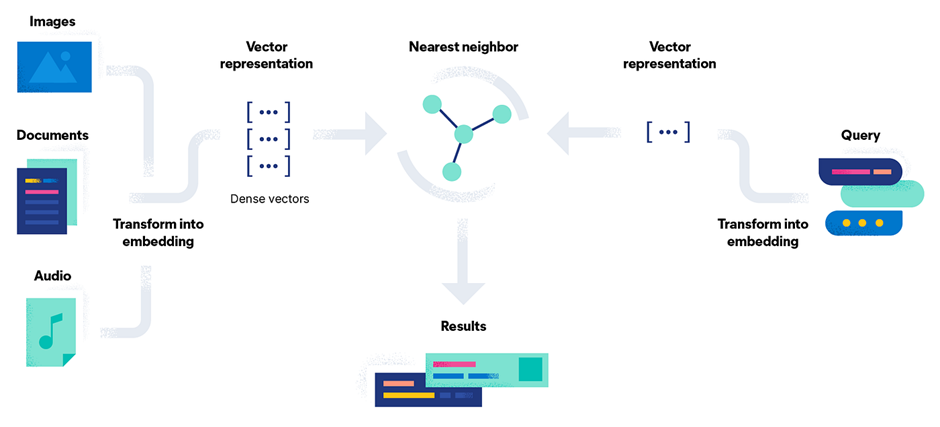
- User query → embedding – When a user enters a query, a transformer model (e.g., a sentence‑transformer) converts it to an embedding in real time.
- Document embeddings already stored – All documents in Elasticsearch have embeddings saved in a
dense_vectorfield. These vectors were generated during indexing. - kNN search – Elasticsearch runs a kNN query, comparing the query vector against all stored vectors using cosine similarity and retrieving the closest matches.
- Return results – The most semantically similar documents are returned to the user.
Conceptually it’s just “compare distances in a high‑dimensional space,” even though the implementation feels advanced.
Building It Step by Step
1. Set up Elasticsearch
I deployed Elasticsearch on Elastic Cloud. Using the managed service made the setup much faster than running a local instance. Within minutes I had a cluster accessible via Kibana and the Python client.
2. Create the Index Mapping
Because I was storing embeddings, I defined a dense_vector field with 384 dimensions (the output size of the all‑MiniLM‑L6‑v2 sentence‑transformer).
PUT products
{
  "mappings": {
    "properties": {
      "title":       { "type": "text" },
      "description":{ "type": "text" },
      "embedding":  {
        "type": "dense_vector",
        "dims": 384
      }
    }
  }
}
Lesson learned: If the dimension count in the mapping doesn’t match the actual vector size, Elasticsearch rejects the documents. There’s no flexibility there.
3. Generate Embeddings
I used the sentence-transformers library in Python:
from sentence_transformers import SentenceTransformer

model = SentenceTransformer('all-MiniLM-L6-v2')

def embed(text: str):
    return model.encode(text).tolist()   # returns a list of 384 floats
The model is lightweight, fast, and provides strong semantic representations—perfect for a small‑to‑medium dataset.
4. Index Documents
For each product I concatenated the title and description, generated the embedding, and indexed the document:
doc = {
    "title": title,
    "description": description,
    "embedding": embed(f"{title} {description}")
}
es.index(index="products", id=product_id, document=doc)
5. Search
I tried two approaches:
| Approach | Description |
|---|---|
| Traditional keyword search | match query on title/description. |
| Semantic kNN search | script_score with cosine similarity on the embedding field. |
The semantic approach consistently returned relevant results even when the query used synonyms or different phrasing.
Final Thoughts
Switching from keyword matching to semantic similarity transformed a brittle search experience into one that truly understands user intent. By leveraging sentence‑transformers for embeddings and Elasticsearch’s dense_vector + kNN capabilities, you can build a powerful, meaning‑aware search system with relatively little infrastructure overhead. Happy searching!
## Keyword vs. Vector Search: My First Hands‑On Test

I recently built a small prototype to compare two approaches for searching a product catalog:

1. **Keyword match query** – fast and simple, but it struggled with synonym‑heavy queries.
2. **k‑NN vector query** – I generated an embedding for the user query in real time and passed it to Elasticsearch’s k‑NN search.

The difference in relevance was noticeable almost immediately.
Comparing the Results
Here’s a simplified comparison of what I observed:
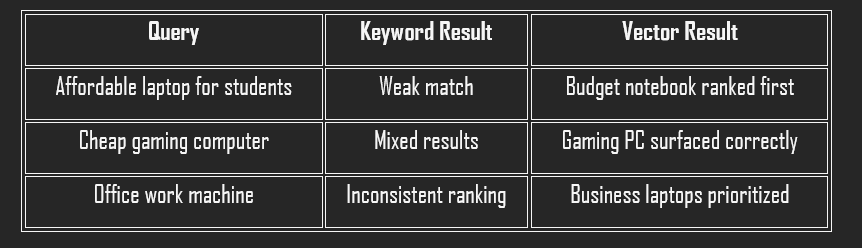
- Speed – Keyword search was slightly faster, which is expected.
- Relevance – Vector search was consistently more aligned with user intent.
- Latency – Slightly higher for k‑NN queries, but still within acceptable limits for my dataset size. With tuning (especially adjusting
num_candidates), performance improved further.
What stood out most wasn’t speed; it was relevance. The system finally understood synonyms and contextual meaning.
Challenges That Taught Me the Most
- Dimension mismatch – Changing the vector dimensions after index creation isn’t allowed, so I had to delete and rebuild the index.
- Slower queries initially – Improper k‑NN parameter tuning caused latency; reducing unnecessary candidate checks fixed it.
These weren’t major roadblocks, but they forced me to understand how Elasticsearch handles vectors internally.
Thinking About Real‑World Usage
In production, a hybrid approach—combining keyword matching and vector similarity—usually offers the best balance of precision and recall. Elastic Cloud makes scaling easier for distributed search workloads.
Potential use cases include:
- E‑commerce sites
- FAQ retrieval systems
- Knowledge bases
- Support bots
Anywhere users describe what they want in natural language, semantic search adds real value.
Conclusion
This project began with a small frustration: search results that technically worked but didn’t feel intelligent. By adding vector search to Elasticsearch, I built a system that understands meaning rather than just word overlap.
Key takeaways
- Embeddings are powerful, but they require careful configuration. Small setup mistakes can break everything.
- Relevance is more than just matching text; it’s about interpreting intent.
If you’re building search systems today, relying only on keywords might not be enough. Once you see how semantic search improves results, it’s hard to ignore the difference.