
What to Look for in Network Switches for VMware vSAN
Source: VMware Blog
What to Look for in Network Switches for VMware vSAN
Since the recent series of blog posts on VMware vSAN networking came out earlier this year, one of the more common questions received has been “What should I use as a Top of Rack (ToR) network switch in my vSAN environment?” Our Broadcom Compatibility Guide (BCG) for vSAN details compatibility and requirements for the hosts that make up a vSAN cluster, but it does not address network switches.
Almost any network switch will work with vSAN, but that does not mean they all meet your data‑center requirements. There are characteristics of modern network switches that you should consider when moving forward with your latest hardware refresh or new cluster build. Let’s look at what warrants attention, and why these specifications are so important.
Why Network Switches Are so Important for vSAN
vSAN is a distributed storage solution. It stores data across hosts in a cluster to ensure data resilience and availability. The hosts that make up a vSAN cluster depend on fast, reliable networking to provide consistent, low‑latency storage.
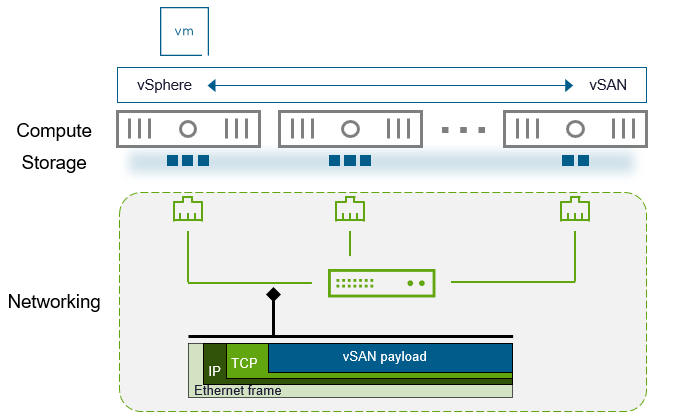
Figure 1. vSAN’s distributed storage model and its reliance on networking.
The dramatic increase in hardware capabilities found in servers over the past two decades is stunning. CPU cores have increased anywhere between 32‑128×, RAM has followed suit, and modern NVMe storage performance has improved by over 2,500×. These improvements have been absorbed by an ever‑increasing demand from applications. Administrators have increased virtual resources assigned to VMs to exploit the power of this new hardware and keep up with business requirements.
Networking has also made massive improvements, but perceptions on the need for faster networking are sorely outdated. For example, the 10 GbE over copper standard was ratified in the mid‑2000s and became more readily available a few years later. While server hardware has improved dramatically, many customers still insist that 10 Gb is sufficient, even though its practical use in the data center began nearly two decades ago. Reluctance to move to 25 Gb or 100 Gb often stems from unfounded claims that 4‑10× performance improvements in networking are unnecessary, despite other hardware increasing by 20‑100× in the same period.
The costs of modern 25/100 Gb switching are quite low, especially when looking at non‑incumbent alternatives. These switches are often a very small percentage (single‑digit) of the total cost of the hosts in each rack, yet those hosts depend heavily on the capabilities of the switches. In other words, your ToR switches are not the place to cut costs.
A complacent network design will make the network the bottleneck. This can be a problem for any environment, but it shows up most when you use a distributed storage system like vSAN. When the network is the bottleneck, instead of relying on the sophisticated schedulers in vSphere and vSAN, traffic must wait on primitive TCP congestion control mechanisms.
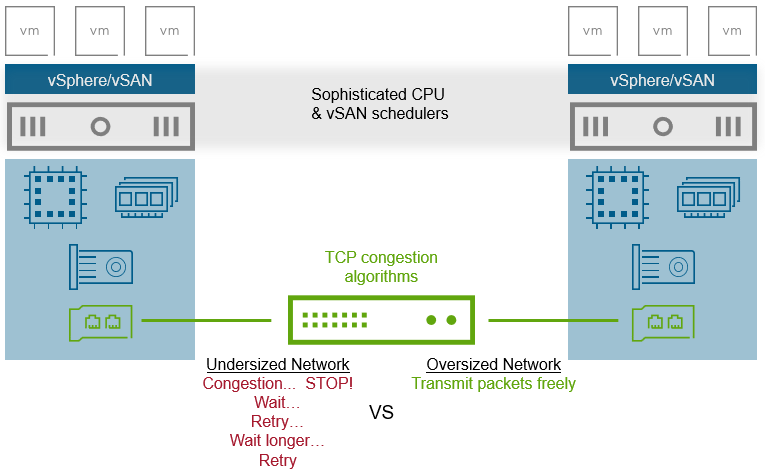
Figure 2. Comparing an undersized network to an oversized network.
Why is this so bad? When network links are saturated, packets drop and must be retransmitted.
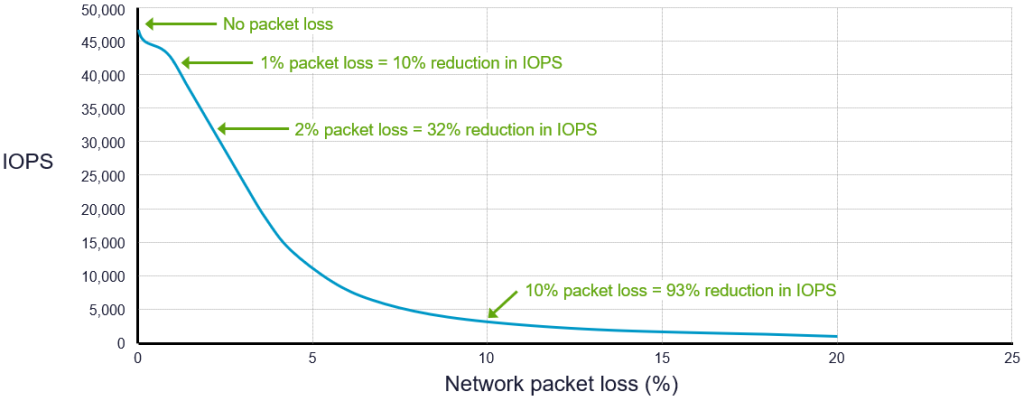
Figure 3. The impact of network packet loss on storage performance.
The result is poor or inconsistent VM storage performance, underutilized CPU and memory, longer repair times during outages, and more difficult troubleshooting.
Recommendations for ToR Switches Used with vSAN
Choosing the correct ToR switches for vSAN provides the conduit for consistent, high‑performance, low‑latency storage. Most vendors refer to switches by the theoretical bandwidth of a single downlink port (e.g., “10 Gb switches,” “25 Gb switches,” “100 Gb switches”), which obscures other important considerations that materially impact performance.
Below are the characteristics that really matter. The information does not prescribe strict minimums; instead, it helps you compare switches as hardware specifications evolve.
Downlink Port Count and Speed
The downlink port count and speed represent the number of ports and their native wire speed to servers in a rack, typically expressed as port count × wire speed (e.g., “32 × 25 Gb”). Modern 25 Gb and 100 Gb switches usually use SFP28 or QSFP28 modules.
- Higher port speed benefits cluster traffic such as vSAN and vMotion that remains within the ToR switches.
- Higher port count offers more flexibility and efficiency for servers. For example, a pair of 32‑port ToR switches can support 16 hosts per rack with up to 4 ports per host, whereas a pair of 48‑port switches can support the same 16 hosts with up to 6 ports per host.
When increasing port count, be mindful of the total bandwidth the switches provide to the spine to maintain appropriate oversubscription ratios. See the post “vSAN Networking – Network Oversubscription” for more information.
While 10 Gb networking is supported on the smallest ReadyNode profile, we highly recommend 25 Gb.