
Native vs. emulation: World of Warcraft game performance on Snapdragon X Elite
Source: Hacker News
Test platform {#1}
The tests were done on a Snapdragon X Elite dev kit equipped with the X1E‑00‑1DE Snapdragon X Elite SoC (3.8 GHz, 4.3 GHz boost on 1‑2 cores) and 32 GB of RAM. The dev kit runs at a higher TDP than most, if not all, laptops and has the theoretically best bin of chips (highest boost clocks).
The key difference since my initial review is the Windows version. Microsoft has been working hard on improving emulation performance and compatibility. Starting with Windows 11 24H2, a new emulator called Prism was introduced, and recent updates added AVX‑instruction support to handle even more x86_64 applications.
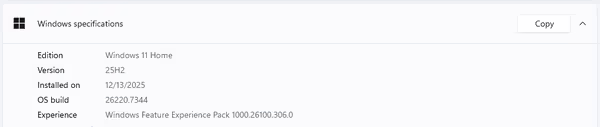
For the tests I used Windows 11 25H2 26220.7344 (Insider Preview) to capture all possible improvements.
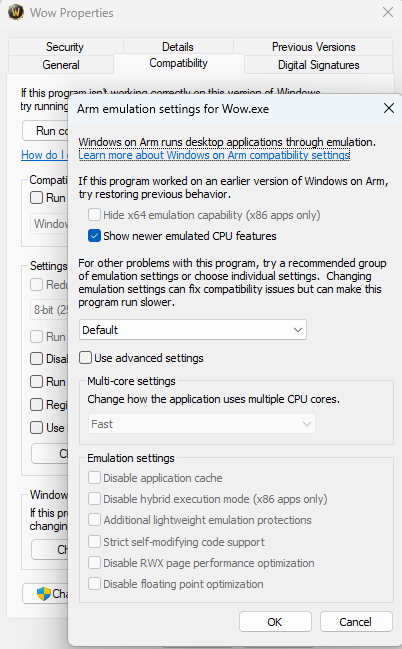
Additionally, the x86_64 binary properties were edited to enable newer emulated CPU features:
World of Warcraft {#2}
World of Warcraft (WoW) is an MMORPG that does not include a built‑in benchmark.
You can still obtain reliable numbers by testing specific zones/instances – see my WoW benchmarking section for details.
- Engine – modern DirectX 12 with optional ray‑traced shadows and a few other features.
- Supported builds – native x86, Windows on ARM, and Apple Silicon.
- In my earlier tests the retail x86 client would not run on Snapdragon; only the Classic client launched, and its FPS was 40‑60 % lower than the native version (the test was not exhaustive).
With the recent Windows and WoW updates, both x86_64 clients run on Windows on ARM, giving me a lot more data. Because MSI Afterburner and similar tools don’t support WoA, I relied on the game’s built‑in average‑FPS meter (note: it does not average over long periods and provides no 1 % low / frame‑time graphs).

Game version and architecture displayed on the login screen
World of Warcraft – native vs. emulated {#3}
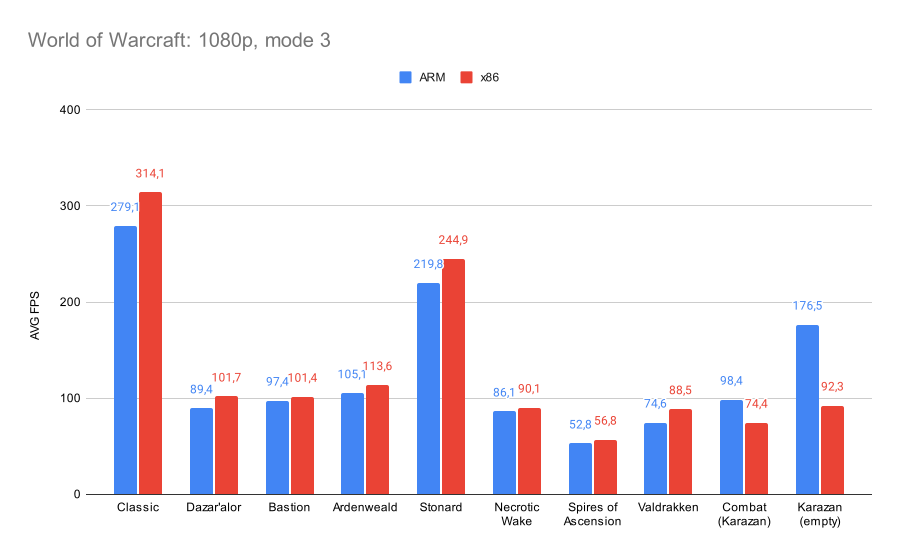
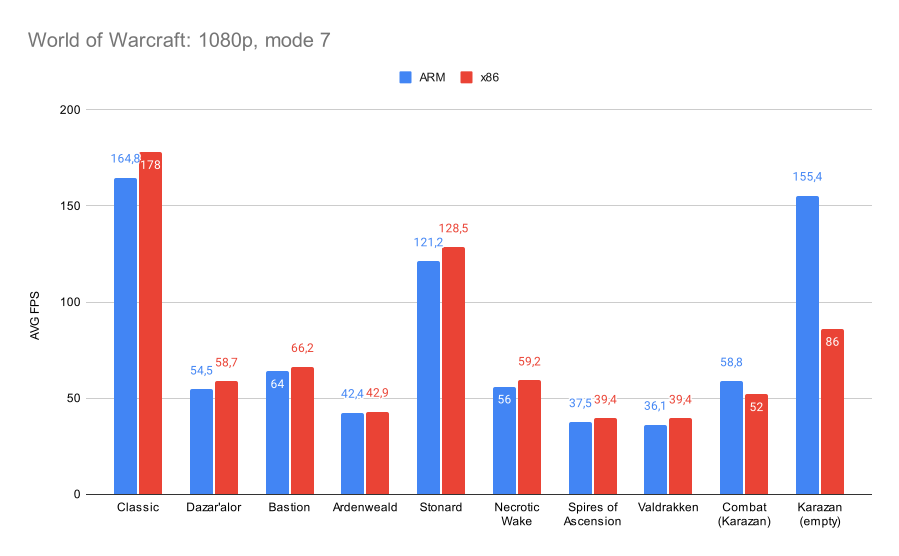
FPS was measured at 1080p for two graphics presets:
| Setting | Description |
|---|---|
| Mode 3 | Low |
| Mode 7 | High |
Mode 3 (Low)
Mode 7 (High)
Observations
- The x86 client often matches or even exceeds the native ARM client.
- WoW Classic and Stonard (retail) are very light zones, so even an iGPU delivers high FPS.
- Ardenweald is the most GPU‑intensive modern zone in the test set.
- Bastion is slightly less demanding but contains more geometry.
- Dazar’alor harbor view serves as a geometry / render‑distance benchmark, heavily GPU‑bound.
- Necrotic Wake and Spires of Ascension are dungeons with mobs, geometry, and unit tracking – they stress both GPU and CPU.
- Valdrakken (player hub) is mostly empty now; active hubs are far more demanding due to the large asset pool.
- Combat benchmark pushes the game into a single‑core CPU limit. It runs in the old Karazhan raid, where a large group of mobs is spawned and the camera is fixed. iGPUs can become the bottleneck on higher settings because of particle effects, while most dGPUs handle it easily.
- Out‑of‑combat (after mobs despawn) FPS in Karazhan rises because the instance has simple geometry and the single‑core bottleneck disappears.
The Karazhan combat test was the only scenario where the native client noticeably outperformed the emulated one. To verify this, I added two modern dungeons; their results aligned with the other zones. This suggests that either the game version differed or that larger instances become limited by system latency, where emulation is less optimal.
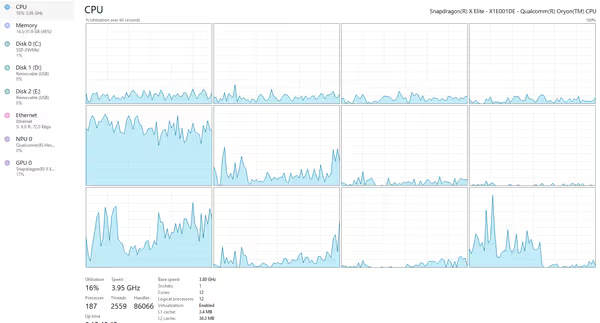
CPU load during combat scenario
WoW by default utilizes four CPU cores, with one core acting as the primary thread. In mass‑combat or mass‑NPC situations the primary core can reach 100 % load and become the limiting factor.
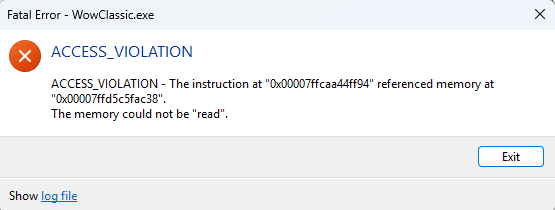
WoW Classic x86 threw an error but still launched
Windows on ARM can run many x86 Windows applications, but not all. In my quick retests:
- Unigine Valley – runs.
- Unigine Superposition – fails to run.
Default vs. very strict emulation {#4}
I also examined how the emulation mode affects performance. Switching to very strict emulation disables several optimizations, which dramatically reduces the FPS of the x86 WoW client.

Performance impact of strict vs. default Windows emulation settings
Mobile SoC Comparison {#5}
I’ve also recently tested the Strix Point HX 370 and Intel Arrow Lake 255H (capped at 30 W), so I added them to the comparison charts.
iGPU‑Heavy Scenarios
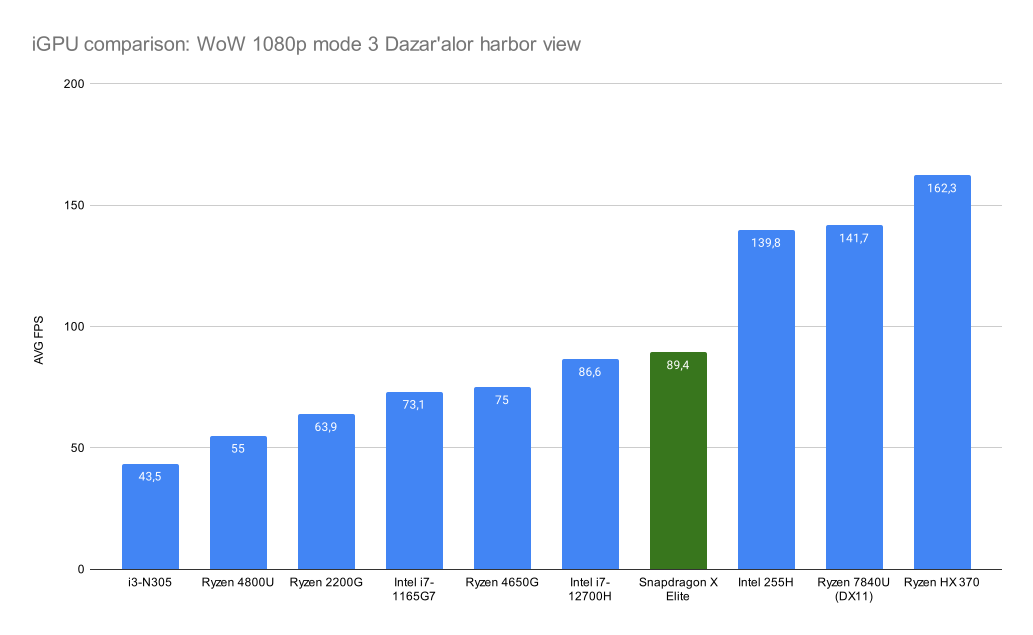 |  |
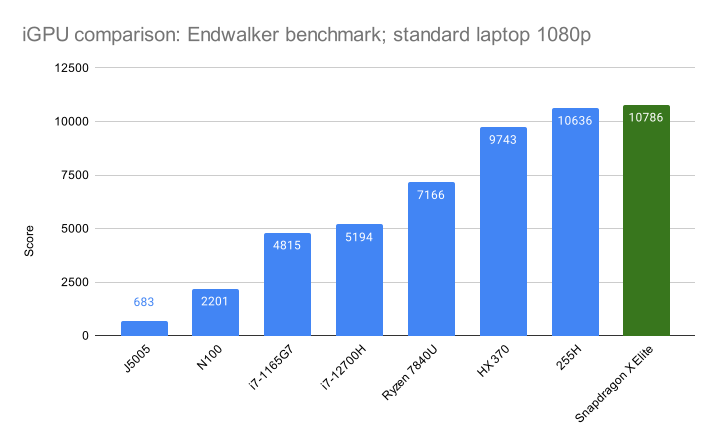 |
Summary – In iGPU‑heavy workloads, Intel and AMD tend to lead, while in CPU‑focused scenarios the three platforms converge to similar performance.
Summary
I wanted to compare native versus emulated performance on Snapdragon, since the initial WoW Classic tests showed a huge gap. After recent Prism updates, I forced the dev kit to upgrade Windows, which allowed the x86 retail World of Warcraft client to run. This let me test both CPU‑ and GPU‑heavy scenarios in the game.
Performance:
- For WoW there was essentially no penalty when running under emulation, at least outside raid/combat situations.
- When you install Battle.net and WoW, the native ARM version is installed by default, so no manual selection is required.
Windows on ARM:
- Compatibility is improving, but it will never be perfect.
- Some applications have hard‑coded checks and cannot use x86 drivers.
Future hardware:
- Qualcomm is preparing the second generation of Mobile X Elite chips.
- Early sales were strong, though many units were returned.
Linux support:
- Still limited: device‑tree lists, firmware extraction, and overall SoC behavior are poorer than on Windows.
- Nevertheless, ARM Linux support is generally better than Windows, and many hardware vendors (e.g., those making astrophotography gear or vision cameras) provide ARM‑Linux drivers, thanks in part to the Raspberry Pi ecosystem.