
The Catch-22 of programming
Source: Dev.to
The Catch-22
- Only skilled programmers can guide AI to create good software.
- It takes a long time to gain the skills to become a skilled programmer, starting with a long period of simple coding at the entry level.
- AI is taking away the jobs of entry‑level programmers.
Becoming a Programmer
In the early days of computing, the route to becoming a programmer was straightforward: you just did it. Training courses were initially nonexistent, so learning came from textbooks and data sheets. Those with the motivation to stick with it became professional programmers.
Later, information became more plentiful. With email and the World Wide Web, people could ask questions and read articles without waiting for a book to arrive. Courses appeared for almost any topic.
However, software also grew more complex. A myriad of tools and libraries became essential, and job listings filled with acronyms, leaving many applicants feeling their efforts were in vain as the prize remained just out of reach.
Programming with an LLM
AI made it seem like a programmer’s life became simpler again. No more need to remember every function in a library—just ask the AI. But as we grew accustomed to this new workflow, AI systems began to target our jobs, and now we hear that “all programming will soon be done entirely by AI engines.”
If you actually ask AI to write software, the output often resembles a prototype and is usually unfit for delivery as a finished product. To ensure a good product you must:
- Create a bullet‑proof prompt describing exactly what you want.
- Closely monitor the entire process from start to finish.
- Enforce good working practices and test everything as it is written.
Only a competent programmer can do this. Hence the Catch‑22:
- To get a good product you need an expert to drive AI correctly.
- Because AI is taking over mundane programming work, few will spend the time to become experts.
If you don’t write the code yourself, you never learn how to spot AI’s mistakes, nor do you understand the capabilities and best uses of a programming language.
The Crux of the Matter
The situation is still developing but will become serious quickly as the supply of top‑level programmers dries up. AI‑generated products will often remain at the prototype stage, incomplete and unfit for purpose.
What Are Our Options?
At the heart of the problem is how we communicate with computers. There are essentially two approaches:
1. Traditional High‑Level Languages
Code written in C++, Java, Python, or any mainstream language. As AI takes over lower‑level coding, the number of people who become skilled in these languages is set to decrease.
2. Natural Language (e.g., English)
AI enables programming via natural language, but human language is inherently ambiguous. AI may interpret what it thinks you mean rather than questioning ambiguities, leading to subtly or grossly incorrect results.
Software can be divided into tools (operating systems, libraries) and products (applications built with those tools). Coders often use the same language for both, even though they require very different forms of expression. A computer algorithm expressed in English is clumsy; a set of business rules that makes perfect sense in English becomes impenetrable when converted to Python or Java.
Even with heavy automation, skilled toolmakers will always be needed. The human brain can produce insights that machines cannot match. The current bottleneck is the lack of a separate class of coder who can express requirements clearly and guide AI without having taken the long route to become a professional user of conventional languages and tools.
Some people excel at expressing clear logic—lawyers, for example, use a highly constrained form of English that is unambiguous. Perhaps we need a similarly constrained language for guiding AI.
An Example
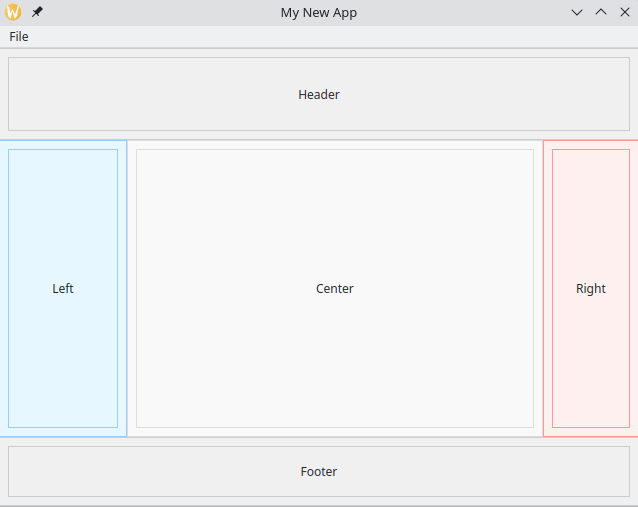
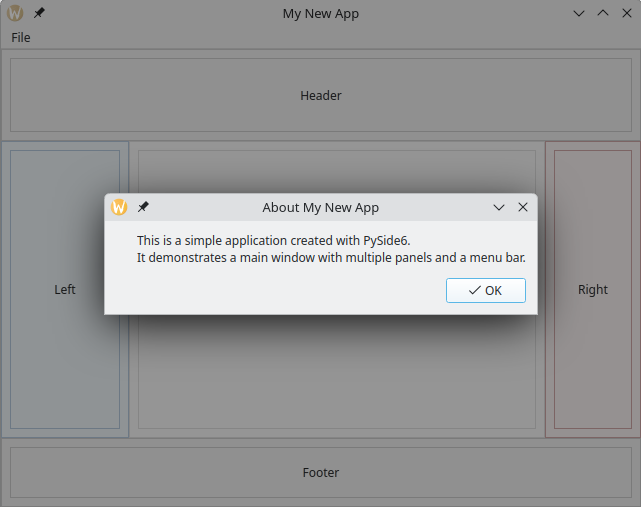
Suppose we want to create a new desktop app with a windowing user interface. We decide on Python with PySide for graphics. The app should mimic a traditional web page layout: a central data area, left and right sidebars, a title bar, and a footer. It includes a menu bar with a single menu containing “About” and “Exit” items.
Desired Layout (illustrative)
AI Prompt (in a bullet‑proof, unambiguous form)
Using PySide6, create a main window with the following attributes:
- Location: 100,100
- Size: 640,480
- Title: My New App

The window contains 3 rows:
1. First row: panel taking 20% of the window height, containing a label with the text “Header”.
2. Second row: occupies the remaining height and contains three elements:
   a. Left panel: takes 20% of the window width, with a label “Left”.
   b. Center panel: takes the remaining width, with a label “Center”.
   c. Right panel: takes 15% of the window width, with a label “Right”.
3. Third row: panel taking 15% of the window height, containing a label with the text “Footer”.

Menu bar:
- Single “File” menu with two items:
  * “About” – when clicked, shows a simple dialog.
  * “Exit” – when clicked, terminates the app.
This prompt is deliberately verbose to avoid ambiguity. Without a compiler to parse natural‑language specifications, discipline in wording—something that only experience provides—is essential. Otherwise, errors can slip through unnoticed, and large sections may need rewriting when changes are required.