
Stop Writing Boilerplate: How I Built a Code Generator to Automate NestJS Development
Source: Dev.to
Summary
- Identified repetitive coding patterns and built a Code Generator to automate them.
- Achieved code consistency, easier maintenance, and significantly faster development cycles.
- Leveraged AI to assist in maintaining the generator itself, reducing the overhead of tool maintenance.
Introduction: Why I Decided to Stop Coding (Manually)
As a backend engineer, I was constantly battling repetitive boilerplate code. Every time I created a new feature I was typing the same structures over and over again. I asked myself:
“Wouldn’t development be much faster if I could just focus on the business logic and implementation?”
The “Aha!” moment came while working with gRPC. I saw how basic code was automatically generated from .proto files. Since the Node.js ecosystem (NestJS, React, Next.js) already embraces code‑generation tools, I decided to build my own Custom Code Generator tailored to our team’s specific architecture.
Phase 1: Standardization Before Automation
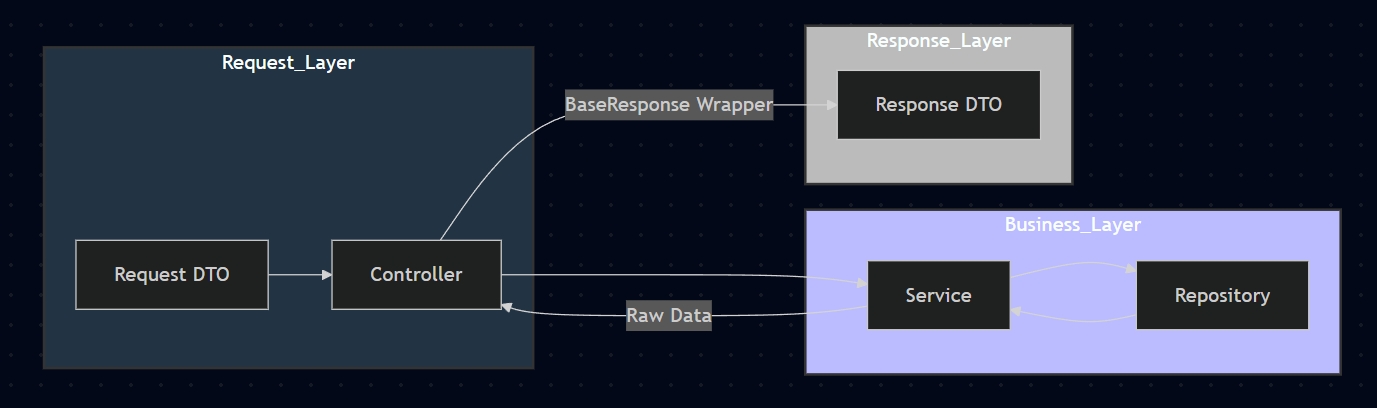
Before building the generator, I needed to define a strict code pattern—you cannot automate chaos. I adopted the standard Controller → Service → Repository pattern and enforced strict rules for Data Transfer Objects (DTOs).
1. Standardizing Response & Request DTOs
Response example
{
  "statusCode": 200,
  "message": "Success",
  "data": {
    "id": 1,
    "name": "John Doe"
  }
}data: always an object. For lists it contains anitemsarray.statusCode&message: mandatory fields.
Request base classes (e.g., pagination, admin requests)
// Example: Composing DTOs using IntersectionType
export class DomainGetDto extends IntersectionType(
  BasePaginationRequestDto,
  AdminRequestDto,
) {}

class DomainResponseData {
  @ApiProperty({ item: DomainResponseDataItem, isArray: true })
  items: DomainResponseDataItem[];
}

export class DomainResponse extends BaseResponse {
  @ApiProperty({ type: DomainResponseData })
  data: DomainResponseData;
}
2. Defining Roles for Controller & Service
| Layer | Responsibilities |
|---|---|
| Controller | - Receives DTOs (query/body) and forwards them to the Service. - Returns the data field from the Service wrapped in BaseResponse.- Handles auth guards and logging. |
| Service | - Contains only business logic. - Returns the raw data payload (no response wrapper). |
Architecture Overview
Phase 2: Building the Generator
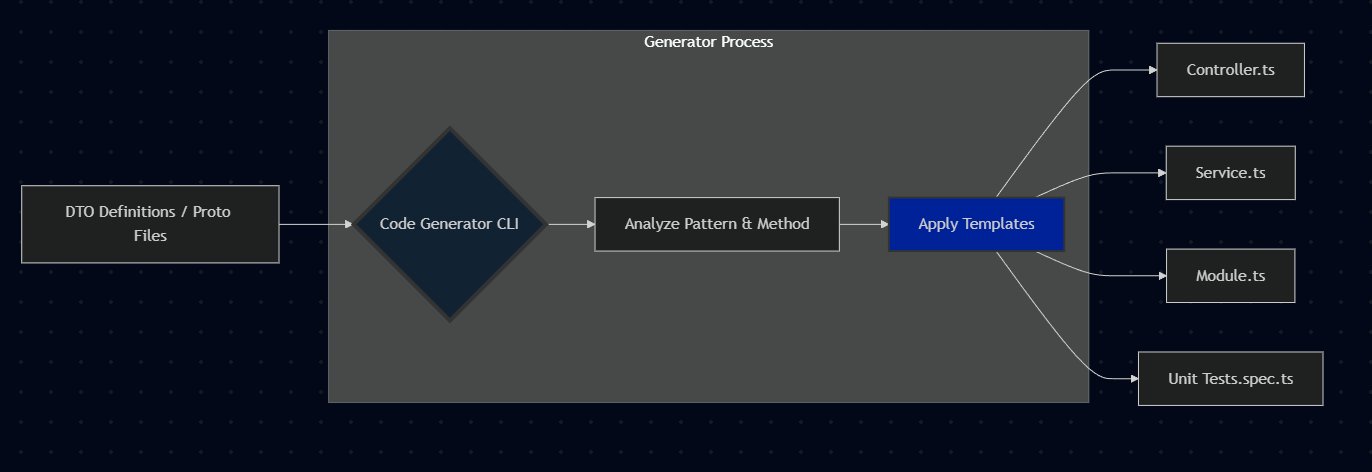
With the patterns in place, I built a CLI generator. The core logic is:
- Analyze DTOs – read the DTO definition files.
- Determine Method – infer the HTTP method from the DTO name (e.g.,
CreateUserDto → POST). - Generate Code
- Create Controller API endpoints.
- Scaffold Service boilerplate.
- Generate the Module file and automatically register it in the main module.
- Type Safety – use TypeScript generics so the Service returns the exact type expected by
BaseResponse.
Deterministic Generation Logic
The generator is 100 % deterministic: it relies on strict pattern matching and predefined templates, unlike AI‑generated code that can be unpredictable. Every character ends up exactly where it should be.
Generation Workflow
Role of AI in Development
While the generator itself follows strict rules, I used AI to build and maintain the generator. Writing AST parsers or complex regex patterns is tedious; AI helped generate those scripts based on the patterns I defined. The workflow became:
Human defines the pattern → AI writes the generator code → Generator writes the product code
Phase 3: The Results
Implementing the Code Generator delivered immediate benefits.
1. Focus on Business Logic
Developers no longer worry about boilerplate. Unless there’s a special edge case, they only touch the Service layer. The generator also scaffolds unit tests, so developers can jump straight into implementation and testing.
2. Consistency & Faster Code Reviews
Common review questions disappear:
- Did they import the right module?
- Is the naming convention correct?
- Did they extend
BaseResponse?
Because the code is guaranteed to be consistent, reviewers can concentrate solely on the logic, drastically reducing review time.
3. Accelerated Development Speed
Boilerplate and test‑file setup used to consume significant time. Now it’s instantaneous.
Bonus: Automating gRPC with Protobuf
For gRPC, the process is even smoother. Unlike REST—where intent must be inferred from DTO names—gRPC provides .proto files that strictly define services and messages, allowing the generator to produce both client‑ and server‑side code without guesswork.
Define the Service and Messages
I created a build‑proto command that:
- Runs
protocto build the base types. - Reads the
.protodefinitions. - Automatically generates the NestJS Controller and Service layers that map to the Proto definitions.
Conclusion
Building a code generator might seem like “over‑engineering” at first, or an added maintenance burden. However, the ROI has been massive.
- Maintenance? Yes, the tool needs maintenance. But with AI assistance, updating the generator is faster than manually updating hundreds of files.
- Value? It transformed me from “just a coder” to an “engineer who designs systems.”
If your team is suffering from repetitive tasks, stop typing. Start generating.