
Stop Re-running Everything: A Local Incremental Pipeline in DuckDB
Source: Dev.to
Incremental Models + Cached DAG Runs (DuckDB‑only)
I love local‑first data work… until I catch myself doing the same thing for the 12ᵗʰ time:
“I changed one model. Better rerun the whole pipeline.”
This post is a light walkthrough of a tiny project that fixes that habit using incremental models and cached DAG runs — all on your laptop with DuckDB. The example is a simplified, DuckDB‑only version of the existing incremental_demo project.
We’ll do three runs:
- seed v1 → initial build
- run again unchanged → mostly skipped
- seed v2 (update + new row) → incremental merge/upsert
That’s it. No cloud. No ceremony.
The whole demo in one sentence
We seed a tiny raw.events table (from CSV), build a staging model, then build incremental facts that only process “new enough” rows based on updated_at, and apply updates based on event_id.
What’s in the mini‑project
There are three key pieces:
-
Two seed snapshots
- v1 – 3 rows.
- v2 – changes
event_id = 2(newerupdated_at, differentvalue) and addsevent_id = 4.
-
A source mapping – the project defines a source
raw.eventsthat points at a seeded table calledseed_events. -
A few models (SQL + Python)
| Model | Type | Description |
|---|---|---|
events_base | Staging (SQL) | Cast timestamps, keep columns tidy |
fct_events_sql_inline | Incremental SQL (inline) | Incremental logic defined in the model file |
fct_events_sql_yaml | Incremental SQL (YAML) | Incremental config lives in project.yml |
fct_events_py_incremental | Incremental Python (DuckDB) | Adds value_x10 in pandas and returns a delta frame |
All of these exist in the exported demo.
DuckDB‑only setup
The demo’s DuckDB profile is simple: it writes to a local DuckDB file.
profiles.yml (DuckDB profile)
dev_duckdb:
  engine: duckdb
  duckdb:
    path: "{{ env('FF_DUCKDB_PATH', '.local/incremental_demo.duckdb') }}"
.env.dev_duckdb (optional convenience)
FF_DUCKDB_PATH=.local/incremental_demo.duckdb
FF_DUCKDB_SCHEMA=inc_demo_schema
The models (the fun part)
Staging: events_base
{{ config(materialized='table') }}

select
  event_id,
  cast(updated_at as timestamp) as updated_at,
  value
from {{ source('raw', 'events') }};
Incremental SQL (inline config): fct_events_sql_inline
{{ config(
    materialized='incremental',
    unique_key='event_id',
    incremental={ 'updated_at_column': 'updated_at' },
) }}

with base as (
  select *
  from {{ ref('events_base.ff') }}
)
select
  event_id,
  updated_at,
  value
from base
{% if is_incremental() %}
where updated_at > (
  select coalesce(max(updated_at), timestamp '1970-01-01 00:00:00')
  from {{ this }}
)
{% endif %};
What it does
materialized='incremental'unique_key='event_id'- Watermark column:
updated_at
On incremental runs it only selects rows newer than the max updated_at already in the target. This assumes updated_at increases when rows change (demo‑only; real pipelines may need late‑arrival handling).
Incremental SQL (YAML‑config style): fct_events_sql_yaml
{{ config(materialized='incremental') }}

with base as (
  select *
  from {{ ref('events_base.ff') }}
)
select
  event_id,
  updated_at,
  value
from base;
Incremental knobs in project.yml
models:
  incremental:
    fct_events_sql_yaml.ff:
      unique_key: "event_id"
      incremental:
        enabled: true
        updated_at_column: "updated_at"
Pick whichever style better suits you.
Incremental Python (DuckDB): fct_events_py_incremental
from fastflowtransform import engine_model
import pandas as pd

@engine_model(
    only="duckdb",
    name="fct_events_py_incremental",
    deps=["events_base.ff"],
)
def build(events_df: pd.DataFrame) -> pd.DataFrame:
    df = events_df.copy()
    df["value_x10"] = df["value"] * 10
    return df[["event_id", "updated_at", "value", "value_x10"]]
The incremental behavior (merge/upsert) is configured in project.yml for this model.
The three‑run walkthrough
We’ll follow the demo’s exact “story arc”: first build, no‑op build, then seed changes triggering incremental updates.
Step 0: pick a local seeds folder
The Makefile uses a local seeds directory and swaps seed_events.csv between v1 and v2.
mkdir -p .local/seedsA tiny dataset that still proves “incremental”
Two versions of the same seed file are provided. v2 updates one existing row and adds one new row — so you can watch an incremental model do both an upsert and an insert.
seeds/seed_events_v1.csv
event_id,updated_at,value
1,2024-01-01 00:00:00,10
2,2024-01-02 00:00:00,20
3,2024-01-03 00:00:00,30
seeds/seed_events_v2.csv
event_id,updated_at,value
1,2024-01-01 00:00:00,10
2,2024-01-05 00:00:00,999
3,2024-01-03 00:00:00,30
4,2024-01-06 00:00:00,40
After you switch from v1 → v2 and run again, you should end up with:
event_id = 2updated (newerupdated_at,value = 999)event_id = 4inserted (brand‑new row)
1️⃣ First run (seed v1 → initial build)
Copy v1 into place:
cp seeds/seed_events_v1.csv .local/seeds/seed_events.csvSeed + run:
FFT_SEEDS_DIR=.local/seeds fft seed . --env dev_duckdb
FFT_SEEDS_DIR=.local/seeds fft run . --env dev_duckdb
You should see all models materialized for the first time.
2️⃣ Second run (unchanged seed → no‑op)
Run the same command again:
FFT_SEEDS_DIR=.local/seeds fft run . --env dev_duckdbAll models should be skipped (cached) because nothing changed.
3️⃣ Third run (seed v2 → incremental merge/upsert)
Swap in the updated seed:
cp seeds/seed_events_v2.csv .local/seeds/seed_events.csvRe‑seed and run:
FFT_SEEDS_DIR=.local/seeds fft seed . --env dev_duckdb
FFT_SEEDS_DIR=.local/seeds fft run . --env dev_duckdb
You’ll see:
fct_events_sql_inlineandfct_events_sql_yamlprocess only the rows withupdated_at> max(updated_at) already present.- The Python model (
fct_events_py_incremental) receives only the delta rows, addsvalue_x10, and merges them back.
Check the final table:
select * from inc_demo_schema.fct_events_sql_inline;Result:
| event_id | updated_at | value |
|---|---|---|
| 1 | 2024‑01‑01 00:00:00 | 10 |
| 2 | 2024‑01‑05 00:00:00 | 999 |
| 3 | 2024‑01‑03 00:00:00 | 30 |
| 4 | 2024‑01‑06 00:00:00 | 40 |
…and the Python model will have an extra column value_x10 with the multiplied values.
Recap
- Incremental models let you process only new/changed rows.
- Cached DAG runs (via FastFlowTransform) skip work when nothing changed.
- All of this runs locally with DuckDB—no cloud, no extra ceremony.
Give it a try, tweak the watermark logic, or experiment with late‑arrival handling. Happy incremental modeling!
Running with cache options (v_duckdb)
fft run . --env dev_duckdb --cache=rwWhat you should expect
events_basebecomes a normal table.- Incremental models create their target tables for the first time (effectively a full build the first time).
No‑op run (same seed v1; should be mostly skipped)
fft run . --env dev_duckdb --cache=rwThe demo calls this the “no‑op run… should be mostly skipped,” which is the best feeling in local data development.
Change the seed (v2 snapshot) and run incremental
# Replace the seed file
cp seeds/seed_events_v2.csv .local/seeds/seed_events.csv

# Load the new seed
FFT_SEEDS_DIR=.local/seeds fft seed . --env dev_duckdb

# Run the incremental models
fft run . --env dev_duckdb --cache=rw
Result
event_id = 2comes in with a newerupdated_atandvalue = 999.event_id = 4appears for the first time.
Your incremental facts should update the row for event_id = 2 and insert event_id = 4, based on unique_key = event_id.
Sanity check in DuckDB
Query the incremental SQL table
duckdb .local/incremental_demo.duckdb \
  "SELECT * FROM inc_demo_schema.fct_events_sql_inline ORDER BY event_id;"
After v2 you should see:
event_id = 2withupdated_at = 2024-01-05andvalue = 999.- A new row for
event_id = 4withupdated_at = 2024-01-06andvalue = 40.
Query the Python table
duckdb .local/incremental_demo.duckdb \
  "SELECT * FROM inc_demo_schema.fct_events_py_incremental ORDER BY event_id;"
You should also see the derived column value_x10 (e.g., 9990 for the updated row).
Make the DAG visible
fft docs serve --env dev_duckdb --open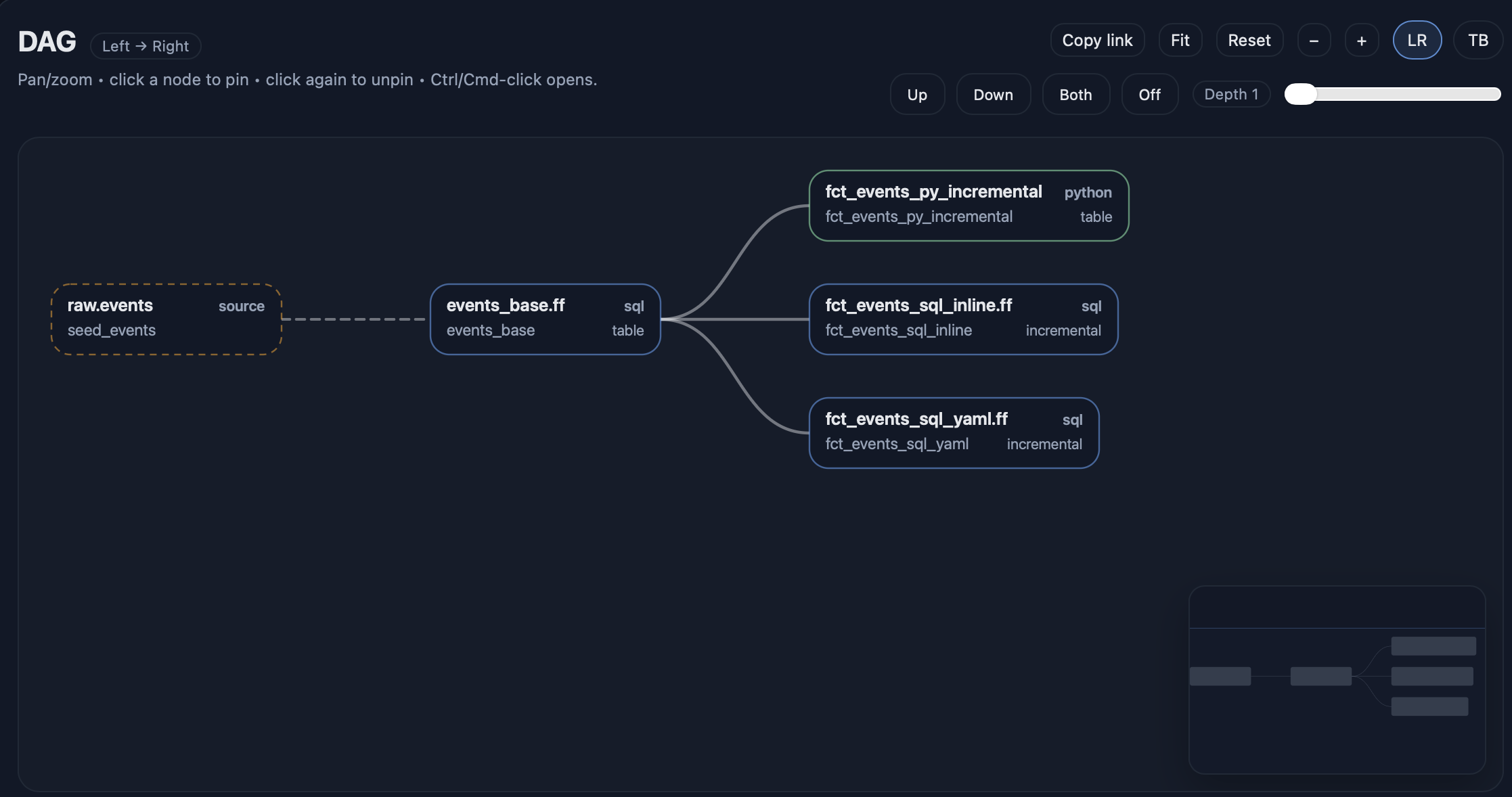
Optional tiny “quality check”
fft test . --env dev_duckdb --select tag:incrementalWhat you just bought yourself
With this setup, your local development loop becomes:
- Run once – builds everything.
- Run again – skips most work (no‑op).
- Change input data – updates only what’s necessary.
- Update existing rows safely (via
unique_key) instead of “append and pray”.
All of this works with a single local DuckDB file, making experimentation cheap and fast.