
Spotify’s latest Premium feature helps you mix a banger playlist, almost like a DJ
Source: Android Authority
TL;DR
- Spotify has enhanced its Mix feature with Smart Reorder, which automatically rearranges playlists based on BPM and musical key to create smooth, DJ‑like transitions.
- Users can still customize individual song transitions or let Spotify handle them automatically for an optimized listening experience.
- Compared to Apple Music’s simpler AutoMix and YouTube Music’s lack of transition features, Spotify offers greater control and sophistication in managing playlist flows.
Background
One of the key features in iOS 26 was AutoMix for Apple Music, an AI‑driven tool that creates seamless, DJ‑style transitions between songs. While iOS 26 was still in beta, Spotify released a similar Mix feature that gave users more granular control. Spotify is now doubling down on that concept with Smart Reorder, which automatically reorders a playlist to improve flow.
Spotify’s Mix Feature
Spotify’s Mix already lets users set transitions between songs:
- Auto – instant blend.
- Presets such as Fade and Rise.
- Advanced options for volume, EQ, and effects.
This level of control can feel liberating, but it may also overwhelm users who just want a well‑flowing playlist without fiddling with settings.
Introducing Smart Reorder
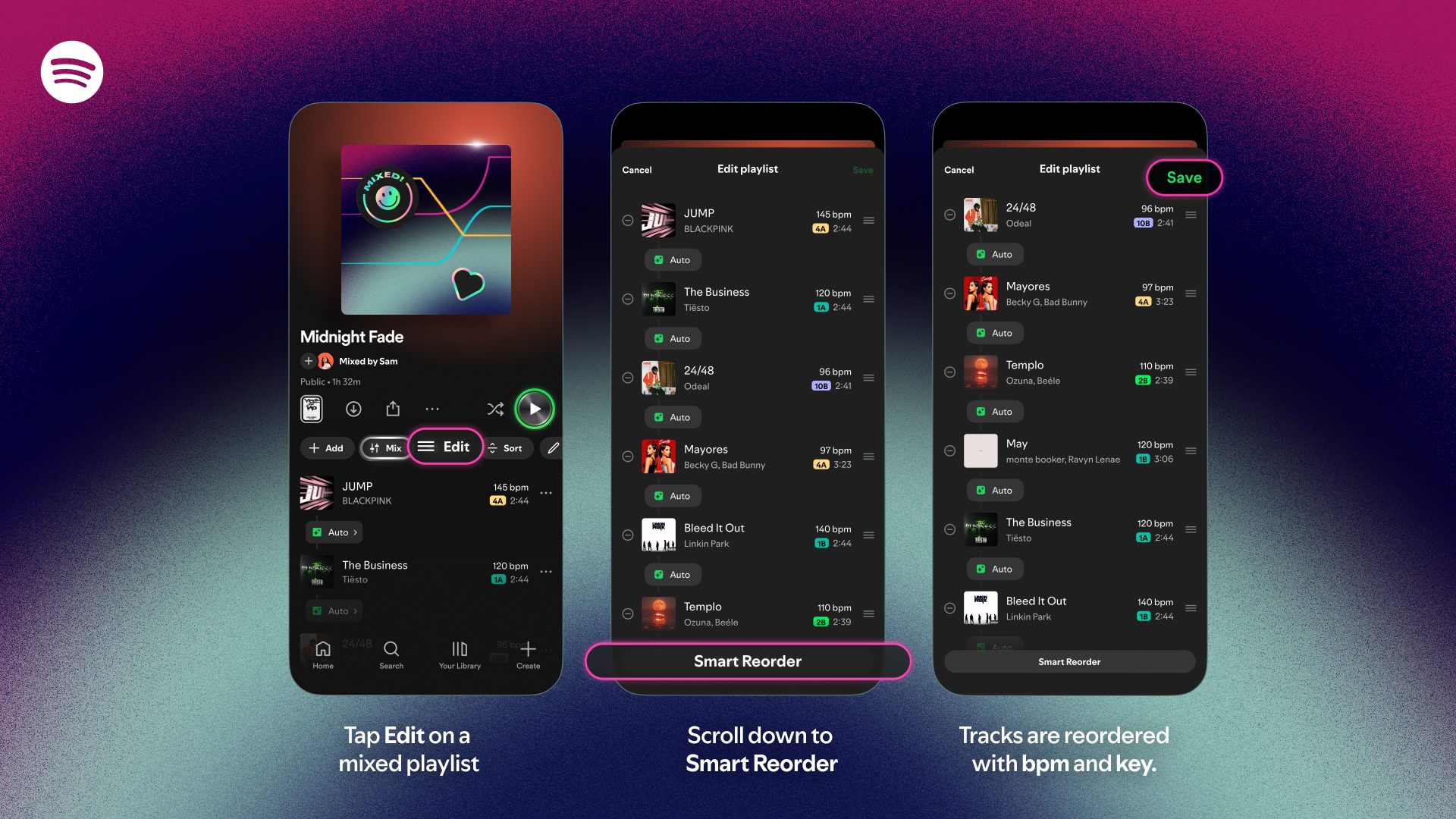
Smart Reorder is a new feature for Spotify Premium users that automatically rearranges playlists based on beats per minute (BPM) and musical key.
How to Use Smart Reorder
- Open a playlist you’ve created.
- Tap Edit.
- At the bottom, tap the new Smart Reorder button.
The playlist will be reordered according to its key and BPM. You can still set individual transitions between songs, or let Spotify handle transitions automatically.
Comparison with Competitors
- Apple Music – AutoMix: Provides basic AI‑driven transitions but lacks the depth of control Spotify offers.
- YouTube Music: Currently has no “AutoMix” or similar transition feature and doesn’t even include a simple crossfade option.
Spotify’s more sophisticated control over playlist transitions should be a breath of fresh air for users looking to craft the perfect listening experience.
Source: Spotify Smart Reorder announcement
Reference: YouTube Music lacks transition features
Reference: Apple Music AutoMix details