
Spotify's latest feature makes it easier to share podcast clips
Published: (May 27, 2026 at 09:02 AM EDT)
2 min read
Source: Engadget
Source: Engadget
Overview
Spotify has introduced a new tool called Podcast Clips that lets you find specific moments in a podcast through a text search and then capture, revisit, and share them.
How It Works
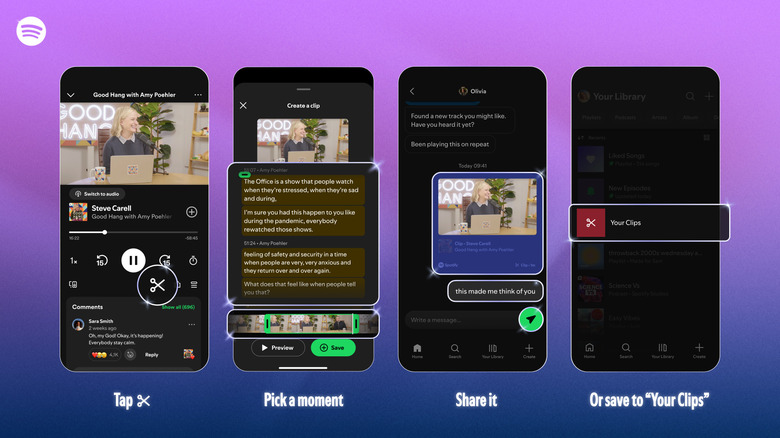
- While listening to any supported podcast, tap the new scissor icon in the Now Playing view.
- A text and video interface (or audio‑only interface for audio‑only podcasts) appears, allowing you to select the moment you want and trim it to the desired length.
- Preview the clip, then save it to your library.
- Share the clip by tapping the sharing button, choosing the “clip” format, and sending it via Spotify Messages or other supported platforms.
Recent Spotify Updates
- AI features: Spotify has added several AI‑related tools, including a chatbot that answers questions about podcast episodes to provide context about hosts or guests.
- Personal podcasts: Users can generate “personal podcasts” from prompts, text, PDFs, and web links.
Sharing Enhancements
Spotify has expanded its sharing options to include:
- Episodes
- Chapters
- Timestamps
- Clips
All of these can be accessed from the share icon.
Availability
Podcast Clips is rolling out globally to both Free and Premium users on mobile. Spotify notes that “availability [will] expand across more shows over time.”