
Production Deployment: Nginx, uWSGI, and Gunicorn for WebSockets
Source: Dev.to
Moving Beyond the Development Server
A common pitfall in Python WebSocket development is moving code that works perfectly with socketio.run(app) in a local environment directly into a production container. While socketio.run() wraps the application in a development server (typically Werkzeug or a basic Eventlet/Gevent runner), it lacks the robustness required for the public internet. It provides no process management, has limited logging capabilities, and cannot handle SSL termination efficiently.
Production WebSocket architectures require a specialized stack. The Python application server (Gunicorn or uWSGI) manages the concurrent greenlets, while a reverse proxy (Nginx) handles connection negotiation, SSL termination, and static asset delivery. This separation of concerns ensures that the Python process remains focused on application logic and message passing, rather than socket‑buffer management or encryption overhead.
Architecture Overview
In a robust production environment, the request flow differs significantly from a standard HTTP REST API. A persistent connection must be established and maintained.
The architecture follows this path:
- Client: Initiates the connection via HTTP (polling) or directly via WebSocket (if supported/configured).
- Nginx (Reverse Proxy): Terminates SSL, serves static assets, and inspects headers. Crucially, it must identify the
Upgradeheader and hold the TCP connection open, bridging the client to the upstream server. - Application Server (Gunicorn/uWSGI): The WSGI container. Unlike standard synchronous workers (which block), this layer must use asynchronous workers (eventlet or gevent) to maintain thousands of concurrent open socket connections on a single OS thread.
- Flask‑SocketIO: The application layer handling the event logic, rooms, and namespaces.

Nginx Configuration for WebSockets
Nginx does not proxy WebSockets by default. It treats the initial handshake request as standard HTTP and, without specific configuration, will strip the Upgrade headers required to switch protocols. Furthermore, Nginx’s default buffering mechanism—designed to optimize HTTP responses—catastrophically breaks the real‑time nature of WebSockets by holding back packets until a buffer fills.
The Critical Directives
To successfully proxy WebSockets, your Nginx location block requires three specific modifications:
- Protocol Upgrade: Explicitly pass the
UpgradeandConnectionheaders. TheConnectionheader value must be set to"Upgrade". - Disable Buffering:
proxy_buffering off;ensures that Flask‑SocketIO events are flushed immediately to the client. - HTTP Version: WebSockets require HTTP/1.1; HTTP/1.0 (the default for
proxy_pass) does not support the Upgrade mechanism.
Production Configuration Block
# Define the upstream - crucial for load balancing later
upstream socketio_nodes {
    ip_hash;               # Critical for Sticky Sessions (see Section 5)
    server 127.0.0.1:5000;
}

server {
    listen 80;
    server_name example.com;

    location /socket.io {
        include proxy_params;
        proxy_http_version 1.1;
        proxy_buffering off;

        # The Upgrade Magic
        proxy_set_header Upgrade $http_upgrade;
        proxy_set_header Connection "Upgrade";

        # Forward to Gunicorn/uWSGI
        proxy_pass http://socketio_nodes/socket.io;

        # Prevent Nginx from killing idle websocket connections
        proxy_read_timeout 86400;
    }
}
The proxy_read_timeout is vital. By default, Nginx may close a connection if no data is sent for 60 seconds. While Socket.IO has a heartbeat, increasing this timeout prevents aggressive pruning of quiet clients.

Gunicorn vs uWSGI for WebSockets
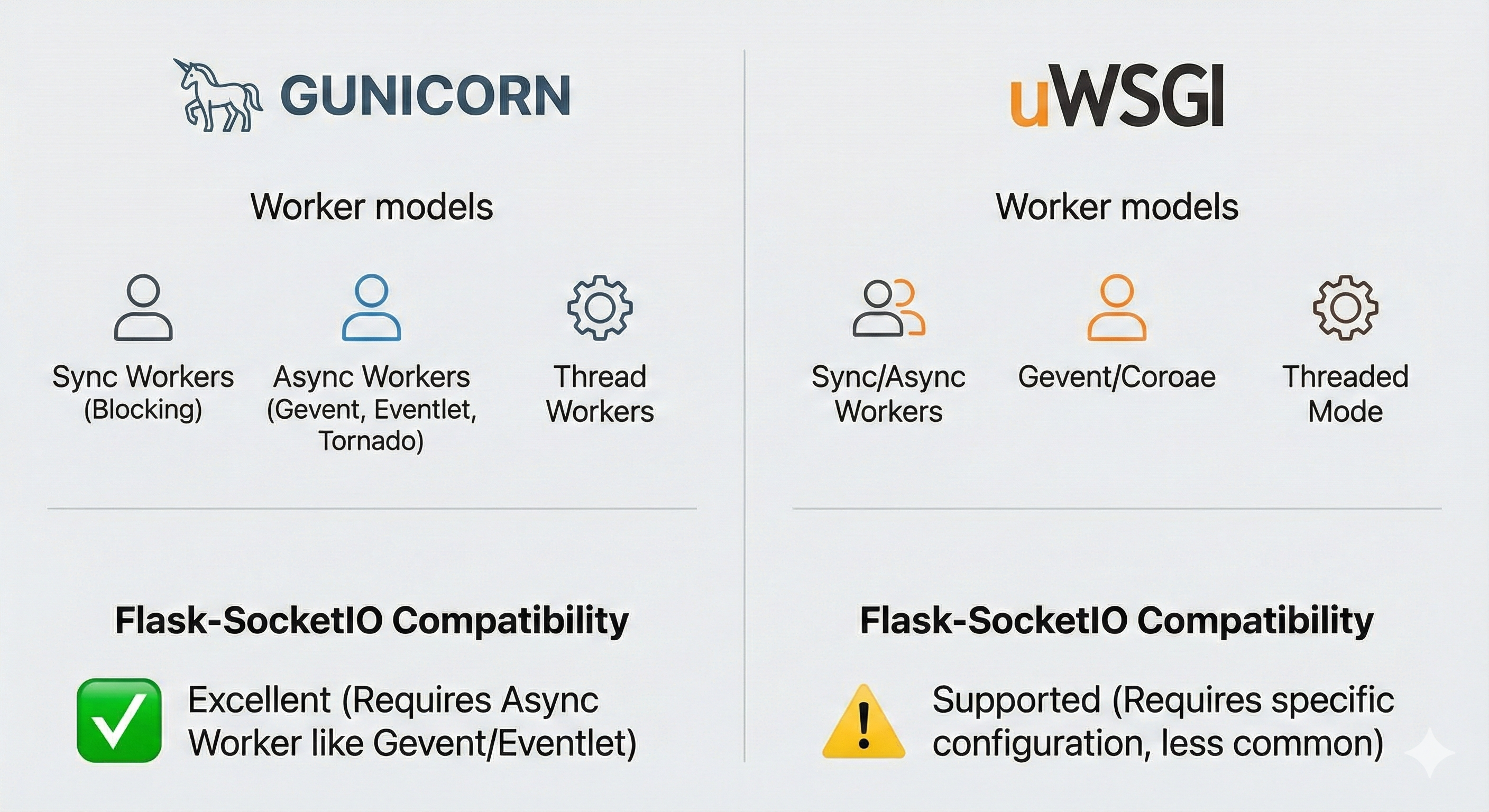
Choosing the right application server is often a point of contention. While both Gunicorn and uWSGI are capable, their handling of asynchronous modes for Flask‑SocketIO differs fundamentally.
Gunicorn: The Recommended Standard
Gunicorn is generally preferred for Flask‑SocketIO deployments due to its native support for eventlet and gevent workers without the need for complex compilation flags or offloading mechanisms.
- Worker Class: You must specify a greenlet‑based worker. Standard sync workers will block on the first WebSocket connection, rendering the server unresponsive to other users.¹
- Command:
gunicorn --worker-class eventlet -w 1 module:app - Concurrency: A single Gunicorn worker with Eventlet can handle thousands of concurrent clients. Adding more workers (
-w 2+) requires a message queue (Redis) and sticky sessions.
uWSGI: Powerful but Complex
uWSGI is a highly performant C‑based server but has a steeper learning curve for WebSockets. It possesses its own native WebSocket support which often conflicts with the Gevent/Eventlet loops used by Flask‑SocketIO libraries.
To make uWSGI work, you generally have two paths:
- Gevent Mode: Run uWSGI with the Gevent loop enabled (
--gevent 1000). - Native … (content truncated)
bSocket Offloading
Use uWSGI’s HTTP WebSocket support (--http-websockets). This requires compiling uWSGI with SSL and WebSocket support, which isn’t always the default in pip packages.¹
Verdict
Use Gunicorn for simplicity and stability with Flask‑SocketIO. Use uWSGI only if you need its specific advanced features or are constrained by an existing infrastructure that mandates it.
Common Production Errors
Deploying WebSockets often results in cryptic errors. Here are the most frequent production issues:
“400 Bad Request” (Session ID Unknown)
Cause: Load‑balancing error. Socket.IO starts with HTTP long‑polling, making several requests (handshake, post data, poll data). If you have multiple Gunicorn workers (e.g., -w 2) or multiple server nodes, and the load balancer (Nginx) sends the second request to a different worker than the first, the connection fails because the new worker has no memory of the session.
Fix: Enable sticky sessions. In Nginx, use the ip_hash directive in the upstream block to route clients to the same backend based on IP.
upstream backend {
    ip_hash;
    server 127.0.0.1:8000;
    server 127.0.0.1:8001;
}
“400 Bad Request” (Handshake Error)
Cause: The Upgrade header was stripped or malformed.
Fix: Verify the following lines are present in the Nginx config:
proxy_set_header Upgrade $http_upgrade;
proxy_set_header Connection "Upgrade";
“502 Bad Gateway”
Cause: Gunicorn/uWSGI is unreachable or crashing.
Fix:
- Ensure the application binds to the correct interface (
0.0.0.0vs.127.0.0.1). - Make sure the upstream port in Nginx matches the Gunicorn bind port.
- Check for blocking calls inside the async worker that could freeze the greenlet loop and trigger health‑check failures.
SSL Termination and WSS
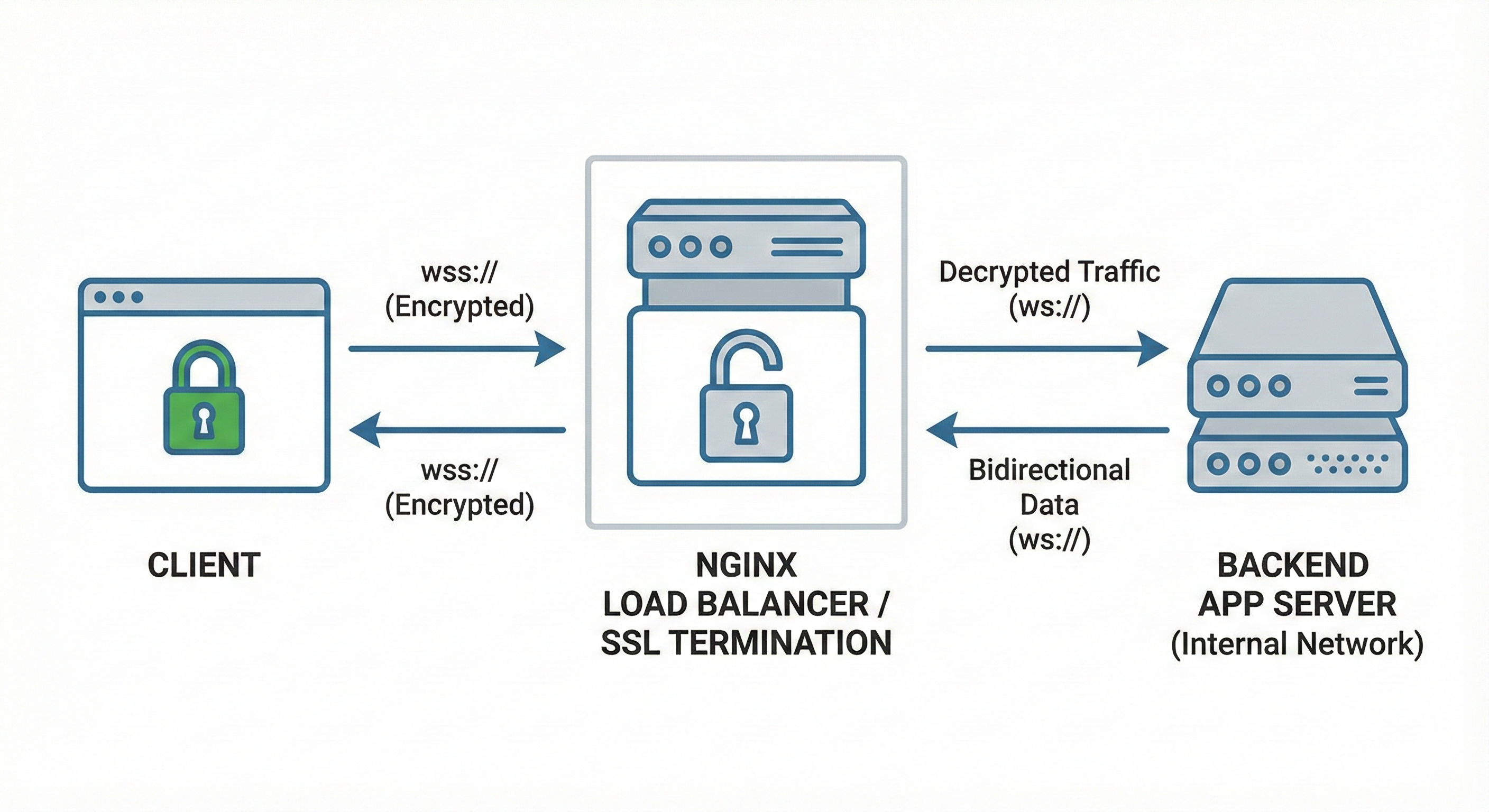
In production you should never handle SSL/TLS inside the Python application itself—encryption is CPU‑intensive. Perform SSL termination at the Nginx level (or at a cloud load balancer).
The Flow
- Client connects via
wss://example.com(Secure WebSocket). - Nginx decrypts the traffic using the SSL certificate.
- Nginx passes unencrypted traffic to Gunicorn via
http://(orws://) over the local loopback network.
Header Forwarding
To let Flask‑SocketIO know the original request was secure (critical for generating correct URLs and cookie flags), forward the protocol header:
proxy_set_header X-Forwarded-Proto $scheme;If you use flask‑talisman or similar security extensions, failing to forward this header will cause infinite redirect loops because the app keeps trying to force an HTTPS upgrade that Nginx has already performed.
Conclusion
Moving Flask‑SocketIO to production requires a shift in architectural thinking. The simple socketio.run(app) command must be replaced by a robust Gunicorn deployment using eventlet or gevent workers to handle high concurrency. Nginx becomes a critical component, requiring explicit configuration to allow WebSocket upgrades and to disable buffering.
Success in production hinges on three pillars:
- Concurrency – Use the correct async worker class.
- Persistence – Configure sticky sessions (
ip_hash) to support the Socket.IO protocol. - Security – Offload SSL termination to the reverse proxy.
By adhering to these patterns, you transform a fragile development prototype into a resilient, scalable real‑time system.