
Liferay Commerce Performance: How We Scaled to 100k+ SKU Imports (Without Crashing the JVM)
Source: Dev.to
If you’ve worked on a Liferay Commerce 7.4 implementation for any serious B2B client, you know the feeling.
Dev goes great. You test your product‑import logic with a CSV of 500 items. It’s fast, snappy, and works like a charm. Then comes UAT (or worse, Production). The client hands you the real master‑data file – 50 000, 100 000, or maybe 250 000 SKUs. You hit Import, and then… silence.
- The logs stop moving.
- The CPU spikes to 100 %.
- The UI freezes.
- Eventually you get a dreaded
java.lang.OutOfMemoryErroror a transaction timeout.
We’ve seen this scenario play out at Nirvana Lab more times than we can count. The reality is that bulk product imports are the single most underestimated performance challenge in enterprise eCommerce.
In this post I’ll skip the marketing fluff and walk you through the exact High‑Performance Import Architecture we use to process 100 k+ SKUs in under 40 minutes—stable, repeatable, and crash‑free.
The “Convenience Trap”: Why OOTB Imports Fail
Before we fix it, we have to understand why the default approach breaks.
Most developers (myself included, in the early days) start by writing a simple service that iterates through a CSV and calls CPDefinitionLocalService for each row.
The problem isn’t the code; it’s the architectural context.
1. The Monolithic Transaction
By default, Liferay tries to wrap the whole request in one transaction. If you have 50 k items, you are asking the database to hold 50 k uncommitted inserts in a rollback segment.
2. Hibernate Session Bloat
Hibernate loves to cache. As you iterate, every single CPDefinition object stays in the first‑level cache (heap memory). It doesn’t get garbage‑collected because the transaction hasn’t closed.
3. The Indexing Storm
This is the silent killer. Every time you add a product, the Indexer wakes up to update Elasticsearch/Solr. Doing this 100 000 times synchronously is performance suicide.
Result: a system that works fine for small catalogs but falls off a cliff as soon as you hit enterprise scale.
The Fix: Chunked, Async, and Deferred
To get high‑performance B2B catalogs running, we tore down the default synchronous model and replaced it with a pattern we call “Chunk‑Commit‑Defer.”
Below is the production‑grade architecture we deployed for our manufacturing clients.
The Architecture (Sequence Diagram)
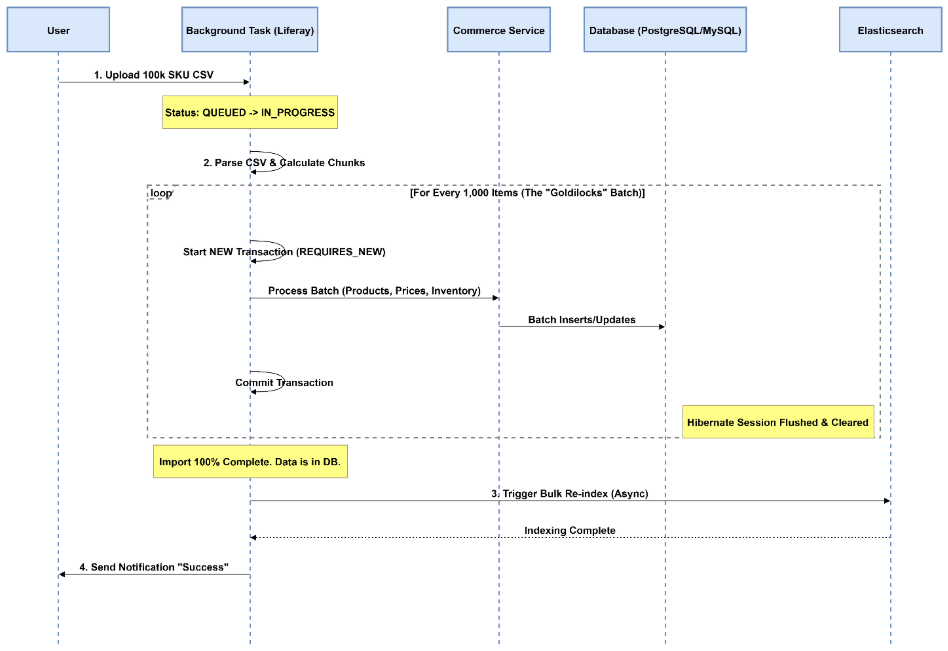
The diagram illustrates the flow. Notice how we break the “Giant Transaction” into bite‑sized pieces and keep the heavy lifting (indexing) for the very end.
Step‑by‑Step Implementation Guide
1. Get Off the Request Thread
Never run a bulk import on the main HTTP thread. If the browser disconnects or the load balancer times out, your import dies in a zombie state.
We use Liferay’s BackgroundTaskExecutor framework. It gives us cluster safety (if one node dies, another picks it up) and built‑in status reporting.
@Component(
    property = "background.task.executor.class.name=com.nirvanalab.commerce.task.ProductImportTaskExecutor",
    service = BackgroundTaskExecutor.class
)
public class ProductImportTaskExecutor extends BaseBackgroundTaskExecutor {
    // Implementation logic here...
}
2. The “Goldilocks” Chunking Strategy
We don’t pass the whole list to the processor. We slice it.
Through extensive benchmarking on Liferay DXP 7.4, we found that a batch size of 500 – 1 000 products is the sweet spot.
| Batch size | Effect |
|---|---|
| ** 5 000** | Hibernate dirty‑checking slows down exponentially |
// The "Outer Loop" inside your Background Task
public void executeImport(List allRows) {
    int batchSize = 1_000;

    for (int i = 0; i  batch = allRows.subList(i, end);

        // This is where the magic happens
        _batchService.processBatchInNewTransaction(batch);

        // Help the Garbage Collector
        batch.clear();
    }
}
Note: The Batch Engine is the preferred modern alternative for large‑scale imports.
3. Transaction Isolation (The Secret Sauce)
Each batch must commit to the database immediately. If you just call a method, it might inherit the parent transaction. Force a new physical transaction with Propagation.REQUIRES_NEW.
@Transactional(propagation = Propagation.REQUIRES_NEW)
public void processBatchInNewTransaction(List batch) {
    for (ProductRow row : batch) {
        // Create Product, set Price, set Inventory …
    }

    // When this method exits, the DB commits and Hibernate flushes.
    // Memory is released.
}
4. Defer the Indexing
If you try to index 100 k products one by one, your import will take 5 hours.
During the import we disable the auto‑reindexing triggers (use IndexerWriterHelper or set the model‑specific indexing to delayed/batch mode if available). The data goes into the database “dark” (unsearchable). Once the loop finishes, we trigger a manual, optimized bulk re‑index.
// Run this ONLY after the loop finishes
Indexer indexer = IndexerRegistryUtil.getIndexer(CPDefinition.class);
indexer.reindex(new String[] { "companyId" }); // Example – adapt to your scope
Recap
| Step | What you do |
|---|---|
| 1 | Off‑load the import to a background task. |
| 2 | Slice the CSV into 500‑1 000‑row chunks. |
| 3 | Wrap each chunk in its own REQUIRES_NEW transaction. |
| 4 | Disable per‑row indexing; run a bulk re‑index after all chunks finish. |
By following this Chunk‑Commit‑Defer pattern you can reliably import hundreds of thousands of SKUs into Liferay Commerce 7.4 without OOM errors, timeouts, or UI freezes.
Happy importing!
etIndexer(CPDefinition.class);

indexer.reindex(CPDefinition.class.getName(), companyId);
The Results: Before vs. After
We recently deployed this architecture for a large automotive parts distributor using Liferay Commerce. The difference was night and day.

Troubleshooting: Lessons from the Trenches
Even with this architecture, we’ve bumped into edge cases. Here are two gotchas to watch out for:
-
The Deadlock Victim
If you try to get fancy and run chunks in parallel threads, you will likely hit database deadlocks on the CPInstance or Inventory tables.Our advice: Stick to single‑threaded sequential chunks. It’s fast enough, and complexity breeds bugs.
-
The Media Trap
Do not try to import high‑res product images in the same transaction as your metadata. Processing binaries eats heap memory.Our advice: Run a Data Pass first (SKUs, Prices, Stock), and then run a separate Media Pass to attach images.
Final Thoughts
Scaling Liferay Commerce isn’t about throwing more hardware at the problem. It’s about respecting the physics of the database and the JVM.
By breaking the monolith into chunks and controlling your transaction boundaries, you can turn a fragile import process into a robust, enterprise‑grade data pipeline.
Struggling with Liferay performance? At Nirvana Lab, we specialize in fixing the “unfixable” performance issues in high‑scale manufacturing and retail implementations.