
Introducing Managed Instances in the Cloud
Source: Dev.to


For many years, organizations embracing the public cloud have known two main types of compute services:
- Customer‑managed (IaaS)
- Fully managed or serverless (PaaS)
The key difference is who is responsible for maintaining the underlying compute nodes (OS patching, hardening, monitoring, etc.) and how scaling is handled (adding/removing nodes based on load).
In an ideal world we would prefer a fully managed (or serverless) solution, but there are use‑cases where we need direct VM access (e.g., SSH for OS‑level configuration).
In this post I review several managed‑instance services and compare them with their fully managed alternatives.
Function as a Service
The only alternative I managed to find is AWS Lambda Managed Instances.
AWS Lambda has been in the market for many years and is the most common serverless compute service (though not the only one). Below is a comparison between standard AWS Lambda and AWS Lambda Managed Instances:

When to Use Which Alternative
Use AWS Lambda (Standard) if:
- Traffic is bursty or unpredictable – you need to scale from zero to thousands of concurrent executions in seconds.
- Low or intermittent volume – “scale‑to‑zero” saves cost during idle periods.
- Strict isolation is required – each request runs in its own Firecracker microVM.
- Simplicity is key – just upload code and run, no infrastructure decisions.
Use AWS Lambda Managed Instances if:
- Traffic is high & predictable – steady‑state workloads make always‑on EC2 (with Savings Plans) cheaper than per‑request billing.
- Workloads are compute/memory intensive – you need specific CPU‑to‑RAM ratios or specialized instruction sets not offered by standard Lambda.
- Latency sensitivity – you cannot tolerate cold‑start latency; instances stay warm.
- High I/O concurrency – many I/O‑bound tasks can share a single vCPU efficiently.
Container Service
Amazon ECS is a highly scalable container orchestration service that automates deployment and management of containers across AWS infrastructure.
Below is a comparison between Amazon ECS (self‑managed EC2) and Amazon ECS Managed Instances:

When to Use Which Alternative
Use Amazon ECS (Self‑Managed EC2) if:
- Custom AMIs are required – compliance or legacy software needs a hardened OS image or custom kernel modules.
- Host access is needed – you require SSH to the underlying node for deep debugging, forensic auditing, or installing host‑level agents not supported by ECS.
- Cost is the sole priority – you want to avoid the additional management fee and have a team that can manually optimise bin‑packing and Spot usage.
- Legacy / hybrid constraints – extending on‑prem network configurations or storage drivers that need manual OS setup.
Use Amazon ECS Managed Instances if:
- GPUs or high memory are needed – you need hardware (e.g., GPU instances for AI/ML) that AWS Fargate doesn’t support, but you don’t want to manage the OS.
- “Fargate‑like” operations with EC2 pricing – you want patching and Auto Scaling Group management offloaded while still using Reserved Instances or Savings Plans.
- Security compliance – you need automated node rotation (e.g., every 14 days) for security patching without building your own pipelines.
- Steady‑state workloads – predictable traffic makes always‑on EC2 instances more cost‑effective than Fargate’s per‑second billing.
Kubernetes Service
Amazon EKS is a fully managed service that simplifies running, scaling, and securing containerized applications by automating the management of the Kubernetes control plane on AWS.
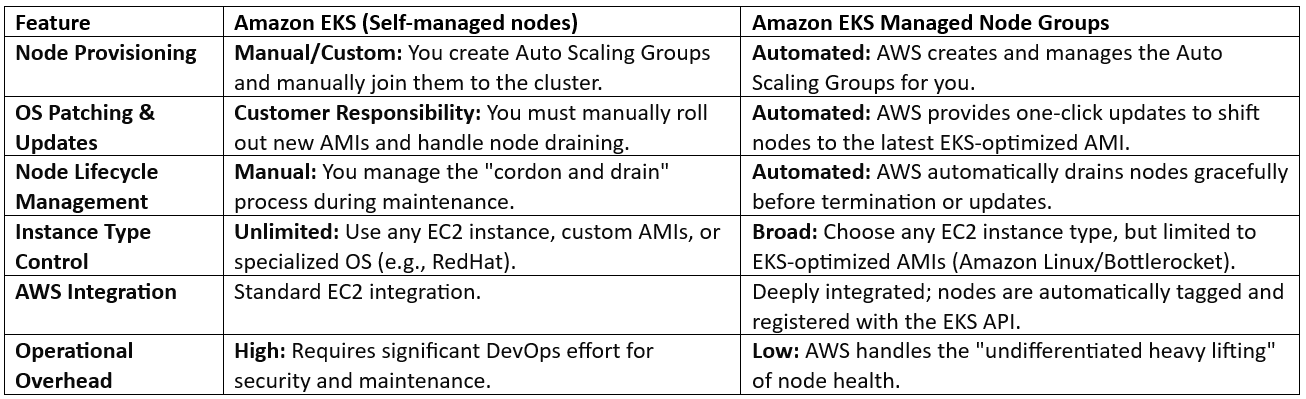
Below is a comparison between Amazon EKS (self‑managed nodes) and Amazon EKS Managed Node Groups:
When to Use Which Alternative
Use Amazon EKS Managed Node Groups If:
- Standard Kubernetes Workloads – you are running standard applications and want to minimize the time spent on infrastructure maintenance.
- Simplified Scaling – you want EKS to automatically handle the creation of Auto Scaling Groups that are natively aware of the cluster state.
- Automated Security – you want a streamlined way to apply security patches and OS updates to your cluster nodes without downtime.
- Operational Efficiency – you have a small team and need to focus on application code rather than Kubernetes “plumbing.”
Use Amazon EKS Self‑Managed Nodes If:
- Custom Operating Systems – you must use a specific, hardened OS image (e.g., a highly customized Ubuntu or RHEL) that is not supported by Managed Node Groups.
- Complex Bootstrap Scripts – you need to run intricate “User Data” scripts during node startup that require fine‑grained control over the initialization sequence.
- Unique Networking Requirements – you are using specialized networking plugins or non‑standard VPC configurations that require manual node configuration.
- Legacy Compliance – you have strict regulatory requirements that mandate manual oversight and “manual sign‑off” for every single OS‑level change.
Summary
In this blog post I reviewed several compute services (from FaaS, containers, and managed Kubernetes), each with alternatives for either the customer managing the compute nodes or AWS managing them.
By leveraging AWS Lambda Managed Instances, Amazon ECS Managed Instances, and Amazon EKS Managed Node Groups, organizations can achieve high hardware performance without the burden of operational complexity. The primary advantage of this managed tier is the ability to decouple hardware selection from operating‑system maintenance. Developers can hand‑pick specific EC2 families—such as GPU‑optimized instances for AI or Graviton for cost efficiency—while AWS handles security patching and instance‑lifecycle updates.
Disclaimer: AI tools were used to research and edit this article. Graphics are created using AI.
About the Author
Eyal Estrin is a seasoned cloud and information‑security architect, AWS Community Builder, and author of Cloud Security Handbook and Security for Cloud‑Native Applications. With over 25 years of experience in the IT industry, he brings deep expertise to his work.
Connect with Eyal on social media: https://linktr.ee/eyalestrin
The opinions expressed here are his own and do not reflect those of his employer.