
How we rebuilt the search architecture for high availability in GitHub Enterprise Server
Source: GitHub Blog
Improving Search Reliability in GitHub Enterprise Server
Much of what you interact with on GitHub depends on search—whether it’s the search bars, the filtering experience on the Issues page, the releases page, the projects page, or the counts for issues and pull requests. Because search is such a core part of the platform, we’ve spent the last year making it more durable. The result? Less time spent managing GitHub Enterprise Server (GHES) and more time working on what your customers care about.
Why Search Indexes Matter
In recent years, GHES administrators needed to be especially careful with search indexes—the special database tables optimized for searching. If maintenance or upgrade steps weren’t followed in the exact order required, indexes could become damaged, need repair, or become locked, causing problems during upgrades.
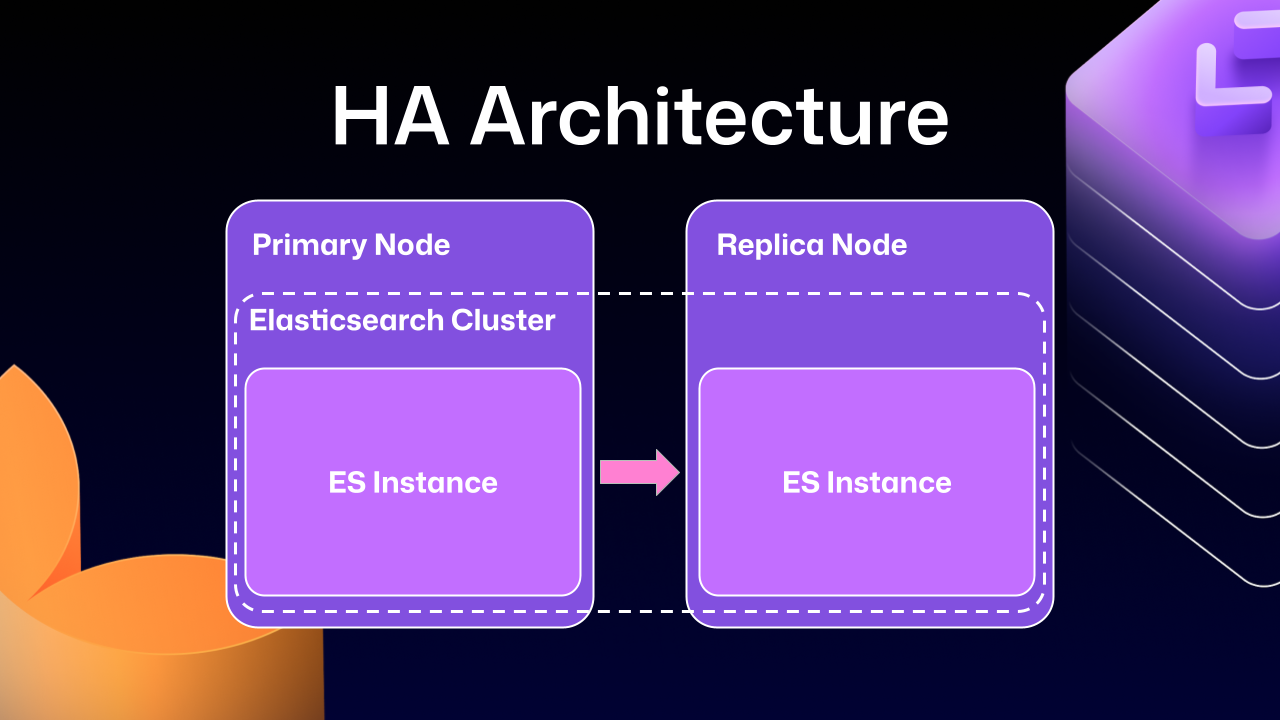
High‑Availability (HA) Architecture – Quick Overview
HA setups keep GHES running smoothly even if part of the system fails:
- Primary node – handles all writes and traffic.
- Replica nodes – stay in sync with the primary and can take over if needed.
Note: The diagram below shows the primary and replica nodes together with an Elasticsearch cluster that powers search.
How Elasticsearch Was Integrated
Previous GHES versions integrated Elasticsearch (our search database) using a leader/follower pattern:
| Role | Description |
|---|---|
| Leader (primary server) | Receives all writes, updates, and traffic. |
| Followers (replicas) | Read‑only; serve search queries. |
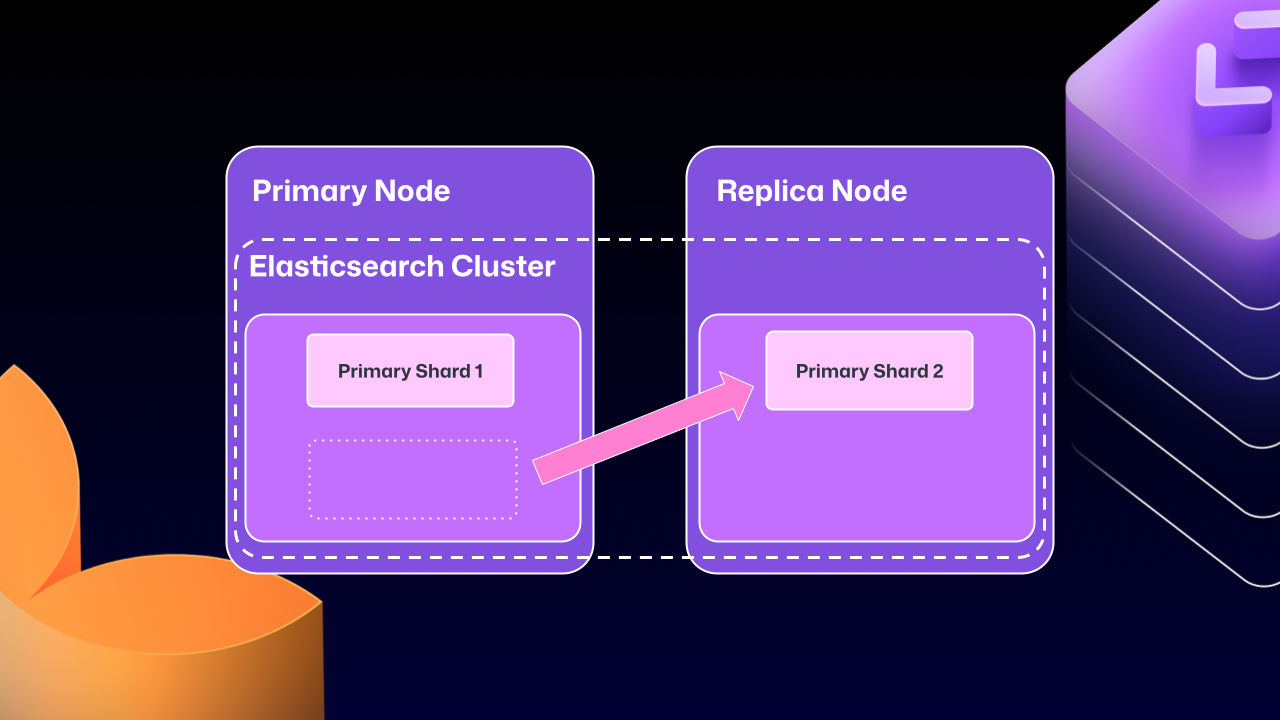
Because Elasticsearch couldn’t natively support a primary‑replica split across servers, GitHub engineers built an Elasticsearch cluster spanning the primary and replica nodes. This gave two benefits:
- Straightforward data replication.
- Local handling of search requests on each node, improving performance.
The Problems with Cross‑Server Clustering
Over time, the drawbacks of this approach outweighed the benefits:
- Primary shard migration – Elasticsearch could move a primary shard (the write‑receiving shard) to a replica node.
- Maintenance dead‑lock – If the replica holding the moved primary shard was taken down for maintenance, GHES could become locked. The replica would wait for Elasticsearch to become healthy, but Elasticsearch couldn’t recover until the replica rejoined.
Attempts to Stabilize the System
For several GHES releases, engineers introduced safeguards:
- Health checks to ensure Elasticsearch was in a good state before proceeding.
- Automated processes to correct drifting states.
- A “search mirroring” prototype aimed at moving away from the clustered mode.
Despite these efforts, database replication at this scale proved extremely challenging, and the system still suffered from consistency issues.
What’s Next?
Our ongoing work focuses on:
- Decoupling Elasticsearch from the HA node topology.
- Providing a more robust, single‑node‑or‑clustered search service that doesn’t rely on cross‑server primary shard movement.
- Delivering clearer upgrade and maintenance procedures that eliminate the risk of locked states.
Stay tuned for upcoming releases that will bring these improvements to production.
What changed?
After years of work, we’re now able to use Elasticsearch’s Cross‑Cluster Replication (CCR) feature to support HA GitHub Enterprise.
“But David,” you say, “that’s replication between clusters. How does that help here?”
I’m glad you asked. With this mode we’re moving to several single‑node Elasticsearch clusters. Each Enterprise Server instance will now operate as an independent single‑node cluster.
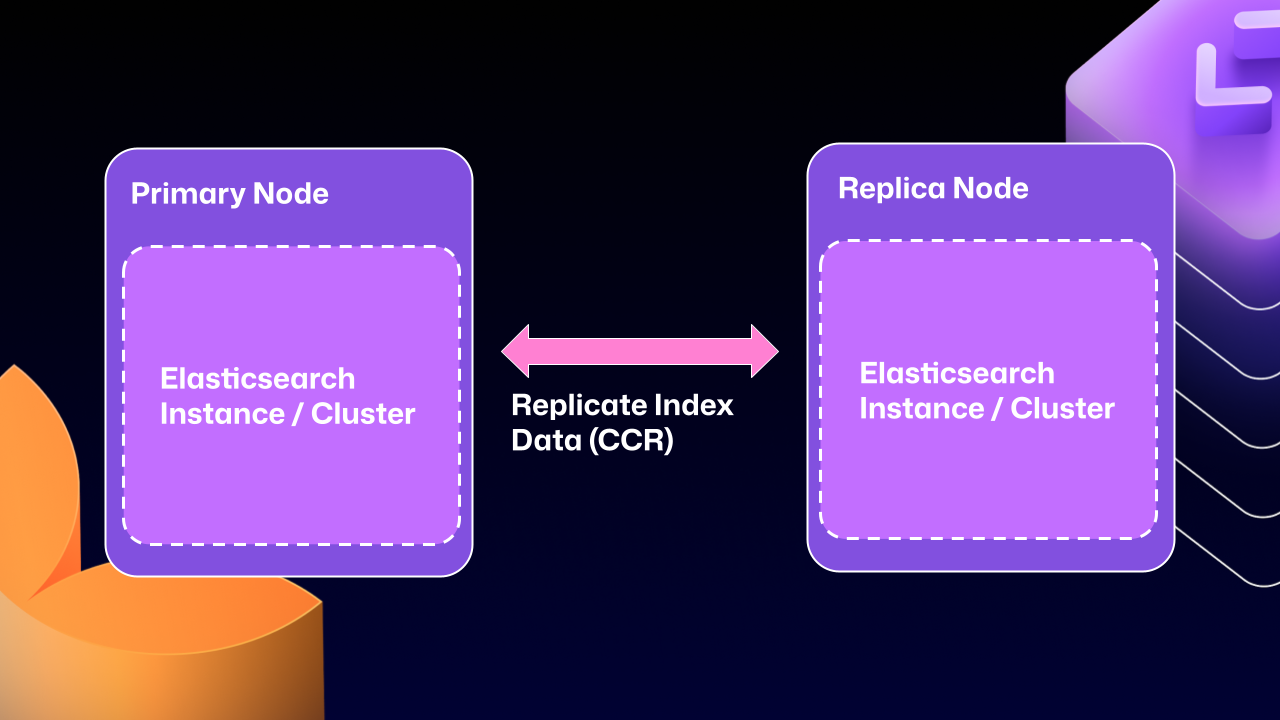
CCR lets us share index data between nodes in a way that is:
- Carefully controlled
- Natively supported by Elasticsearch
It copies data once it’s been persisted to the Lucene segments (Elasticsearch’s underlying data store). This ensures we’re replicating data that has been durably persisted within the Elasticsearch cluster.
In other words, now that Elasticsearch supports a leader/follower pattern, GitHub Enterprise Server administrators will no longer be left in a state where critical data winds up on read‑only nodes.
Under the hood
Elasticsearch provides an auto‑follow API, but it only applies to indexes that are created after the policy exists.
GitHub Enterprise Server HA installations already contain a long‑lived set of indexes, so we need a bootstrap step that:
- Attaches followers to the existing indexes, and
- Enables auto‑follow for any indexes created in the future.
Sample bootstrap workflow
def bootstrap_ccr(primary, replica):
    """
    Bootstrap cross‑cluster replication (CCR) between a primary and a replica
    GitHub Enterprise Server cluster.
    """
    # 1️⃣ Fetch the current indexes on each cluster
    primary_indexes  = list_indexes(primary)
    replica_indexes = list_indexes(replica)

    # 2️⃣ Filter out system indexes – we only manage GHE indexes
    managed = filter(primary_indexes, is_managed_ghe_index)

    # 3️⃣ Ensure every managed index has a follower on the replica
    for index in managed:
        if index not in replica_indexes:
            # Index does not exist on replica → create follower index
            ensure_follower_index(replica, leader=primary, index=index)
        else:
            # Index already exists → make sure it is following the leader
            ensure_following(replica, leader=primary, index=index)

    # 4️⃣ Install an auto‑follow pattern for future indexes
    ensure_auto_follow_policy(
        replica,
        leader=primary,
        patterns=[managed_index_patterns],
        exclude=[system_index_patterns],
    )
Why this matters
- Custom lifecycle management – Elasticsearch only replicates documents.
We must handle the rest of the index lifecycle (creation, deletion, failover, upgrades). - Failover & upgrades – Additional custom workflows have been built to safely migrate or delete indexes and to support rolling upgrades.
This bootstrap routine is one of the key pieces that enables CCR for GitHub Enterprise Server while preserving the existing index set.
How to Get Started with CCR Mode
-
Request access – Email support@github.com and let the team know you’d like to use the new HA mode for GitHub Enterprise Server. They’ll set up your organization so you can download the required license.
-
Download the license – Once you have the license file, enable CCR in the Elasticsearch configuration:
ghe-config app.elasticsearch.ccr true -
Apply the configuration – Run
config-applyor perform an upgrade on your cluster to move to 3.19.1, the first release that supports this architecture. -
Restart the server – After the restart, Elasticsearch will migrate the installation to the new replication method. This process:
- Consolidates all data onto the primary nodes
- Breaks clustering across nodes
- Restarts replication using CCR
The migration time depends on the size of your GitHub Enterprise Server instance.
Note: The new HA method is optional for now, but it will become the default over the next two years. We encourage you to try it early and share feedback.
Want to get the most out of search on your High‑Availability GitHub Enterprise Server deployment?
Reach out to support to get set up with our new search architecture!
Written by

David Tippett – GitHub Software Engineer
David is an expert in search engineering, covering everything from infrastructure to relevance engineering within GitHub.
Explore More from GitHub
- Docs – Everything you need to master GitHub, all in one place.
- GitHub – Build what’s next on GitHub, the place for anyone from anywhere to build anything.
- Customer stories – Meet the companies and engineering teams that build with GitHub.
- The GitHub Podcast – Catch up on the podcast covering topics, trends, stories, and culture in the open‑source developer community.