
How I Taught My Agent My Design Taste
Why I Did This
My goal wasn’t to “outsource” my creativity. I wanted to use Genuary as a sandbox to learn agentic‑engineering workflows, which are quickly becoming the standard way developers work with AI‑augmented tools.
To keep my skills sharp, I used goose to experiment with these workflows in short, daily bursts.
- By letting goose handle execution, I could test different architectures side‑by‑side.
- The experiment let me see which parts of an agentic workflow actually add value and which parts I could ditch.
- I spent a few hours building the infrastructure, buying myself an entire month of workflow data.
💡 Skills – reusable sets of instructions and resources that teach goose how to perform specific tasks.
See the docs:
The Inspiration
I have to give a huge shout‑out to my friend Andrew Zigler. I saw him crushing Genuary and reached out to learn how he was doing it. He shared his creations and mentioned he was using a “harness.”
I’d been hearing the term all December but didn’t actually know what it meant. Andrew explained:
A harness is just the toolbox you build for the model. It’s the set of deterministic scripts that wrap the LLM so it can interact with your environment reliably.
He had used this approach to solve a different challenge—building a system that could iterate, submit, and verify itself. The idea is to spend time up‑front defining a spec and constraints, then delegate. Once you have deterministic tools with good logging, the agent loops until it hits its goal.
My usual approach is very vanilla and prompt‑heavy, but I was open to experimenting because Andrew was getting excellent results.
Harness vs. Skills
Inspired by that conversation, I built two versions of the same workflow to see how they handled the daily Genuary prompts.
| Approach | Location | Description |
|---|---|---|
| 1. Harness + Recipe | /genuary | A shell script acts as the harness, handling scaffolding (folder creation, surfacing the daily prompt) so the agent doesn’t have to guess where to go. The recipe is ~300 lines, fully self‑contained. |
| 2. Skills + Recipe | /genuary-skills | The recipe is leaner because it delegates the “how” to a skill. The skill contains the design philosophy, references, and examples, letting the agent “discover” its instructions from a bundle rather than a flat script. |
I spent one focused session building the entire system:
- Recipes – the step‑by‑step instructions that generate the daily Genuary output.
- Skills – reusable knowledge bundles that encapsulate design philosophy, reference material, and example snippets.
- Harness scripts, templates, and GitHub Actions – automation that creates the folder structure, injects the prompt, runs the recipe/skill, and commits the result.
(All of this happened in the quiet hours of my December break, with my one‑year‑old sleeping on my lap.)
The short‑term effort bought long‑term leverage: from that point on the system did the daily work automatically.
On Taste
The automation was smooth, but when I reviewed the output I noticed everything looked suspiciously similar.
That got me thinking about the discourse that you can’t teach an agent “taste.” Here’s how I develop taste personally:
- Seeing what’s cool and copying it.
- Knowing what’s over‑played because you’ve seen it too much.
- Following people with “good taste” and absorbing their patterns.
I asked Goose about the problem:
“I noticed it always does salmon‑colored circles… we said creative… any ideas on how to make sure it thinks outside the box?”

Goose replied that it was following a p5.js template it retrieved, which included a fill(255, 100, 100) (salmon!) value and an ellipse example. Since LLMs anchor heavily on concrete examples, the agent was following the code more than my “creative” instructions.
I removed the salmon circle from the template, then went further: I asked how to ban common AI‑generated clichés altogether. Goose searched discussions, pulled examples, and produced a banned‑list of patterns that scream “AI‑generated.”
BANNED CLICHÉS
| Category | Banned Patterns |
|---|---|
| Color Crimes | Salmon or coral pink, teal & orange combos, purple‑pink‑blue gradients. |
| Composition Crimes | Single centered shapes, perfect symmetry with no variation, generic spirals. |
| The Gold Rule | If it looks like AI‑generated output, do not do it. |
ENCOURAGED PATTERNS
| Category | Encouraged Patterns |
|---|---|
| Color Wins | HSB mode with shifting hues, complementary palettes, gradients that evolve over time. |
| Composition Wins | Particle systems with emergent behavior, layered depth with transparency, hundreds of elements interacting. |
Takeaway
You can automate the process of generating creative code, but you still need a human hand to define and curate the aesthetic “taste.” By combining deterministic harnesses (or well‑crafted skills) with thoughtful constraints, you can give an agent the freedom to explore while keeping it from falling into cliché.
Movement Wins
Noise‑based flow fields, flocking/swarming, organic growth patterns, breathing with variation.
Inspiration Sources
- Natural phenomena: starlings murmuration, fireflies, aurora, smoke, water.
The Gold Rule
If it sparks joy and someone would want to share it, you’re on the right track.
Note: Goose determined this list through pattern recognition. So perhaps agents can use patterns to reflect my taste—not because they understand beauty, but because I’m explicitly teaching them what I personally respond to.
I showed Andrew my favorite output of the three days: butterflies lining themselves in a Fibonacci sequence.
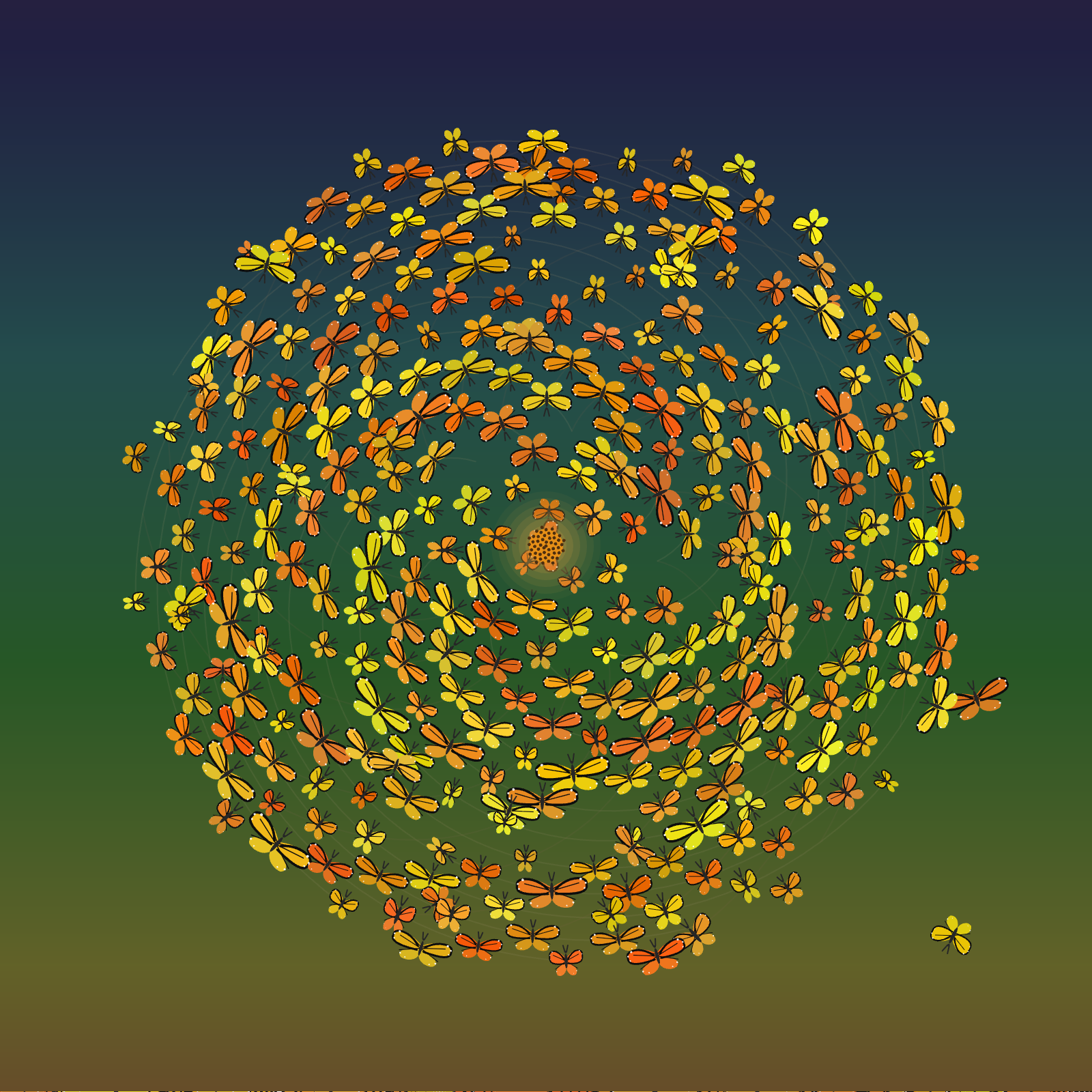
His response was validating:
“WOW that’s an incredible Fibonacci… I’d be really curious to know your aesthetic prompting. Mine leans more pixel art and mathematical color manipulation because I’ve conditioned it that way… I like that yours leaned softer and tried to not look computer‑created… like phone wallpaper practically lol. How did you even get that cool thinned line art on the butterflies? It looks like a base image. It’s so cool. Did it draw SVGs? Like where did those come from?”
Because I’d specifically told Goose to look at “natural phenomena” and “organic growth,” it used Bézier curves for the wings, shifted the colors based on the spiral position to create depth, and applied a warm amber‑to‑blue gradient instead of stark black.
Scaling Visual Feedback Loops
Both workflows use the Chrome DevTools MCP server so Goose can see the output and iterate on it. This created a conflict where multiple instances couldn’t share the same Chrome profile. I didn’t want a manual step, so I asked the agent if it was possible to run Chrome DevTools in parallel. The solution was assigning separate user‑data directories.
# genuary recipe example
- type: stdio
  name: Chrome Dev Tools
  cmd: npx
  args:
    - -y
    - chrome-devtools-mcp@latest
    - --userDataDir
    - /tmp/genuary-harness-chrome-profile
Enter fullscreen mode
Exit fullscreen mode
What I Learned
I automated execution so I could study taste, constraint design, and feedback loops.
| Approach | Characteristics |
|---|---|
| Harness‑based workflow | More reliable and efficient; produces predictable results; follows instructions faithfully and optimizes for consistency. |
| Skills‑based approach | Messier; surfaces more surprises; makes stranger connections; requires more editorial intervention; feels more like a collaboration than a pipeline. |
This reinforced for me that the “AI vs. human” framing is too simplistic. Automation handles repetition and speed well, but taste still lives in constraint‑setting, curation, and deciding what should never happen. I ended up not automating taste; instead, the system made my preferences legible enough to be reflected back to me.
See the Code
The code and full transcripts live in my Genuary 2026 repo. Each day’s folder contains the complete conversation history, including pitches, iterations, and the back‑and‑forth between me and the agent. You can also view the creations on the Genuary 2026 site.