
🚀 How Developers Can Stop Pretending to Understand AI Buzzwords
Source: Dev.to
“If you can’t explain it simply, you don’t understand it well enough.” — Albert Einstein
You know that feeling when someone starts talking about agentic AI workflows with RAG pipelines and vector embeddings and everyone nods like they totally get it? I was that developer—pretending to understand while feeling completely lost.
A few months ago I hit my breaking point. Every dev thread, every tech talk was just buzzword soup with zero actual clarity. So I stopped faking it and decided to actually learn this stuff. Plot twist: most people are faking it too.
The Research Paper Rabbit Hole
My first move? Dive into IBM research papers. They’re thorough and well‑researched, but also dense—my brain exploded after reading just one.
Next stop: YouTube. There’s brilliant content out there, but after watching a video on transformers, another on embeddings, and hearing a casual mention of “attention mechanisms,” I was left wondering how it all connected.
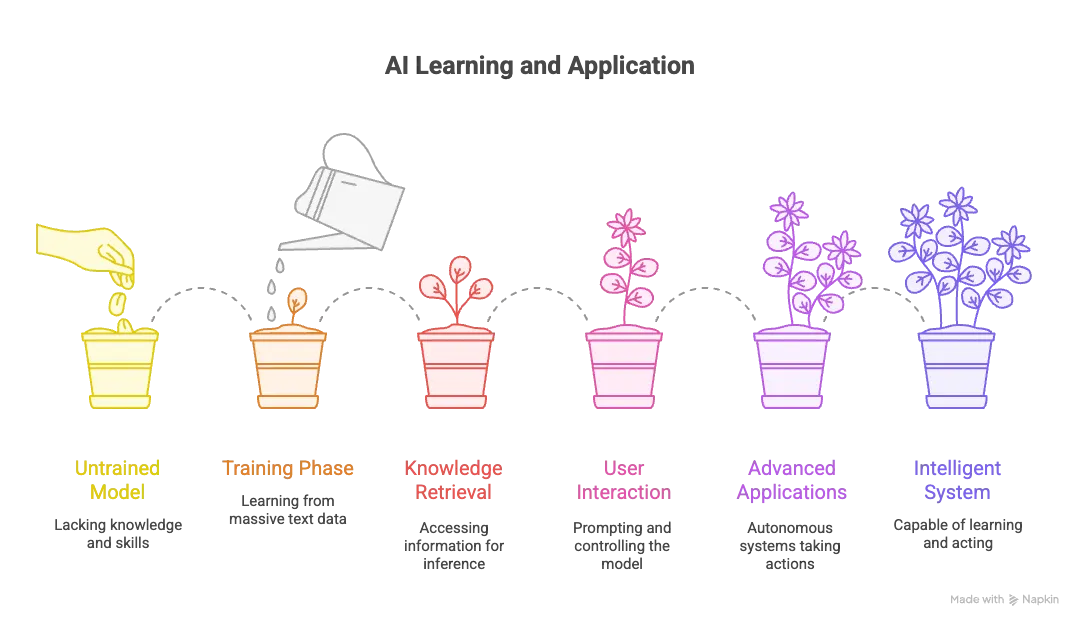
I kept thinking: “Can someone PLEASE just give me one clean map? All of it. In one place. That actually makes sense?”
So… I made one.
Key Takeaways
- A plain‑talk view of AI terms that often feel too dense or “expert‑only.”
- How the basics link together — models, prompts, safety, and the layers that hold the AI stack in place.
- Why prompts matter, why they sometimes go wrong, and how to keep them on track.
- How machines learn, retrieve information, and produce better answers.
- The flow from simple chat systems to tools, tasks, and full‑on AI helpers that can act on your behalf.
- The ability to read AI threads, posts, papers, or videos without feeling lost or drained.
Grab a paper and pen, take notes, and absorb at your own pace. No rush.
Before We Start
If you’re completely new, make sure you’ve heard of these concepts:
Core Concepts
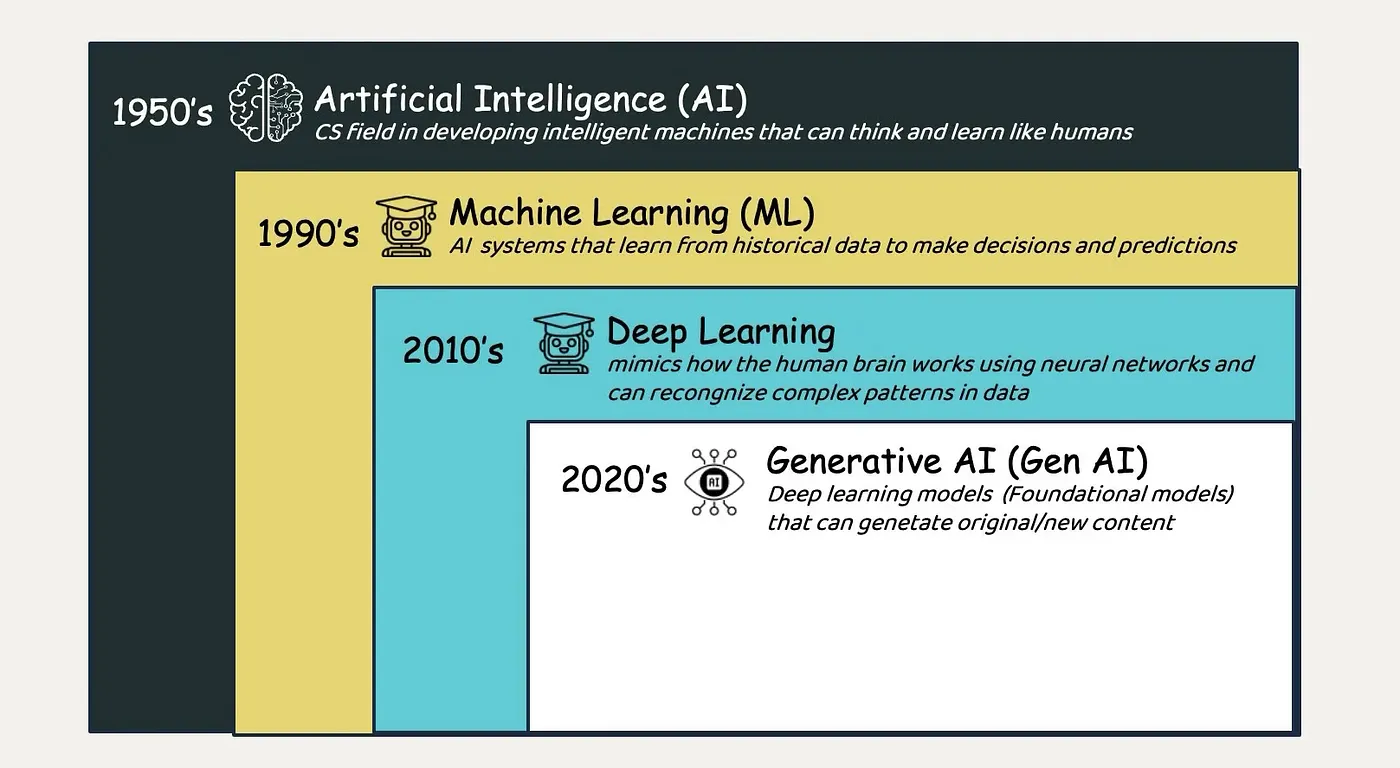
- Neural Networks – Brain‑inspired structures of interconnected nodes that process information.
- Deep Learning – Stacking many neural‑network layers to learn complex patterns from large datasets.
- Natural Language Processing (NLP) – Teaching computers to understand, interpret, and generate human language.
- Machine Learning – The broader field where computers learn patterns from data without explicit programming for every scenario.
- Training Data – The collection of examples used to teach AI models patterns and relationships.
- Model – The trained AI system that can make predictions or generate outputs.
- Algorithm – The mathematical rules guiding how a model learns from data.
- Pattern Recognition – AI’s ability to identify recurring structures, relationships, and trends in data.
- Prediction – How trained models generate outputs by using learned patterns to guess what comes next.
- Inference – Using a trained model to generate outputs or make decisions on new, unseen data.
The Four‑Phase Journey
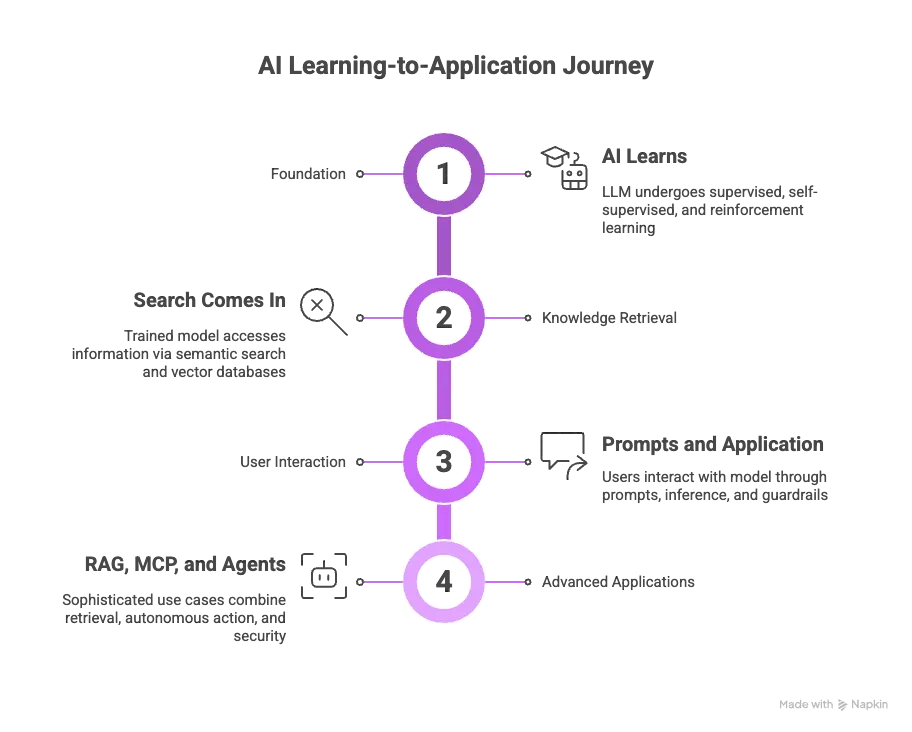
The Four‑Phase Learning Framework
Instead of drowning in terminology, here’s how AI concepts actually connect.
🎯 Phase 1: The Foundation — How AI Learns
The large language model (LLM) must first learn through training, which happens in three fundamental ways:
- Supervised learning – Learning from labeled examples.
- Self‑supervised learning – Predicting missing pieces in unlabeled data (how modern LLMs are trained).
- Reinforcement learning – Trial‑and‑error with feedback.
The Training Pipeline
During training the model processes massive amounts of text by:
- Breaking it into tokens.
- Converting tokens into embeddings.
- Using attention mechanisms to determine which parts matter most.
- Building patterns across transformer layers that capture complex relationships.
To make models production‑ready we apply:
- Distillation – Shrinking large models into smaller, faster ones.
- Quantization – Reducing numerical precision (e.g., from 32‑bit to 8‑bit or 4‑bit) for faster inference on limited hardware.
🔍 Phase 2: Knowledge Retrieval — Bridging Training and Real‑Time Access
Once trained, models need efficient ways to access information during inference. This is where semantic search and vector databases become critical.
How Semantic Search Works
Unlike traditional keyword matching, semantic search understands meaning:
- Searching “smartphone” also retrieves “cellphone” and “mobile devices”.
- Related concepts live close together in vector space.
Vector Databases
Vector databases store data as high‑dimensional numerical arrays, enabling lightning‑fast similarity searches essential for real‑time AI applications. This retrieval capability bridges what models learned during training with the information they can access when answering your questions.
💬 Phase 3: User Interaction — Prompts, Safety, and Inference
Prompts are the interface for communicating with AI. When you submit a prompt, the model:
- Tokenizes the input.
- Converts tokens to embeddings.
- Generates responses one token at a time through inference.
- Calculates probabilities for potential next tokens.
- Outputs the most likely token.
Prompt Engineering Techniques
- Zero‑shot – No examples provided.
- Few‑shot – Providing a few sample outputs.
- Chain‑of‑thought – Step‑by‑step reasoning.
Safety Considerations
Prompts introduce risks:
- Hallucinations – Fabricated responses not grounded in training data.
- Prompt injection – Malicious instructions disguised as user input.
That’s why guardrails—safeguards operating across data, models, applications, and workflows—are essential to keep AI systems safe and reliable.