
Google Meet now lets you choose what’s included in your meeting notes
Source: Android Authority
TL;DR
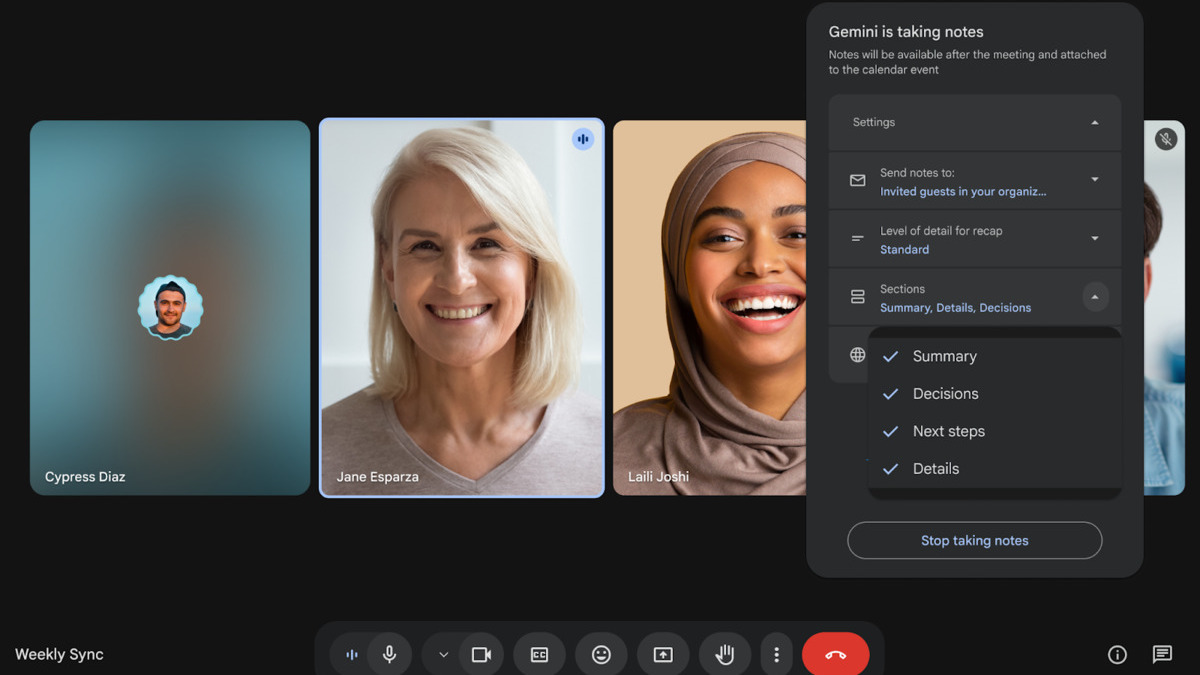
- You can now toggle which “Take notes for me” sections appear in your notes.
- The Summary section is now more concise and scannable.
- A “Decisions” section has been added to the Google Meet feature.
New customization options for “Take notes for me”
Google recently announced that the Meet app’s “Take notes for me” feature would be expanding, allowing you to use the tool whether you’re attending a meeting hosted on a third‑party provider or in‑person. This month, Google is adding more customization options and a new Decisions section.
Meeting notes are divided into separate sections:
- Summary
- Decisions
- Next steps
- Details
You can now choose which of these sections appear in your notes. The toggles you set apply only to the current meeting; defaults are restored for future calls.
Decisions section
The new Decisions section “captures outcomes and tracks their status, such as Aligned, Needs further discussion, Disagreed, or Shelved.”
- Initially available in English only.
- Google has not announced when support for additional languages will arrive.
Improved Summary section
The Summary section has been refined to be more concise and scannable, making it easier to grasp the key points of a meeting at a glance.
Availability
These updates are rolling out today for:
- Enterprise Standard and Plus
- Business Standard and Plus
- Frontline Plus
- Google AI Pro for Education
The feature will also be available to subscribers of Google AI Pro and Ultra.
Read more about the expansion of “Take notes for me.”
Learn about the new customization options on the Google Workspace Updates blog.