
Google Home update delivers huge automation expansion, Nest Cam upgrades for all
Source: 9to5Google
Following months of early‑access improvements, Google Home is launching massive expansions to automations this week, along with new Nest Cam upgrades that are now available to all users.
Automation expansions
Automations in the Google Home app let users set up background actions that trigger automatically when lights turn on, sensors trip, and more. This update adds a large number of new starters, conditions, and actions.
Security & Access Control
- Arm and disarm – arm security systems, check if the system is armed.
- Door lock monitoring – detect states such as locked, unlocked, jammed, forced open, or ajar.
- Binary sensors – simple true/false states like contact/no contact, leak/no leak, freeze/no freeze.
Appliance & Cleaning
- Appliance state (Start & Stop) – control operational states (Start, Stop, Pause, Resume) for washers, dryers, coffee machines, etc.
- Robot vacuums – commands to dock, pause, or resume cleaning sessions.
Lighting & Environment Control
- Lighting control – adjust brightness, toggle on/off, manage light effects.
- Colored lights – change color or color temperature of bulbs, LED strips, etc.
- Window coverings – open/close blinds or check position percentage.
- Climate – monitor relative humidity via thermostats.
Media & Entertainment
- Playback control – monitor states like playing, paused, or buffering.
- Volume – check and manage volume levels on media devices.
Device Health & Inputs
- Power management – monitor battery levels and charging status.
- Switch events – use smart switch inputs, including initial press, long press, and release events.
As detailed on a support page with examples, many of these automations have been live in Early Access. Now everyone can use them. The new triggers and actions will first appear in standard automations and later in the “Ask Home” and “Help me create” AI‑powered experiences.
Nest Cam improvements
Starting today, Nest Cam owners will see a redesigned player for event history, including zoomed‑in and animated previews, smoother timeline navigation, and new filtering options (e.g., “Package seen”). The app overall feels faster, with 10‑second forward/backward shortcuts, improved event descriptions, and a simplified camera‑settings menu.
“Familiar Faces” adds better face‑library management by excluding blurry, small, or low‑quality detections, and introduces a quick thumbs‑up/down feedback shortcut.
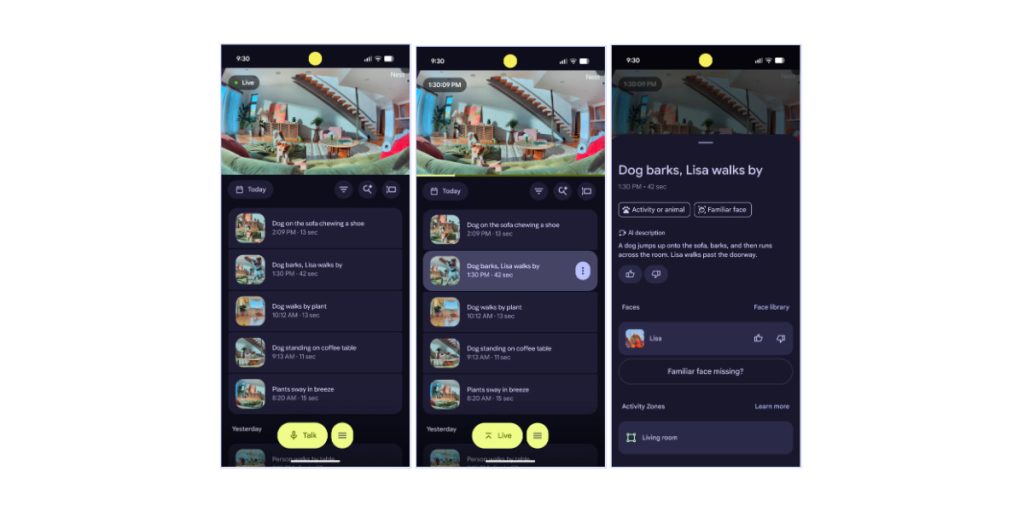
Earlier‑generation Nest cameras (pre‑2021) will also receive Gemini event descriptions and zoomed‑in previews. Many of these improvements still require a Google Home Premium subscription, but the rollout is now available to all Home users outside the public preview.