
Git And GitHub For Students & Beginners Understanding Basic Version Control And Collaboration
Published: (January 18, 2026 at 02:27 AM EST)
1 min read
Source: Dev.to
Source: Dev.to
Git
Version control system that allows people to save code, track changes and work together on the same project.
GitHub
Where your code is stored online.
Users of GitHub
- Data Scientists & Engineers
- AI and Machine Learning Engineers
- Students and Teachers
- Software Developers
Importance
- Store code online
- Monitor changes of stored code
- Enable collaboration on different projects
- Review code and suggest changes
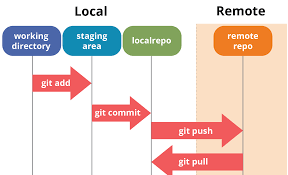
Basic Git Workflow
Your Computer → Git → GitHub → Git → Your Computer- Pull updates from GitHub
- Git tracks the changes
- Push changes to GitHub
- Pull updates from GitHub
How to Push Code to GitHub
Pushing means sending and uploading code to GitHub.
Steps
-
Go to your GitHub account.
-
Click New repository.
-
Add a description, e.g., Learning Git basics.
-
Run the command:
git push
How to Pull Code from GitHub
Pulling means downloading the latest changes from GitHub.
- See what files changed
- See what code was added or removed
- Identify who changed what and when
- Save changes as versions you can return to
Tutorial Video
This beginner tutorial introduced the basics of version control and collaboration. Learners gained an understanding of essential Git commands and how GitHub helps manage and share code. With regular practice and continued exploration of advanced features, beginners can confidently use Git and GitHub in real‑world projects and teamwork.