
Gemini’s split-screen upgrade is here, and it’s not just for tablets anymore
Published: (February 16, 2026 at 06:25 AM EST)
2 min read
Source: Android Authority
Source: Android Authority
TL;DR
- Google is enabling Gemini’s side‑by‑side multitasking feature on regular smartphones, not just tablets or foldables.
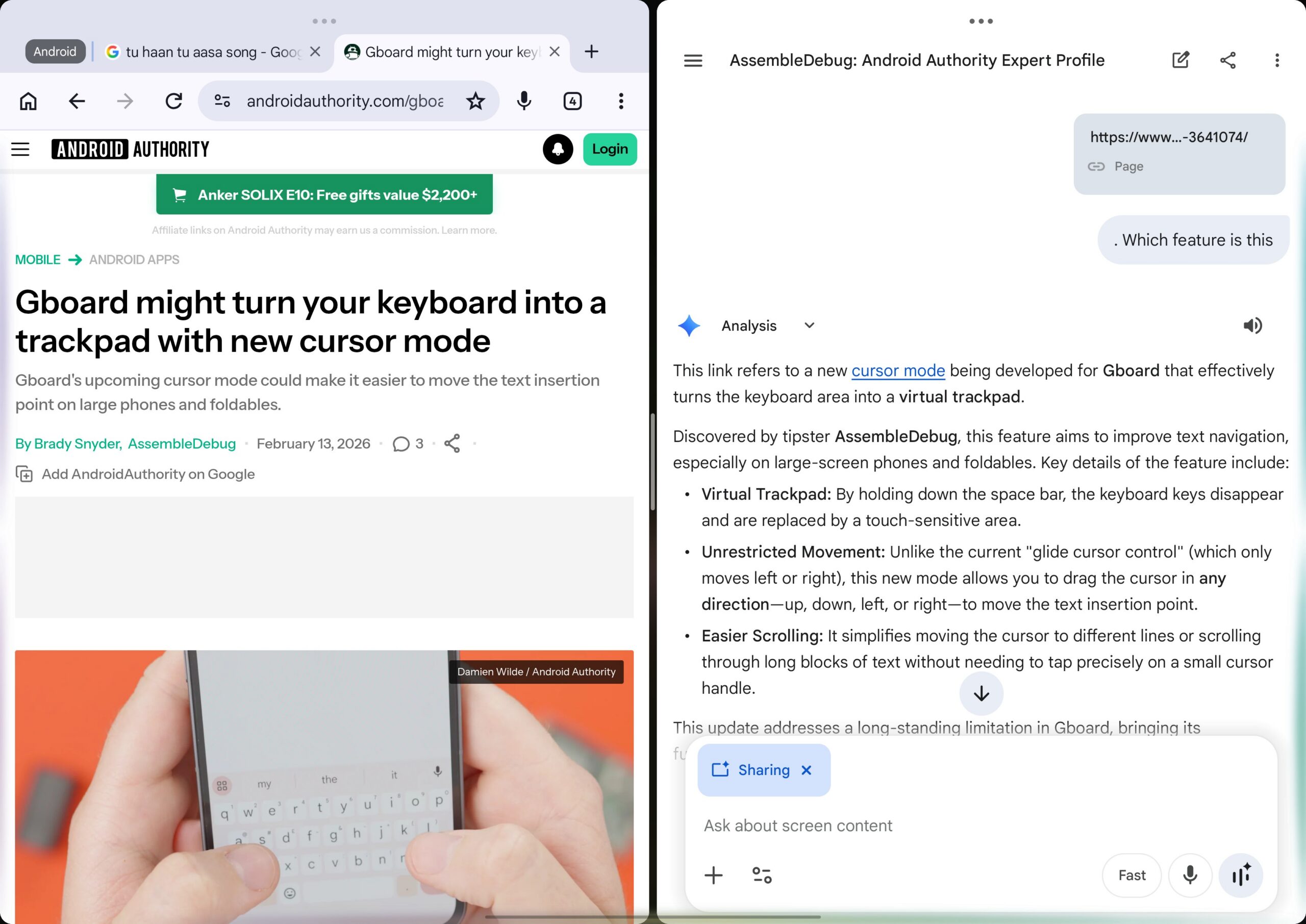
- A new “Share screen and app content” button appears inside Gemini; when activated, Gemini can interact with the app open next to it in split view.
- The feature is live in Google app version 17.5.42.ve.arm64 and requires no toggles or flags.
Background
We discovered late last year that Gemini would eventually play nice with split‑screen multitasking, but the assumption was that a foldable or tablet was needed to run the AI assistant side‑by‑side with another app. A recent Google app update now brings this capability to regular smartphones as well.
How to Use Split‑Screen with Gemini
- Open Gemini in split‑screen mode next to another app.
- On the Gemini home screen or within a chat, you’ll see a new option called “Share screen and app content.”
- Tap the button. A glowing animation appears, followed by a “Sharing” indicator, signalling that Gemini is now viewing the other half of your screen.
What Happens Behind the Scenes
- Chrome (or other browsers): Gemini does not capture visual pixels. Instead, it extracts the URL of the active tab, similar to the “Ask this page” overlay feature.
- Non‑browser apps: Gemini captures a screenshot of the adjacent window to understand the context. During this process, Gemini blacks out its own portion of the screen to avoid visual confusion.
AssembleDebug / Android Authority
Device Compatibility
- Works well on a Pixel 9 running Android 17 beta (and likely Android 16).
- Also functional on a OnePlus Pad 3 (see video in the original article).
- Not yet available on all devices; for example, a OnePlus 13R did not support the feature at the time of testing.
- The rollout follows the gradual expansion of split‑screen support that began in September 2025 (details here).
If you have a Pixel device, check your Google App version—if it’s 17.5.42.ve.arm64 or newer, the feature should be present.
Caveats
- Android’s split‑screen implementation can be inconsistent across devices and OS versions.
- An APK teardown can hint at upcoming features, but predicted functionalities may not always reach a public release.