
Coursera’s Google UX Design Certificate: What It Covers, How It’s Structured, and Why It Can Actually Work
Source: Dev.to
Introduction
If you’ve been thinking about switching careers into UX design (or adding UX skills to your toolbox), you’ve probably seen the Google UX Design Professional Certificate on Coursera. It’s one of the most well‑known beginner UX programs online — and honestly, I get why people consider it. I earned the certificate myself back then.
In this post I’ll break down:
- What the certificate is about
- How the learning is structured
- My opinion on whether it’s “enough” to make it in UX
TL;DR: If you take it seriously and do everything thoroughly, you can learn a lot and build a portfolio that truly helps you.
What is the Google UX Design Certificate?
The Google UX Design Certificate is an online program hosted on Coursera that teaches the fundamentals of UX (User Experience) design from the ground up.
It’s aimed at beginners — meaning you don’t need prior UX knowledge (which is true). The whole idea is to:
- ✅ Learn the UX process
- ✅ Practice real UX methods
- ✅ Create portfolio‑ready case studies
- ✅ Understand how UX work looks in a real product team
It’s not just theory. It’s very hands‑on and focuses heavily on learning by doing: sketches, wireframes, prototypes, testing, iteration, and presentation.
Note: A really cool new feature on Coursera’s learning platform shows how much you can earn in specific roles and how many jobs are currently available in your country.

What topics does it cover?
The course walks you through the full UX workflow with a very “industry‑style” approach. Here’s the big picture:
1️⃣ UX Foundations & Thinking Like a Designer
You learn what UX actually is, what UX designers do, and how products are shaped by user goals and business goals.
2️⃣ UX Design Process: Empathize, Define, Ideate
You’ll work with typical UX research steps such as:
- Understanding user needs
- Identifying pain points
- Writing problem statements
- Building personas
- Creating user journey maps
- Generating solution ideas
3️⃣ Wireframes → Prototypes
You go from quick sketches to:
- Low‑fidelity wireframes
- Higher‑fidelity mockups
- Clickable prototypes
4️⃣ Testing & Iterating (UX Research)
One of the best parts: it teaches a design mindset that’s very realistic—your first version won’t be perfect, so you test, learn, and improve.
5️⃣ High‑Fidelity Designs
You build mockups and high‑fidelity products using Figma, the go‑to tool for UX designers. You’ll become very confident with this tool throughout the program.
6️⃣ Dynamic User Interfaces (UI)
Everything from UX design thinking frameworks to creating a dynamic website.
7️⃣ Building Your Portfolio & Presenting Case Studies
The portfolio isn’t just “add some screenshots”. You’re pushed to explain your thinking:
- What the problem was
- How you made decisions
- What you learned
- How you improved the design
8️⃣ Job Search with AI
The newest addition helps you find a job, stay organized with applications, and more—using AI. AI is everywhere, so being skilled in this area makes you job‑ready.
How is the program structured?
The certificate is divided into multiple courses (basically a series). Each part builds on the last one.

The learning format is very Coursera‑style:
- Short video lessons
- Written transcripts for everything
- Quizzes for theory and vocabulary
- Practical exercises (real UX tasks)
- Peer‑reviewed assignments (scarier than they sound)
- Design projects that become portfolio pieces
You don’t just pass by watching videos — you have to produce work.
By the end, you finish not only with a certificate but also with actual design projects you can show.
The whole program is self‑paced, so no worries if you don’t have a lot of time. The average learner takes about 6 months, spending ~10 hours per week. If that isn’t possible for you, it doesn’t matter; the only thing that matters is reaching the finish line.
If you move faster, even better—especially for your wallet. Start with a 7‑day trial to see if the program is the right fit. The faster you go through the program, the cheaper it becomes.
What I liked (and why it matters)
The strongest part of this certificate is that it encourages you to create complete case studies, not just “random screens”.
If you put the work in, you’ll end up with:
- Clear UX process practice
- Structured thinking
- Project documentation
- Portfolio content you can polish later
Also: it teaches a UX workflow that can be applied anywhere — even if you later move from mobile UX into web UX, accessibility, product design, or service design.
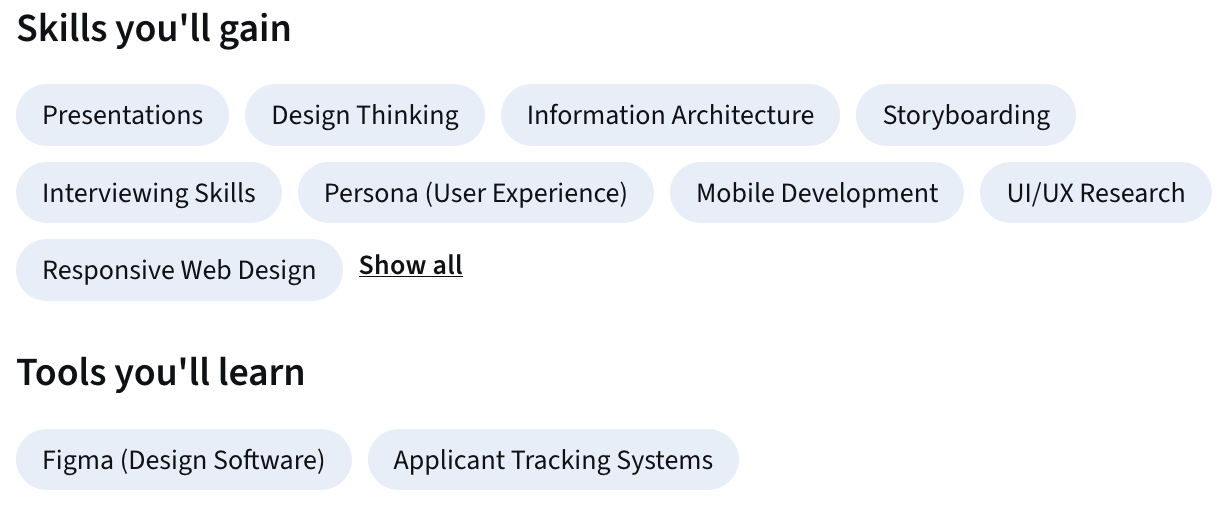
Skills and topics summary
[Image: Skills and topics summary]
(Image placeholder – replace with the appropriate graphic.)
My honest opinion:
It works if you do it thoroughly.
Here’s my take
If you rush it, this becomes “just another online course”.
But if you spend time, do every assignment properly, and treat every project like a real client project, you will:
- ✅ learn a lot
- ✅ build strong UX habits
- ✅ create a portfolio you can be proud of
- ✅ get confident enough to apply for UX roles
And yes — I genuinely believe that with enough effort and consistency, you can make it as a UX designer with this certificate as your foundation.
The certificate won’t magically hand you a job, but it can absolutely give you the skills, structure, and portfolio that make a UX career realistic.
Tips to get the most out of it
If you’re considering doing the Google UX Design Certificate, here’s what I recommend:
1️⃣ Don’t aim for “finished fast”, aim for “done well”
Your portfolio benefits more from one strong case study than three rushed ones.
2️⃣ Document everything
Save:
- screenshots of drafts
- iterations
- notes from research
- test feedback
Those details turn your project into a compelling story.
3️⃣ Treat feedback seriously
Peer reviews aren’t always perfect, but they train you to:
- explain your decisions
- accept critique
- improve your design logically
4️⃣ Upgrade your final case studies later
What you produce during the course can become the “base version”.
After the certificate, you can refine visuals, rewrite the case study, improve prototypes, and make it look much more professional.
Final thoughts
The Google UX Design Certificate on Coursera is a structured, beginner‑friendly way to enter UX design — but it rewards effort.
If you invest the time, take each step seriously, and build your projects thoroughly, you’ll come out with:
- real UX skills
- a clear process
- a portfolio you can show
- a path into the UX field
In my opinion: it’s worth it — if you commit.
Image credits: Original images and screenshots from the Coursera website.