
CompTIA Security+ SY0-701 4.2 Study Guide: Asset Management
Source: Dev.to
1. The Procurement and Purchasing Process
Acquiring new technology is rarely as simple as buying a product off a shelf. In a professional environment, this is a highly structured process designed to ensure fiscal responsibility and technical compatibility.
The Workflow of Acquisition
| Step | Description |
|---|---|
| Initiation | The end user identifies a need for specific hardware or software. |
| Collaboration | The user works with the IT department to verify technical requirements and with the purchasing department to handle logistics. |
| Approval | Budget analysis is performed; formal sign‑offs are required from IT, purchasing, and company management. |
| Negotiation | The organization negotiates with the supplier to secure the best price, favorable licensing terms, and contract details. |
| Delivery and Invoicing | After terms are settled, the supplier delivers the goods and issues an invoice. |
| Payment Terms | Invoices often include “Net 30” or “Net 60” clauses, meaning payment is due 30 or 60 days after receipt. |
2. Asset Tracking and Inventory Management
Once a tangible product is received, it must be entered into a central asset tracking system. This system allows the organization to manage the asset’s entire life cycle.
Key Tracking Data
- Ownership – Every asset is assigned to an individual (e.g., a laptop issued to an employee). This helps IT locate the device for updates or repairs.
- Asset Type – Categorized as laptop, desktop, mobile device, etc.
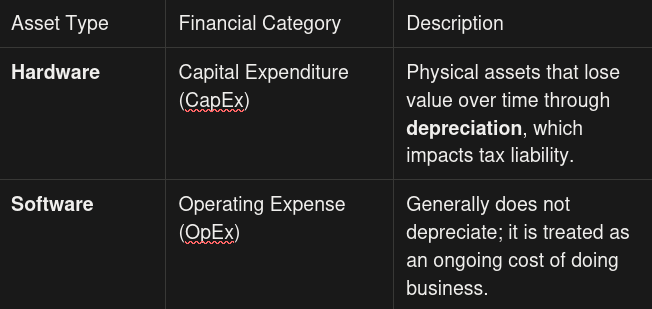
- Hardware vs. Software – Distinguishing the two is vital for financial and tax purposes.
Advanced Tracking Concepts
- Inventory Identification – IT can generate reports that list every router, cable, and hardware component on the network, aiding the help desk in pinpointing the exact make and model associated with a support ticket.
- Enumeration – Breaking a single entity down into its components (e.g., a desktop is enumerated as CPU, memory, storage drives, keyboard, mouse, etc.).
- Asset Tags – Physical labels or barcodes attached to a device. They link the physical item to its digital record and serve as a security feature to deter theft or aid recovery.
3. Media Sanitization and Disposal
When an asset reaches the end of its usefulness—or needs to be reassigned—the data on its storage drives must be handled carefully to prevent unauthorized access.
Reuse vs. Disposal
- Internal Reuse – If a device is moving from one employee to another, use a secure‑delete utility to overwrite data so it is unrecoverable. In some cases, only specific sensitive files may need deletion.
- Decommissioning / Recycling – If the device is leaving the organization, more aggressive sanitization is required.
Methods of Physical Destruction
| Method | Description |
|---|---|
| Shredding / Pulverizing | Industrial machinery grinds the drive into small pieces. |
| Drilling / Hammering | Manual holes are punched through the platters, rendering them unreadable. |
| Incineration | The drive is destroyed by fire. |
| Degaussing | A powerful electromagnetic field wipes the data, rendering most hard drives unusable. |
Third‑Party Disposal
Large organizations often contract with certified e‑waste recyclers or data‑destruction vendors to ensure compliance with regulatory requirements and to obtain certificates of destruction.
Certificate of Destruction
When organizations retire thousands of devices, they often hire third‑party contractors. To maintain a chain of custody and prove the data is gone, the contractor must provide a Certificate of Destruction. This document confirms that the specific drives supplied have been destroyed.
4. Data Retention

While some data must be destroyed, other data must be kept. Data Retention involves preserving original sources, copies, and backups for specific periods.
- Legal Mandates: Certain regulations require organizations to keep financial records or emails for a set number of years.
- Policies and Procedures: Organizations should have written policies outlining what data to keep and how long to keep it.
- Operational Benefits: Retention is a best practice for disaster recovery. If data is accidentally deleted or a site failure occurs, retained backups allow the business to resume operations at a new location.
Effective asset management is the foundation upon which all other security controls are built. After all, how can you protect a device if you don’t know it exists, who owns it, or where it is located? By mastering the lifecycle of an asset—from the initial purchase to the final certificate of destruction—you ensure that your organization remains both fiscally responsible and data‑secure.
Reflection: If your organization were hit by a disaster tomorrow, would your current asset inventory be detailed enough to prove exactly what was lost to your insurance company and your stakeholders?
Next Steps
Don’t stop here! Take the concepts of hardware and software management and apply them to your own home network:
- Create a simple spreadsheet of your devices.
- Include columns for Device Name, Purchase Date, and Serial Number.
This practical exercise will solidify your understanding of inventory management as you continue your journey toward earning your CompTIA Security+ certification.