
Stop Guessing: Turn Vibe Coding from 'Sometimes Magic' to 'Reliably Powerful'!
Source: Dev.to
I spent hours tweaking prompts in Trae.ai. The output?
Almost right, but missing the one thing that mattered. I tried again.
And again.
By the 5th attempt I was frustrated—not with the tool, but with myself: Why can’t I just get this right the first time?
Then it finally dawned on me: I was asking AI to read my mind!
If you’re an experienced dev already comfortable with Trae.ai, Cursor, or other vibe‑coding tools, you might be thinking:
“I’m already vibe‑coding just fine; I iterate fast, follow my intuition, and shape the output as I go. Why would I add structure to something that’s supposed to remain fluid?”
Fair question. But here’s why…
The Problem with Weak Prompts
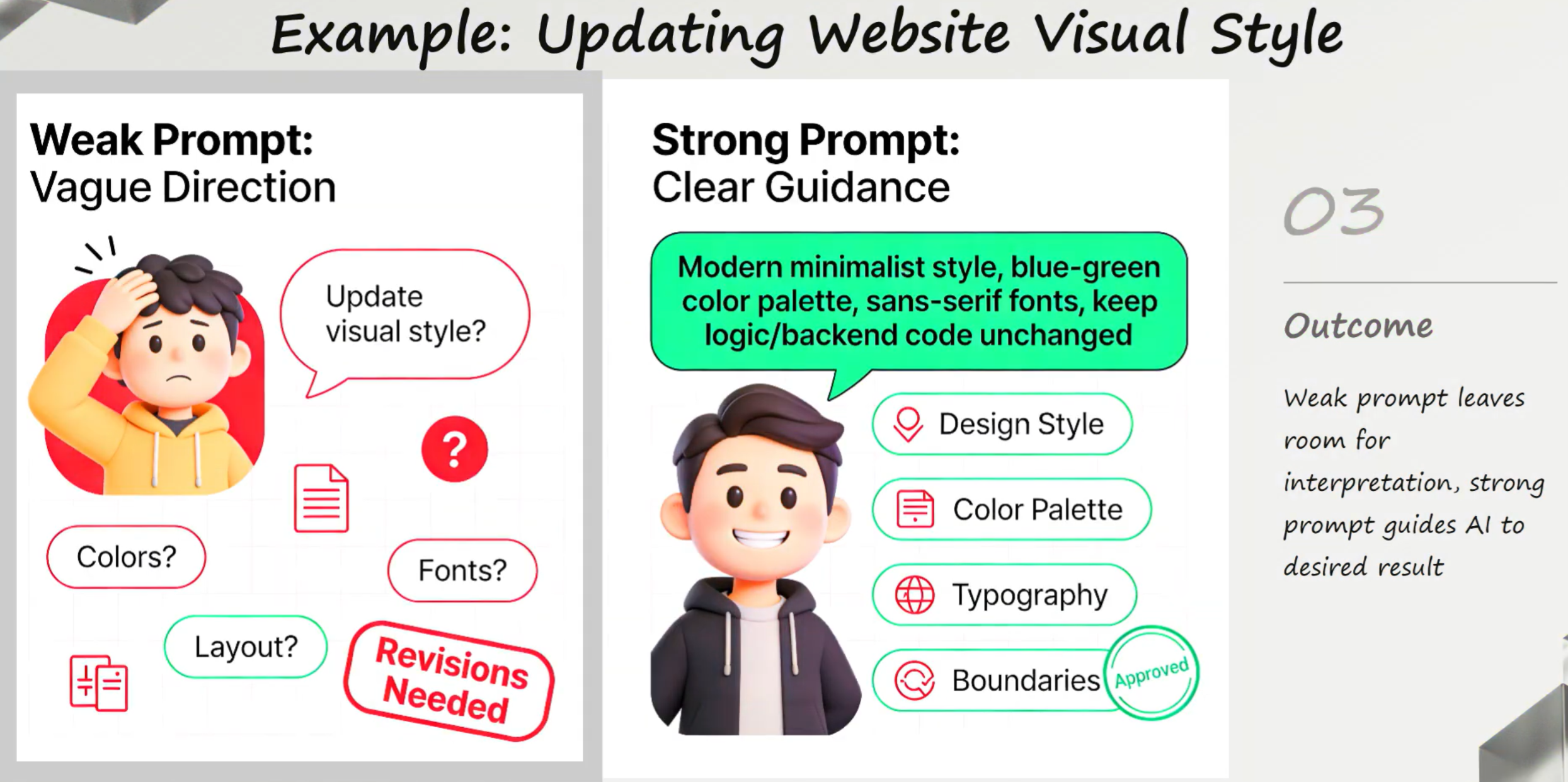
Prompt:
- Update Visual Style.
AI:
- Update one element, one section, one screen, a few screens, the entire app?
- Just the font, the size, the colour, other visual effects? What does this human want?
Weak prompts lack specificity, while strong prompts are structured and provide detailed instructions. When you use a weak prompt, AI has to guess your intent. That can be useful when you’re just exploring or aren’t sure what you want, but when you do know, a strong prompt gets you to your destination cheaper and faster.
From Magic to Method
Think of G.S.B.E.C. like a type system for your prompts. Just as TypeScript catches errors before runtime, G.S.B.E.C. catches ambiguity before Trae.ai starts coding.
The G.S.B.E.C. Prompt Framework
GOAL:
- What is the primary objective?
- What problem does it solve?
- What is the specific, measurable expected outcome?

SCOPE:
- Who is the app for?
- What high‑level functional areas does it cover?

BEHAVIORS:
- What specific actions can users take?
- How should the system respond?

EXCLUSIONS:
- What must the application explicitly NOT include or do?
- Set clear boundaries to prevent scope creep.

CONSTRAINTS: What rules must be respected across three categories:
- Technical (stack, compatibility, performance, security)
- Business (budget, timeline, resources)
- Regulatory (GDPR, WCAG, industry requirements)
For an in‑depth explanation, watch the video:
G.S.B.E.C. doesn’t take away the spirit of vibe coding; it sharpens it by removing the guesswork. With a clearer structure, your first prompt gets you much closer to the end goal, so you spend less time iterating. Fewer iterations also mean fewer tokens used and lower costs overall.
Using AI to Generate the G.S.B.E.C. Prompt
You don’t have to craft everything manually. Let AI generate the G.S.B.E.C. prompt, then tweak as needed.
Meta‑Prompt (copy‑paste into ChatGPT, Gemini, Qwen, etc.)
Please create a prompt for my idea using the G.S.B.E.C. framework that consists of Goals, Scope, Behaviours, Exclusions, and Constraints, as defined below:

GOAL: What is the primary objective? What problem does it solve (who experiences this pain point)? What is the specific, measurable expected outcome?

SCOPE: Who is the app for (target audience, user personas, technical proficiency, pain points)? What high‑level functional areas does it cover (core features, supported platforms, integrations)?

BEHAVIORS: What specific actions can users take, and how should the system respond? For MVP validation, define either high‑level behaviors (intent‑focused) or granular step‑by‑step flows based on complexity.

EXCLUSIONS: What must the application explicitly NOT include or do? Set clear boundaries to prevent scope creep.

CONSTRAINTS: What rules must be respected across three categories:
- Technical (stack, compatibility, performance, security)
- Business (budget, timeline, resources)
- Regulatory (GDPR, WCAG, industry requirements)

From my idea, derive the goal with a clear problem statement and measurable outcome. If you are unable to do so, please ask me clarifying questions before proceeding to output the G.S.B.E.C. prompt.
If you have asked me 3 times and you are still unable to derive the goal with a clear problem statement and measurable outcome, give me an example I can learn from and stop the conversation.

Once the goal is successfully derived, for remaining components, make reasonable assumptions and produce an MVP‑level output focused on validating the goal.

Output the complete G.S.B.E.C. in a structured format with clear headers. Include a 2‑3 sentence “MVP Summary” at the beginning.

**Technology Stack**
- Mobile/multi‑platform: PWA‑appropriate stack
- Non‑mobile: Plain HTML/CSS/JS **or** Tailwind + TypeScript + React + Vite
- 2D Game: Phaser
- 3D Game: Three.js
- Database: Supabase preferred; FastAPI backend only when justified
- Deployment: Vercel preferred

Finally, recommend three potential application names.

My idea is:
Building Our Community Clothes‑Swap App Using Trae.ai
The Big Idea
I wanted to build a community clothes‑swap app because I have many garments I never wear—or maybe only once—and feel bad throwing them away.
(The rest of the article continues…)
Turning an Idea into an MVP with Trae AI
I thought there might be more people like me, but I wasn’t sure. So I asked myself: why not build an MVP using Trae?
The goal: an app that makes it simple for people nearby to swap pieces they don’t use anymore, save money, and make fashion a bit more sustainable.
I fired a prompt to Trae and… never mind. After failing again and again, I switched to the GSBEC method.
What happened next?
You can get the GSBEC prompt I used from the YouTube video’s description.
Your Turn
Unless it’s a trivial app, the GSBEC prompt probably won’t give you the full app you have in mind. But if it brings you closer to your vision, you’ll spend far less time iterating and burn far fewer tokens (💰).
- Take the GSBEC Meta Prompt and play around with it.
- You’ll be amazed at the difference it makes.
Tip: Trae also has an “Optimise Your Input” function that can provide more context to your MVP idea.
Look for the button at the bottom‑right of the UI – it looks like a star or diamond. The button next to it is for voice input if you prefer talking to typing.
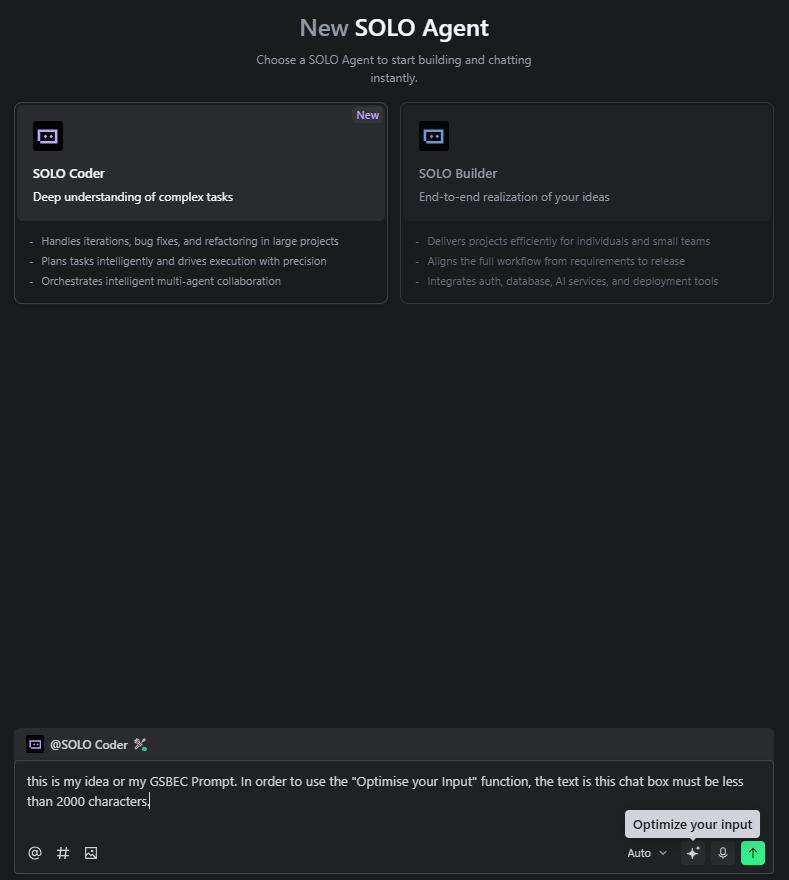
You can use this feature by itself or together with the GSBEC prompt.
Get Started with Trae
Here’s the link to my 10× AI Engineer, Trae:
https://www.trae.ai/
- Feed it your GSBEC prompt.
- If you can think and explain it, you can build it.
Series Introduction
This post is the first in a three‑part series: Turn Ideas into MVP Fast with Trae AI
- Stop Guessing: Turn vibe coding from “sometimes magic” to “reliably powerful.”
- Visual Customization: Use natural‑language prompts in Trae.ai.
- Debugging & Feature Iteration: Iterate faster with Trae AI.