
Building a Production-Grade AWS 3-Tier Java Application (Hands-On)
Source: Dev.to
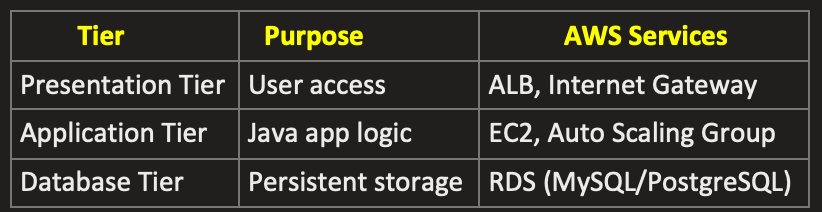
This project implements a secure and scalable 3‑tier architecture on AWS. The presentation layer uses an Application Load Balancer deployed in public subnets. The application layer consists of Spring Boot applications running on EC2 instances in private subnets and scaled via Auto Scaling. The database layer uses Amazon RDS deployed in private subnets. A Bastion Host provides secure administrative access, and a NAT Gateway enables outbound internet access for private instances.
The article walks through everything built, step by step, and explains why each component exists.
What We’re Building
At the end of this project, the application looks like this:
User
 ↓
Route 53
 ↓
CloudFront
 ↓
Application Load Balancer
 ↓
EC2 Auto Scaling Group
 ↓            ↓
Redis Cache    RDS Proxy
                 ↓
        RDS MySQL + Read Replica
The goal wasn’t just to “make it work”, but to make it:
- Secure
- Scalable
- Highly available
- Production‑ready
Phase 1: Networking (Foundation)
Create VPC & Subnets
- VPC – a new VPC is created.
- Subnets (8 total)
- Public Subnets (2) – for Load Balancer, NAT Gateway, Bastion Host.
- Private App Subnets (2) – for EC2 Auto Scaling Group.
- Private DB Subnets (2) – for RDS, RDS Proxy, Read Replica.
- Private Cache Subnets (2) – for Redis (ElastiCache).
Internet Gateway
- Create an Internet Gateway and attach it to the VPC.
- Allows public subnets to access the internet.
NAT Gateway
- Create a NAT Gateway in a public subnet and allocate an Elastic IP.
- Provides outbound‑only internet access for private subnets.
Route Tables
- Public Route Table – route
0.0.0.0/0→ Internet Gateway; associated with the two public subnets. - Private Route Table – route
0.0.0.0/0→ NAT Gateway; associated with all private subnets (app, DB, cache).
Security Groups
| Security Group | Inbound Rules | Outbound Rules |
|---|---|---|
| alb-sg (ALB) | 80, 443 from 0.0.0.0/0 | 8080 to app-sg |
| bastion-sg | 22 (SSH) from your IP | 22 to app-sg |
| app-sg | 8080 from alb-sg; 22 from bastion-sg | All |
| db-sg | 3306 from app-sg | Local |
| redis-sg | 6379 from app-sg | Local |
Phase 2: Compute Layer
-
Bastion Host – the only SSH entry point.
- Subnet: public‑a
- Public IP: enabled
- Security Group:
bastion-sg
-
Application Load Balancer
- Type: Application
- Scheme: Internet‑facing
- Subnets: public‑a, public‑b
- Security Group:
alb-sg
-
Target Group (attached to the ALB)
- Target type: Instance
- Port:
8080 - Health check path:
/health
-
Launch Template
- AMI: Ubuntu
- Instance type:
t3.micro - Security Group:
app-sg - IAM Role:
ec2-app-role - User data: (empty)
-
Auto Scaling Group
- Subnets:
private-app-a,private-app-b - Min: 1, Desired: 2, Max: 3
- Attached to the ALB target group
- Subnets:
Phase 3: Database Layer
- Create a DB Subnet Group selecting the private DB subnets.
- Launch an RDS MySQL instance within that subnet group.
- Store the DB password in AWS Secrets Manager and enable automatic rotation.
- Create a Read Replica for scaling reads.
- Set up an RDS Proxy to pool connections.
Phase 4: Redis Cache
- Create a Cache Subnet Group using the private cache subnets.
- Deploy a Redis (ElastiCache) Cluster within that group.
Phase 5: CloudFront & Route 53
- Request an SSL/TLS certificate via AWS Certificate Manager.
- Create a CloudFront Distribution that points to the ALB.
- Add the appropriate DNS records in a Route 53 hosted zone.
Source Code
GitHub Repository – AWS‑3tier‑Java‑Spring‑Boot‑App
To run the application locally
git clone https://github.com/dipakprasad22/AWS-3tier-Java-Spring-Boot-App.git
cd AWS-3tier-Java-Spring-Boot-App
mvn clean package
java -Xms256m -Xmx512m -jar target/app.jar
curl http://localhost:8080/health
# Access via ALB DNS name
# http:///hello