
BigQuery Sharing: An Underrated Data Exchange Platform You Should Know
Source: Dev.to
Source: Dev.to – BigQuery Sharing: An Underrated Data‑Exchange Platform You Should Know
BigQuery Sharing – Live Data Exchanges Made Simple
BigQuery isn’t just a data warehouse anymore. Most teams know how to run analytics queries, build dashboards, or use BigQuery for BI.
A surprisingly under‑used feature — BigQuery Sharing — lets you build live data exchanges across internal teams, regions, and even external partners without copying data. It’s stable, scalable, and solves real modern‑data‑distribution problems, yet few teams adopt it.
As data usage shifts from reporting to operational and AI‑driven workloads, sharing data becomes a platform problem, not an export task.
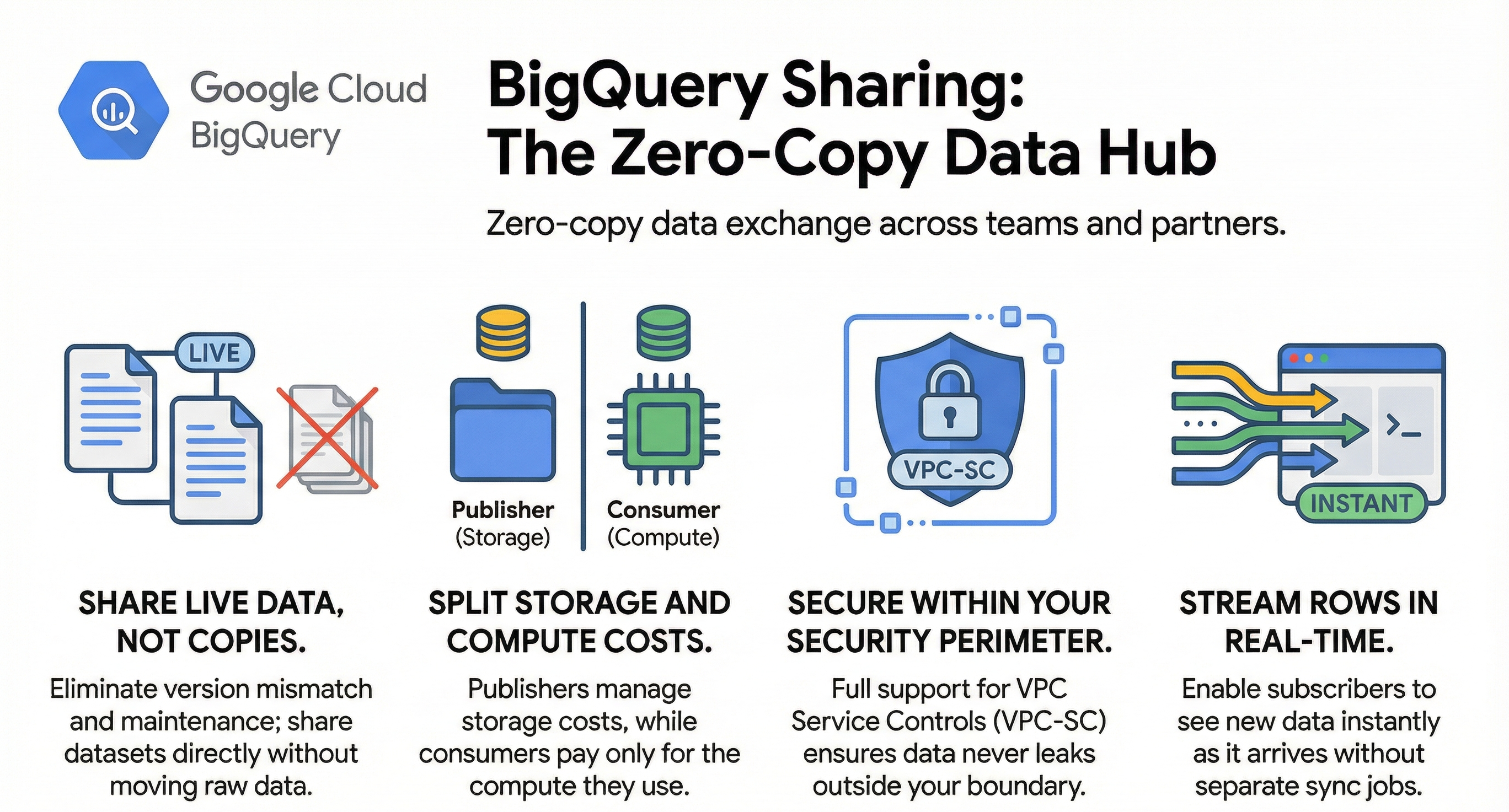
In this article we’ll cover
- Why traditional sharing patterns are painful
- What BigQuery Sharing actually is
- How governance and cost models work
- VPC‑SC rules for secure sharing
- Streaming data sharing
- Real‑world use cases
- Terraform examples
The Problem with Traditional Data Sharing
Many organizations still share data by:
- Exporting CSV dumps
- Copying datasets to partner projects
- Using SFTP folders or email attachments
- Maintaining fragile ETL pipelines
These approaches create:
- Data duplication
- Version mismatch
- Security blind spots
- High‑maintenance effort
What if you could share live data in a governed way, without moving it?
That’s exactly what BigQuery Sharing enables.
What BigQuery Sharing Actually Is
BigQuery Sharing (formerly Analytics Hub) is a built‑in way to:
- Share datasets or views
- Publish them as listings
- Group listings in data exchanges
- Enable internal or external consumers to subscribe and query them
Although it’s been available for a while, it remains underrated—many architects aren’t aware of its existence or how much it simplifies data collaboration.
Core Concepts
- Data Exchange – A catalog of shared assets.
- Listing – A specific dataset or view advertised in an exchange.
- Subscriber – A consumer project linked to a listing.
- Shared Dataset – Remains in the publisher’s project; it is not copied.
These concepts let you publish and subscribe to shared data without moving raw data around.
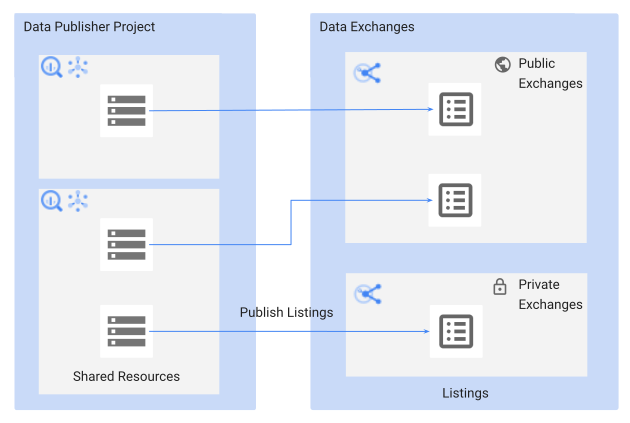
Diagram illustrating the relationships between Data Exchange, Listings, Subscribers, and Shared Datasets.
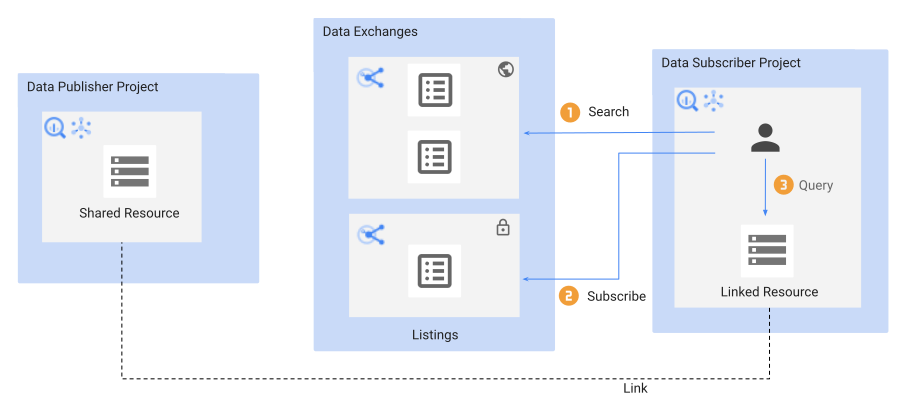
Diagram showing the flow of data between publishers and subscribers.
Where It Fits in Modern Architectures
Internal Enterprise Data Hubs
Imagine each region or line of business owns its own BigQuery project. They produce data independently but need a central analytics function:
- Each unit publishes curated datasets/views.
- The central analytics team subscribes.
- No ETL copies are needed.
External Partner Data Sharing
Retailers, manufacturers, and service providers can share relevant data with vendors or partners:
- Product‑performance metrics.
- Aggregated sales trends.
- Regional insights.
Your partners query the shared listings directly, paying for compute while you retain ownership and storage of the data.
Pricing & Governance
How BigQuery Handles Storage & Compute
- Storage stays in the publisher’s project.
- Consumers pay only for the compute they use.
Result:
| Role | Responsibility |
|---|---|
| Publisher | Manages storage costs |
| Consumer | Pays for query (compute) costs |
| Both | No data is physically moved or duplicated |
Governance
- IAM – controls dataset visibility.
- Authorized views – shape exactly what consumers can see.
- Audit logs – record all activity for compliance and troubleshooting.
This model creates a clear security and billing boundary that traditional file‑sharing solutions can’t match.
VPC‑SC Support for BigQuery Sharing (Security Perimeters)
Many enterprises operate in confidential or regulated environments. Google Cloud’s VPC Service Controls (VPC‑SC) let you restrict data access to defined perimeters.
Good news: BigQuery Sharing (Analytics Hub) works with VPC‑SC. You can share datasets between projects that are inside the same perimeter and still enforce perimeter policies. This ensures:
- Shared data doesn’t leak outside your security boundary.
- Shared datasets respect your compliance posture.
- All BigQuery queries stay within scoped networks.
In practice, you only need to ensure both the publisher and consumer projects are in the same VPC‑SC perimeter.
Real‑Time Data Sharing: BigQuery Stream Sharing
Static datasets are useful, but many modern applications require real‑time data delivery.
BigQuery Stream Sharing extends the standard BigQuery Sharing capabilities by allowing real‑time streams to be shared directly with downstream consumers.
Why Stream Sharing?
- Immediate availability – rows appear for subscribers the moment they are appended.
- No extra infrastructure – eliminates the need for separate brokers, message queues, or sync jobs.
- Simplified architecture – a single source of truth in BigQuery serves both batch and streaming workloads.
Typical Streaming Use Cases
Financial Services
- Share rapidly changing instrument prices, quotes, and orders.
- Detect money‑laundering or payment fraud with near‑real‑time data.
- Support trading‑risk calculations that require up‑to‑the‑second market data.
Retail & Consumer Packaged Goods (CPG)
- Keep store‑level inventory counts up to date in near‑real time.
- Propagate point‑of‑sale transactions instantly to downstream analytics.
- Enable dynamic pricing or promotion adjustments based on live sales signals.
IoT & Telemetry
- Stream sensor readings from devices directly into a shared dataset.
- Power real‑time dashboards for monitoring equipment health or environmental conditions.
Marketing & Advertising
- Share click‑stream and impression data with attribution models as events occur.
- Allow bid‑optimization engines to react to the latest user‑behavior signals.
How It Works
- Producer writes to a BigQuery table using the streaming API (
INSERTorSTREAMING_INSERTS). - Access control (IAM) is granted to the target project or specific users/groups, just like regular table sharing.
- Subscriber queries the shared table; newly streamed rows become visible almost instantly (typically < 1 second latency).
Best Practices
| Recommendation | Reason |
|---|---|
| Partition by ingestion time | Improves query performance and cost when scanning recent data. |
| Set appropriate row‑level security | Prevents unauthorized access to sensitive streaming data. |
| Monitor streaming quotas | Avoid throttling; use INSERT quotas and back‑off strategies. |
| Leverage clustering | Optimizes queries that filter on frequently accessed columns (e.g., symbol, store_id). |
Use TABLESAMPLE SYSTEM for large tables | Allows quick preview of streaming data without scanning the entire table. |
Example Query (SQL)
-- Show the most recent 100 rows streamed in the last minute
SELECT *
FROM `shared_project.shared_dataset.realtime_events`
WHERE _PARTITIONTIME BETWEEN TIMESTAMP_SUB(CURRENT_TIMESTAMP(), INTERVAL 1 MINUTE)
                        AND CURRENT_TIMESTAMP()
ORDER BY _PARTITIONTIME DESC
LIMIT 100;
Getting Started
- Create a dataset in the producer project (if not already existing).
- Enable streaming on the target table (standard streaming inserts).
- Grant IAM roles (
bigquery.dataVieweror a custom role) to the consumer project/users. - Test by inserting a few rows and querying from the consumer side.
BigQuery Stream Sharing lets you treat streaming data as a first‑class, shareable asset—removing the friction between real‑time producers and downstream analytics consumers.
Terraform Example: BigQuery Data Exchange, Listing, and Access Grant
The snippet below shows a minimal Terraform configuration that:
- Creates a BigQuery Data Exchange (the “data‑as‑a‑service” container).
- Adds a Listing to the exchange that points to a curated dataset.
- Grants a subscriber project read‑only access to the listed dataset.
# -------------------------------------------------
# Provider configuration
# -------------------------------------------------
provider "google" {
  project = var.publisher_project   # Publisher project ID
  region  = "us-central1"
}

# -------------------------------------------------
# 1️⃣ Data Exchange
# -------------------------------------------------
resource "google_bigquery_data_exchange" "exchange" {
  location    = "US"
  name        = "my_exchange"
  description = "Internal data exchange for analytics"
}

# -------------------------------------------------
# 2️⃣ Listing (exposes a dataset through the exchange)
# -------------------------------------------------
resource "google_bigquery_listing" "listing" {
  data_exchange_id = google_bigquery_data_exchange.exchange.id
  name             = "sales_view"
  description      = "Curated sales view for analytics"

  primary_dataset {
    dataset_id = "sales_dataset"
    project_id = var.publisher_project
  }
}

# -------------------------------------------------
# 3️⃣ IAM grant for the subscriber project
# -------------------------------------------------
resource "google_bigquery_iam_member" "subscriber_access" {
  # The dataset exposed by the listing
  dataset_id = google_bigquery_listing.listing.primary_dataset[0].dataset_id

  role   = "roles/bigquery.dataViewer"
  member = "projectOwner:${var.subscriber_project}"
}
Tip: Replace
var.publisher_project,var.subscriber_project, dataset names, and IAM roles with values that match your organization’s naming conventions and security policies.
Bottom line
BigQuery Sharing lets you treat data as a service—live, governed, and cost‑transparent—so you can focus on building insights rather than managing copies.
Real‑Time Data Use Cases
- Personalize marketing and customer interaction
- Adjust prices dynamically
- Monitor social signals (e.g., social‑media feeds)
- Optimize physical‑store layouts with live operational feeds
Stream sharing gives consumers current data while publishers retain ownership and governance.
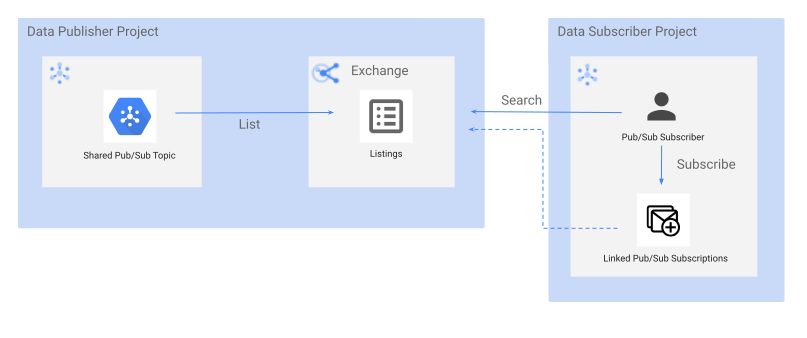
Terraform Snippets
Create a Data Exchange
resource "google_bigquery_analytics_hub_data_exchange" "hub" {
  project          = var.hub_project_id
  location         = var.location
  data_exchange_id = "global_data_exchange"
  display_name     = "Global Data Exchange"
  description      = "Shared resources for internal and external data consumers"
}
Publish a Listing
resource "google_bigquery_analytics_hub_listing" "events_listing" {
  project          = var.hub_project_id
  location         = var.location
  data_exchange_id = google_bigquery_analytics_hub_data_exchange.hub.data_exchange_id
  listing_id       = "events_shared"
  display_name     = "Shared Events"
  description      = "Curated view of events data for partners"

  bigquery_dataset {
    dataset = "projects/${var.hub_project_id}/datasets/${var.shared_dataset_id}"
  }
}
Conclusion
BigQuery Sharing—including VPC‑SC support and real‑time stream sharing—is one of those hidden‑but‑practical features that solves real collaboration problems. It lets you:
- Share data across internal teams without copying
- Securely expose curated data to external partners
- Stream real‑time data with governance
- Separate storage and compute billing cleanly
- Stay within security perimeters