
Automating EL pipeline using Azure Functions(Python)
Source: Dev.to
Problem & Context
As a data engineer I was responsible for moving data between storage locations. The existing approach used a trigger on each ADF pipeline that started a copy whenever a new blob was created. This setup was not efficient, scalable, or easy to maintain. I needed a reproducible, simple, fast, and scalable architecture, which led to the Azure Functions solution.
Architecture at a Glance
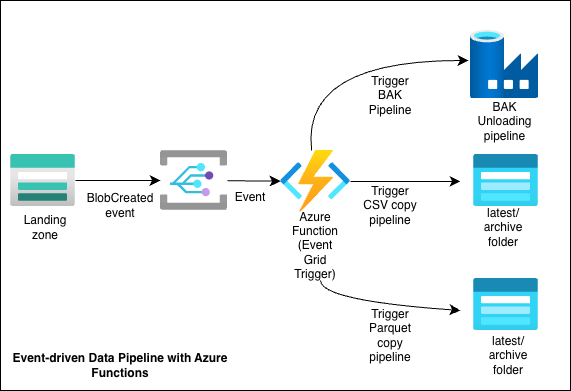
- A new file is uploaded to a source Storage Account.
- Event Grid raises a BlobCreated event.
- An Azure Function (Python, Event Grid trigger) receives the event.
- The function:
- Parses the event payload to identify the container/blob.
- Determines the origin (data source) and the next steps using environment variables.
- Triggers the appropriate pipeline.
- The pipeline executes, copying the file(s) to the correct folders in the destination Storage Account(s) or invoking an ADF pipeline.
A single Azure Function App hosts multiple functions (4 in total):
- 2 functions for copying CSV files
- 1 function for Apache Parquet file transfer
- 1 function for triggering an ADF pipeline that handles SQL Bak files
Each function is associated with the storage container that receives its expected file type, ensuring the correct pipeline runs.
Config & Environment Variables
Instead of hard‑coding storage paths and pipeline names, most configuration is stored in Application Settings (environment variables) on the Function App, e.g.:
- Source containers
- Destination folders (e.g.,
latest,archive) - The ADF pipeline to call for a given “origin”
This approach makes it easy to:
- Support multiple data sources
- Promote the solution across environments (dev / test / prod)
- Update destinations without redeploying code
Example: for the CSV source Alderhey, the variables were named Alderhey_1_destination_folder, Alderhey_1_destination_storage_account, etc., and similar patterns were used for other destinations.
Auth & Networking
Authentication is handled via an Azure AD App Registration whose credentials are stored in environment variables. The app is granted the following roles:
- Storage Blob Data Contributor on the relevant storage accounts
- Data Factory Contributor on the ADF instance
Depending on your environment you may also need to configure:
- VNet integration for the Function App
- Private endpoints for Storage and Data Factory
- Firewall rules that allow Event Grid → Function and Function → Storage/ADF traffic
These networking considerations are often the source of “it works on my machine” issues, so test connectivity step by step.
How to Deploy
- Create an Azure Function App (Python runtime) in your chosen region.
- Deploy the function code from VS Code or via Azure DevOps/GitHub Actions.
- Configure Application Settings (environment variables) for:
- Source/destination storage details
- Pipeline names / resource IDs
- Create the App Registration and assign the required roles.
- Create an Event Grid subscription on your Storage Account for BlobCreated events, pointing to the Function endpoint.
- Upload a test file and verify that the pipeline runs and the data lands in the expected locations.
Lesson Learned
This project demonstrated how Azure Functions can be used to implement EL pipelines with minimal code, high reusability, and full automation. The solution is portable across environments, tenants, and additional destinations. If you’re working with Azure Functions, Event Grid, or ADF and want to exchange ideas, feel free to reach out.
Full code: My Github
Connect with me on LinkedIn: Nafisah Badmos