
April KB5083769 Windows 11 update causes backup software failures
Source: Bleeping Computer
The April 2026 KB5083769 security update breaks third‑party backup applications on systems running Windows 11 24H2 and 25H2.
User reports first spotted by Microsoft MVP Susan Bradley indicate that software relying on VSS (Volume Shadow Copy Service) snapshots fails due to a VSS service timeout.
Microsoft VSS, introduced in Windows Server 2003, coordinates OS, backup software, and business apps (e.g., SQL Server, Exchange). It is also used by Windows features such as Windows Server Backup, System Center Data Protection Manager, and System Restore.

Affected Software
The issue impacts, but is not limited to, the following backup products:
-
Acronis Cyber Protect Cloud – see Acronis support document describing the error “The backup has failed because Microsoft VSS has timed out during the snapshot creation.”
-
Macrium Reflect – reported VSS problems after installing KB5083769.
-
NinjaOne Backup – users observed backup failures linked to the April 2026 patch.
-
UrBackup Server – file backups stopped working after the update.
Acronis also notes that the problem affects Windows 11 Pro and Home editions and may cause loss of connectivity to the cloud console.
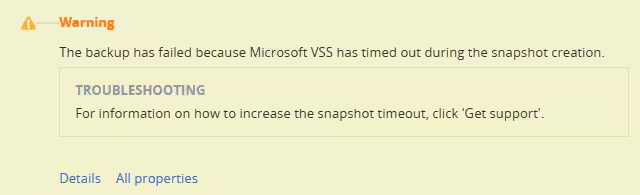 Acronis backup error (Acronis)
Temporary Workaround
- Open Settings → Windows Update → Update history → Related settings → Uninstall updates.
- Locate and uninstall “Security update for Microsoft Windows (KB5083769)”.
- Pause Windows updates.
- Reboot the system.
Related Microsoft Updates
-
Microsoft released out‑of‑band (OOB) updates to address Windows Server issues that caused restart loops and update installation failures after the April 2026 security updates.
-
A separate warning noted that some Windows Server 2025 devices could boot into BitLocker recovery after installing KB5082063.
BleepingComputer reached out to Microsoft for additional details; a response was not immediately available.