
Microsoft tests modern Windows Run, says it's faster than legacy dialog
Source: Bleeping Computer
Overview
Microsoft has confirmed that Windows 11 is getting a new modern Run dialog with dark‑mode support and faster performance in preview build 26300.8346. The classic Run dialog has been a staple since Windows 95, letting power users press Win + R to launch commands, open file paths, or jump to locations without opening File Explorer.
The modern version keeps the same core functionality while adopting Fluent Design, offering dark mode out of the box, and delivering better performance than the legacy dialog.
“When we set out on creating the new experience, we knew the existing dialog was fast. We also knew we needed to be sure we deeply understood how you all used it. Modernize, be opinionated, and evolve it,” Microsoft explained in a blog post.
Performance
- Legacy Run: ~103 ms to appear after Win + R.
- Modern Run: median 94 ms time‑to‑show.
“This was a huge team effort – we’ve collaborated tightly with partners across the platform to get these UI surfaces loading snappy. Improvements we’ve made to the platform don’t just make Run fast, but they help make the whole OS more efficient,” the company said.
Microsoft expects the numbers to improve further as the feature is refined.
Microsoft drops “Browse” feature in new Run
User data showed the Browse button (used to open a directory picker) was used in less than 0.0038 % of Run invocations, based on a sample of 35 million users. Consequently, the modern Run dialog removes the Browse button.
Additional enhancements:
- Support for
~\to quickly access the user’s home directory. - Icons displayed next to recent entries, making them easier to identify without adding visual weight.
How to enable or disable modern Run
The modern Run dialog is optional and must be enabled manually:
- Open Settings → Advanced Settings.
- Toggle the switch for Modern Run.
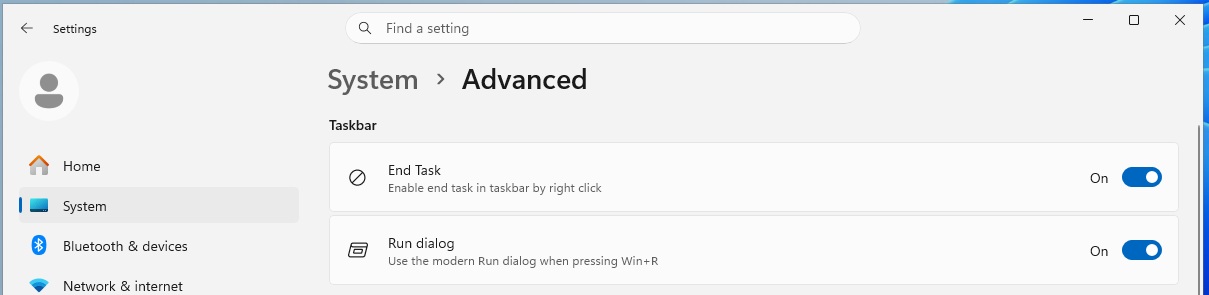
Enable or disable modern Run dialog (Source: BleepingComputer)
Microsoft plans to add more features and is collecting feedback before a broader rollout.
Other changes rolling out with today’s preview update
- Windows Share UI for Azure AD users now lets you install apps directly from the Share dialog, eliminating the need to pre‑install them via the Microsoft Store.
- Magnifier gains preset zoom levels (5 %, 10 %, 25 %, 50 %, 100 %, 150 %, 200 %, 400 %) for finer control.
These updates will be phased in over the coming months. To test them now, download Windows 11 Build 26300.8346 from the new Experimental Channel.