
AI agents are everywhere, but what actually is an AI Agent?
Source: Dev.to
AI agents are everywhere today.
From image generation to content creation, from coding assistants to autonomous research tools, the word agent has quietly become the default label for anything that feels a little more capable than a chatbot.
But if you look closely at most explanations, something feels incomplete. We jump straight into frameworks, abstractions, and applications, without a clear mental model of what an agent actually is.
So let’s slow down and ask the real question:
What actually makes an agent an agent?
This is the first of a three‑part series on AI Agents. In this article, we’ll establish the foundational concepts. Later in the series, we will dive into architectural patterns, control flows, and state management.
Let’s Start With the Simplest Possible Interaction
Consider the most basic thing we can do with a model: give it a prompt.
import OpenAI from "openai";

const client = new OpenAI();

const response = await client.chat.completions.create({
  model: "gpt-5.1",
  messages: [
    { role: "user", content: "Summarize the concept of AI agents" }
  ]
});

console.log(response.choices[0].message.content);
The model responds. The reasoning might be solid. The output might even be impressive.
And then… everything stops.
- Nothing is remembered.
- Nothing continues.
- No next decision is made.
No matter how sophisticated the model is, or how carefully the prompt is engineered, this interaction lives entirely inside a single request‑response boundary. The model can reason, explain, and even plan, but once the response is generated, the computation is over.
Prompt engineering can improve what the model says, but it cannot change how the system behaves.
So the natural next question becomes:
What if we make the model do more than just respond? Would that make it an Agent?
What If We Let the Model Act?
The obvious next step is to give the model the ability to perform actions. We expose tools—functions that can read files, write output, search the web, or call APIs—and allow the model to invoke them.
const tools = [
  {
    type: "function",
    function: {
      name: "readFile",
      description: "Read a file from disk",
      parameters: {
        type: "object",
        properties: {
          path: { type: "string" }
        },
        required: ["path"]
      }
    }
  }
];

const response = await client.chat.completions.create({
  model: "gpt-5.1",
  messages: [
    { role: "user", content: "Read README.md and summarize it" }
  ],
  tools
});
Now the model can decide to call readFile, your application executes it, and the result is passed back to the model.
This is a major upgrade. The system can interact with the real world, not just describe it.
But even here, something subtle is missing. The model makes a decision, triggers an action, produces a response, and then exits. It doesn’t reflect on whether the action was sufficient, decide whether more steps are needed, or recover/adapt. It can act, but it doesn’t own the process. This is where many systems stop, and where many “agents” quietly fail to become agents.
So… What Actually Makes Something an Agent?
An agent is a system that repeatedly observes its state, decides on an action, executes that action, and incorporates the result before deciding again.
This is how Andrej Karpathy, co‑founder of OpenAI and EurekaLabs, describes an AI Agent:
“An agent is essentially a language model running in a loop, with access to tools and memory.”
The critical word here is loop. As long as you know how to write a loop in your code, you already understand the core idea behind agents. Without a loop, there is no agent.
The Loop Is the Behavior
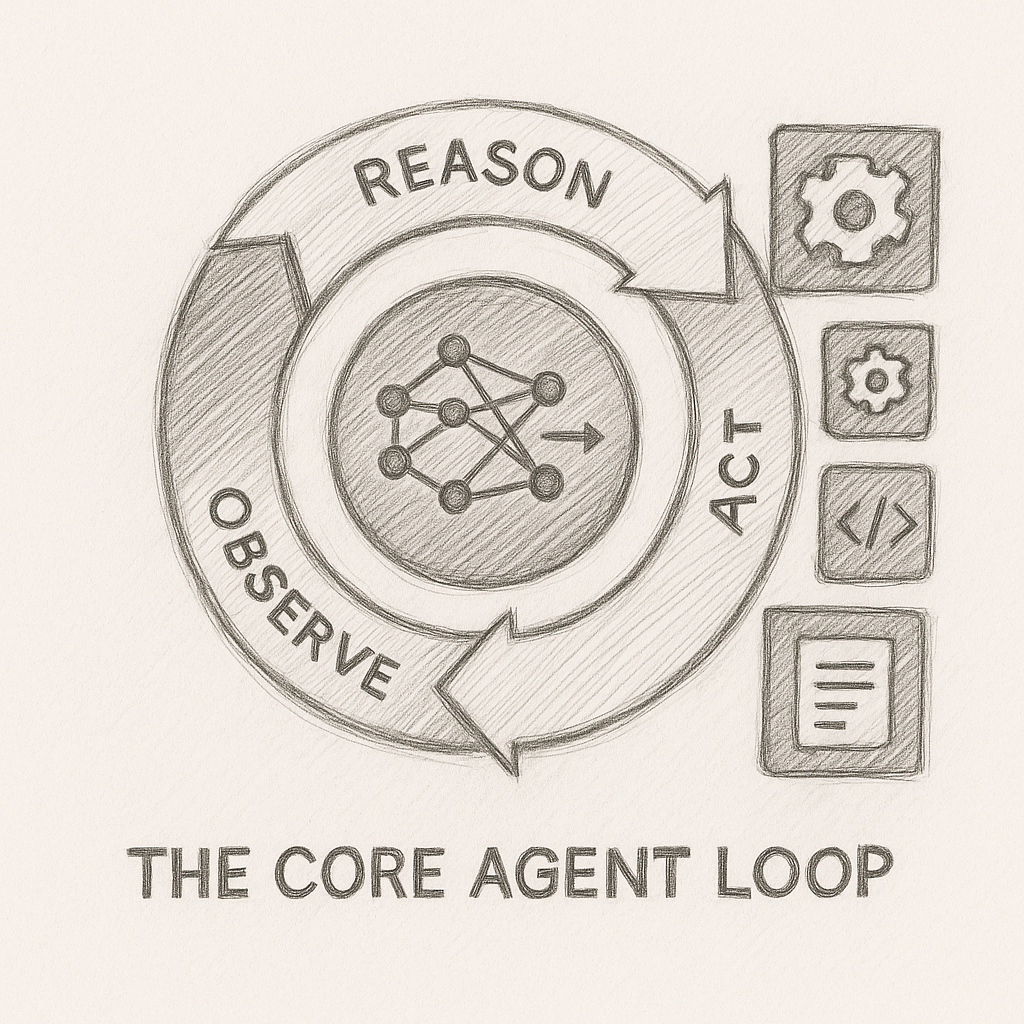
An agent is not defined by prompts, tools, or frameworks. It is defined by what happens after the first action.
An agent repeatedly:
- reasons about its current state,
- decides what to do next,
- executes an action,
- observes the result, and
- feeds that result back into the next decision.
This idea commonly appears as the ReAct pattern (Reason + Act), where reasoning, action, and observation are interleaved in a continuous cycle. The names don’t matter much; the repetition does.
Once this loop exists, the model stops being a passive responder and starts behaving like a system that can steer its own execution.
Let’s Build a Simple Agent (to learn how it works)
We’ll put the concept into practice with a real, simple agent written in JavaScript. The goal is straightforward: explore a directory and produce a summary of all markdown files.
Dependencies
npm install openaiTools (Real Functions)
import fs from "fs/promises";

async function listFiles(dir) {
  return await fs.readdir(dir);
}

async function readFile(filePath) {
  return await fs.readFile(filePath, "utf-8");
}
Tool Definitions
const tools = [
  {
    type: "function",
    function: {
      name: "listFiles",
      description: "List files in a directory",
      parameters: {
        type: "object",
        properties: {
          dir: { type: "string" }
        },
        required: ["dir"]
      }
    }
  },
  {
    type: "function",
    function: {
      name: "readFile",
      description: "Read a text file",
      parameters: {
        type: "object",
        properties: {
          filePath: { type: "string" }
        },
        required: ["filePath"]
      }
    }
  }
];
The Agent Loop
import OpenAI from "openai";

const client = new OpenAI();

async function runAgent(goal) {
  const messages = [
    {
      role: "system",
      content:
        "You are an agent. Decide what action to take next and continue until the task is complete."
    },
    { role: "user", content: goal }
  ];

  let done = false;

  while (!done) {
    const response = await client.chat.completions.create({
      model: "gpt-4.1",
      messages,
      tools
    });

    const message = response.choices[0].message;
    messages.push(message);

    if (message.tool_calls) {
      for (const call of message.tool_calls) {
        const args = JSON.parse(call.function.arguments);

        let result;
        if (call.function.name === "listFiles") {
          result = await listFiles(args.dir);
        } else if (call.function.name === "readFile") {
          result = await readFile(args.filePath);
        }

        messages.push({
          role: "tool",
          tool_call_id: call.id,
          content: JSON.stringify(result)
        });
      }
    } else {
      done = true;
      console.log(message.content);
    }
  }
}runAgent("Summarize all markdown files inside the ./docs directory");This is an agent not because of the tools or the model, but because the system keeps deciding. The loop is what turns capability into behavior.
Agents vs Workflows
(Section to be continued…)