
10 Warp Terminal Features That Will Change How You Code
Source: Dev.to
After years of muscle memory built on the classic terminal experience, I wasn’t expecting much from a “new” terminal. Then I spent 10 minutes with Warp… and never looked back.
Warp isn’t just a prettier terminal. It’s a complete re‑imagining of what a command‑line environment can be in 2025.
Here are the 10 features that made me switch overnight.
1. Blocks — Never Scroll Blindly Again

Long command outputs used to be a wall of text. Warp automatically groups each command and its output into collapsible, labeled blocks. You can jump between blocks, search inside them, copy only the output, or even share a single block with a teammate. It’s like having Jupyter notebooks… but for your shell.
2. Command Palette (Cmd + P)

Why type when you can search? Hit Cmd + P and instantly find past commands, saved workflows, or even run AI‑generated ones. It’s Spotlight for your terminal.
3. Workflows — Turn Repetition Into One Click

Every team has those 5‑line scripts everyone copies from the internal wiki. Warp lets you turn them into shareable, version‑controlled workflows. One keystroke to spin up a local dev environment, run lint + tests, or deploy to staging. Your future self will thank you.
4. Built‑in AI That Actually Understands You

Type “delete all node_modules recursively and reinstall” in plain English → Warp’s AI turns it into the correct find command with confirmation. It also explains unfamiliar commands, fixes typos, and suggests flags you forgot. No more Googling basic CLI one‑liners.
5. The Input Editor Every Developer Dreamed Of

Multi‑line editing with proper syntax highlighting, inline error detection, and Vim/Emacs bindings. Writing complex kubectl or docker compose commands finally feels natural instead of painful.
6. Real‑Time Session Sharing

Pair programming in the terminal used to mean “here’s a tmux session, good luck.” Now you just click Share → copy a link → your teammate joins your exact session instantly. No setup, no port forwarding.
7. Warp Drive – The Community Package Manager for Your Terminal

Think GitHub Gists, but organized, searchable, and installable with one click. Thousands of workflows already live in Warp Drive: Rails credentials setup, AWS profile switchers, Kubernetes debugging kits… you name it.
8. Themes That Don’t Sacrifice Performance

GPU‑accelerated rendering means silky‑smooth scrolling even when you have dozens of active blocks. Choose from a curated palette of dark, light, and high‑contrast themes that stay crisp on any display.
9. Integrated Terminal‑Based File Explorer
Warp includes a pane‑less file explorer that works directly inside the shell. Navigate directories, preview files, and open them in your editor without leaving the terminal context. Drag‑and‑drop support lets you move files with a single keystroke.
10. Cross‑Platform Consistency
Whether you’re on macOS, Linux, or Windows (via WSL), Warp delivers the same UI, shortcuts, and extensions. Your configuration syncs automatically through your Warp account, so you can hop between machines without re‑configuring.
Bottom line: Warp turns the terminal from a static scroll‑back buffer into an interactive, collaborative, and AI‑enhanced workspace. If you haven’t tried it yet, give it a spin—you’ll wonder how you ever lived without it.
Additional Performance & Preview Highlights
9. Preview Files Without Leaving the Terminal
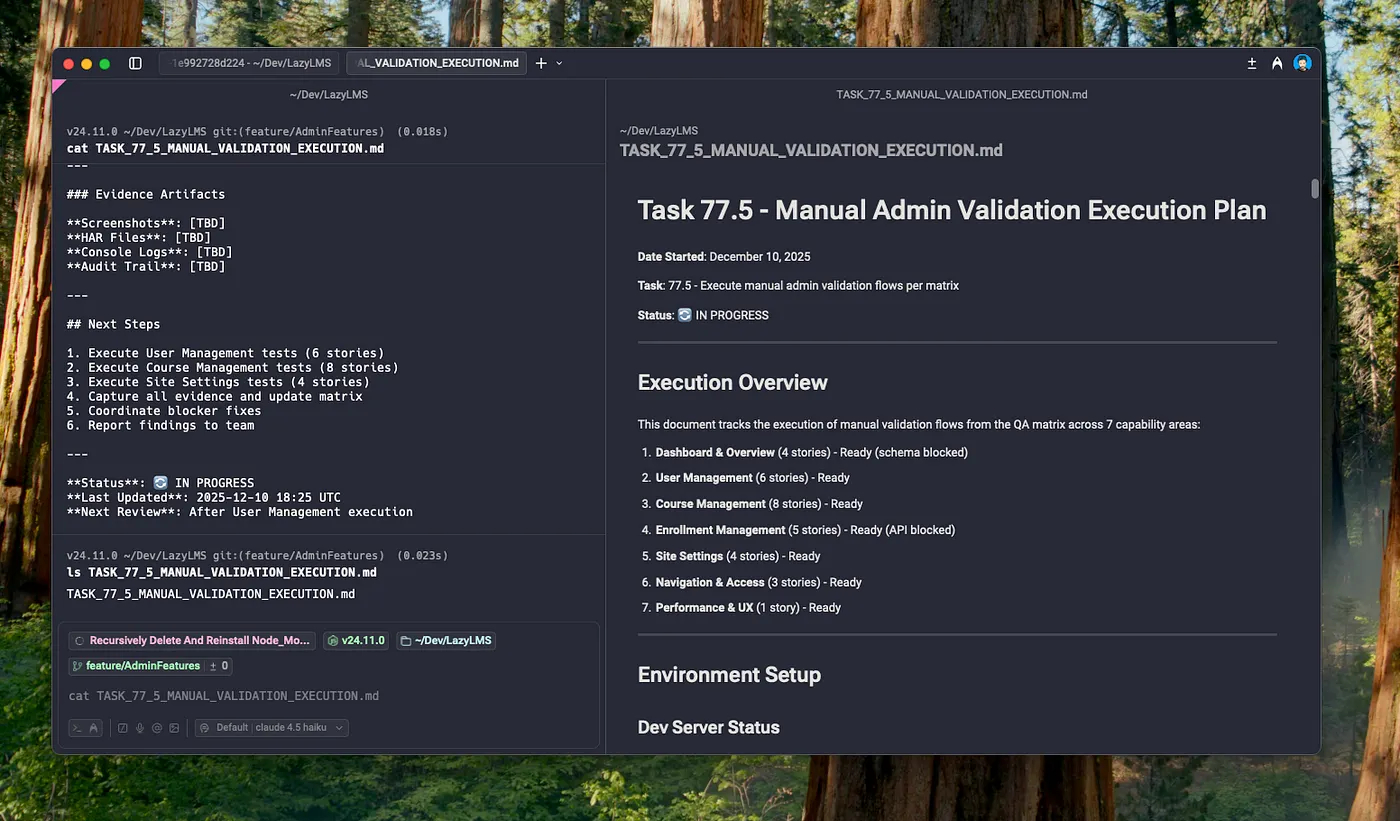
Preview files inside Warp without needing to open them in an external editor, reducing the need to jump between various other viewers.
10. Speed That Feels Like Cheating
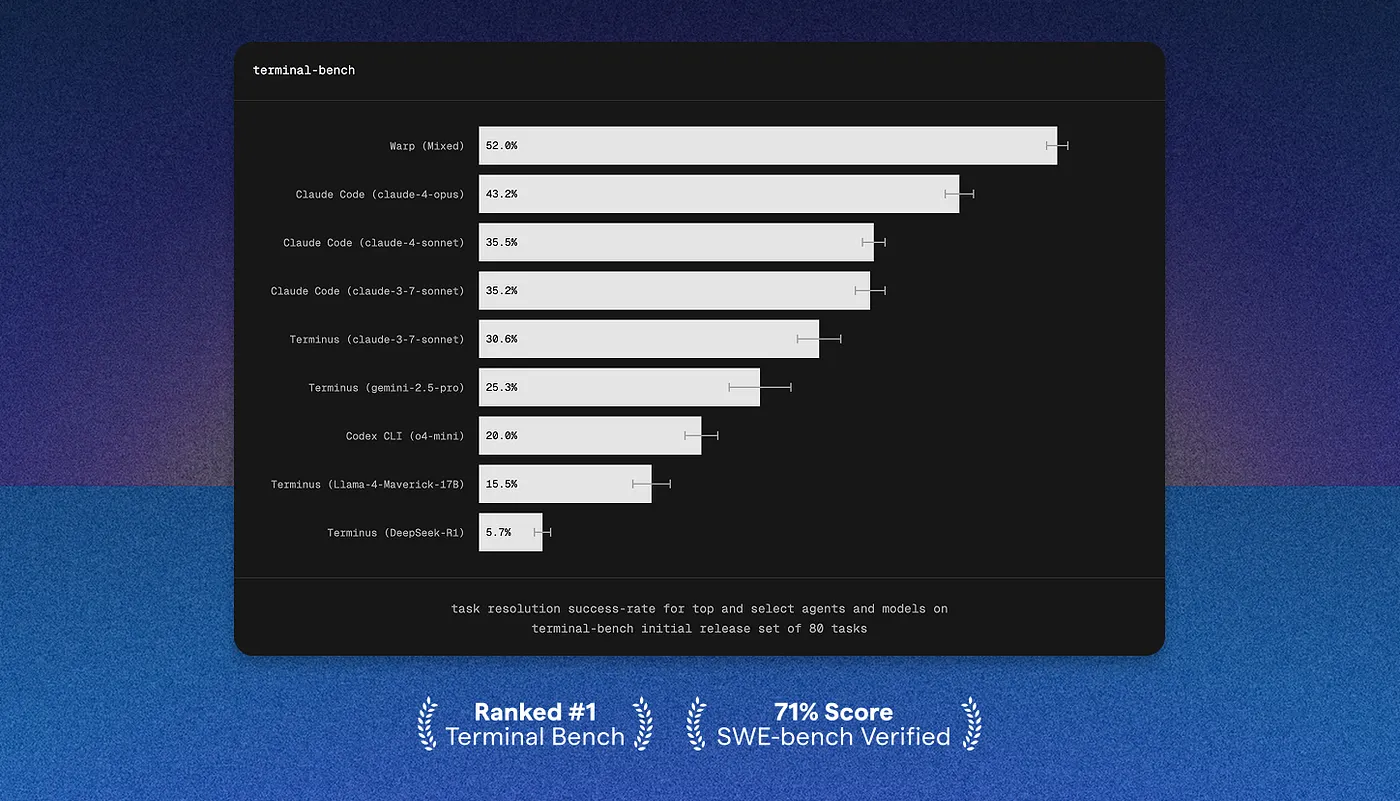
Everything is fast—startup time, scrolling, search, autocomplete. Warp consistently beats every other terminal I’ve benchmarked. It’s the first terminal where I never feel the tool getting in my way.
Final Thoughts
Warp isn’t trying to replace your shell (it still runs zsh, fish, or bash underneath). It’s replacing the 40‑year‑old terminal paradigm with something built for modern development teams.
If you spend more than an hour a day in the terminal, do yourself a favor: download Warp and try these 10 features for a week. I did, and I’m never going back.
→ Try Warp for free:
(Use the code THELAZYTECHIEPRO to get $5 off!)
P.S. Yes, it works great on macOS, Linux, and now Windows (WSL). No excuses left. 😄